

How Much Does It Cost to Build a Website in Year One?
Learn how much it costs to build a website in year one and at renewal. Compare scope, hosting, support, and variable fees with a worked Enter Pro example.
How much does it cost to build a website? Start with the first-year total, then calculate what the second year will cost. A monthly builder subscription, a designer’s project fee, and a complete operating budget describe different purchases. Your useful number includes the work needed to launch, the services you must renew, and any charges that grow with usage.
A five-page brochure site and a five-page booking site can look similar while requiring very different work. This guide separates those costs, compares build routes, and works through clearly labeled USD and PKR examples. The Enter Pro example uses Juniper Paws, a fictional grooming business whose first release accepts enquiries rather than payments or confirmed appointments.
Start With the Scope and the First-Year Total
The cost to build a website depends on what someone must design, write, connect, test, and support. List the public pages and the actions visitors can take: read a service menu, send an enquiry, pay for an item, manage a subscription, or enter a private account. Price those actions before choosing a package by its page allowance.
Count reusable page types as well as individual pages. Ten service pages sharing one approved structure may need less design work than three routes with different interactions. Content still matters: ten original service descriptions, photographs, and location details remain ten sets of material to prepare and check. A reusable template reduces repetition; it does not supply accurate business information.
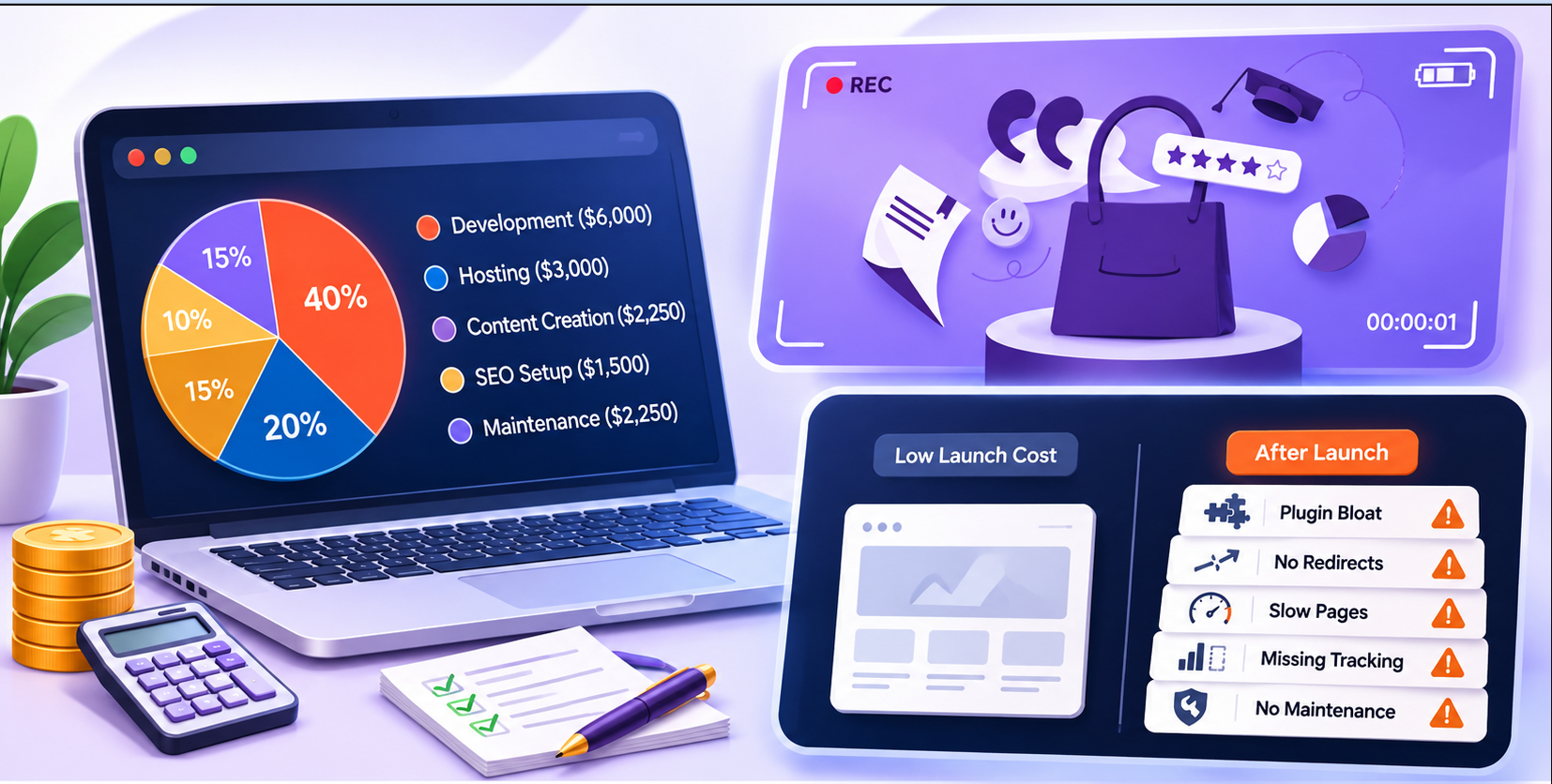
Alt text: Website cost breakdown chart, e-commerce illustration, and post-launch maintenance warnings in a modern collage.
What an Average Cost to Build a Website Can Hide
An average cost to build a website is useful only when the scope, currency, region, and inclusions resemble your project. A hosting charge leaves out implementation. A freelance fee might include launch but omit copywriting and support. A marketplace range may combine a simple template setup with bespoke development. Keep the date and assumptions beside any benchmark.
For regional context, GoDaddy’s Pakistan pricing guide includes a PKR 25,000 first-year builder scenario and a PKR 245,000 designer scenario. These are the publisher’s illustrative totals, not live checkout quotes. Their components differ, so subtracting one from the other would not establish a saving on the same specification.
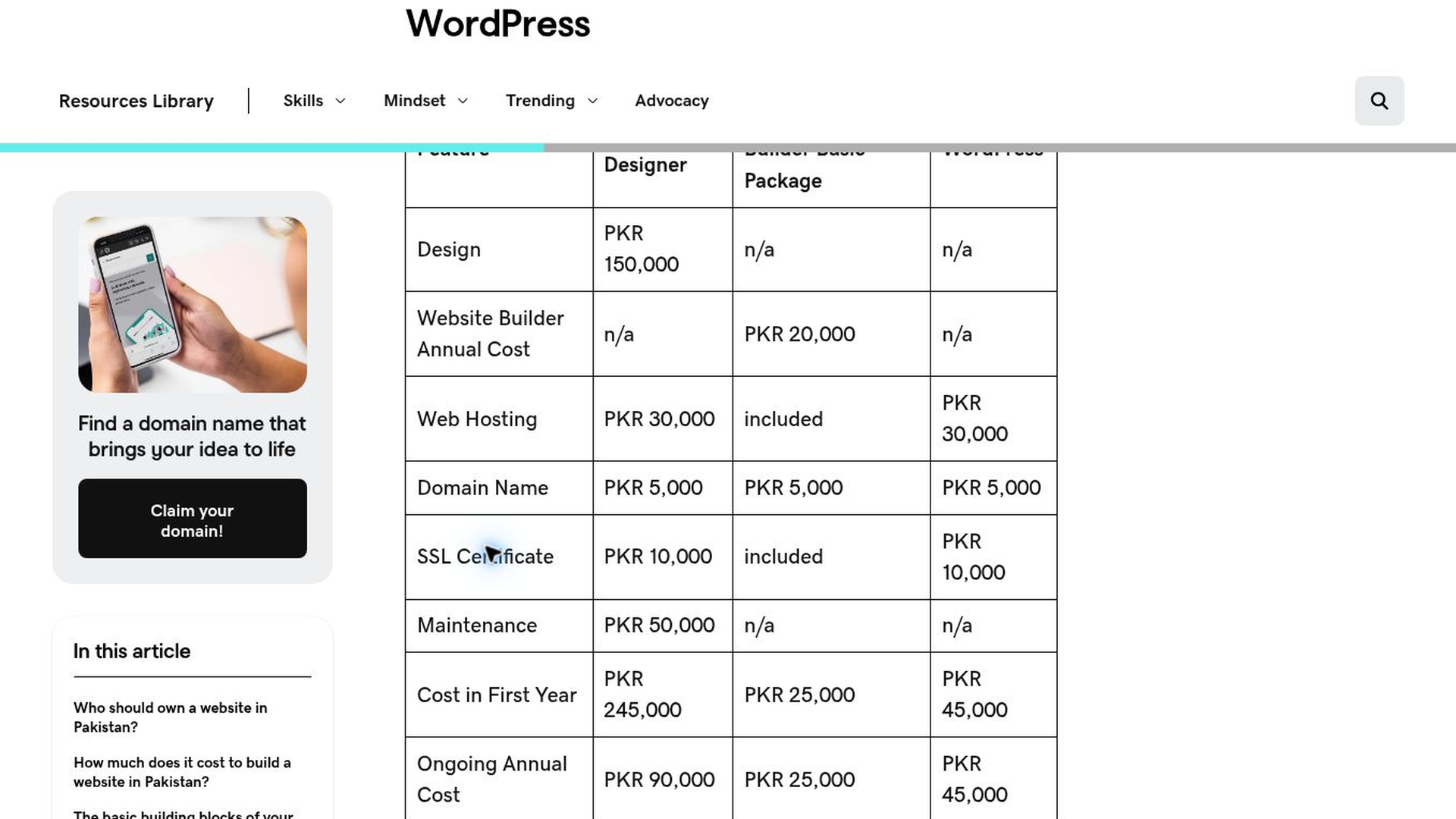
Alt text: GoDaddy’s guide comparing illustrative first-year and ongoing website costs in PKR.
Use published figures to identify questions, then request your own written estimate. Ask which content is ready, how many layouts are unique, whether integrations are included, and who handles renewal. Keep PKR examples and USD examples separate unless you deliberately convert them using a recorded exchange rate and date.
How Much Does a Website Build Cost After the First Invoice?
When you ask “how much does a website build cost after launch?”, calculate two totals. First-year cash equals one-time work plus first-year subscriptions, care, estimated usage charges, and applicable taxes. The renewal estimate removes genuinely one-time work and replaces introductory amounts with the charges that apply next term.
Keep cash timing visible. A plan advertised with a monthly equivalent may require a full year or longer upfront. Record the actual payment due and billing period, rather than multiplying an introductory monthly headline indefinitely. Check whether an included domain, mailbox, or plugin becomes a separate renewal later.
Alt text: Evolution of website invoicing from ancient records and paper receipts to modern digital invoices on laptops and smartphones.
Track owner effort in a separate column. Preparing photographs, checking copy, answering design questions, and learning the editor take time even when no contractor invoices for them. I would compare both cash and responsibilities before calling a DIY route inexpensive. You can value that time for an internal decision without presenting it as a provider fee.
Break the Website Build Cost Into Comparable Lines
Separate What You Buy Once From What You Keep Paying For
A transparent website build cost identifies the deliverable, charging period, account owner, and renewal basis for each line. Bundles need particular attention. If your selected platform includes hosting and HTTPS, do not add a second hosting allowance for the same service. If an external tool remains necessary, name it and state why.
| Cost line | What to ask for | Timing | Common omission |
|---|---|---|---|
| Discovery, copy, and media | Page list, number of interviews, ownership of supplied or created assets. | Usually one-time per scope. | Product photography, edits, accessibility text, or image licensing. |
| Design and implementation | Reusable templates, supported workflows, revision rounds, and acceptance checks. | One-time build plus approved scope changes. | Mobile states, empty states, form errors, or third-party setup. |
| Domain, hosting, and software | Plan, currency, billing term, included capacity, and renewal. | Annual, monthly, or metered. | Full-term prepayment, extra seats, mailbox costs, or add-ons. |
| Operations and support | Update owner, backups, recovery, response window, and change allowance. | Recurring or per incident. | Restores, monitoring, training, or post-launch changes. |
| Usage and transactions | Rate basis, estimated usage, and who pays the provider. | Variable. | Payment fees, overages, additional storage, or API usage. |
Separate a defect correction from a new request. Fixing a form that fails the agreed specification is different from adding file uploads after approval. A proposal becomes easier to manage when it states how revisions, acceptance, and subsequent changes are handled. Ask for the practical distinction in plain language before comparing support packages.

Alt text: A website planning desk with product photography, printed page designs, and a server-maintenance scene.
Upwork’s website cost guide is useful for seeing how labor, domains, hosting, and ongoing work enter an estimate. Treat published ranges as context. Your own supplier still needs to price the specific workflows and handoff responsibilities you require.
For maintenance, “included support” needs a definition. Ask who updates software, checks failed enquiries, restores a backup, and edits a changed service price. Confirm whether the allowance covers a fixed amount of work or only specified incidents. Keep response expectations and the owner’s contact route with the project handoff.
Compare Build Routes With the Same Acceptance Criteria
DIY Builder, Freelancer, Agency, or Custom App?
Choose a delivery route against the same written requirements. A DIY builder suits a standard public site when you can provide content and own the review. A freelancer can deliver a tightly defined project with a clear handoff. An agency may coordinate several disciplines. A custom app needs a separate estimate for data, roles, integrations, and operating support.

Alt text: Professional web developers designing websites, freelance developer profiles, and a creative team collaborating on a website project.
| Route | Good fit | Cost question | Acceptance check |
|---|---|---|---|
| DIY template | A few public pages with ready content. | What is bundled and what renews separately? | Owner can edit key pages and receive a test enquiry. |
| Freelance build | Defined design, content, and functionality. | How many templates and revisions are included? | Agreed routes and workflows pass on the final domain. |
| Agency delivery | Coordinated design, copy, integration, and handoff. | Are strategy, media, training, and support included? | Work package and owner responsibilities are documented. |
| Custom web app | Private data, multiple roles, or business-specific logic. | How are integration, hosting, and changes estimated? | Correct access and realistic failure cases are tested. |
The route name alone does not establish quality or completeness. Ask each option to demonstrate the same outcome: a visitor can find the service, understand the conditions, submit a valid request, and reach an appropriate confirmation. Also check what happens when required information is missing. Compare a working release against a working release.
Ownership affects future costs. Record who controls the domain, billing account, content, source files where applicable, and paid licenses. Ask what a new maintainer would receive. A low initial invoice can become awkward if every routine update requires a separate supplier or if a license cannot move with the project.
Work Through Sample First-Year and Renewal Budgets
The following USD amounts are invented examples for comparing estimate structure. They exclude taxes, variable fees, and unpaid owner time. They are not provider rates, market averages, or minimum prices. Replace every assumed amount with the relevant written quote before making a purchasing decision.
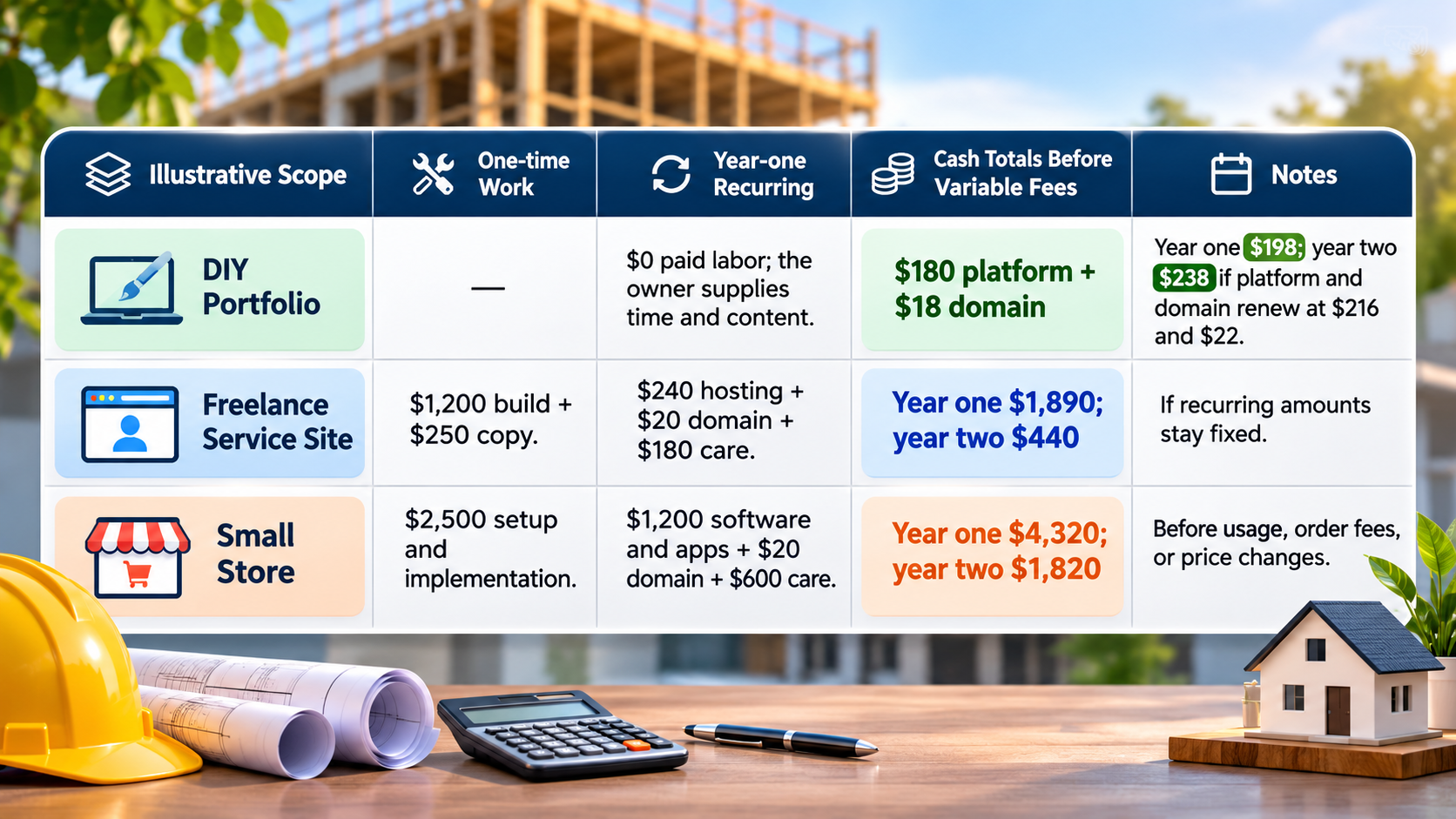
Alt text: Website cost comparison table showing DIY portfolio, freelance service website, and small online store expenses, including setup costs, recurring fees, and first- and second-year totals.
| Illustrative scope | One-time work | Year-one recurring | Cash totals before variable fees |
|---|---|---|---|
| DIY portfolio | $0 paid labor; the owner supplies time and content. | $180 platform + $18 domain. | Year one $198; year two $238 if platform and domain renew at $216 and $22. |
| Freelance service site | $1,200 build + $250 copy. | $240 hosting + $20 domain + $180 care. | Year one $1,890; year two $440 if recurring amounts stay fixed. |
| Small store | $2,500 setup and implementation. | $1,200 software and apps + $20 domain + $600 care. | Year one $4,320; year two $1,820 before usage, order fees, or price changes. |
The DIY example has no paid labor line because the owner supplies the work. Its first-year cash is $180 + $18 = $198. At the assumed renewal amounts, $216 + $22 = $238. That increase does not represent new design work; it comes entirely from the example’s recurring charges.
The service-site example combines $1,450 of one-time work with $440 of annual services, giving $1,890 in year one. The store combines $2,500 of setup with $1,820 recurring, giving $4,320. Neither total includes order-related charges. The larger total reflects a different scope, so it is not a like-for-like verdict on the delivery route.
Estimate variable fees separately. Suppose a hypothetical processor charged 2.5% plus $0.20 per order. At 100 orders averaging 40,thesimplifiedcalculationwouldbe100×((40 × 0.025) + $0.20) = $120. This is arithmetic using invented rates, not a provider offer. Actual rules may also address refunds, currency conversion, tax treatment, or other charges.
Elementor’s website budgeting guide separates initial work from ongoing services and software. That distinction helps when reviewing a bundled quote: retain each necessary service, but remove a duplicate allowance when the same provision is already included.
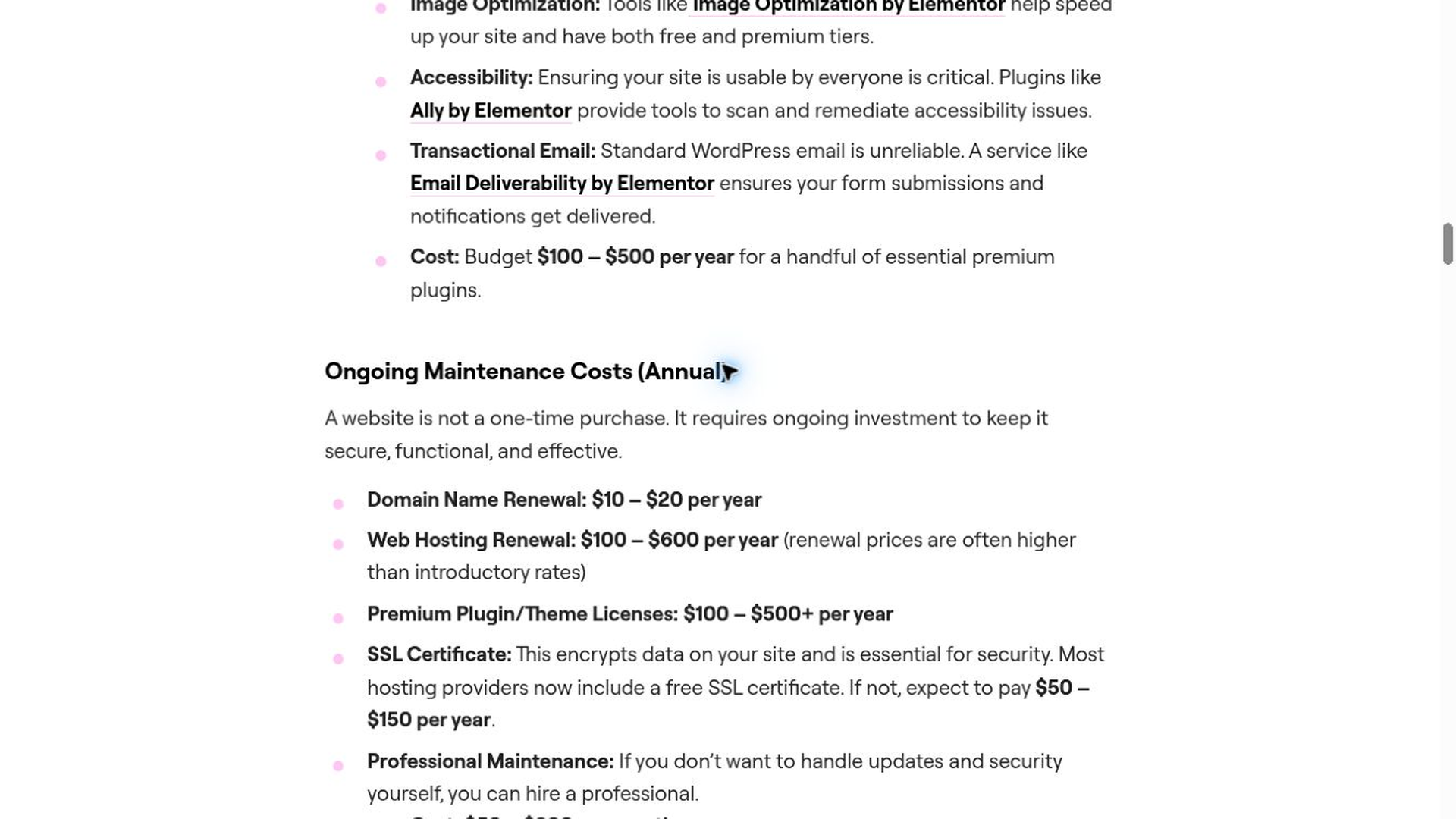
Alt text: Elementor’s website cost guide showing an annual maintenance section and recurring expense categories.
Build a renewal calendar beside the total. Record the service, account owner, next charge date, currency, and cancellation or migration dependency. This helps you distinguish a predictable annual commitment from optional improvement work that can be scheduled later.
Decide Which Features Earn Their Place in the Budget
How Much Does It Cost to Build a Good Website for Your Goal?
The useful version of “how much does it cost to build a good website” defines what good means for the business. A local workshop needs clear coverage and a reliable enquiry route. A shop needs accurate product information and a functioning order journey. A member portal needs appropriate access to private information. Those are different acceptance conditions.
Write the condition as something observable. “Looks professional” is hard to price consistently. “A new visitor can identify the service area, find the starting price, and submit a request with required fields validated” gives the team a concrete review. Then decide what additional work actually supports that result.

Alt text: A studio owner reviewing a ceramics product page alongside photographs and a small set of planning cards.
Cut Scope Without Cutting the Checks That Protect the Launch
Prepare approved content before paid implementation starts, reuse suitable page patterns, and consolidate feedback through one decision maker. Separate the first release from later improvements. An enquiry can be enough when staff must discuss availability personally; a live booking system adds another set of states, rules, and operating responsibilities.
Keep meaningful mobile, keyboard, and form checks in the agreed work. A shorter feature list can still be usable and complete. Review empty fields, invalid entries, long text, and the next step after submission. When a form collects personal details, specify who may read them and what happens if delivery or storage fails.
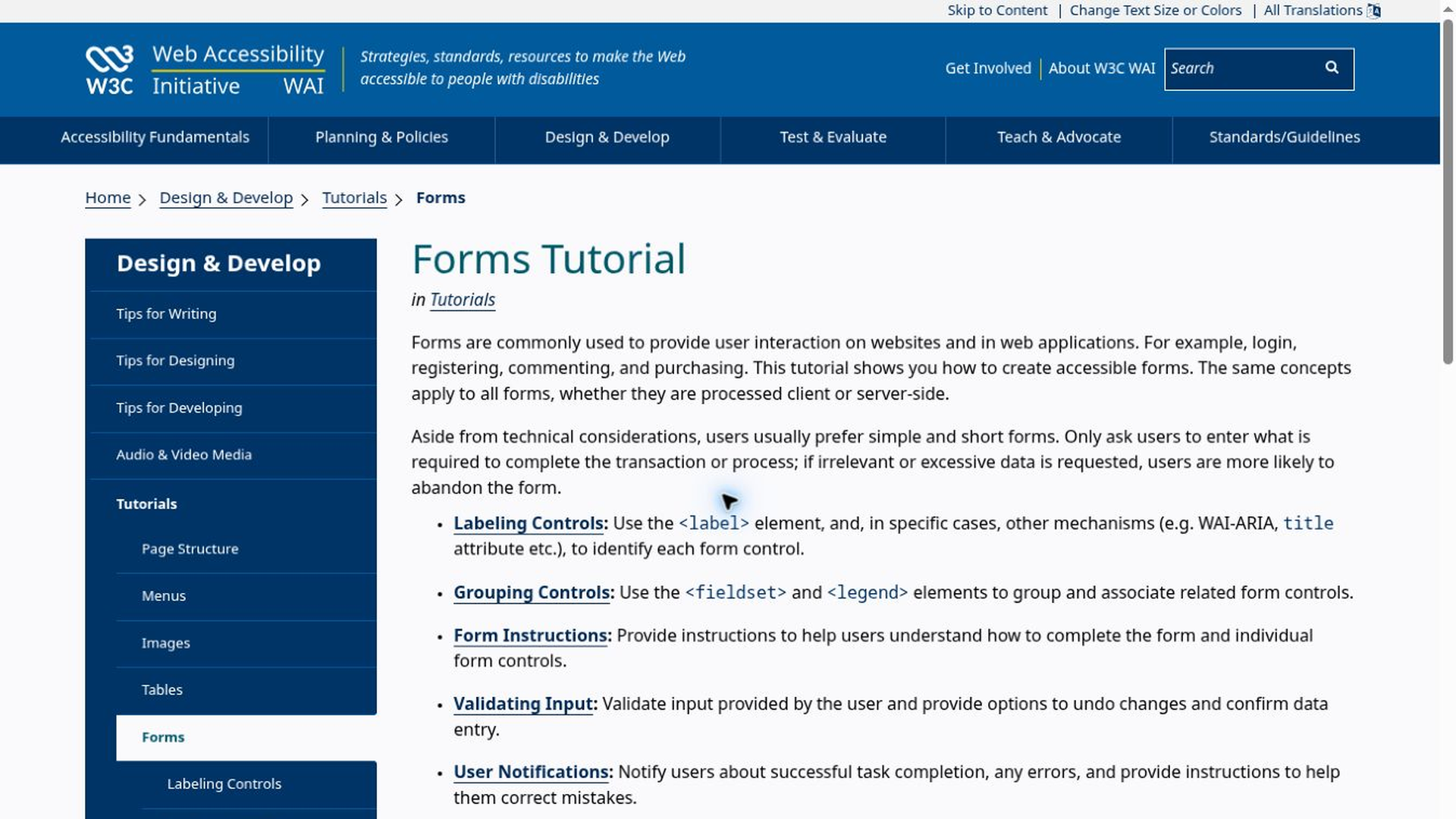
Alt text: W3C’s Forms Tutorial with guidance on labels, grouped controls, instructions, validation, and notifications.
Useful form work includes persistent labels, clear instructions, understandable errors, and feedback that matches what actually happened. A decorative success message does not prove that a request reached the business. Make delivery verification an acceptance task, with an owner responsible for checking it before a real launch.
Request a Quote That Is Easy to Compare and Maintain
Send the same brief to every supplier: page list, reusable templates, visitor actions, supplied assets, integration needs, revision allowance, and launch checks. Ask for assumptions and exclusions beside the price. A proposal that leaves copy, media, or form delivery unspecified is still missing information, even when its headline amount looks precise.

Alt text: Two people comparing website proposals against the same printed page plan.
When a quote changes, ask which requirement or dependency changed and which routes need retesting. Keep optional items separate from the agreed release. This turns a price discussion into a scope decision and makes it easier to compare the cost of doing the work now with the cost of revisiting it later.
Estimate and Build a Grooming Enquiry Site in Enter Pro: Juniper Paws
Juniper Paws is a fictional pet-grooming studio in Lahore. The supplied project captures show a five-page brief, a returned plan, a homepage, and form validation errors. They provide a concrete scope example. The PKR budget below is a separate illustrative model; it is not shown in the interface and does not represent Enter Pro pricing or a real client quotation.
Step 1: Set the Enquiry-Only Scope Before Requesting Prices
The brief lists Home, Services, Preparation Guide, About, and Request Grooming. It explicitly excludes payments, deposits, and reserved appointments. That boundary matters: the first release helps an owner request a conversation, while staff agree on the visit afterward. It does not need a checkout or an availability engine to meet that initial purpose.
Use Enter Pro’s Plan Mode to make those requirements reviewable before generation. Include the content the owner supplies, required form fields, expected error behavior, and the distinction between a requested time and a confirmed slot. Keep any deposit workflow as an optional change.
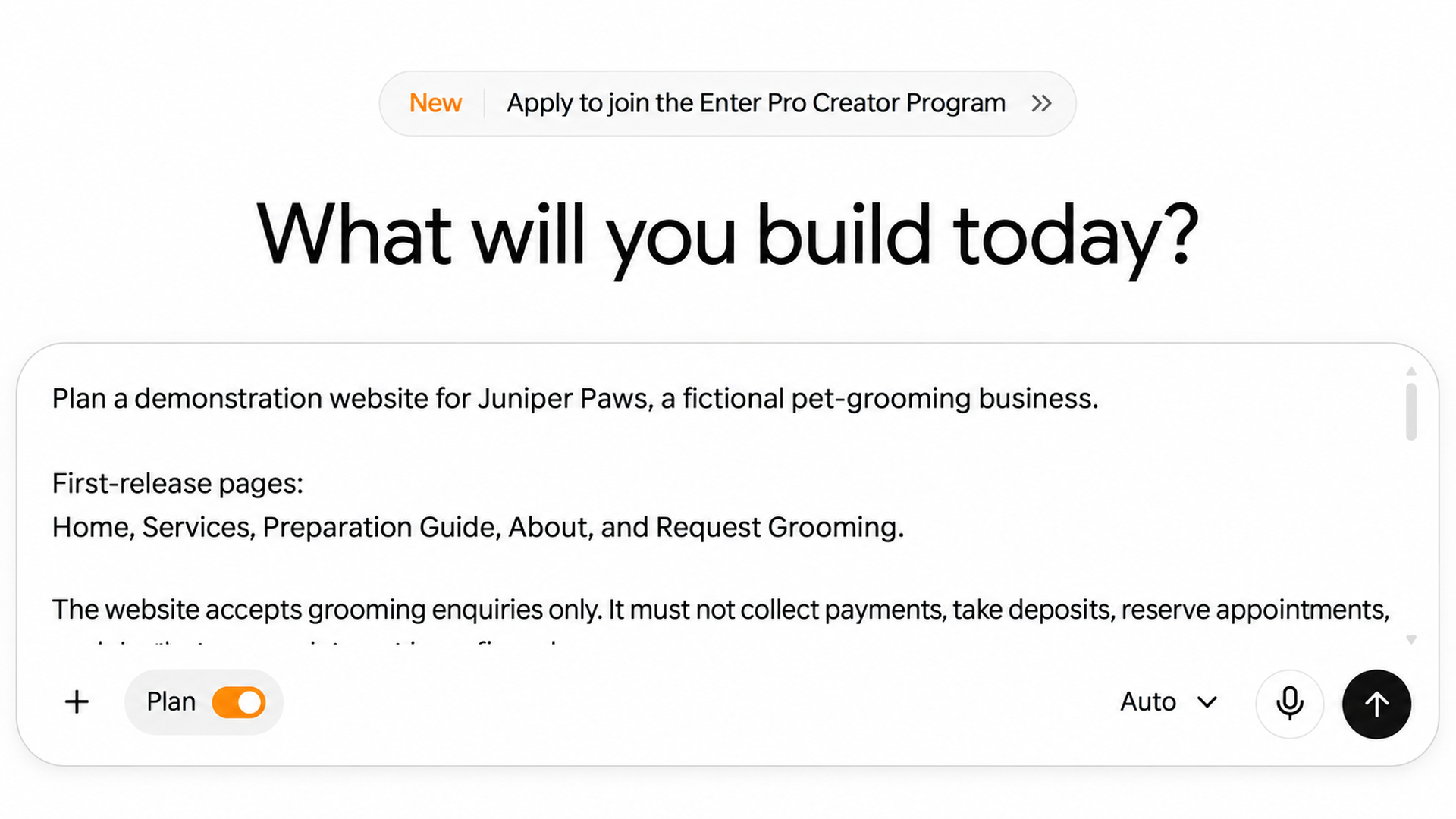
Alt text: Enhanced Enter Pro capture of the Juniper Paws five-page demonstration brief with Plan enabled.
Step 2: Review the Plan and Compare Year-One Cash With Renewal
The returned plan describes the five-page demonstration and the visitor’s route from service information to a grooming enquiry. Review that scope against the brief before attaching a budget. Check whether the preparation guide, service descriptions, and contact details require new content. Any sample endorsement would need replacement with approved, truthful material before a real business used it.
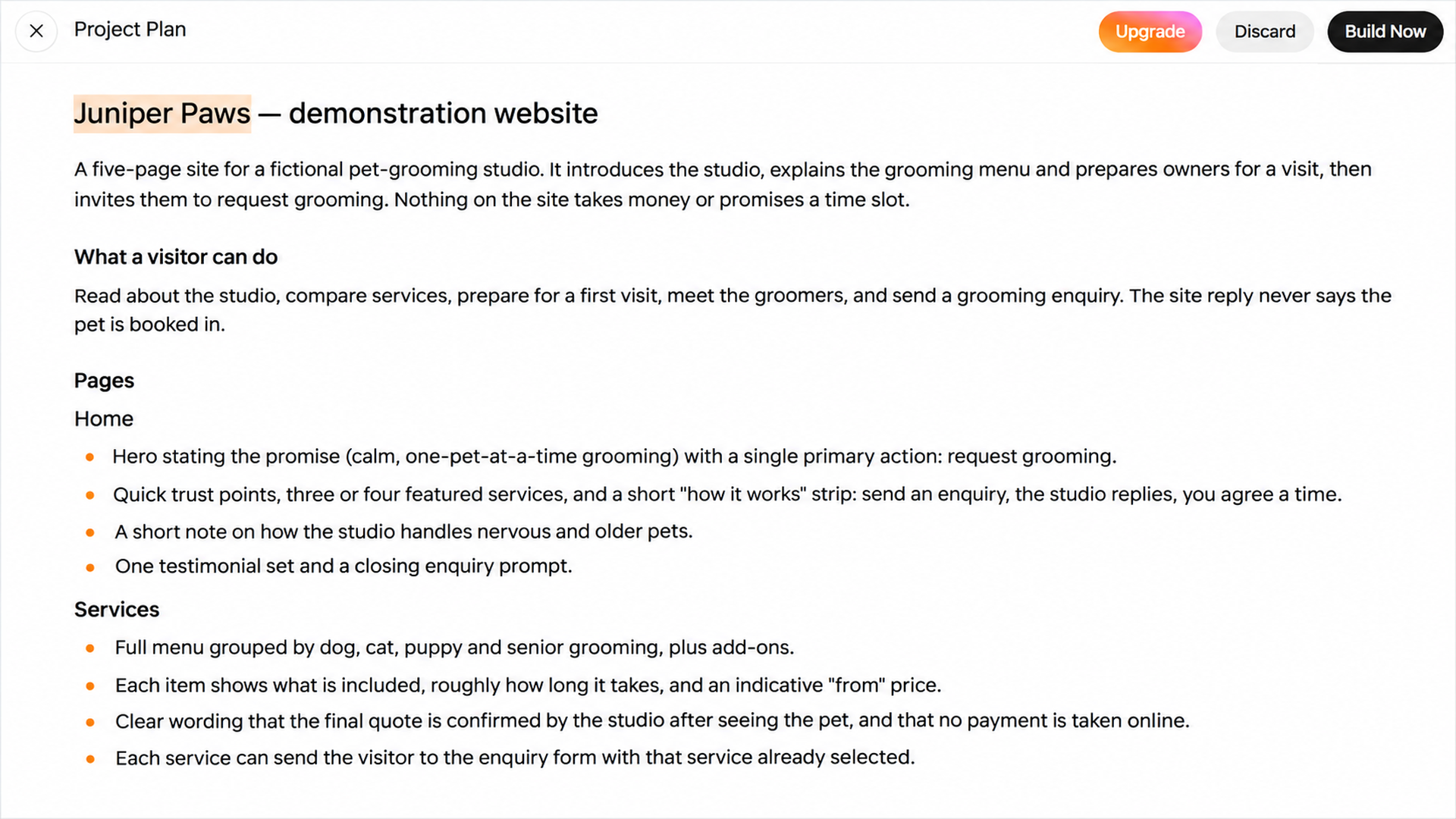
Alt text: Enhanced capture of the returned Juniper Paws project plan describing the enquiry-only scope and page requirements.
| Illustrative PKR line | Year one | Year two | Assumption |
|---|---|---|---|
| Build | 60,000 | 0 | One-time agreed implementation. |
| Content | 12,000 | 0 | Initial supplied or commissioned content. |
| Hosting / platform allowance | 18,000 | 22,000 | Replace with the actual plan; avoid bundled duplication. |
| Domain | 4,000 | 4,500 | Assumed first term and renewal. |
| Routine care | 15,000 | 15,000 | Same assumed allowance. |
| Base total | 109,000 | 41,500 | Excludes tax, usage, new work, and owner time. |
Using these assumptions, PKR 60,000 + 12,000 + 18,000 + 4,000 + 15,000 produces a first-year total of PKR 109,000. The next-year estimate is PKR 22,000 + 4,500 + 15,000 = PKR 41,500. Taxes, usage, new work, and owner time remain excluded. If your chosen platform bundles hosting, adjust the hosting line to avoid duplication while retaining the actual platform charge.
Step 3: Keep the Generated Site Within the Agreed Release
The homepage presents calm, one-pet-at-a-time grooming, a service-menu route, and a Request Grooming action. The visible “Full grooms from PKR 3,500” is a sample grooming-service price. It is unrelated to the cost of building the website. The nearby wording also says that sending a request does not book an appointment.
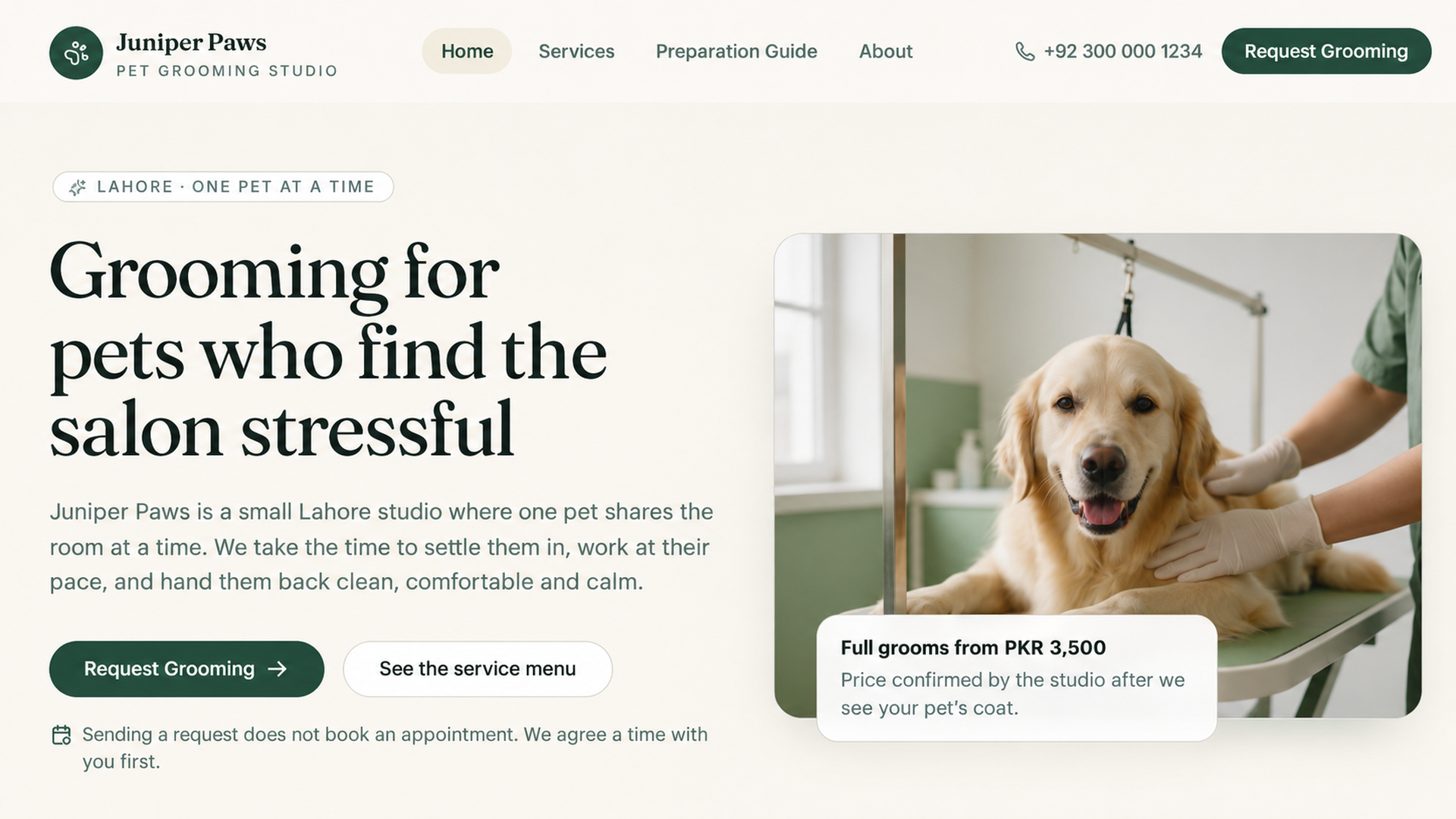
Alt text: Enhanced Juniper Paws homepage capture with the grooming offer, request action, and sample PKR 3,500 service price.
Use the Visual Editor for supported copy, color, and spacing refinements while keeping that promise consistent across pages. A clearer action label or service summary can improve the explanation without adding a new paid workflow. Check each revised route rather than assuming a homepage edit covers the rest of the project.
Step 4: Inspect Validation and Price a Deposit Upgrade Separately
The form capture shows required-field errors, including missing name and phone information, alongside the “request, not a reservation” explanation. This demonstrates a visible validation state. It does not establish that a valid enquiry was delivered, stored, or reviewed. Those checks still belong in the acceptance work for a production version.
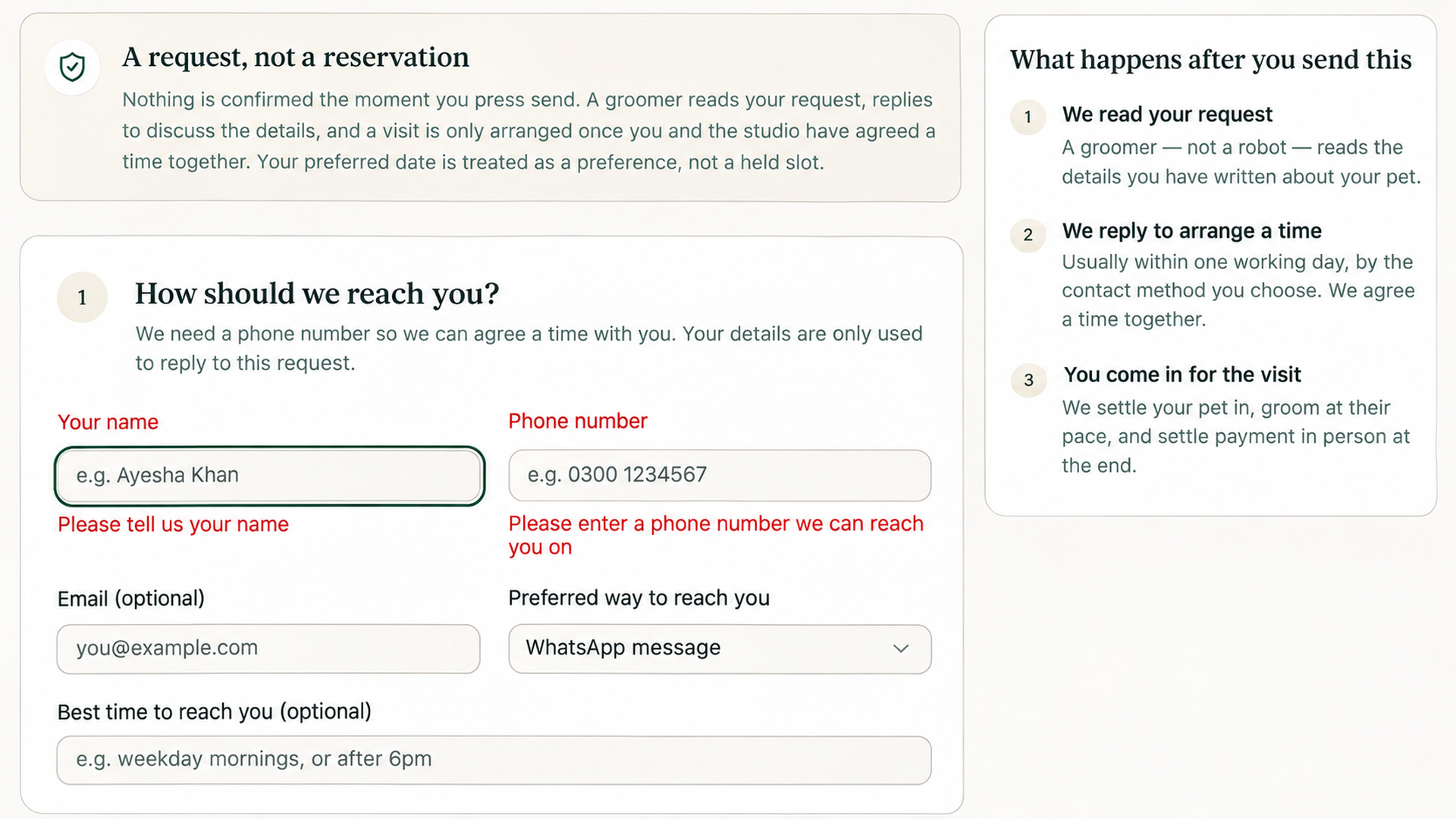
Alt text: Enhanced Juniper Paws form capture showing missing-field errors and the request-not-reservation explanation.
If private request records become necessary, Enter Cloud provides backend services that can be considered in the implementation. Verify the actual data handling, access permissions, delivery behavior, and applicable charges. The supplied captures do not show a connected backend or a completed submission.
A hypothetical deposit upgrade costing PKR 25,000 to implement plus PKR 6,000 in annual software adds PKR 31,000 to year one, making PKR 140,000 before variable fees. Its next-year total would be PKR 47,500 under the same assumptions. Over three years with unchanged renewals, the base model totals PKR 192,000; the upgraded model totals PKR 235,000. The PKR 43,000 difference is the assumed implementation plus three annual software charges.
That comparison answers a specific business question: does accepting deposits justify the extra work and ongoing commitment? It does not predict revenue or savings. Confirm the need, request actual quotes, and document the additional payment, refund, confirmation, and failure checks before expanding the release.
Conclusion: Compare the Cost of a Working Site Over Time
To answer “how much does it cost to build a website?”, define the release, separate one-time work from renewal, and price optional or usage-based charges explicitly. Compare complete proposals using the same acceptance conditions. Your estimate should explain what visitors can do at launch, who keeps it working, and which payments return next year.
Turn your page list and required visitor actions into a concrete project brief. Start planning your website in Enter Pro → and review the scope before adding optional features.
FAQ About How Much Does It Cost to Build a Website?
Can I Publish a Basic Site Without Paying for a Custom Domain?
Some platforms offer a provider-owned address. Check current publishing limits, branding, and access conditions before relying on it. A custom domain, business mailbox, paid integration, or support package can still add costs. A free starting address does not automatically make the whole project free to operate.
Are Hosting and Domain Registration the Same Cost?
No. The domain is the address; hosting serves the website. A provider may bundle both for an initial term. Review the actual invoice and renewal conditions before budgeting them separately, and record which account controls each service so renewals and future changes have a clear owner.
What Should I Budget for After Launch?
Include necessary platform or hosting charges, domain renewal, software, routine care, and variable usage. Keep new features and major content work separate. Ask who handles updates, failed requests, and recovery. A clear operating allowance should describe the work covered, rather than simply saying “maintenance included.”
Does the Number of Pages Determine the Price?
Page count is one input. Unique templates, content production, private accounts, and integrations can matter more. Several pages may reuse one design, while a single booking route can require multiple states and substantial testing. Compare the actual content and workflows before treating a page allowance as the whole specification.
How Can I Reduce the Cost to Build a Website?
Prepare approved copy and media, reuse a suitable layout, and limit the first release to essential actions. Keep one organized review process and ask for optional additions separately. Retain the tests that show the release works. Removing necessary checks changes what you are buying, even if it lowers the invoice.
How Do I Compare Local and International Quotes?
Request the same scope and clarify currency, billing period, renewal, and applicable fees. If comparison requires conversion, record the rate and date. Do not combine local PKR examples with USD examples as if they describe the same supplier, market, or package. Compare responsibilities and handoff alongside price.
Can Enter Pro Help Me Define Scope Before Spending?
Enter Pro’s planning workflow can help you specify routes, required actions, and review conditions before generation. The Juniper Paws brief illustrates that boundary by excluding deposits and confirmed appointments. Use the resulting scope to request quotes, and verify current plan limits and external service charges independently.
Does an Enter Pro Project Include Every Cost of Running the Site?
Your Enter Pro project budget depends on the plan and services you select. Check current billing details and any separate domain, integration, usage, or maintenance requirements. Keep content preparation and operating responsibilities visible too. A generated preview does not establish that every production service is configured or included.