
Lovable AI Review 2026: Features, Pricing, Pros and Cons
Read our 2026 Lovable AI review covering how the app builder works, Lovable AI pricing, free access, key features, pros, cons, and production readiness.
Lovable AI can turn a plain-language brief into a full-stack web application with interface, data, logic, authentication, and hosting. The real decision is whether its credit model, generated stack, and review workflow fit your project. This Lovable AI review combines a hands-on SignalDesk build with current official product pages and documentation to explain what it can build, what plans cost, and what still needs human verification.
Lovable AI Review: The Quick Verdict
The Lovable AI app builder is a strong fit for people who want to move from an idea to working web software through conversation.
In short, Lovable stands out for how quickly it can turn a detailed brief into a polished, multi-page web app with code, data, authentication, cloud services, and publishing in one workflow. That speed makes it appealing for focused MVPs and internal tools, while the credit model and the need to verify permissions, integrations, and backend behavior are the main trade-offs. The sections below look at how the platform works, what our hands-on build produced, how the plans are priced, and where Enter Pro offers a different approach to editing and control.
What Is Lovable AI?
What is Lovable AI? It is a full-stack AI development platform for creating, editing, and deploying web applications with natural-language instructions.
A project workspace brings the chat, preview, code, and version history together. You explain the product, pages, data, user actions, and visual direction; Lovable builds from that brief and keeps the result open for further changes.
The current Lovable AI platform is broader than the earlier “chat to React and Supabase” description. Lovable’s official documentation says applications can include frontend, backend, database, authentication, integrations, hosting, and editable code. Projects can also sync through Git to GitHub, GitLab, or Bitbucket for use in an existing engineering workflow.
Lovable’s app-builder page is explicit that the goal is a working app, not a static mockup. Screens, data, business logic, authentication, hosting, and built-in security scanning are all part of that promise. Even so, the generated app still needs to be tested rather than accepted at face value. For another browser-based workflow, see Enter’s AI app builder overview.
How the Lovable AI App Builder Works
For this review, we gave Lovable one detailed B2B SaaS brief and recorded how far the first build got before the free allowance ran low.
1. Describe the Application
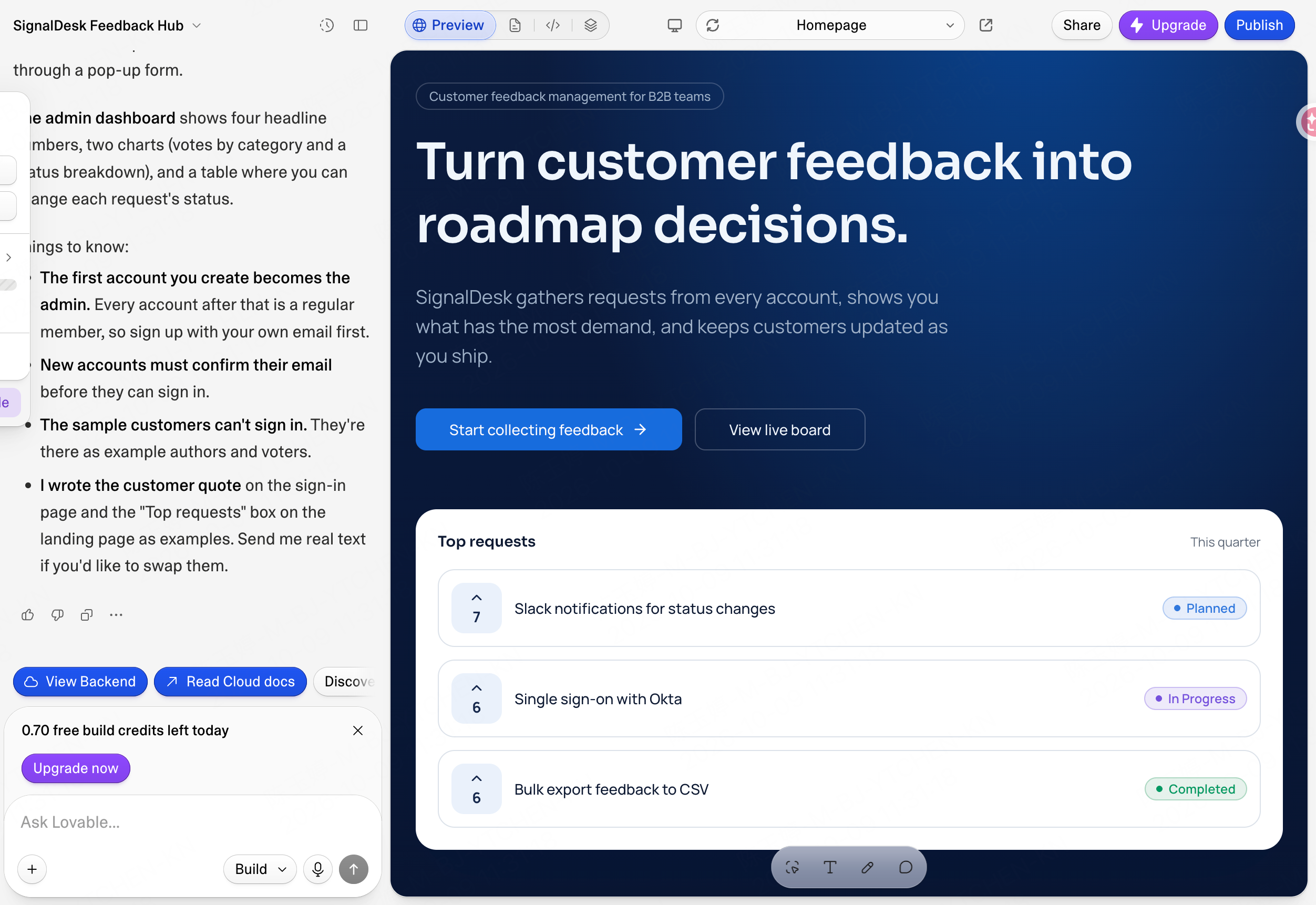
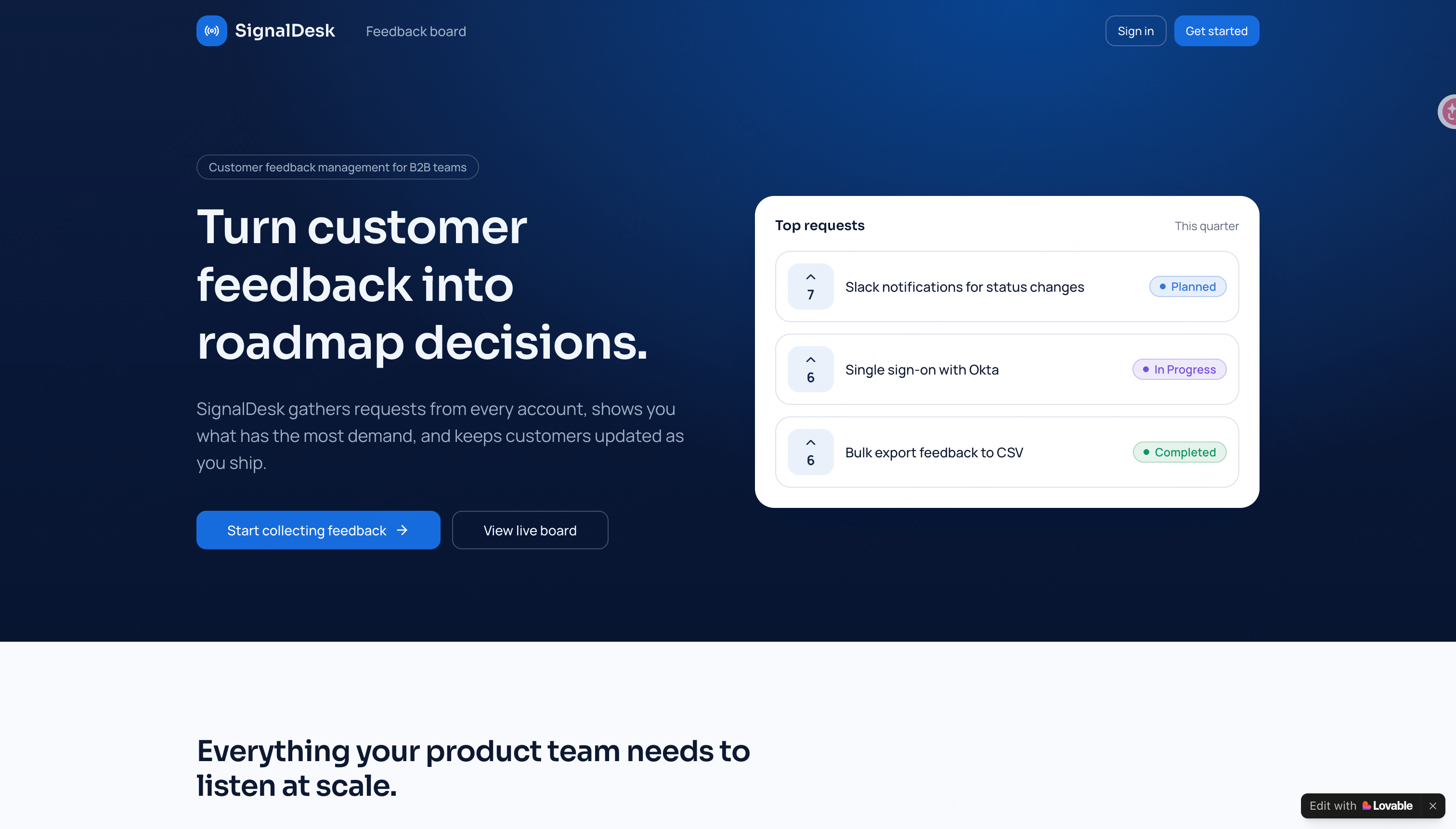
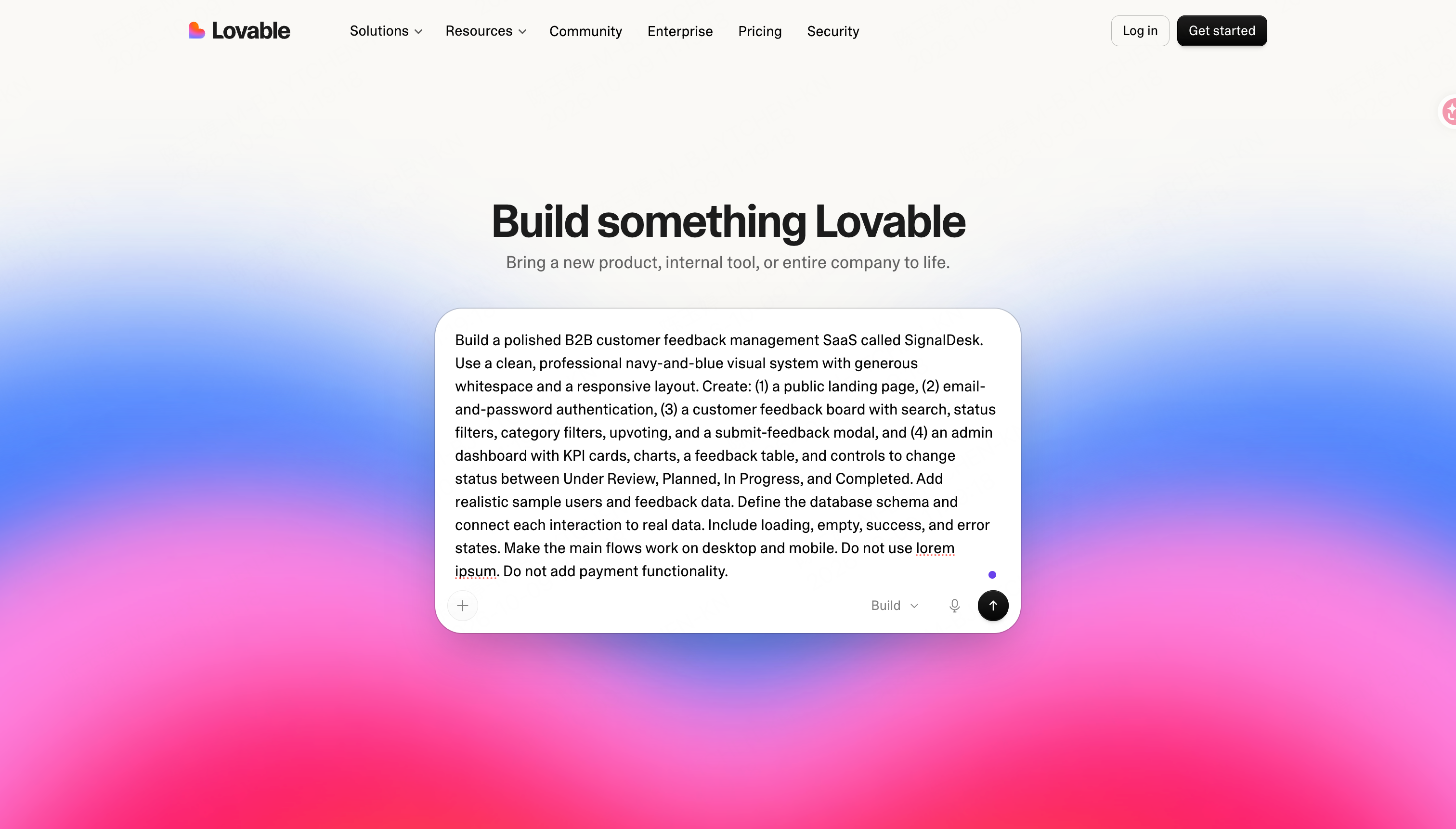
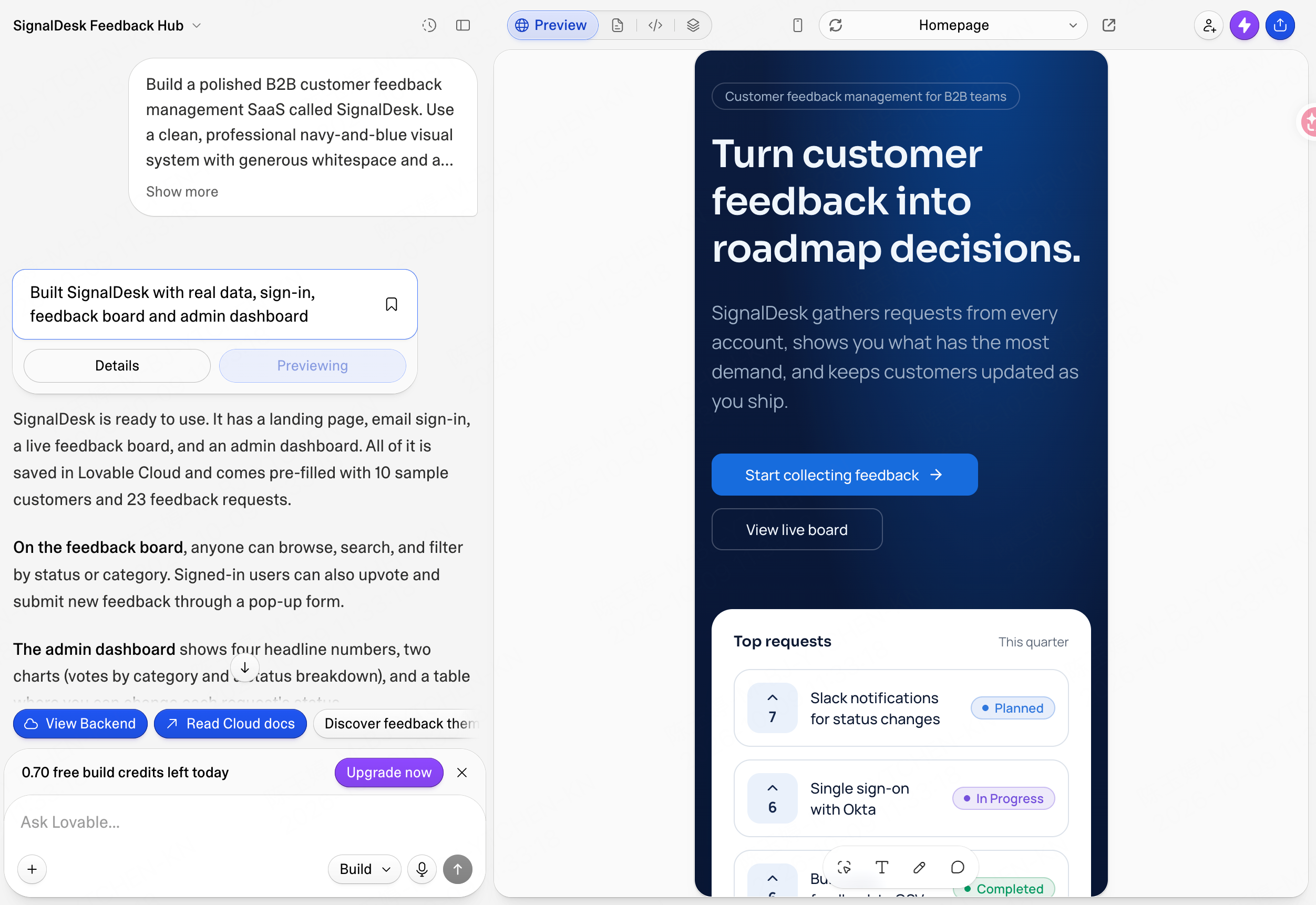
Our test prompt asked the Lovable AI app builder to create SignalDesk, a customer-feedback SaaS with a public landing page, email-and-password authentication, a searchable feedback board, upvoting, submissions, an admin dashboard, realistic data, and responsive states.
Instead of the vague instruction “build a SaaS,” the brief named the users, screens, data, permissions, status changes, and failure states. Lovable therefore had a real workflow to build around.
2. Generate and Inspect the First Version
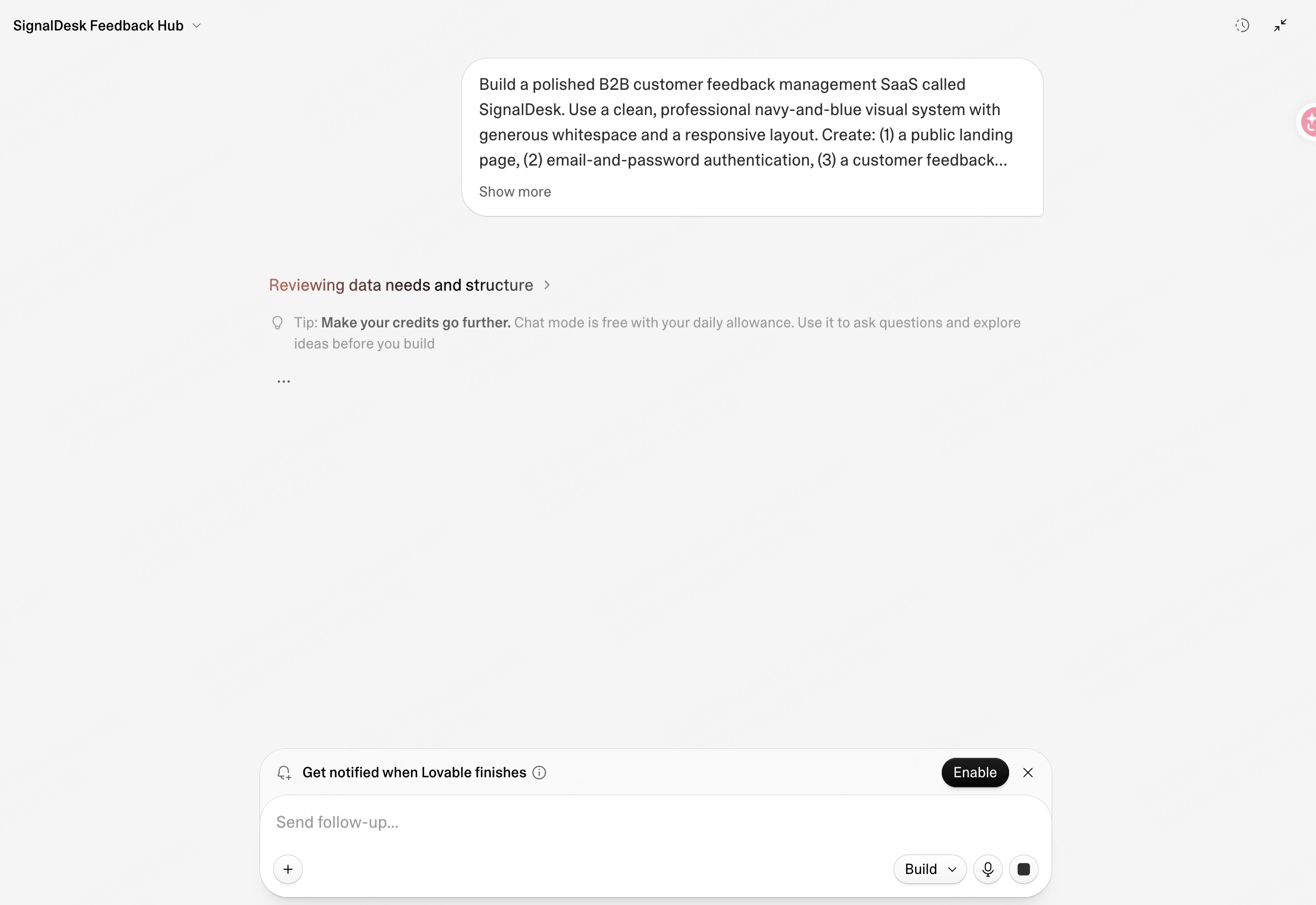
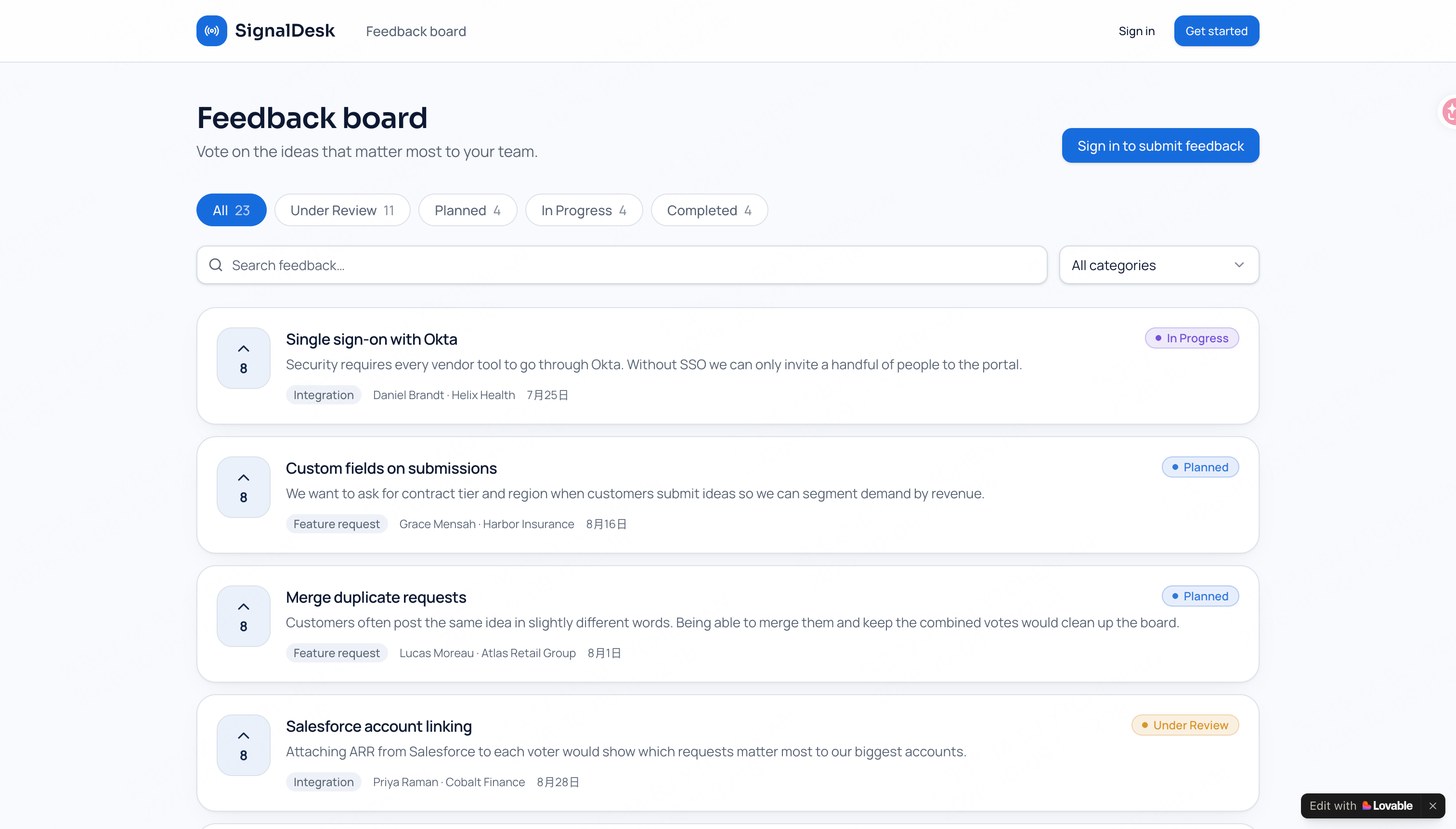
The first prompt produced a usable-looking first version: a branded landing page, realistic requests, status labels, a feedback board, a sign-up screen, and a mobile preview. Lovable’s build summary said the project also used Lovable Cloud and contained ten sample customers, 23 feedback requests, and an admin dashboard.
Visually, the result followed the requested navy-and-blue direction and felt consistent across several screens. It was more than a single polished mockup. Still, screenshots alone cannot tell us whether every permission, database write, filter, or status change works.
3. Review the Generated Experience
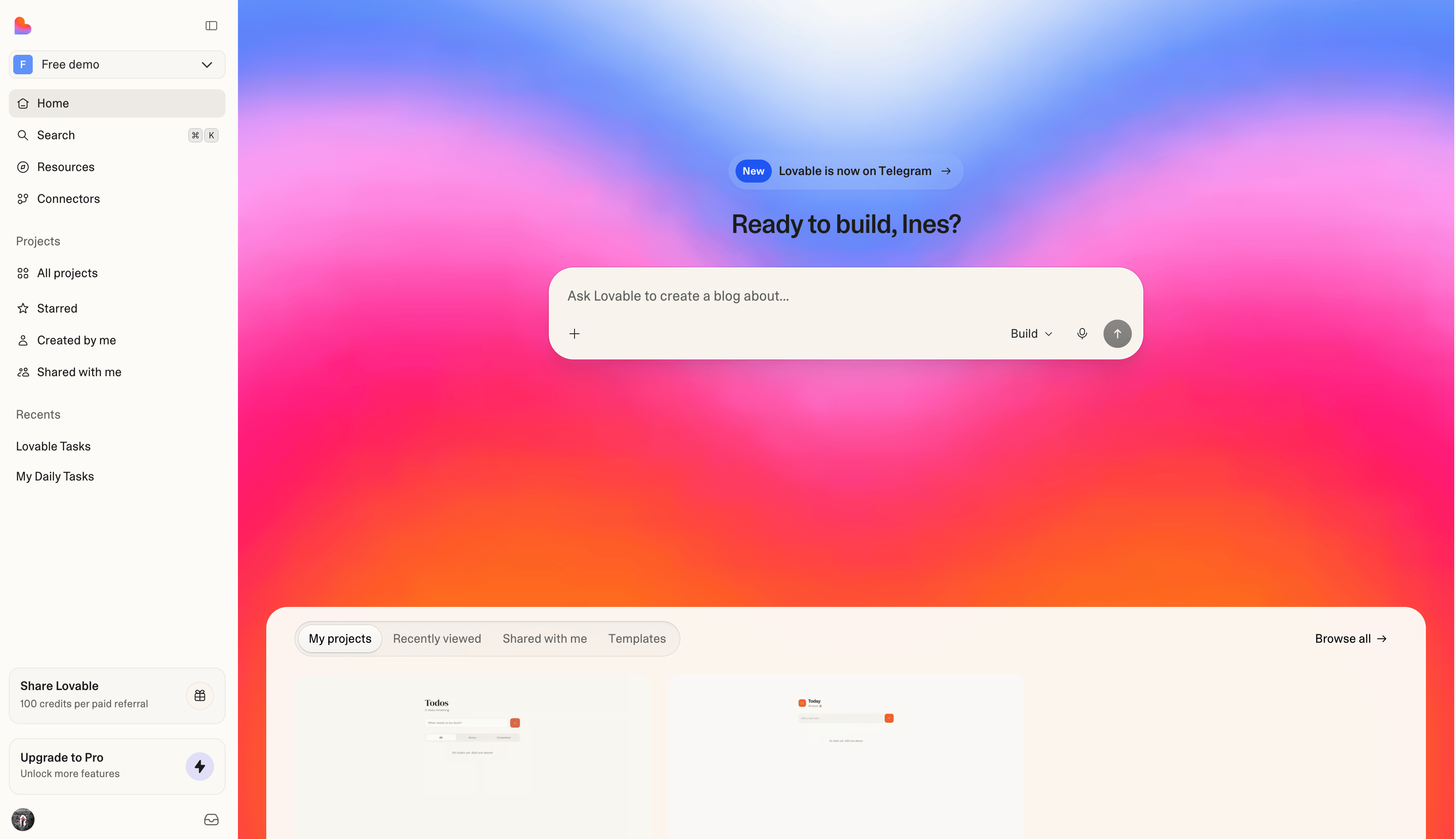
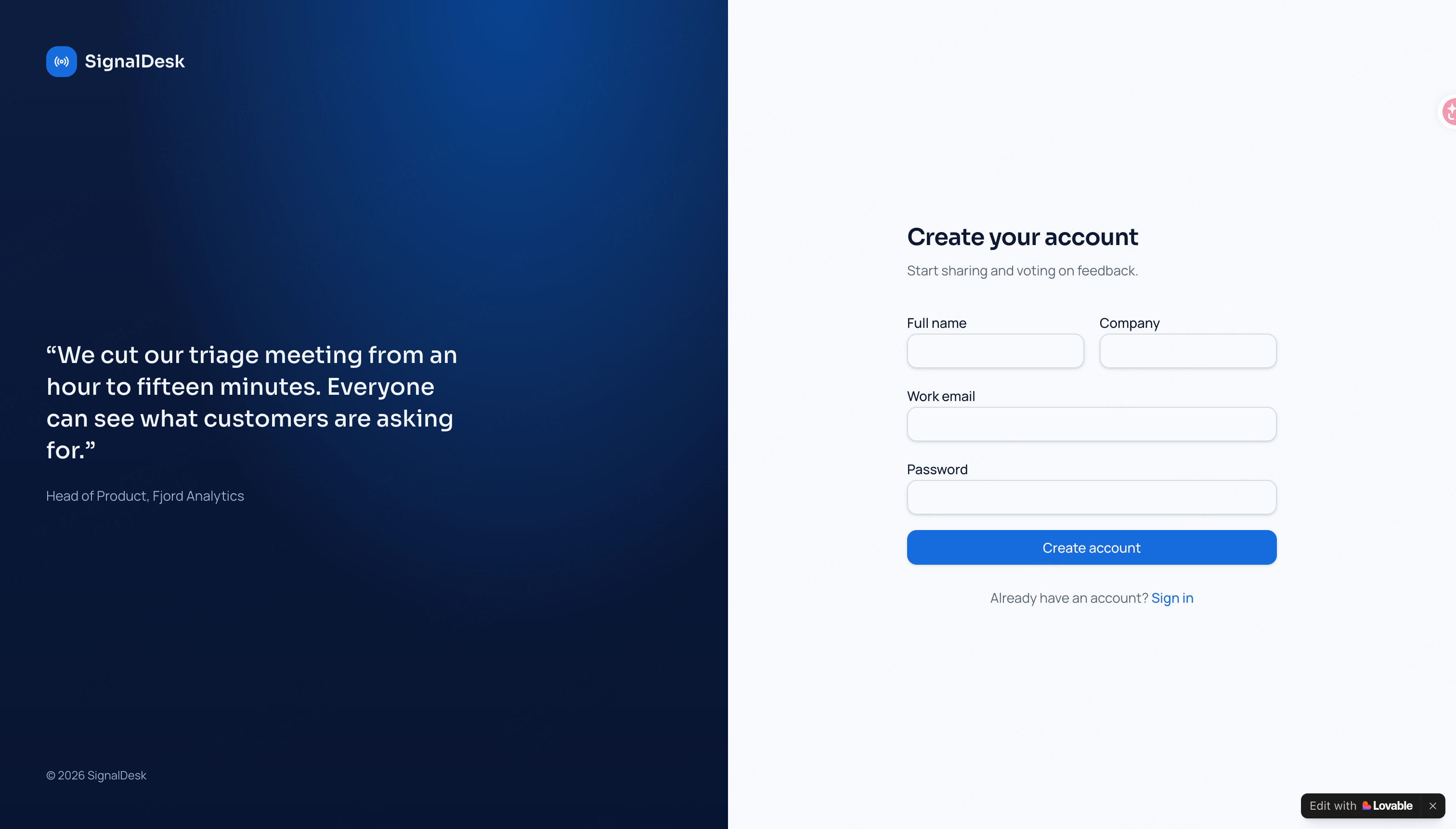
The first build covered a surprising amount of the brief. We could see account creation, a public request board, sample data, several statuses, and a mobile layout. The build summary added two useful details: the first registered account becomes the admin, and new accounts must confirm their email.
We had prepared a second prompt to test revisions and bug fixing, but the first build left only 0.70 free build credits. There was not enough allowance to run it. So this review cannot say whether Lovable would have fixed the remaining issues cleanly, or how many more rounds the project would have needed.
4. Connect Services, Test, and Publish
The project was created in Lovable Cloud, and the editor exposed backend access and publishing controls. The screenshots confirm that the requested application structure and authentication interface were generated. They do not independently verify database rules, email delivery, role enforcement, data persistence, production security, or the published application under real traffic.
The first build is a starting point, not the finish line. Budget both credits and review time for the less visible work: testing authentication, permissions, forms, database changes, mobile behavior, loading states, and failures before publishing.
Key Features of the Lovable AI Platform
Lovable combines conversational building with code, cloud services, collaboration, and deployment.
Natural-Language Application Generation
Describe the product in plain language and generate a working first version. This is the core experience behind the Lovable app builder: the prompt can cover interface, data, logic, and user flows instead of requesting one code snippet at a time.
Full-Stack Project Output
According to the documentation, a project can include the frontend, backend, database, authentication, and integrations. That is a much broader target than a landing-page generator, though the generated flows still need checking.
Live Preview, Code, and Version History
The conversation, live preview, code, and version history sit in the same project. A non-technical teammate can focus on what is on screen while a developer checks or extends the source.
Git Synchronization
Projects can sync with GitHub, GitLab, or Bitbucket. Teams can then bring the code into their usual review process, CI/CD setup, repository permissions, and external infrastructure. Enter’s AI code generator guide shows a related approach to generating and refining application code.
Cloud, Hosting, and Authentication
Lovable provides hosting and backend capabilities inside its platform. Its product pages now describe a built-in backend path, so the old article’s framing of Supabase as the only native backend is no longer complete. Supabase can still be part of a connected stack where appropriate.
Connectors and Payments
Available connectors cover payments, email, maps, AI services, Google products, and other business tools. Check the exact connector and setup requirements before committing it to a client or product plan.
Security and Governance
Security scanning, workspace roles, SSO, audit logs, and sensitive-data controls are part of Lovable’s current governance story. Some of these controls sit behind Business or Enterprise plans, so check the plan before assuming they are included.
What Can You Build with Lovable AI?
The Lovable AI tool supports a wide range of browser-based products and business workflows.
SaaS and Customer-Facing Applications
A focused SaaS product is an obvious use case: customer dashboards, client portals, admin panels, or another multi-user workflow. Start with the one action the product cannot fail at, then expand once that works.
Internal Tools and Operational Apps
Internal tools are another natural fit. A team could replace a spreadsheet with a form and approval flow, build a lightweight CRM, or create an inventory and reporting view around an existing process.
Dashboards and Data Visualization
For reporting work, connect the source data and build the KPI views, filters, and drill-downs around it. The charts may look convincing before the numbers are right, so check calculations and access against the source.
Websites and Marketing Pages
The Lovable AI website builder can generate company sites, landing pages, campaign pages, portfolios, and event experiences. The Lovable website builder workflow is strongest when the content hierarchy and conversion path are defined before generation.
Marketplaces and Commerce
Booking flows, storefronts, and directories are possible too, but commerce exposes weak spots quickly. Payments, stock, refunds, permissions, and failed transactions all need real testing before launch.
AI-Powered Apps
Assistants, content tools, and AI search are also within scope. Before shipping one, decide what reaches the model, what gets stored, and what the product should do when the model returns something wrong or unsafe.
Lovable AI Pricing: Plans and Credits
Lovable AI pricing uses credits shared across a workspace rather than per-seat fees.
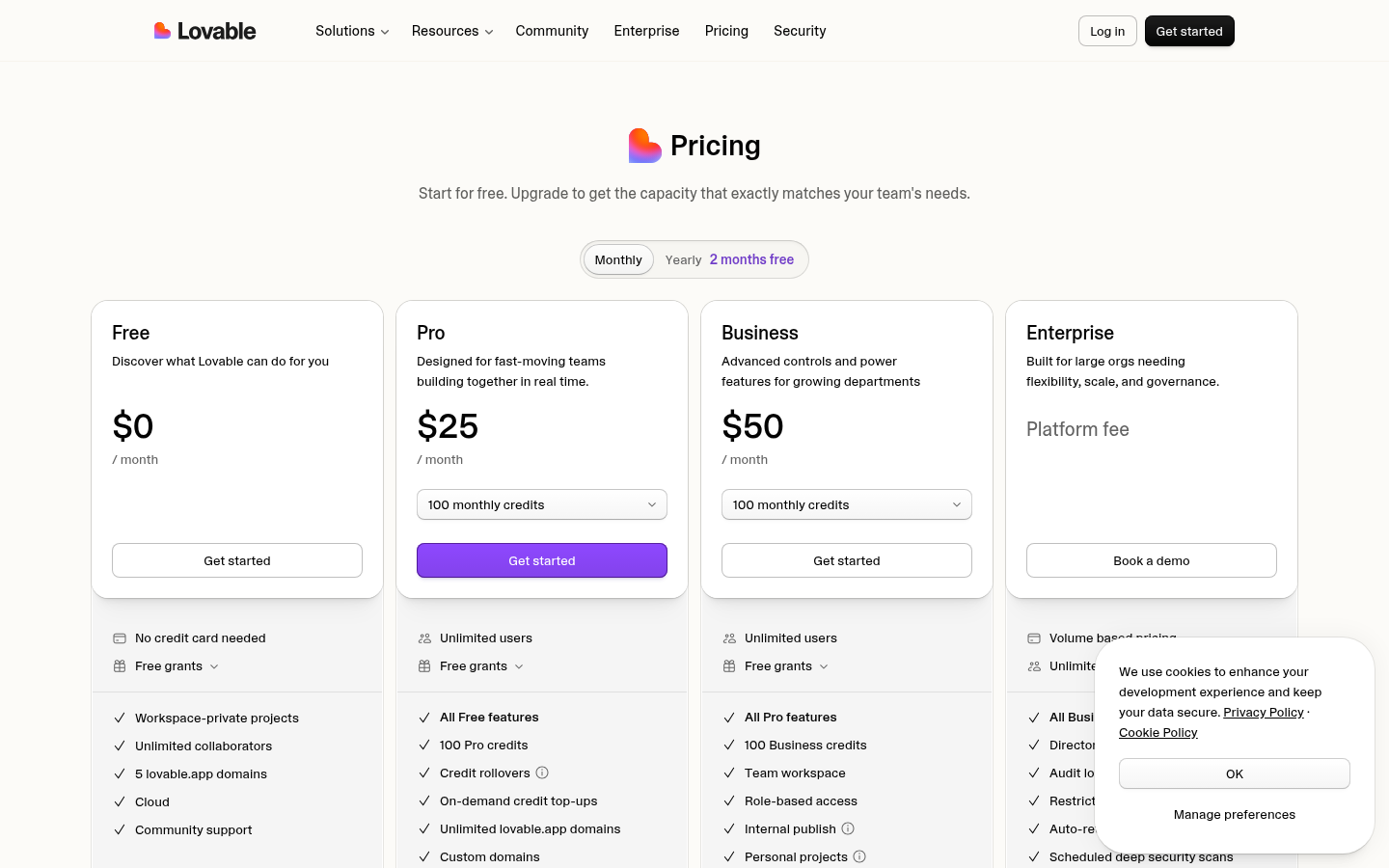
The official pricing page showed the following monthly plans on October 8, 2026:
| Plan | Price | Credits | Selected features |
|---|---|---|---|
| Free | $0/month | Free grants | Workspace-private projects, unlimited collaborators, up to five lovable.app domains, Cloud, and community support. |
| Pro | $25/month | 100 monthly credits plus eligible grants | Custom domains, roles and permissions, credit limits, badge removal, design systems, email support, and credit rollover under current rules. |
| Business | $50/month | 100 monthly credits plus eligible grants | Team workspace, role-based access, internal publishing, personal projects, SSO, security center, templates, and priority support. |
| Enterprise | Platform fee | Volume based | SCIM, audit logs, publishing controls, scheduled scans, sensitive-data controls, Git data residency, private registries, CSM, onboarding, and custom SLA. |
Credits are not a simple per-prompt price. Usage changes by plan, feature, and task complexity. Default Mode can consume different amounts, while Plan Mode is currently listed at one credit per message. Builds, Cloud usage, and AI features inside a deployed app may also use the workspace balance or included grants.
One prompt is a poor basis for a project budget. Test a representative workflow, note the credits it uses, and include revisions, hosting, connectors, and in-app AI in the estimate.
Is Lovable AI Free?
Yes. Is Lovable AI free? The current Free plan costs $0 and includes free grants, private workspace projects, unlimited collaborators, Cloud, and up to five lovable.app domains.
Lovable’s current pricing FAQ says the Free plan includes daily build-credit grants, monthly Cloud grants, and a small grant for AI features built into user apps. These allowances and consumption rules can change, so link to the current pricing page instead of copying fixed limits into evergreen copy.
The free tier is enough to see how the workflow feels and try a small idea. It should not be read as a promise that a full app, repeated debugging, or real production traffic will cost nothing.
Lovable AI Pros and Cons
The appeal is easy to understand: Lovable gets a lot onto the screen quickly. The caution is that speed can hide unfinished logic, technical choices, and costs that only show up during revision.
Pros
- A brief can become a surprisingly complete first build. Screens, data, logic, sign-in, and hosting can all take shape in one project.
- Different roles can contribute without working the same way. One person can stay in the conversation and preview while a developer reviews or extends the code.
- Editable and portable code. Git sync supports established engineering workflows and reduces platform lock-in.
- Integrated infrastructure. Hosting, backend services, authentication, connectors, and security checks are available in the platform.
- Flexible collaboration. Workspaces support multiple contributors without per-seat pricing on the standard plans.
Cons
- A finished-looking interface can be misleading. Permissions, data handling, business rules, and integrations may still be incomplete or wrong.
- Credits make the final cost hard to predict from the pricing page alone. Complex builds, revisions, hosting, and AI features can all change the total.
- Plan limits matter. Governance, support, and enterprise controls sit on higher tiers.
- The broad scope can make important technical choices easy to miss. A non-technical builder may still need help with security, architecture, and operational risk.
- It is primarily a web-software platform. Projects that require a specific local stack or deeply customized infrastructure may need a different workflow.
Is Lovable AI Production Ready?
A polished first preview is not enough to answer that question. Production readiness depends on the app, the review behind it, and how the team plans to operate it.
Our SignalDesk test showed that Lovable can generate a connected product structure rather than only a static mockup. The first build visibly included a public landing page, account creation, a populated feedback board, mobile behavior, Lovable Cloud, and access to backend and publishing controls.
That is a promising first result, but it does not make the app production-ready. We did not independently verify email delivery, database authorization, admin roles, persistence, backups, security, monitoring, or real traffic. With only 0.70 free build credits left, we also could not run a second refinement and regression pass.
Before launch, review authentication, role permissions, row-level access, secrets, data retention, backups, error handling, external dependencies, responsive behavior, performance, analytics, and incident ownership. Run functional and security tests on the deployed application, not just the editor preview.
A marketing site and a regulated multi-tenant product carry very different risks. The review should match the data involved, the people using it, and the cost of getting something wrong.
Who Should Use the Lovable AI App Builder?
The Lovable AI app builder works best when the project scope is clear and the output can be verified.
It suits founders with a focused MVP, product teams testing a workflow, operators replacing an internal process, marketers launching an interactive site, and agencies preparing a first client build. Engineering teams can also use Git sync to take the work further.
Be more cautious if the project handles regulated data, relies on complex tenant permissions, has strict infrastructure rules, needs native-device features, expects heavy traffic, or cannot tolerate variable credit costs.
Start with the feature most likely to expose problems. One signed-in workflow, one action that changes data, one integration, and one real revision tell you more than a long feature checklist. If direct visual control and a defined React workflow matter to your team, Enter Pro is a useful next comparison.
Lovable AI vs Enter Pro: Which Workflow Fits?
Both platforms turn natural language into web software, but their current product boundaries and editing workflows are not identical.
| Decision area | Lovable AI | Enter Pro |
|---|---|---|
| Primary workflow | Conversation-led, full-stack web-software platform with project chat, preview, code, cloud services, connectors, and publishing. | Browser-based React app builder combining AI generation, Visual Editor, Code Editor, Enter Cloud, and web publishing. |
| Generated web stack | Current Lovable projects are documented as full-stack web applications; the exact stack can evolve and should be checked for the project. | React + Vite + TypeScript + Tailwind CSS for Enter Pro browser projects. |
| Backend path | Lovable Cloud and connected services; Git sync supports external engineering workflows. | Enter Cloud provides database, storage, functions, authentication, and secret management. |
| Direct editing | Refine through chat and edit code; current official pages describe continued design and workflow refinement. | Visual Editor for direct interface changes plus an integrated Code Editor. |
| Git workflow | Git sync supports GitHub, GitLab, and Bitbucket under current documentation. | GitHub sync and code download are available on eligible plans. |
| Pricing model | Workspace credits cover building, Cloud, and AI features, with plan-specific grants and variable consumption. | Daily free Credits plus plan-specific Build and AI Credits under current Enter pricing. |
| Best starting point | Teams that want a broad, conversation-led web-software platform with connectors and enterprise options. | Teams building React web apps that value direct visual control and Enter’s integrated cloud workflow. |
Use the table as a shortlist, not a verdict. Give both tools the same brief and compare the first result, the work needed to revise it, the code, integrations, deployment, and total usage cost.
Lovable AI Review Methodology and Evidence Limits
This Lovable AI review combines a hands-on SignalDesk build with Lovable’s official website, pricing page, and product documentation checked on October 8–9, 2026.
We started from a blank project and submitted one complete prompt. The result included a landing page, sign-up flow, populated feedback board, mobile preview, and a project in Lovable Cloud. We saved screenshots of the prompt, the build in progress, the first result, authentication, the feedback board, and the remaining allowance.
The test stopped after that first build. The workspace showed 0.70 free build credits remaining, which was not enough for the planned refinement and regression pass. We also did not test email delivery, database authorization, admin permissions, persistence, a live published URL, security, or production traffic. The conclusions below stay within what the screenshots and official sources actually show.
Plan details, Git sync, cloud services, connectors, and security features come from Lovable’s own materials. Our screenshots support only what happened in the SignalDesk build. A different project may take a different amount of work and use a different number of credits.
Bottom Line: Is Lovable AI Worth It?
Lovable is worth a look if you want to turn a product brief into a working web app without opening an empty repository first.
The old shorthand—“React plus Supabase prototypes”—no longer describes the whole product. Lovable now covers cloud infrastructure, authentication, connectors, code ownership, Git sync, security controls, collaboration, and enterprise governance. It can be relevant to real products, not just demos.
Generating an app is the easy part to see. The harder question is whether your team can review it, test it, run it, and afford the iterations. Try one representative workflow first, check the risky parts, and watch the credit use before expanding the project.
Enter Pro takes a different approach to revisions. You do not have to describe every visual change in chat: the Visual Editor lets you adjust the interface directly, and the Code Editor is there when a developer needs to work in the React code. Prompting, visual tweaks, and code changes can all happen in the same browser workspace.
That editing workflow sits alongside Enter Cloud, which covers database, storage, functions, authentication, and secrets, as well as web publishing and eligible GitHub workflows. Enter Pro is a sensible comparison for teams that want a defined React-based stack and need designers, operators, and developers to work on the same app without using the same tools in the same way.
There is no automatic winner. Give Enter Pro and Lovable the same realistic brief, then compare the first result, the work needed to revise it, the code, backend setup, publishing, and the credits spent before the app feels ready.
Try Enter Pro and build your first app →
FAQs about Lovable AI
What is Lovable AI?
Lovable AI is a full-stack AI development platform that turns natural-language instructions into web applications with frontend, backend, data, authentication, integrations, hosting, and editable code.
Is Lovable AI free?
Yes. Lovable has a $0 Free plan with current grants for building, Cloud, and a limited trial of in-app AI features. Allowances and usage rules can change, so check the official pricing page before planning a project.
How much does Lovable AI cost?
As of October 8, 2026, Pro is listed at $25 per month with 100 monthly credits, Business at $50 per month with 100 monthly credits, and Enterprise with a platform fee and volume-based pricing.
Can Lovable build a complete web app?
Yes. The Lovable app builder is designed to create web applications with interface, data, logic, authentication, integrations, and hosting. The generated application still needs functional, security, and operational review. If direct visual revision is important, compare the same brief in Enter Pro’s Visual Editor.
Can Lovable build a website?
Yes. The Lovable AI website builder can create company websites, landing pages, portfolios, campaigns, and other browser-based experiences. Content quality and technical SEO still require review.
Can I export Lovable code?
Lovable says users own their code, and current documentation supports Git sync with GitHub, GitLab, or Bitbucket for integration into existing engineering workflows. Enter Pro is another option when you want an integrated Code Editor alongside GitHub sync and code download on eligible plans.
Is Lovable AI production ready?
Lovable can publish and operate real web applications, but production readiness depends on the app. Review permissions, data, security, integrations, performance, backups, monitoring, and failure handling before launch.
What is the best Lovable AI alternative?
There is no universal best alternative. Enter Pro is worth comparing when you want a browser-based React builder with direct Visual Editor control, integrated code editing, Enter Cloud, and web publishing.