

Overview — What is this template?
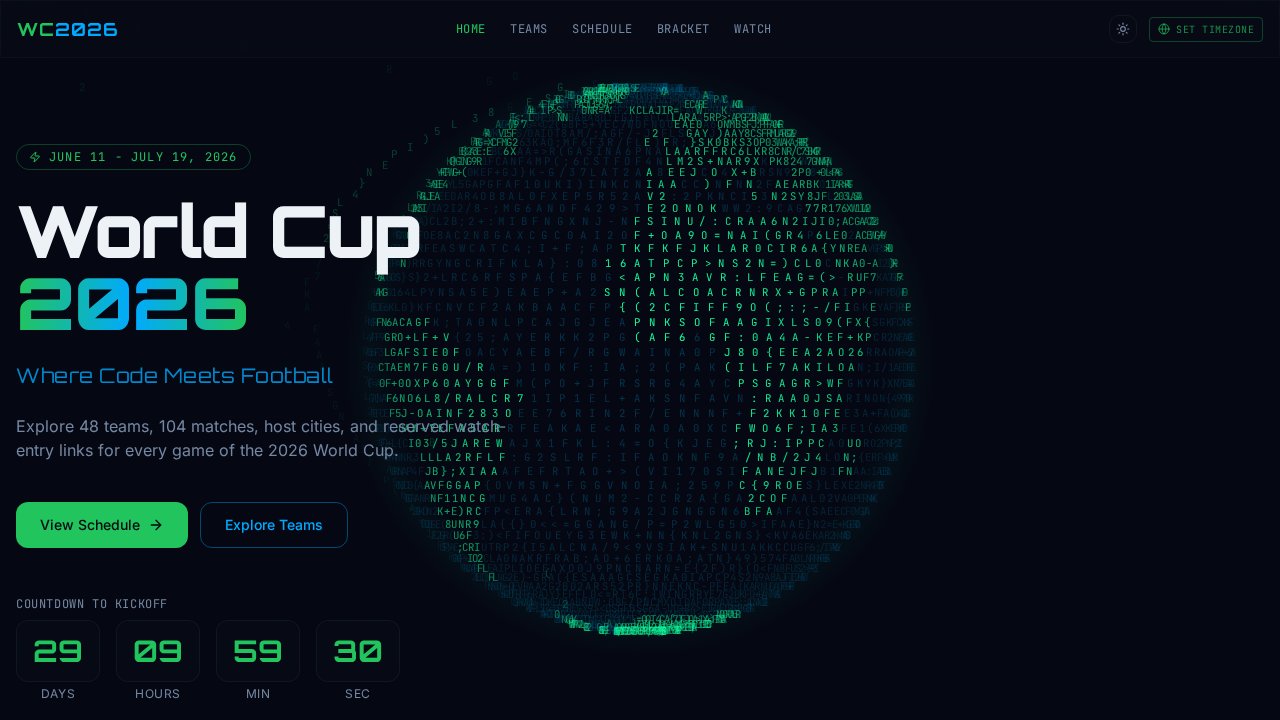
The Free Cyberpunk World Cup Tournament Dashboard Template is a developer-inspired, dark-themed tracker designed specifically for fans, communities, and creators who want to track the 2026 World Cup. This free dashboard provides a complete central hub for match schedules, team rosters, brackets, and broadcast links, presenting high-density sports data in a stylized hacker aesthetic. With a high-contrast palette and real-time utilities, it makes following matches across multiple global timezones simple and engaging. You can customize the entire page to suit your community or brand by launching this project with Enter Pro by Converge AI.
Key highlights
- ASCII-art globe rendered via monospace character grid on dark canvas
- Real-time countdown component displaying days, hours, minutes, and seconds
- Sticky top navigation with five route sections
- Timezone toggle utility for localized match time display
- High-contrast dark palette with cyan/green accent system
- Free Cyberpunk World Cup Tournament Dashboard Template layout for quick publishing
Who is this Cyberpunk World Cup Tournament Dashboard for?
- Sports Communities and Event Organizers: Ideal for soccer clubs, local viewing groups, or discord servers that need a dedicated space to manage schedules, track scores, and coordinate game watch parties.
- Developer and Tech Enthusiasts: Perfectly tailored for coders, dev communities, and tech organizations wanting to experience the tournament through a matrix-inspired, terminal-style interface.
- Sports Media and Content Creators: Excellent for digital creators, sports bloggers, and soccer influencers looking to offer their audience a highly stylized alternative to standard mainstream sports portals.
Best use cases for a Cyberpunk World Cup Tournament Dashboard
Community Match Hub
Deploy a free companion microsite for your gaming server, developer community, or local neighborhood group to share watch links and track match results as they happen.
Corporate Hackathon or Viewing Portal
Use this as a themed digital dashboard in your office or internal workspace to build excitement around the tournament with the live countdown and schedule explorer.
Stylized Sports Blog Landing Page
Incorporate the template as a standalone feature page within your editorial project, capturing search traffic from fans searching for unique dark-mode tournament trackers.
How to build with Enter Pro
- Remix the Tournament Dashboard: Click the "Remix Template" button on this page to load the dashboard in the online editor with your free trial credits.
- Customize with Enter Agent: Chat with Enter Agent to replace the default match data, adjust the countdown to point to your selected match, and customize the team lists or national accent colors.
- Publish and Share: Once your modifications are complete, hit publish to deploy your custom page to a free personal subdomain on enterapp.pro and share it with your community.
FAQ
What are the main visual features of this Free Cyberpunk World Cup Tournament Dashboard Template?
This template features a unique monospace ASCII-art globe on a dark canvas, creating a terminal-inspired, hacker-themed aesthetic. It also includes a real-time countdown timer to kickoff, a localized timezone selector, a multi-section navigation system for teams, schedules, and brackets, and a vibrant cyan-green neon accent system that makes data stand out on dark layouts.
Is this Cyberpunk World Cup Tournament Dashboard template free to customize and publish?
Yes, this is a completely remixable template that is free to customize and deploy. You can experiment with the layout, modify the code, and publish your final project on your own custom subdomain without any upfront cost.
How do I localized match times inside the template?
The template includes a timezone toggle utility built into its sticky navigation bar. This tool allows global audiences to easily convert match times into their local timezone, ensuring that nobody misses a kickoff.
Can I deploy this template on a custom domain?
Yes, once you have finished editing your layout and schedule details, you can configure your project settings to link your own custom domain name using standard CNAME records, replacing the default subdomains.