

Overview — What is this template?
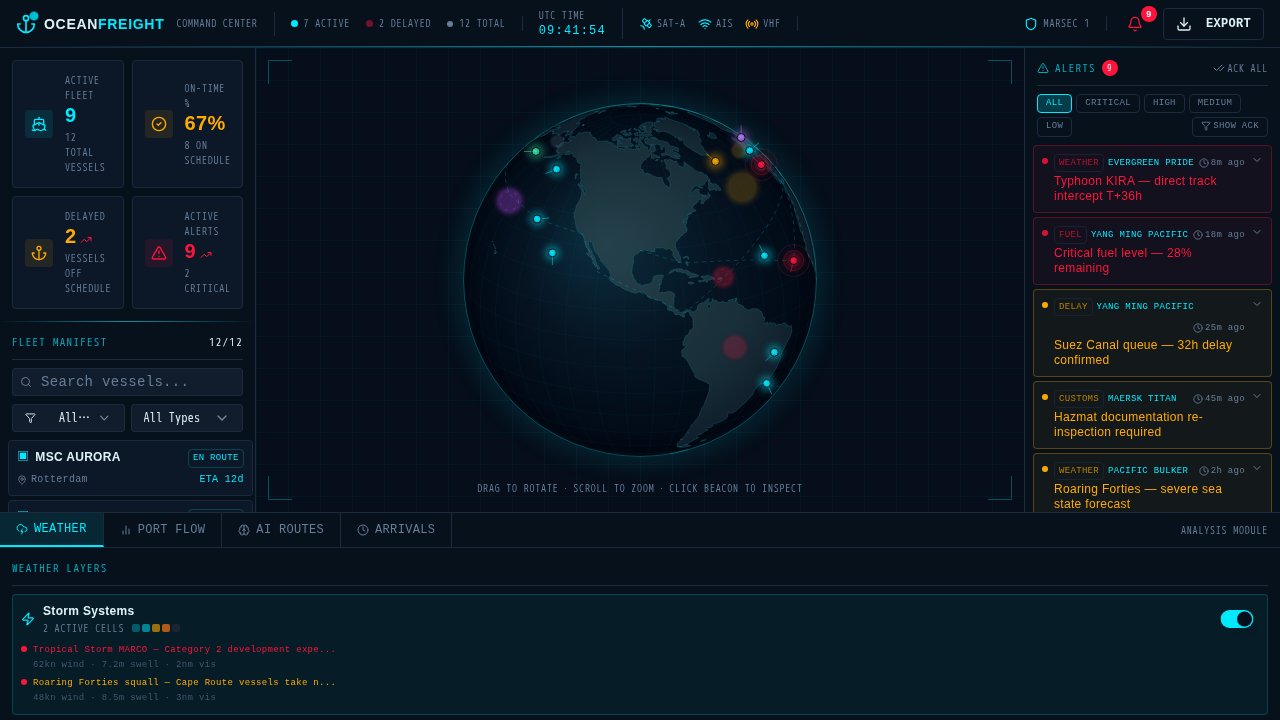
The Free Tactical Maritime Fleet Command Dashboard Template is a professional, dark-themed analytics dashboard designed specifically for ocean freight operations, maritime logistics, and global fleet management. This free template provides shipping companies, port authorities, and supply-chain SaaS developers with a military-grade command center interface that unifies telemetry data, vessel monitoring, and alert prioritization into a single, high-contrast workspace. By utilizing a high-performance visual layout, it solves the challenge of scattered fleet data and helps operators make critical routing and weather decisions without screen switching. Ready to customize or deploy instantly, this template is the ideal starting point for building sophisticated logistics applications. You can remix and launch your application today using Enter Pro by Converge AI.
Key highlights
- Interactive WebGL-rendered 3D globe with draggable rotation, scroll-zoom, and clickable vessel beacons
- Multi-severity alert triage panel with timestamped cards and acknowledgement controls
- Tabbed bottom analysis module for weather layers, Sankey port-flow diagrams, AI route comparison, and ETA arrival timeline
- Dense sidebar telemetry featuring a KPI card grid, sparkline trend indicators, and a searchable fleet manifest list
- High-contrast tactical design with a dark sonar-cyan (#00f0ff) and radar-amber (#ff6b35) accent color system
- Free Tactical Maritime Fleet Command Dashboard Template download with immediate web-based preview and configuration
Who is this Tactical Maritime Fleet Command Dashboard template for?
- Maritime Logistics Teams: Operations coordinators who need to monitor global vessel positions, track real-time weather risks, and triage arrival delay alerts within a centralized dashboard.
- Supply Chain SaaS Builders: Software engineers and product managers developing custom logistics, port-flow, or fleet management platforms who need a dark, high-density dashboard that commands operational seriousness.
- Port Authorities and Harbor Masters: Port operators who require a clean, responsive interface to manage incoming and outgoing vessel manifests, port congestion, and berth schedules.
- Enterprise Hackathon Teams: Engineers building rapid maritime or logistics prototypes who want to bypass UI design phases and start with a fully responsive, data-dense layout.
Best use cases for a Tactical Maritime Fleet Command Dashboard
Real-Time Fleet Vessel Tracking
This template is exceptionally suited for tracking active vessels across global shipping lanes. Developers can drop in live AIS telemetry and map coordinate feeds, allowing terminal operators to monitor routes, view current speeds, and assess localized risks. Utilizing the interactive 3D globe, teams can select specific vessel beacons to slide open deep telemetry profiles and manifest details.
Multi-Severity Operational Alert Triage
Use this design as a dedicated risk and exception management portal. Operations managers can configure the right-hand triage panel to filter incoming telemetry errors, severe weather warnings, and schedule deviations by importance level. Operators can acknowledge and resolve events directly within the card interface, keeping fleet dispatchers updated in real time.
Port Flow & Berth Congestion Monitoring
By connecting real-time port analytics data, users can turn the bottom tabbed panel into a visual Sankey flow chart or queue sequence. This helps terminal managers forecast wait times, analyze harbor throughput, and dynamically adjust arrival ETA estimations to prevent port bottlenecks.
AI Route Comparison Companion
Perfect as a free tactical planning microsite for comparing shipping routes. Ship captains and route planners can toggle the bottom analysis tab to evaluate distance, fuel consumption, and weather forecasts between traditional routes and AI-optimized alternatives, selecting the safest and most efficient path forward.
How to build with Enter Pro
- Remix Template: Click the "Remix Template" button on this page and sign in to create an editable, personal version of this maritime dashboard template.
- Chat with Enter Agent to Customize: Use natural language to describe your changes. Instruct Enter Agent to customize your fleet manifest lists, update visual cards, rename alert severity categories, or swap out static statistics to fit your operational requirements.
- Deploy and Publish: Once your edits are complete, click publish to build and deploy your project on a shareable
enterapp.prosubdomain, complete with a live URL to showcase your custom dashboard.
FAQ
Is this Tactical Maritime Fleet Command Dashboard template free to customize and use?
Yes, this is a completely free template that you can remix, modify, and develop further. You can edit the layouts, integrate your custom APIs, change visual components, and publish the completed dashboard online without any fee or license restriction.
What framework and libraries are used in the Free Tactical Maritime Fleet Command Dashboard Template?
This professional logistics dashboard is built on a dark-themed UI featuring high-contrast typography. It uses a high-performance WebGL-rendered 3D globe supporting interactive draggable rotation, scroll-to-zoom, and clickable beacon markers for seamless vessel monitoring.
Can I connect real-time vessel telemetry and weather data to this template?
Yes. The template structure is organized with defined sections for live GPS, telemetry manifests, and analysis modules. You can ask Enter Agent to help you bind these fields to live maritime APIs, weather endpoints, or your internal logistics databases.
Do I need advanced coding skills to modify the layout or colors?
No professional coding experience is required. By working with Enter Agent, you can make visual adjustments, customize tables, alter sidebar elements, and refine the sonar-cyan and radar-amber palette using simple chat commands.
How do I deploy my customized maritime command dashboard online?
Once your dashboard is tailored to your workflow, you can deploy it instantly with one click. Enter Pro compiles your changes and hosts the active web application, providing you with a secure, responsive URL that you can share with your operators or team members.