
Emergent AI Review 2026: Features, Pricing, Pros and Cons
Read our 2026 Emergent AI review of the app builder, with current pricing, free credits, hands-on results, pros, cons, and who it suits.
Emergent AI Review 2026: Features, Pricing, Pros and Cons
Emergent AI can turn a plain-English prompt into a working website, web app, or mobile app. The harder question is whether its conversation-led workflow, credit model, and generated output fit your project. This Emergent AI review combines current official information with a hands-on booking-app build to show what worked, what the test cost, and what still needed verification.
Emergent AI Review: The Quick Verdict
The Emergent AI builder is strongest for teams that want to turn a detailed brief into working software through conversation.
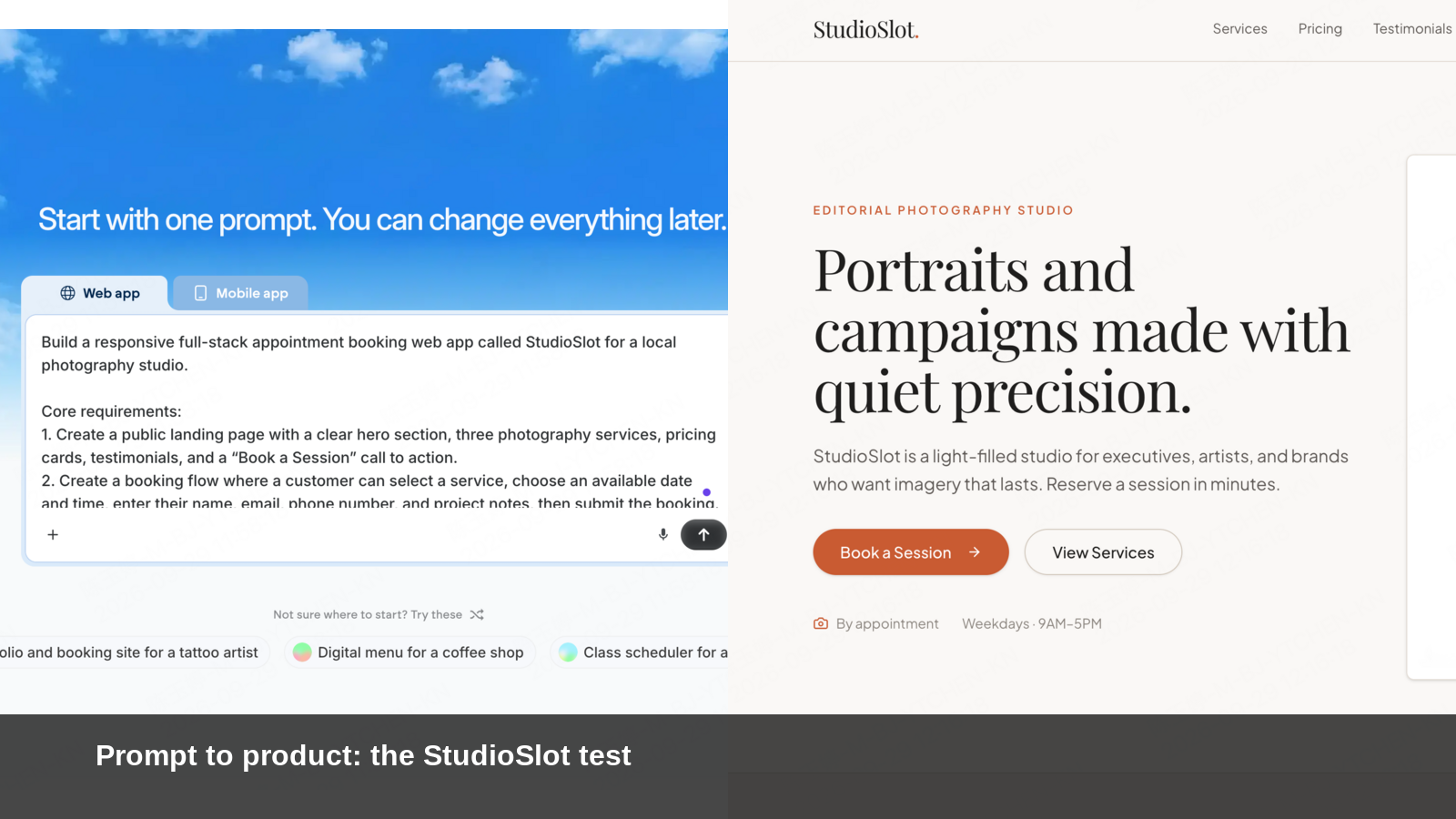
In our test, one prompt produced a polished photography-studio homepage, a four-step appointment flow, backend files, and an admin-oriented project structure. The result looked far more complete than a static mockup. Emergent also displayed its file edits while iterating, so the workflow was not limited to generating a single page.
The main trade-off was credits. The account showed 10.00 credits before the test and 2.79 after the first completed build—a 7.21 reduction in this specific run. A later iteration reached “Credit Exhausted,” preventing another repair request without adding credits. That is one observed project, not a universal price per prompt, but it shows why a representative test matters before you estimate a larger build.
Emergent is worth trying if you prefer prompt-led building and its supported output types match your project. If direct canvas editing or predictable revision costs matter more, compare the same brief in another builder before committing.
What Is Emergent AI?
The Emergent AI platform turns natural-language briefs into working software, including websites, web apps, mobile apps, dashboards, and SaaS products.
You describe the product, users, pages, data, logic, and design direction. The platform then generates an application that you can preview and refine through conversation. Emergent’s current product pages position it for websites, native mobile apps, web apps, dashboards, CRMs, schedules, AI agents, and other business tools.
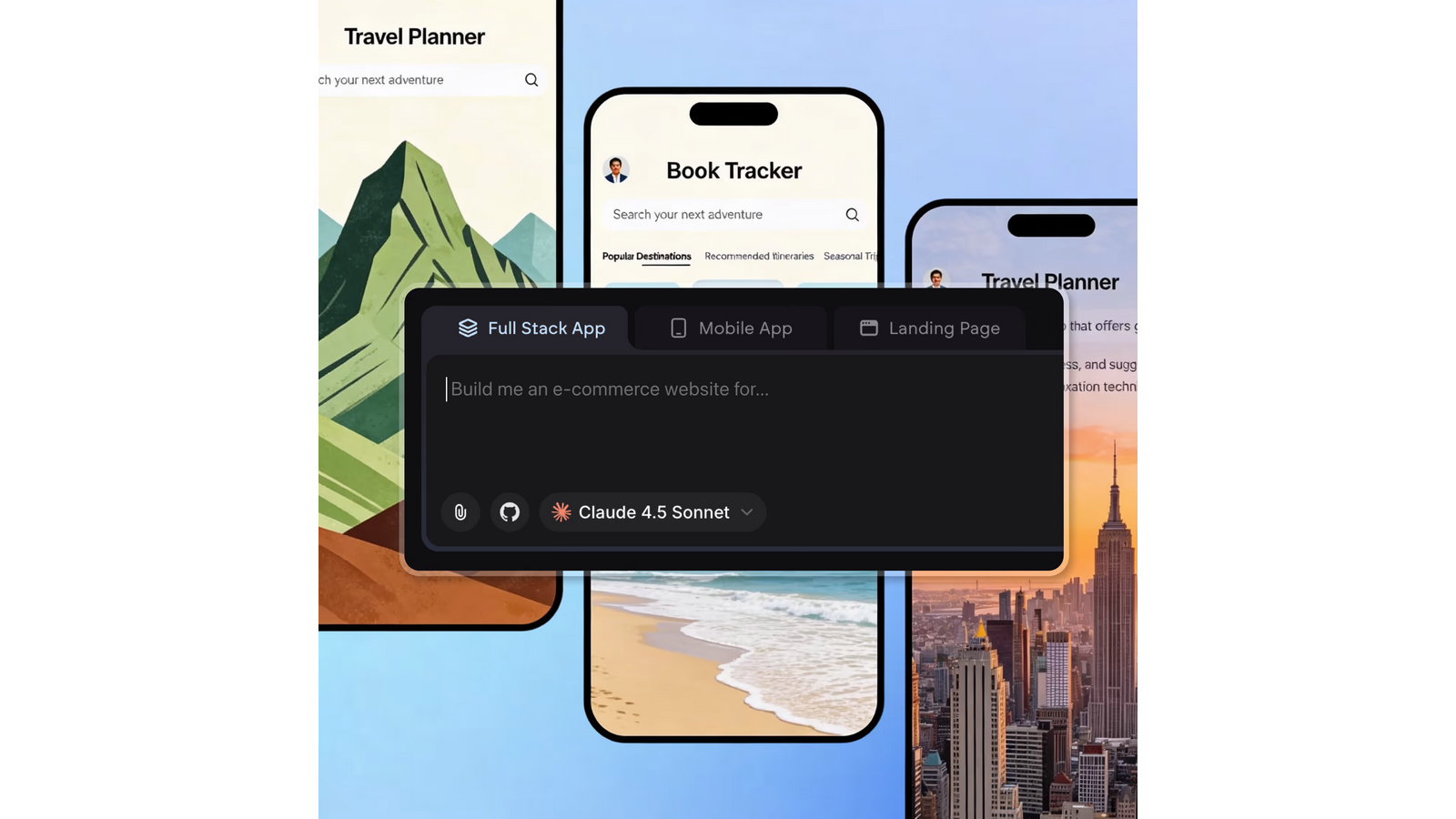
That makes it broader than a page generator. An Emergent AI app can include interface screens, forms, application logic, stored data, integrations, and publishing steps. The exact output still depends on the clarity of the brief, available credits, chosen plan, and the review performed after generation.
Emergent calls the workflow “building through conversation.” That description is useful because it explains both the strength and the limitation: you can ask for complex software in everyday language, but many changes still depend on the agent correctly interpreting another prompt.
How We Tested the Emergent AI App Builder
We used one scoped brief so the result could be checked against visible requirements rather than judged by appearance alone.
The test asked Emergent to build StudioSlot, a responsive full-stack appointment-booking web app for a photography studio. The brief required a public landing page, three services, pricing, testimonials, a four-step booking flow, stored booking records, an admin dashboard, status changes, filters, search, validation, loading states, seed data, and mobile responsiveness.
The Exact Emergent AI App Builder Prompt
To make the test reproducible, this is the complete prompt submitted in Emergent’s Web app mode. No payment provider or external API credential was included.
Build a responsive full-stack appointment booking web app called StudioSlot for a local photography studio.

Core requirements:
1. Create a public landing page with a clear hero section, three photography services, pricing cards, testimonials, and a “Book a Session” call to action.
2. Create a booking flow where a customer can select a service, choose an available date and time, enter their name, email, phone number, and project notes, then submit the booking.
3. Save every booking to the app database with these fields: customer name, email, phone, service, date, time, notes, and booking status.
4. Create an admin dashboard that lists all bookings and allows the status to be changed between New, Confirmed, Completed, and Cancelled.
5. Add filters for service and booking status, plus a search field for customer name or email.
6. Include form validation, empty states, loading states, success confirmation, and clear error messages.
7. Add realistic seed data so the dashboard is not empty on first preview.
8. Make the entire experience responsive for desktop and mobile.

Design direction:
- Clean editorial style for a premium photography studio
- Warm off-white background
- Charcoal text
- Muted terracotta accent color
- Generous spacing and readable typography
- Avoid excessive gradients, glassmorphism, and decorative animation

Use Emergent’s built-in database and authentication if they are available in this project type. Do not add external payments or integrations. If a requested capability is unavailable, create a working demo state and clearly identify the limitation instead of silently omitting it.
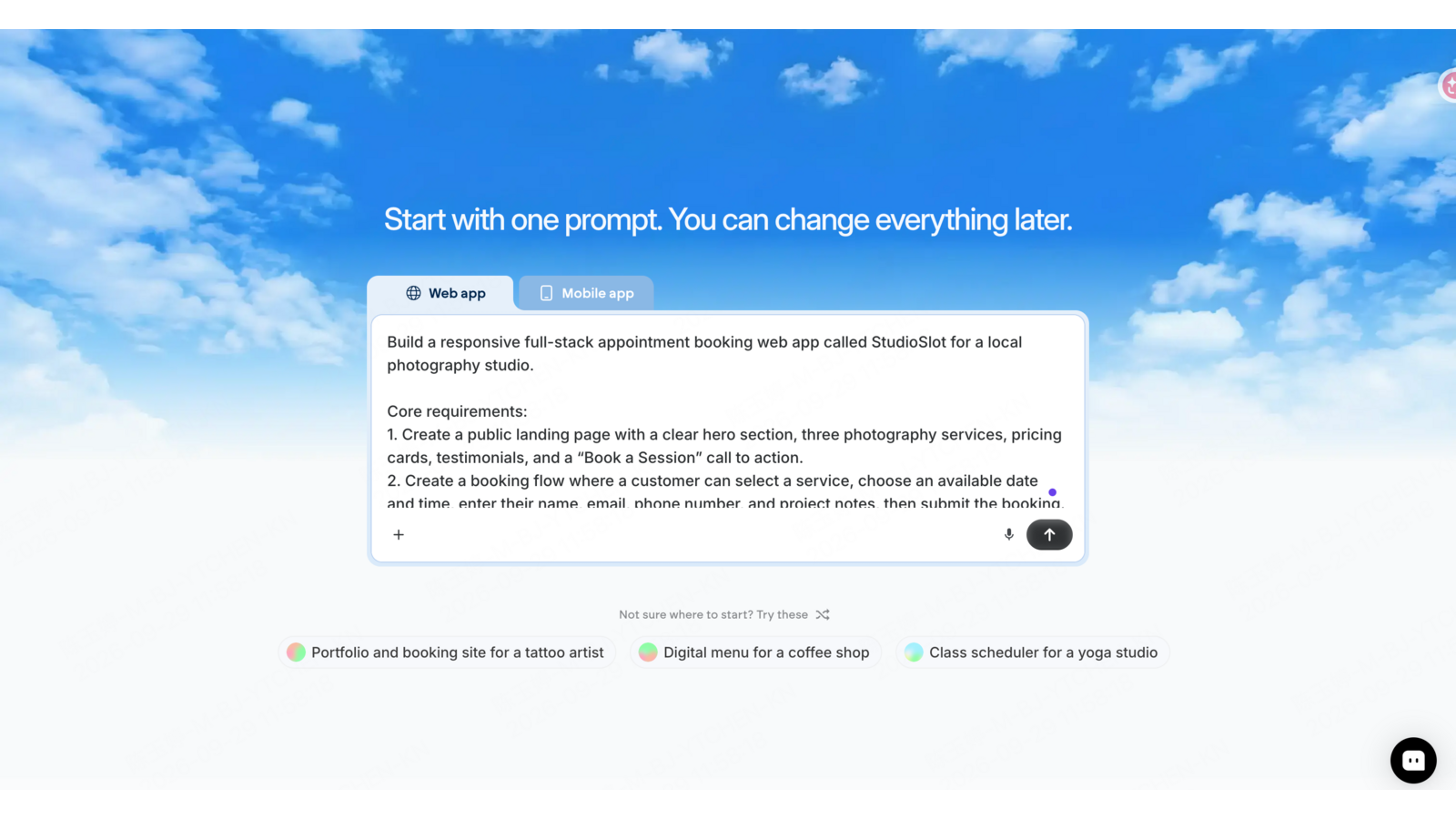
We deliberately excluded payments and other services that would require external credentials. That kept the test focused on the builder’s own interface, data, logic, and iteration workflow.
The prompt also specified a restrained visual direction: warm off-white surfaces, charcoal text, muted terracotta accents, generous spacing, and no excessive gradients or animation. This made the final visual result easier to compare with the original design request.
Two evidence limits matter. First, the generated agent reported that its backend and frontend tests passed, but that status is the agent’s own report—not an independent audit. Second, screenshots prove the visible pages and workflow states, but they do not prove every database rule, permission, or edge case. Production readiness still requires manual testing.
How the Emergent AI App Builder Works
The workflow moves from a scoped brief to review, revision, testing, and publishing.
Describe the product
Start with the audience, required screens, data, actions, and outcome. “Build a booking app” names a category. Adding user roles, booking rules, fields, statuses, mobile behavior, and success criteria gives the Emergent AI app builder a clearer target.
Review the generated application
Check more than the hero section. Open navigation, submit forms, inspect empty and error states, and confirm that the main workflow reaches a meaningful end. A polished homepage is useful, but it does not prove that the underlying product works.
Refine through conversation
Ask for one focused change at a time. During our test, Emergent displayed Memory retrieval and edits to backend files while adding a managed email integration. The live application remained visible beside the activity feed.

This is useful process visibility, but it should not be overread. The screenshot proves that the interface displayed edits to files such as server.py and** .env**; it does not reveal the contents of those files or independently prove that the integration worked end to end.
Test before publishing
Verify authentication, permissions, forms, data persistence, integrations, responsive behavior, and failure states. Emergent’s official pages describe publishing for web apps, progressive web apps, Android, and iOS. Native app releases still require platform-specific signing, testing, and store review.
Key Features of the Emergent AI Platform
Its main strength is breadth: one conversation can cover interface, logic, data, integrations, and publishing.
Natural-language building
Emergent lets users create and revise software by describing the desired behavior. A detailed brief can combine design, pages, data fields, validation, and business logic instead of treating each as a separate tool.
Multiple output types
Official pages cover websites, web apps, native mobile apps, dashboards, SaaS tools, CRMs, schedules, and AI agents. This range makes the platform relevant to more than landing-page work.
UI, data, and backend workflows
Emergent presents the product as handling interface structure, application logic, stored data, and integrations. Our test supported that positioning at a visible level: it generated a public site, a multi-step workflow, project files, and admin-oriented functionality from one brief.
Live preview and agent activity
The workspace keeps the application preview beside the conversation and activity feed. That makes it easier to relate an agent action to a visible result, although each change still needs review.
GitHub integration
The official pricing page lists GitHub integration on Standard and higher plans. This matters when a team needs version-control access or wants a path from the generated project into a conventional development workflow.
Advanced controls on higher tiers
Pro currently lists a 1M context window, Ultra thinking, System Prompt Edit, custom AI agents, high-performance computing, and priority support. Business and Enterprise add collaboration, administration, deployment, and reporting controls.
What Can You Build with the Emergent App Builder?
Use a narrow, testable first project to judge how well the output fits your workflow.
Websites
The Emergent AI website builder is positioned for complete websites, landing pages, product pages, business sites, portfolios, and content-led experiences. Its website-builder page describes design changes as conversation-driven.
Web apps and SaaS products
Use Emergent for authenticated workflows, booking tools, customer portals, internal products, and subscription software. Complex projects still require careful review of the data model, access controls, third-party services, and edge cases.
Mobile apps
Emergent markets native Android and iOS generation, progressive web apps, and export-ready builds. Teams should separately verify device behavior, permissions, signing, store requirements, and any native feature they depend on.
Dashboards and internal tools
The platform also targets analytics dashboards, CRMs, operational workflows, and data-entry tools. These are sensible first projects when the user group and workflow are known and the output can be checked quickly.
What our test produced
The first StudioSlot result included a clean photography-studio homepage with services, pricing, testimonials, an admin navigation item, and booking calls to action. The visual direction closely followed the requested editorial style.

The result also included a four-step booking flow for service, date and time, customer details, and confirmation. That is stronger evidence than the homepage alone because it shows a multi-screen product workflow.
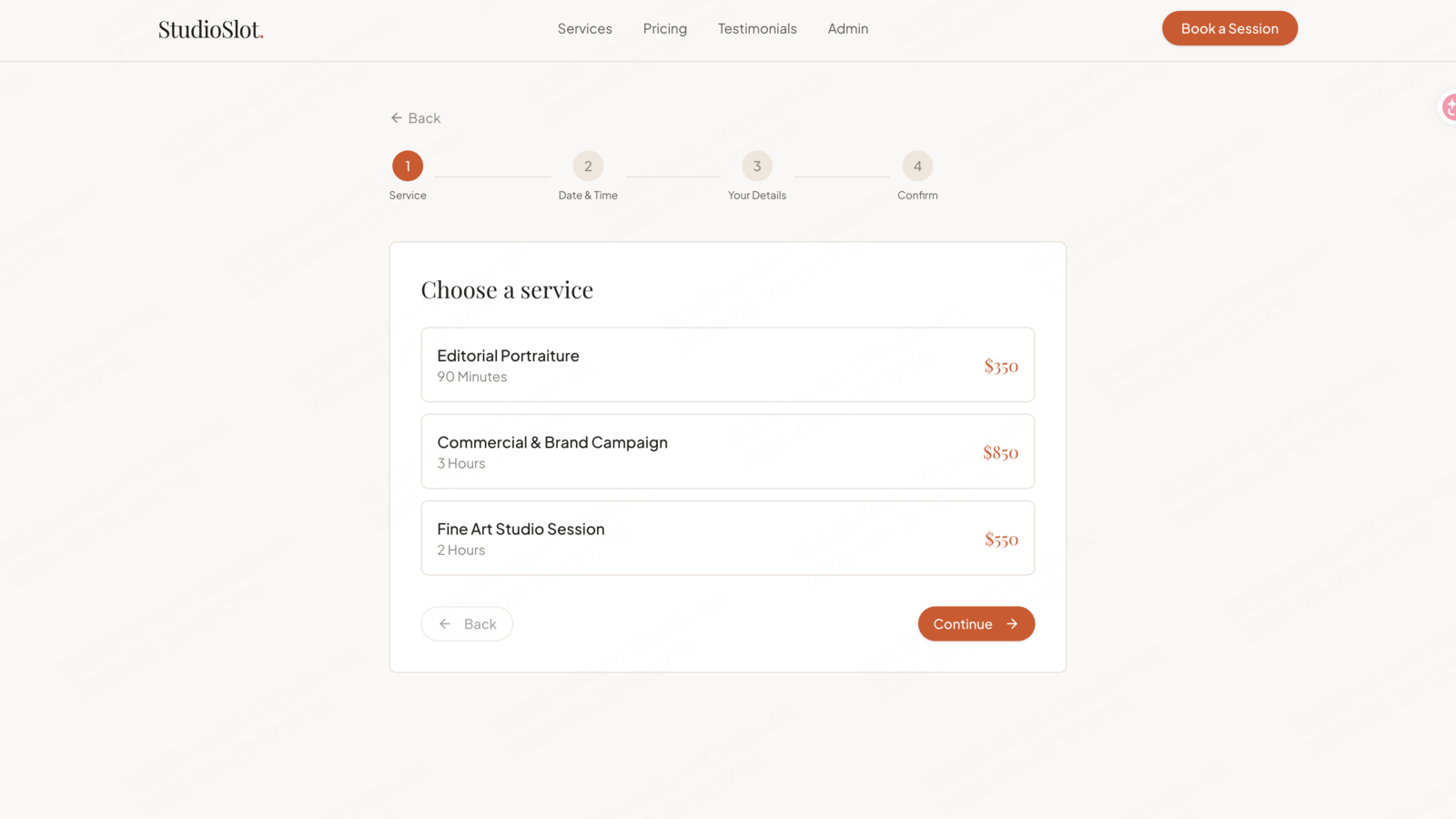
We did not treat the agent’s “100%” test status as independent proof of production readiness. Before launch, a human tester should submit a booking, confirm persistence in the admin view, change its status, exercise search and filters, test duplicate slots, and verify mobile behavior.
Emergent AI Pricing: Plans and Credits
Emergent uses monthly credits, so generation and revision volume affect the practical cost of a project.
The official Emergent pricing page showed the following plans on September 28, 2026:
| Plan | Monthly price | Included credits | Selected features |
|---|---|---|---|
| Free | $0 | 10 monthly credits | Core platform features, web and mobile experiences, advanced models, and one-click LLM integration. |
| Standard | $20 monthly; $17/month billed annually | 100 monthly credits | Private project hosting, extra-credit purchases, GitHub integration, and fork tasks. |
| Pro | $200 monthly; $167/month billed annually | 750 monthly credits | 1M context window, Ultra thinking, System Prompt Edit, custom AI agents, high-performance computing, and priority support. |
| Business | Custom | Custom | RBAC, SSO, shared workspaces, and real-time co-editing. |
| Enterprise | Custom | Custom | Credit limits, audit logs, self-hosted database support, VPC deployment, usage reporting, and priority SLA/support. |
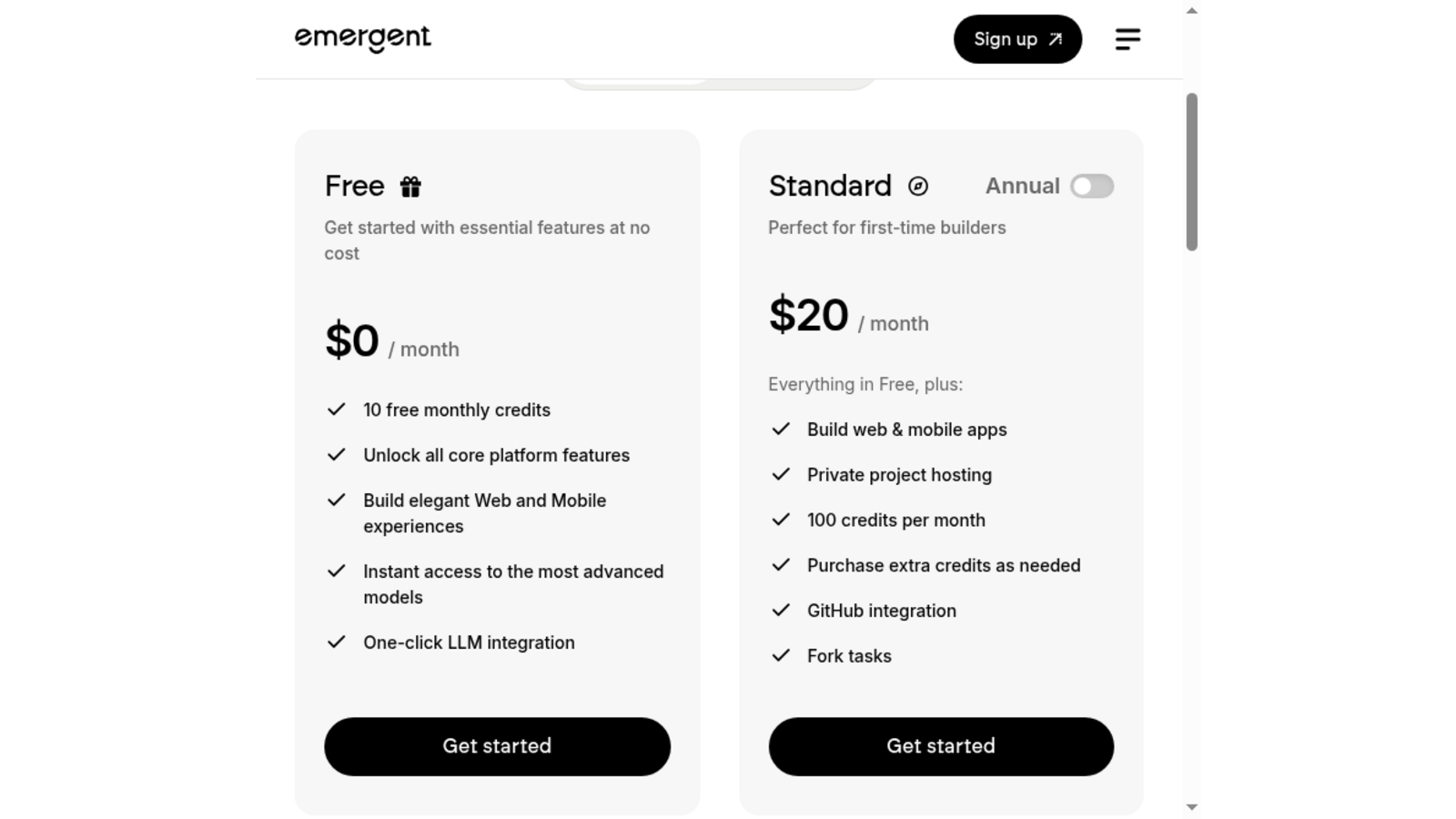
Pricing changes over time, so check the official page before purchasing. The public pricing page describes monthly allowances, but it does not establish a universal credit charge for every prompt or task.
What happened in our credit test
The account displayed 10.00 credits before the StudioSlot prompt. At the first “Agent Finished” state, it showed 2.79 credits remaining. That is a 7.21 reduction observed during this build. The result included a public site, booking flow, backend files, seed data described by the agent, and admin-oriented functionality.
During a later iteration, Emergent displayed “Credit Exhausted.” A focused repair prompt then returned an insufficient-balance error. This shows how revision scope can matter after the initial generation.
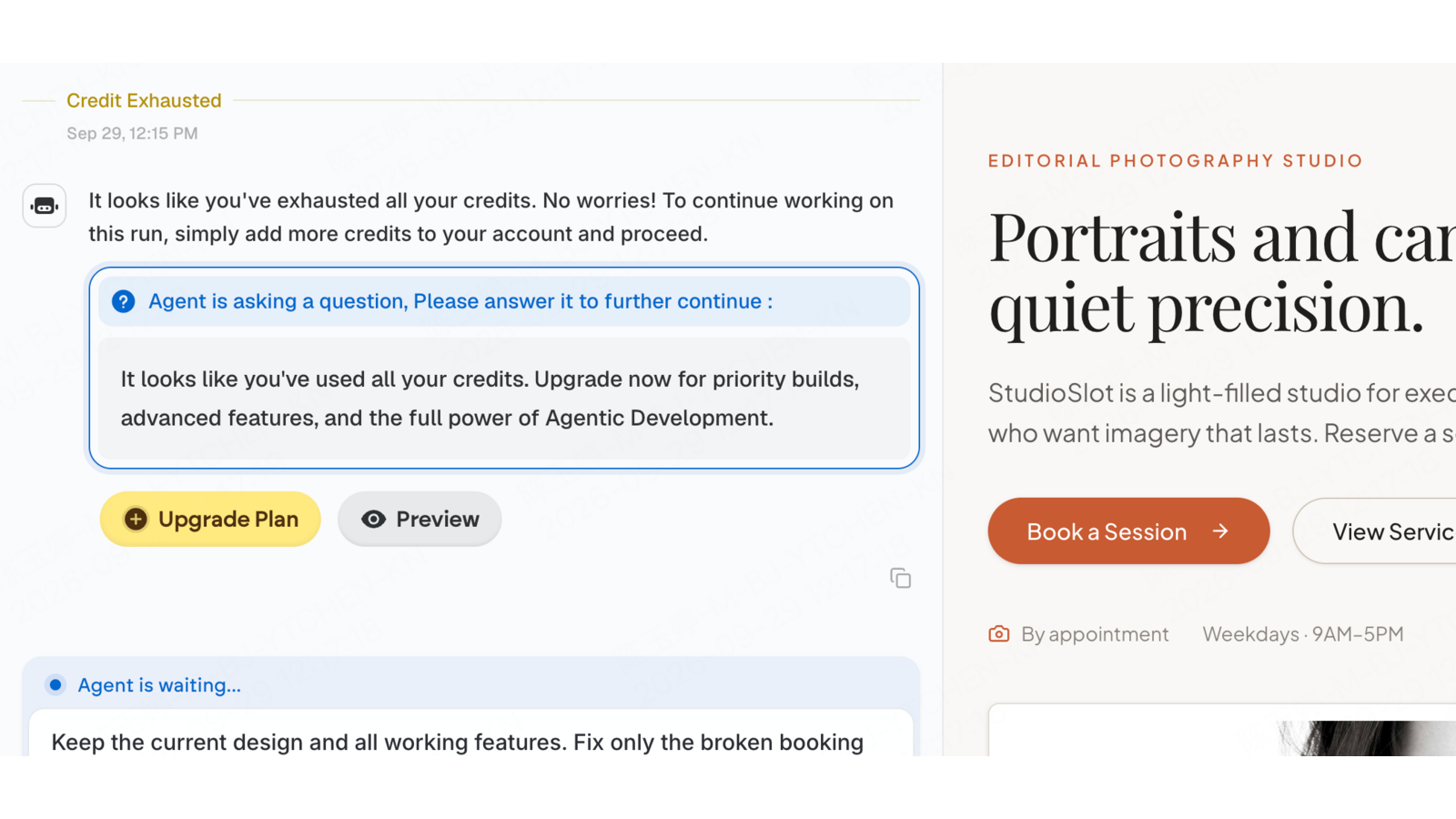
This is one account, one brief, and one sequence of actions. It should not be converted into a fixed “cost per app” or “cost per prompt.” The safer method is to run one representative feature, record the starting and ending balance, and estimate the remaining work from that evidence.
Is Emergent AI Free?
Yes. The Emergent AI pricing page lists a $0 plan with 10 free monthly credits.
The Free plan also lists core platform features, web and mobile experiences, advanced models, and one-click LLM integration. That is enough to inspect the workspace and attempt a scoped build.
In our test, the initial 10.00-credit balance supported the first substantial StudioSlot generation, but later refinement exhausted the remaining balance. Your consumption may differ based on scope, agent actions, retries, and requested integrations.
Treat the free plan as an evaluation allowance rather than proof that a complete project will fit within ten credits. Start with the hardest representative workflow, not the easiest page, and record usage before expanding the brief.
Emergent AI Pros and Cons
Its broad build scope is useful, but prompt-led editing and credit limits shape the trade-off.
Pros
- A substantial first result from one brief. Our test produced a polished homepage and multi-step booking experience instead of a static concept image.
- One workflow spans multiple layers. Official pages cover UI, data, backend logic, integrations, and publishing.
- Broad product range. Emergent supports websites, web apps, mobile apps, dashboards, SaaS products, and other business tools.
- Visible agent activity. File edits and live preview can be reviewed in the same workspace.
- A free entry point. Ten monthly credits let new users test a real brief before choosing a paid plan.
- GitHub support on paid plans. Standard and higher tiers offer a path into version-controlled development.
Cons
- Revision cost is project-dependent. Our later iteration exhausted the test balance, so the first generated result was not the full cost of refinement.
- Prompt-led design control. Emergent’s website-builder page says there are “no visual editors” and frames redesign as a conversational task.
- Important features are plan-gated. Private hosting and GitHub integration begin on Standard, while advanced controls sit on Pro or custom tiers.
- Agent-reported tests are not independent verification. Teams still need to validate persistence, permissions, integrations, responsive behavior, and failure states.
- Native publishing adds external steps. Android and iOS releases still involve signing, device testing, and store review.
Who Is the Emergent AI Builder Best For?
Fit depends more on your preferred workflow and review capacity than on your technical background.
Good fit: founders validating a focused MVP; product managers turning requirements into a working prototype; operators building a dashboard or internal workflow; agencies producing an initial client build; and teams that prefer conversation-led iteration.
Test carefully first: projects that need exact visual control, a fixed technical stack, predictable revision costs, complex access rules, regulated data handling, deep native-device features, or a store release on a strict deadline.
Before choosing a paid plan, run the hardest representative workflow. Test one authenticated path, one stored-data action, one external service if needed, mobile behavior, and a realistic revision cycle. That reveals more about fit than a long feature checklist.
Emergent AI vs Enter Pro: Which Workflow Fits?
Emergent prioritizes conversational building; Enter Pro adds direct visual and code editing to the AI workflow.
Emergent’s official website-builder page describes changing colors, fonts, layouts, and sections through conversation and states that there is no visual editor or manual tweaking. That can work well when the agent interprets the change correctly and the user prefers a prompt-first workflow.
Enter Pro combines AI generation with a live Visual Editor and an integrated code editor. In the Visual Editor, users can click an element to change text, links, images, layout, and styles directly. Enter Pro also provides version history, automatic runtime-error detection, Enter Cloud services, and one-click web publishing.
| Comparison | Emergent AI | Enter Pro |
|---|---|---|
| Best fit | Conversation-first websites, web apps, dashboards, SaaS tools, and native mobile-app workflows. | Browser-based React apps that need direct visual and source-code control. |
| Primary editing workflow | Describe changes through conversation. | Use chat, click-to-edit Visual Editor controls, or the integrated code editor. |
| Direct visual editing | Its current website-builder page describes a prompt-led workflow and says there is no visual editor or manual tweaking. | Click elements to change text, links, images, spacing, layout, and styles directly. |
| Generated output | Websites, web apps, dashboards, SaaS tools, PWAs, and native mobile-app outputs listed on current official pages. | Editable React + Vite + TypeScript + Tailwind CSS web projects. |
| Code control | GitHub integration begins on the current Standard plan; higher-plan controls vary. | Built-in code editor, version history, plus code download and GitHub sync on eligible plans. |
| Cloud and backend path | Platform-managed application setup and a catalog of third-party integrations. | Enter Cloud includes database, storage, server functions, authentication, and secrets in the same workspace. |
| Publishing focus | Web, PWA, Android, and iOS paths are listed; native releases still require platform-specific steps. | One-click web publishing, with custom domains available on eligible plans. |
| Why choose it | Choose Emergent when output breadth and conversation-led building matter most. | Choose Enter Pro when you want to correct the final interface directly, inspect the React source, and keep cloud services and web publishing connected. |
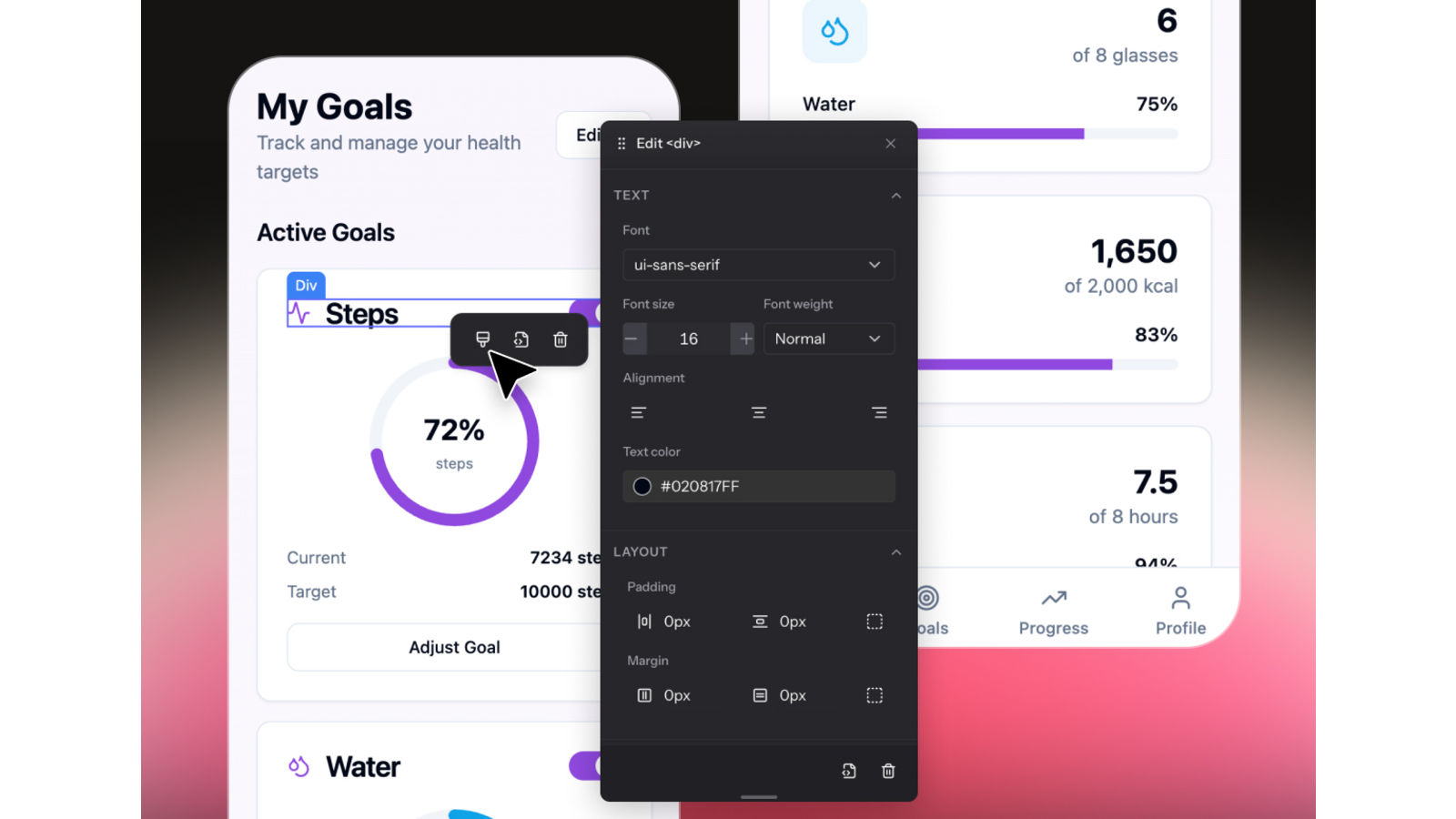
Choose Emergent when: you want a conversation-first workflow across websites, web apps, dashboards, SaaS tools, or native mobile apps; its current plans and supported publishing path fit the project.
Choose Enter Pro when: you are building a browser-based React application and want direct visual editing, source-code access, version history, integrated cloud services, and web publishing in one workspace.
Neither platform is automatically better for every project. Give both the same brief. Compare time to a usable result, number of revision cycles, ability to make final corrections, required output type, and total cost under current plans.
Bottom Line: Is Emergent AI Worth Trying?
Emergent AI is worth testing when you want to turn a clear brief into working software through conversation.
Our StudioSlot build showed meaningful capability: one prompt produced a polished public site and a multi-step booking experience, while later activity displayed backend file edits alongside live preview. It also exposed the main planning risk. The initial build used most of the available test balance, and a later iteration exhausted it.
Do not choose Emergent—or any AI builder—from a feature list alone. Build one representative workflow, verify the output, record the credits used, and test how easily you can make the final corrections.
If direct visual control matters more than prompt-only design changes, run the same brief in Enter Pro and compare the revision experience before deciding.
Build the same brief with Enter Pro →
Emergent AI FAQ
These answers summarize the current official plans and the evidence from our StudioSlot test.
What is Emergent AI?
Emergent AI is a conversation-based platform for generating websites, web apps, mobile apps, dashboards, SaaS products, and other business software from natural-language instructions.
Is Emergent AI free?
Yes. As of September 28, 2026, the official pricing page lists a Free plan at $0 per month with 10 free monthly credits and access to core platform features.
How does Emergent AI pricing work?
Emergent uses monthly credits. Standard is listed at $20 per month with 100 credits, while Pro is $200 per month with 750 credits. Annual billing lowers the displayed monthly equivalent. Business and Enterprise use custom pricing.
Can Emergent AI build a website?
Yes. The Emergent AI website builder is marketed for complete websites, landing pages, product pages, and other web experiences generated and revised through conversation.
Can the Emergent AI app builder create mobile apps?
Emergent’s official app-builder page lists native Android and iOS apps, progressive web apps, and export-ready builds. Teams still need to verify device behavior, signing, and store requirements.
Do I need coding experience to use Emergent?
No coding experience is required to begin. However, reviewing data flows, permissions, integrations, error states, and security remains important before publishing production software.