What Is a Generative AI Chatbot? A Complete 2026 Guide
What is a generative AI chatbot? Learn how it works, how it differs from rule-based bots, real examples with results, and how to build one step by step.
A generative AI chatbot uses a large language model (LLM) to write new answers in natural language, instead of picking from a list of pre-written replies. That's why it can handle questions nobody scripted, follow up when something is unclear, and answer in dozens of languages. These tools now operate at enormous scale: OpenAI reported in 2026 that ChatGPT had passed 1 billion weekly users, Google said the Gemini app passed 750 million monthly users in February 2026, and Meta said Meta AI reached about 1 billion monthly users across its apps in May 2025. This guide explains how these chatbots work, real examples with results, what they can be used for, the risks to plan for, and three ways to build one.
What is a generative AI chatbot?
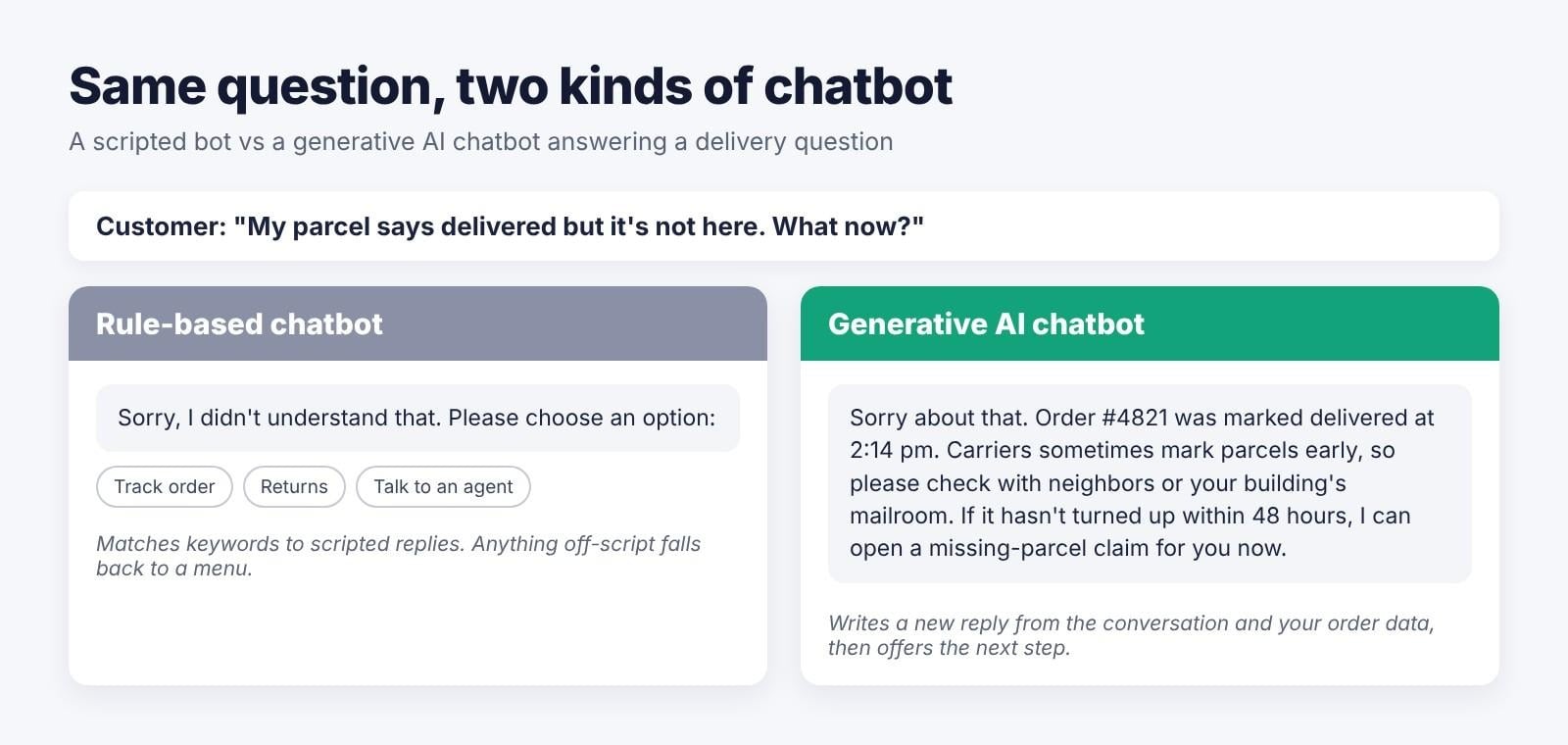
It's a chatbot that generates each reply from context using an LLM such as GPT, Claude, Gemini, or Llama. Instead of following a decision tree, it reads the conversation (and any documents it's given), then writes a new answer. That lets it handle questions nobody prepared a script for.
ChatGPT is the best-known example, and Gemini, Claude, Microsoft Copilot, and Meta AI work the same way. But not every chatbot is generative: many website bots still run on scripted flows, where each question has to match a keyword or button to get a reply.
Generative vs rule-based chatbots
| Aspects | Rule-based chatbot | Generative AI bot |
|---|---|---|
| How it answers | Decision trees, keywords, and intents mapped to pre-written replies | An LLM writes a new reply from the conversation and any documents it can access |
| Unexpected questions | Falls back ("Sorry, I didn't get that") | Usually handles them and asks follow-ups |
| Setup | Script every flow by hand | Write instructions and connect a knowledge source |
| Accuracy risk | Predictable; only says what's scripted | Can make things up unless answers are grounded |
| Cost model | Fixed license | Per-message or per-token usage |
| Examples | IVR menus, early FAQ bots, ELIZA (1966) | ChatGPT, Gemini, Claude, Klarna's assistant |
Most business support bots today are hybrids. They use scripted flows for transactions where every step must be exact, such as refunds and bookings, and generative answers for open questions about products, policies, or troubleshooting.
Generative AI vs conversational AI
- Conversational AI: the wider field of software that talks with people, including intent detection, speech recognition, and dialogue management. It includes rule-based bots and voice assistants.
- Generative AI: models that create new content, such as text, images, or code.
Chatbots built on LLMs sit where the two overlap: they're conversational, and they generate their answers rather than retrieving fixed ones.
How does it work?
Behind every reply, there are a few moving parts. Knowing them makes it much easier to judge a vendor's claims or design your own bot.
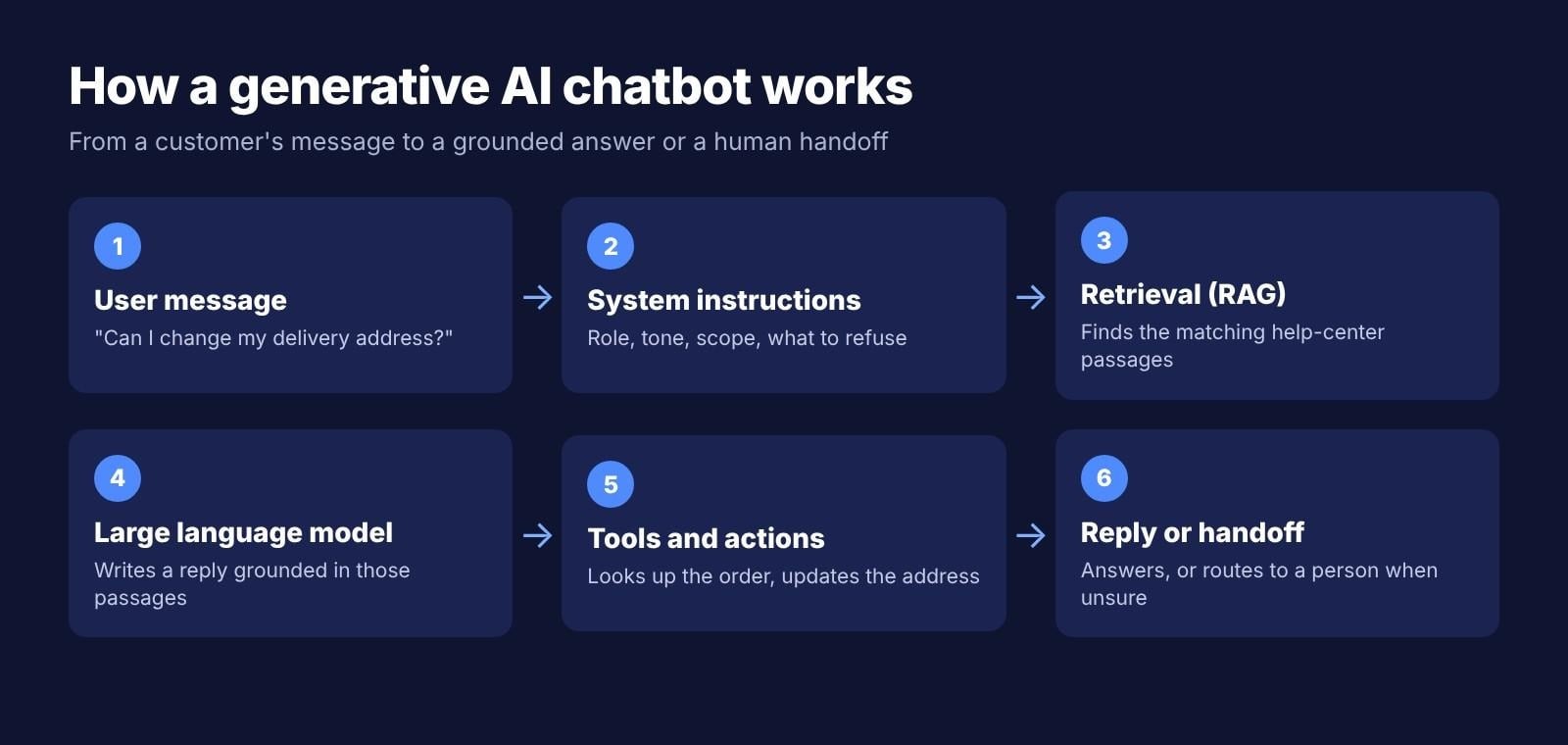
- The model: an LLM trained on large amounts of text predicts the reply one token (a word or part of a word) at a time.
- System instructions: a hidden prompt sets the bot's role, tone, scope, and what it must not do, such as giving legal advice or discussing competitors.
- Context window: the conversation history and documents the model can see at once. Anything outside it, the bot doesn't know.
- Retrieval-augmented generation (RAG): the bot searches your help docs, policies, or product data and passes the relevant passages to the model, so answers are grounded in your content. Research from Meta AI (Shuster et al., 2021) found that retrieval reduces hallucination in conversation.
- Tools and actions: through APIs, the bot can check an order status, book an appointment, or create a support ticket.
- Guardrails and human handoff: topic limits, content filters, and a route to a person when the bot is unsure, or the customer asks for one.
Here's how those parts work together on one real question. A customer asks, "Can I change my delivery address?" The system instructions tell the bot it's a support assistant for one store and must never promise refunds. The retrieval step finds the shipping policy, which says addresses can be changed until an order ships. The bot then calls the order system, sees the parcel hasn't shipped yet, and replies with the option to update the address. If the order had already shipped, the instructions would tell it to hand the conversation to a person instead of guessing.
Generative AI chatbot examples
Generative AI chatbots have become a mainstream interface, with leading technology companies now serving hundreds of millions of users through assistants like ChatGPT, Gemini, and Meta AI. Beyond consumer usage, businesses are deploying chatbots in production, from customer service to booking support, with measurable results in cost, speed, and resolution quality.
Popular generative AI chatbots
| Chatbot | Made by | What it's known for | Usage figure |
|---|---|---|---|
| ChatGPT | OpenAI | General assistant, custom GPTs, file analysis, coding | 1B+ weekly users (OpenAI, 2026) |
| Gemini | Built into Google Workspace and Android | 750M+ monthly users (Feb 2026) | |
| Meta AI | Meta | Built into WhatsApp, Instagram, Facebook, and Messenger | About 1B monthly users (May 2025) |
| Claude | Anthropic | Long documents, writing, and coding | Not publicly disclosed |
| Microsoft Copilot | Microsoft | Windows and Microsoft 365 integration | Not publicly disclosed |
| Perplexity | Perplexity AI | Search answers with cited sources | Not publicly disclosed |
Note: Figures and data are current as of October 2026. Usage numbers come from company announcements, as reported by TechCrunch for Gemini and CNBC for Meta AI.
Business examples with real results
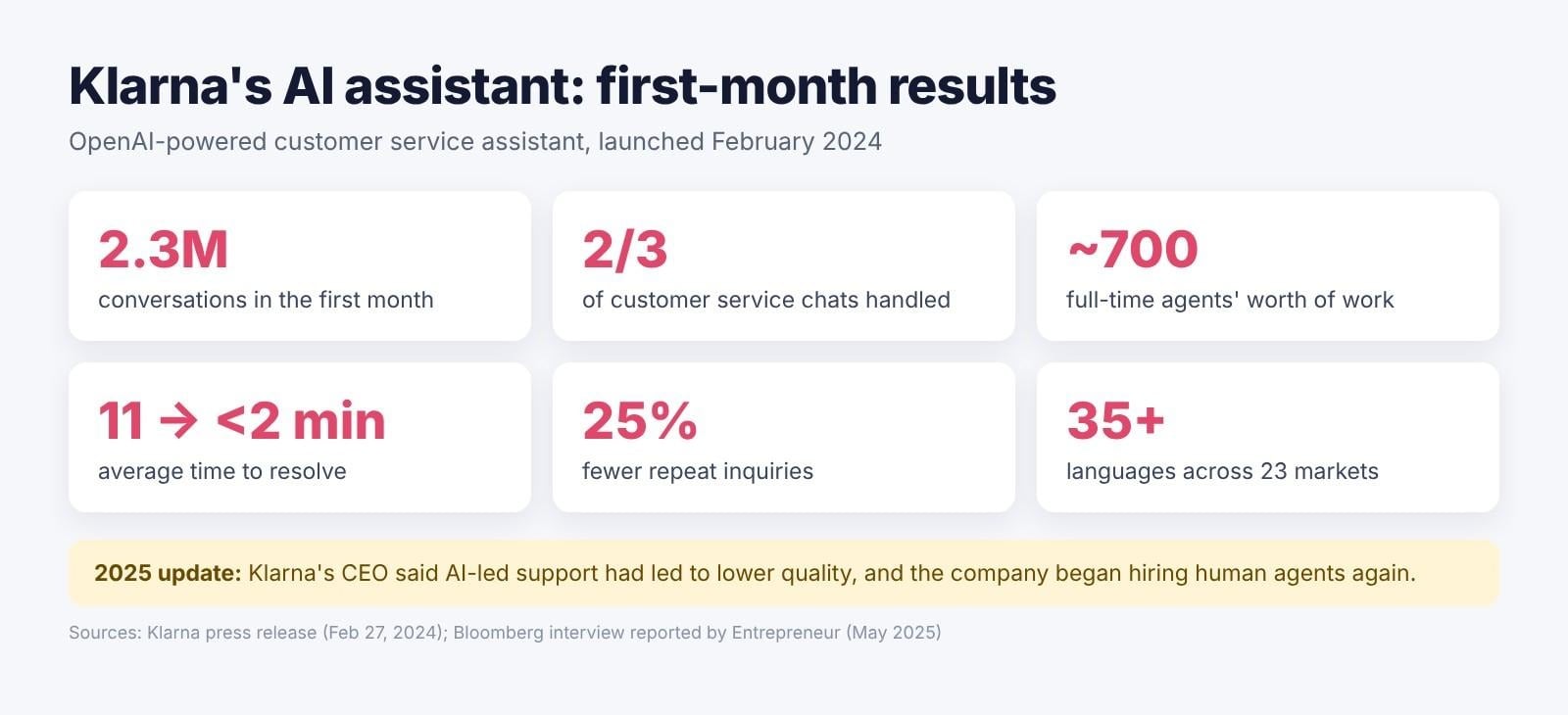
- Klarna (2024): In its first month, Klarna's OpenAI-powered assistant handled 2.3 million conversations, two-thirds of all customer service chats, doing the work of about 700 full-time agents. Average resolution time fell from 11 minutes to under 2 minutes, with 25% fewer repeat inquiries.
- Klarna (2025): CEO Sebastian Siemiatkowski later said AI-led support had led to lower quality, and the company began hiring human agents again. The lesson: generative AI works best alongside a clear human handoff.
- Orange France: The telecom company built a generative customer bot on Google Cloud and reached production in about three weeks, according to Google Cloud.
- Retail and travel: David's Bridal uses an AI assistant called "Zoey," built with LivePerson, to help customers with questions and appointments, and Pelago by Singapore Airlines uses a Yellow.ai assistant to support travel bookings.
What can ChatGPT and other generative AI chatbots be used for?
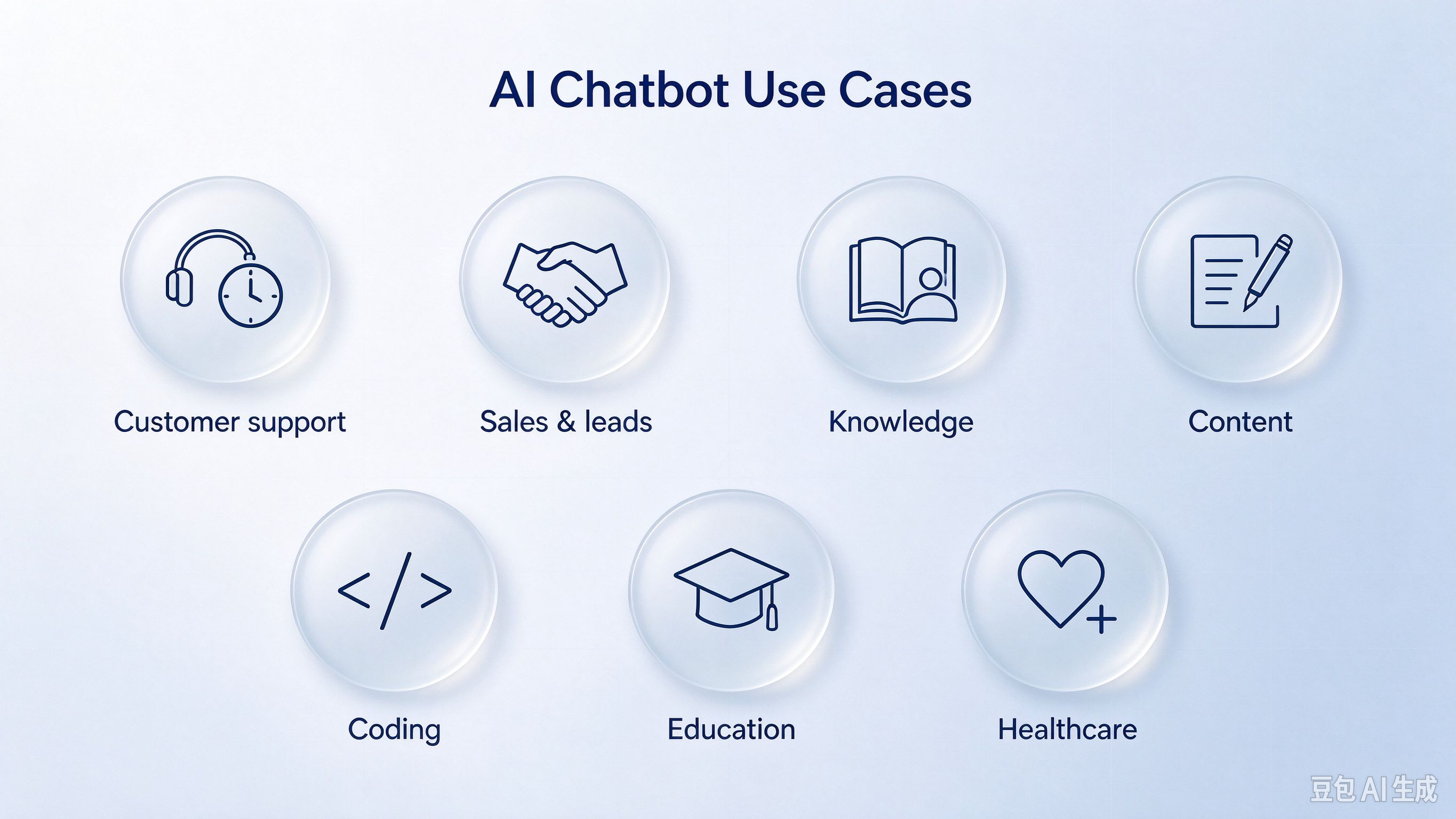
- Customer support: answering FAQs, order status, returns, and account questions around the clock.
- Sales and lead qualification: answering product questions on the website and booking demos with interested visitors.
- Internal knowledge assistants: answering HR policy, IT help, and onboarding questions from company docs.
- Content and marketing: drafting emails, product descriptions, and social posts for a person to edit.
- Coding help: explaining errors and writing code snippets.
- Education and training: tutoring, practicing quizzes, and explaining concepts step by step.
- Healthcare and service intake: collecting patient or customer details before a human takes over.
Many of these use cases are within reach for small teams, too; see how AI for small businesses can cover support, operations, and marketing without a dedicated tech team.
Benefits of generative AI for chatbot development
- Handles open-ended questions: You don't have to script every path a conversation might take. Customers can phrase a question however they like, and the bot still understands what they mean.
- Faster to set up: A set of instructions and a knowledge base replace hundreds of hand-built flows, so a first version can go live in days rather than months.
- Multilingual by default: Modern LLMs understand and write many languages without separate scripts. Klarna's assistant worked in more than 35 languages across 23 markets.
- Always on: It gives 24/7 answers without extra headcount, which matters most for businesses with customers in several time zones.
- Improves with your content: Update the docs, and the answers update with them. There's no need to rebuild flows every time a policy changes.
- Better handoffs: When the bot does pass a conversation to a person, it can include a summary, so the customer doesn't have to repeat themselves.
Risks and limitations to plan for
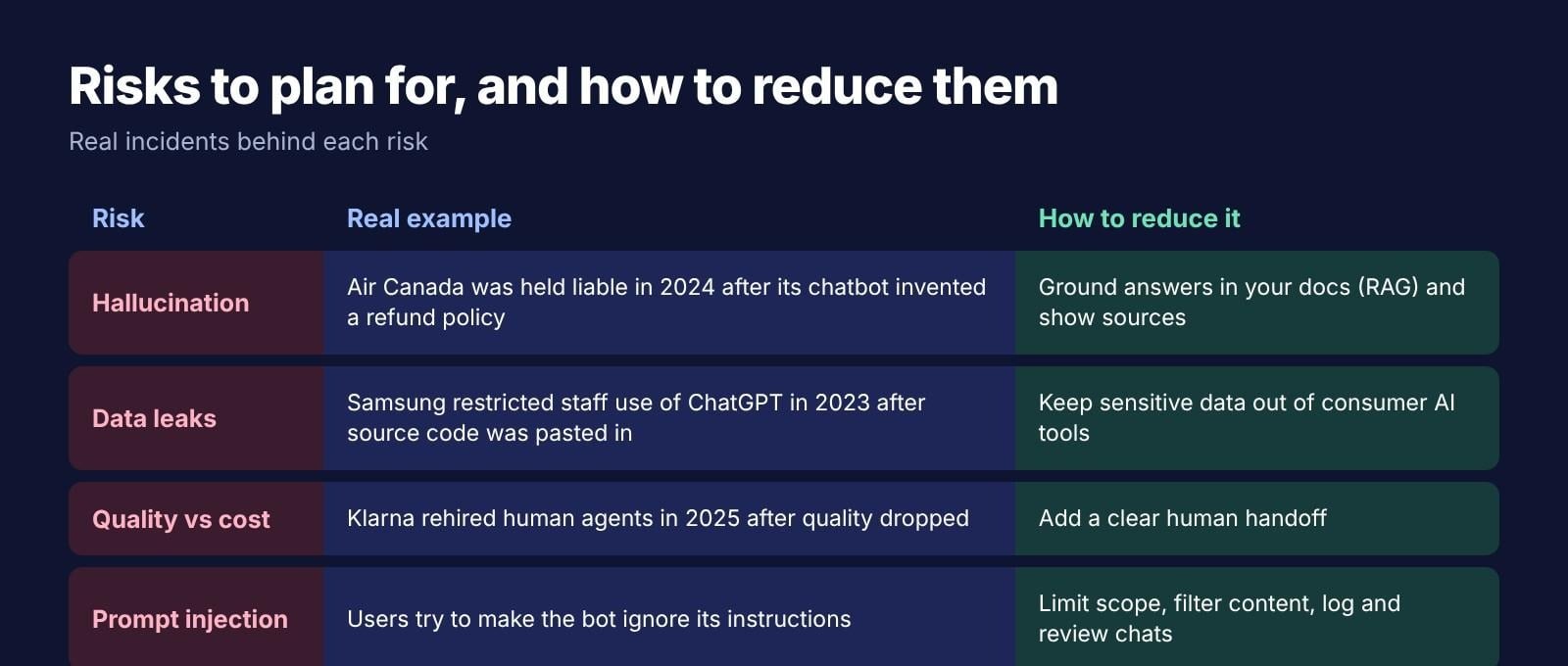
- Hallucination with real consequences: In Moffatt v. Air Canada (February 2024), a Canadian tribunal held the airline liable after its chatbot invented a bereavement-fare refund policy, and ordered it to pay C$812.02.
- Data leaks: Samsung restricted staff use of ChatGPT and other generative AI tools in May 2023 after engineers pasted internal source code into ChatGPT.
- Quality vs. cost: Klarna's 2025 shift back to human agents shows that cutting costs can hurt customer experience.
- Prompt injection and jailbreaks: users may try to make the bot ignore its instructions or reveal information it shouldn't.
To reduce these risks:
- Ground every answer: use RAG over approved documents and show the source next to each answer, so customers and staff can check it.
- Limit the scope: tell the bot in its instructions which topics it covers and what it must refuse, such as legal or medical advice.
- Add a clear human handoff: route refunds, complaints, and anything the bot is unsure about to a person.
- Protect sensitive data: keep customer records, passwords, and source code out of consumer AI tools, and use business or API plans with clear data terms.
- Log and review conversations: read a sample of transcripts every week and fix the instructions or documents behind wrong answers.
- Test before launch: run real customer questions, including attempts to break the rules, before the bot goes public.
How to create a generative AI chatbot: 3 build paths
There are three realistic ways to build one, depending on your skills and how much content the bot has to know.
| Aspects | No-code builder | LLM API + your own code | RAG over your company docs |
|---|---|---|---|
| How it works | Describe the bot, upload docs, embed it | Call the OpenAI, Anthropic, or Gemini API from your app | Store docs in a vector database and retrieve them for each answer |
| Example tools | Enter Pro, Chatbase, Botpress, Voiceflow, custom GPTs | OpenAI API, Anthropic API, Gemini API, LangChain | Pinecone, Chroma, Weaviate, LlamaIndex |
| Skills needed | None | A developer | A developer with data experience |
| Time to launch | Hours to days | Weeks | Weeks to months |
| Best for | Small teams and first versions | Custom products | Large or fast-changing knowledge bases |
How to create a chatbot by using generative AI step by step
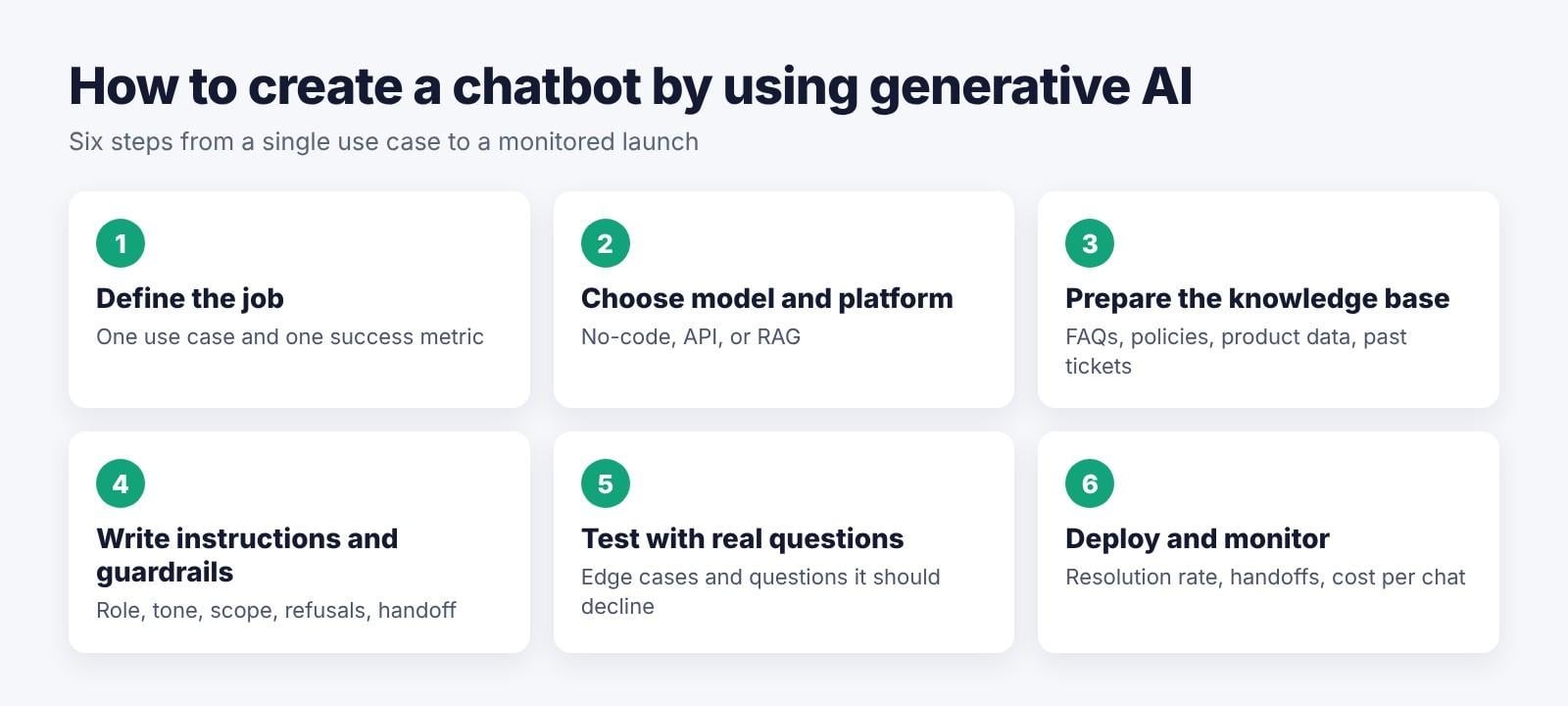
Step 1: Define the job
Pick one use case, such as answering order and returning questions, and one success metric, such as resolution rate or average response time. A narrow first job is easier to test and improve.
Step 2: Choose the model and platform
Pick a building path from the table above. A no-code builder is the fastest way to get a first version live, while an API or RAG setup gives developers more control.
Step 3: Prepare the knowledge base
Collect your FAQs, policies, product data, and past support tickets. Remove outdated pages and fix contradictions, because the bot will repeat whatever you give it.
Step 4: Write the instructions and guardrails
Set the bot's role, tone, and scope, what it must refuse, and exactly when to hand off to a person. This guide to writing clear AI prompts covers the basics.
Step 5: Test with real questions
Use questions from real customers, including edge cases, rude messages, and questions the bot should decline. Check every answer against your policies.
Step 6: Deploy and monitor
Launch on your website, WhatsApp, Slack, or Teams. Track the resolution rate, how often the bot hands off, and the cost per conversation, and review transcripts every week.
How much does it cost to build one?
- Consumer plans: ChatGPT, Gemini, and Claude each offer a free tier and paid individual plans of around $20 a month, which are fine for personal use but not for embedding a bot on your website.
- APIs: charged per million tokens of input and output. Smaller, faster models cost a fraction of what frontier models cost, and output tokens are usually priced several times higher than input tokens. Check the OpenAI, Anthropic, and Google pricing pages for current rates.
- No-code builders: monthly plans, often with limits on messages or credits.
- Custom development: developer time plus hosting and API usage, which grows with traffic.
In practice, the biggest cost driver is volume. A bot that answers a few hundred short questions a month costs very little to run, while one handling thousands of long conversations with large documents in every request can add up quickly. Choosing a smaller model for simple questions, keeping retrieved passages short, and capping conversation length all help keep costs predictable.
Pricing changes often, so confirm current figures on each provider's official pricing page before your budget.
Build an AI chatbot app with Enter Pro
Enter Pro is an AI app builder for teams that want a chatbot inside a working product, such as a support widget on their website or an internal assistant for staff, without writing code. You describe the chatbot and the app around it, and Enter Pro plans and builds it with a database, user sign-in, and the AI model of your choice.
| Component | CTA Button |
|---|---|
| Web.Text | Build Your AI Chatbot |
| Web.Href | https://enter.pro/workspace/ |
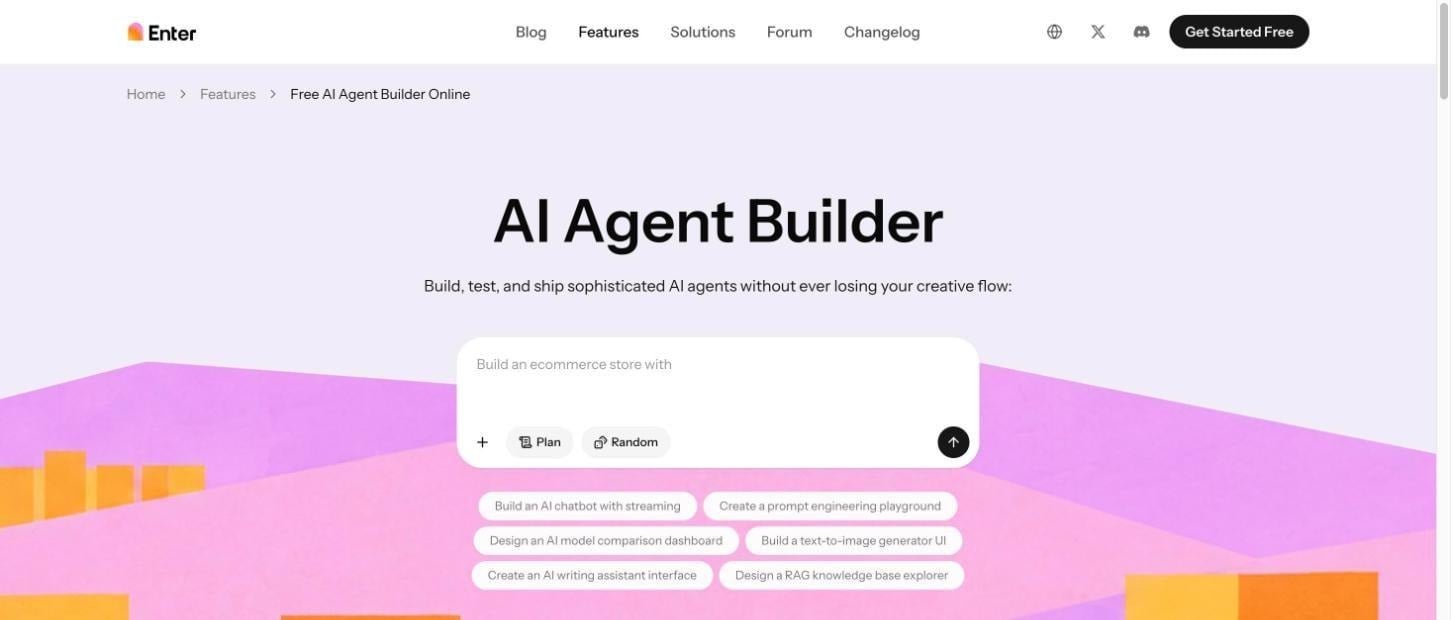
Key features
- AI agent builder: Build, test, and deploy AI agents by chatting with the no-code AI agent builder, from support bots to internal assistants.
- Model choice: Pick GPT, Claude, and other leading models from the built-in model picker, and switch models without managing separate subscriptions.
- Enter Cloud: Get a managed database, user sign-in, file storage, and edge functions for chat history and documents, with no separate backend setup.
- Connectors: Connect services such as Slack, GitHub, and Stripe, so your chatbot can work with the tools your team already uses.
How to build a chatbot with Enter Pro
Step 1: Describe your chatbot
Describe what the chatbot should do and where it lives, for example: "A support chatbot for my online store that answers shipping and returns questions from our FAQ page and hands off to email when it can't help."
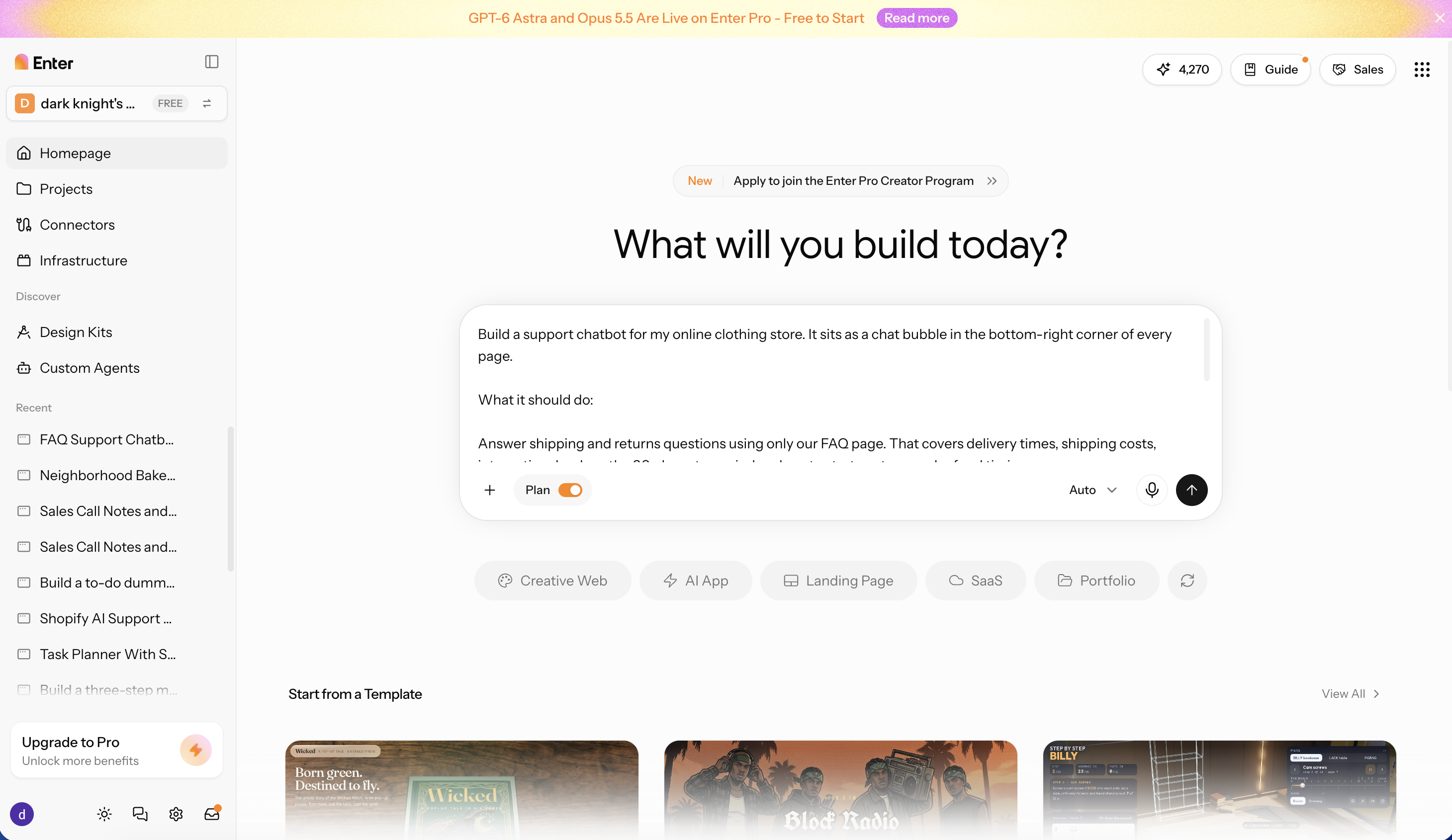
Step 2: Review the plan and generate
Check the pages, data model, and handoff flow in Plan Mode, add anything that's missing, then build. Once the AI chatbot is generated, you can customize it using the visual editor.
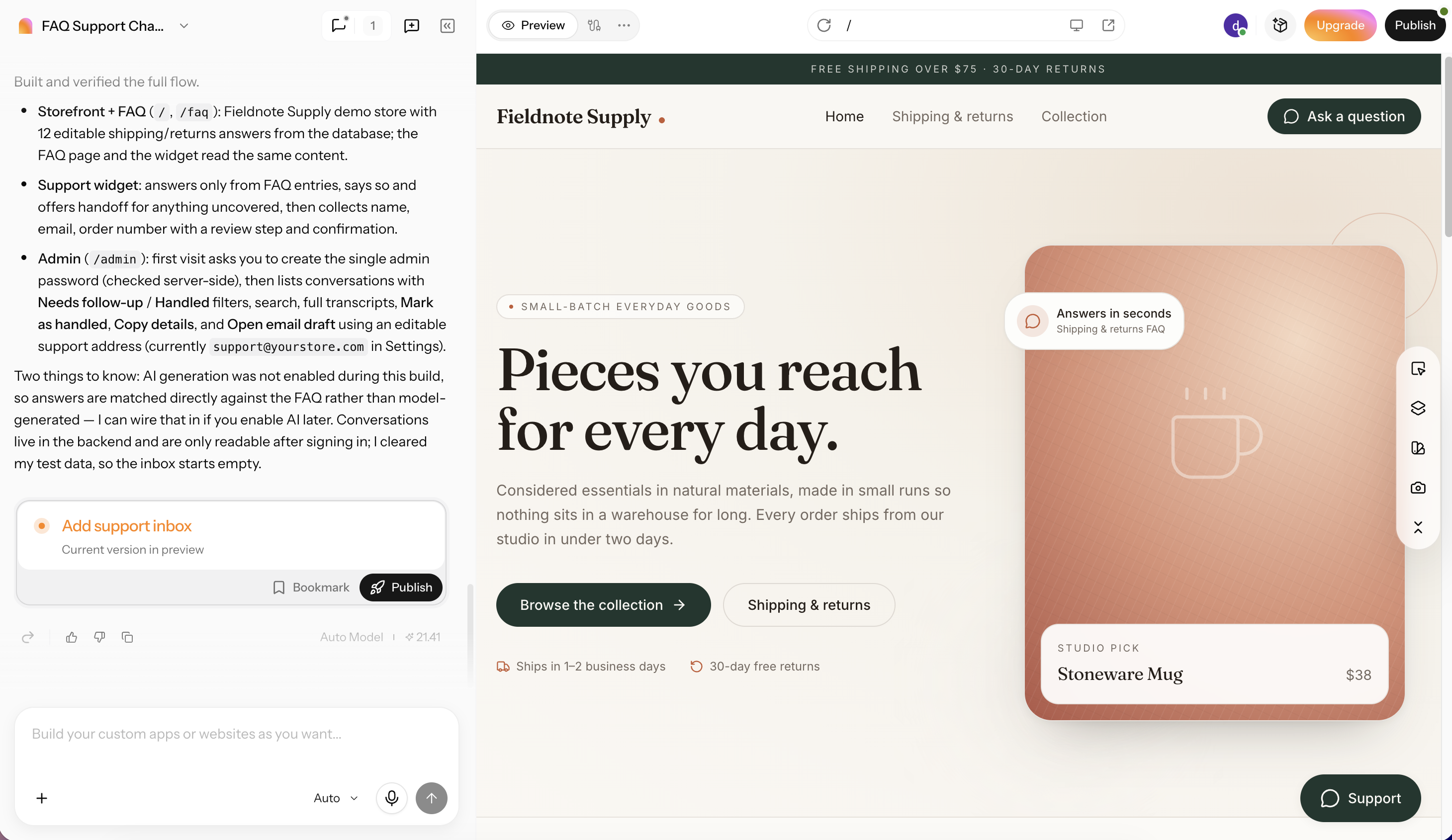
Step 3: Test and publish the chatbot
Ask the chatbot real customer questions in the preview, refine its instructions until the answers match your policies, then publish and add it to your site.
| Component | CTA Button |
|---|---|
| Web.Text | Build Your AI Chatbot |
| Web.Href | https://enter.pro/workspace/ |
Conclusion
A generative AI chatbot writes its own answers with an LLM, which makes it far more flexible than a scripted bot. It also means it needs grounding in your content, clear guardrails, and a human handoff for cases it can't handle. Start with one job, connect your own content, test with real questions, and pick the path that fits your skills and budget. If you want the chatbot inside a working app without writing code, Enter Pro lets you describe it, review the plan, and publish it. Build your own AI chatbot using Enter Pro today!
FAQs about generative AI chatbots
Is every chatbot generative AI, and how is it different from a traditional chatbot?
No. Many chatbots still follow scripted decision trees and can only give pre-written replies. A generative chatbot uses an LLM to write each answer from the conversation and your documents, so it can handle questions nobody scripted, but it needs grounding and guardrails to stay accurate.
Is ChatGPT a generative AI chatbot?
Yes. ChatGPT is built on OpenAI's large language models and writes each reply from the conversation instead of choosing from pre-written answers. Gemini, Claude, Microsoft Copilot, and Meta AI work the same way. If you need a private AI chatbot, Enter Pro allows you to build with simple prompts.
What are some generative AI chatbot examples?
Well-known consumer examples include ChatGPT, Gemini, Claude, Microsoft Copilot, Meta AI, and Perplexity. Business examples include Klarna's customer service assistant, Orange France's customer bot built on Google Cloud, and David's Bridal's "Zoey" assistant. You can also build your own AI chatbot using Enter Pro with no coding experience.
What can ChatGPT, OpenAI's generative AI chatbot, be used for?
ChatGPT can be used for writing and editing, research and summaries, brainstorming, coding help, data analysis, learning, and customer-facing tasks when connected to a company's own content. Businesses also use OpenAI's models through the API to power their own support bots and internal assistants.
Are generative AI chatbots safe for business data?
They can be, with the right setup. Use business or API plans with clear data-handling terms, keep sensitive data out of consumer tools, ground the bot in approved documents, limit what it can access, and log conversations for review.
What is the difference between generative AI and conversational AI?
Conversational AI is the broader field of software that talks with people, including scripted bots and voice assistants. Generative AI refers to models that create new content. A chatbot built on an LLM sits where the two overlap: it's conversational and generates its own replies.