
Cloud Application Development Services: A Practical Guide for 2026
Learn what cloud application development services include, how to choose the right platform, and which cloud-native trends and security factors matter in 2026.
Building a customer portal, internal dashboard, or SaaS product seems super exciting. But how do you start? Do you hire developers, or should you just use a cloud platform, or let AI draft the first version? Cloud Application Development Services help organizations build, develop, deploy, integrate, and support cloud-based applications. In 2026, there are more options than ever for cloud apps-from agencies to AI-powered app builders. So, which one should you follow? That will be driven by your budget, app complexity, security, integration, and technical expertise. Use this guide to choose the right direction for your organization.
What are cloud application development services?
Cloud application development services help businesses create and deploy applications on the cloud platform, from design and prototyping to coding, database implementation, testing, and deployment.
Do you always need developers? Of course, not. Here are three typical approaches to developing cloud applications.
| Approach | How it works | Best for |
|---|---|---|
| Custom development services | A development team builds an application around your business needs. | Complex apps with specific requirements. |
| Cloud application development platforms | Ready-made tools and managed services help teams build, deploy, and run applications. | Businesses that want a simpler development process. |
| AI-assisted app development | Users describe what they need in plain language, and AI generates a starting version they can improve. | Prototypes, MVPs, and apps that need a quick starting point. |
Keep in mind: Cloud-based and cloud-native aren't the same. You can deploy an existing application on a cloud platform without making any modifications. What's "cloud-native" is when you build an application to make better use of cloud capabilities like auto-scaling, managed services, and continuous deployment.
Cloud-based vs. Cloud-native application development
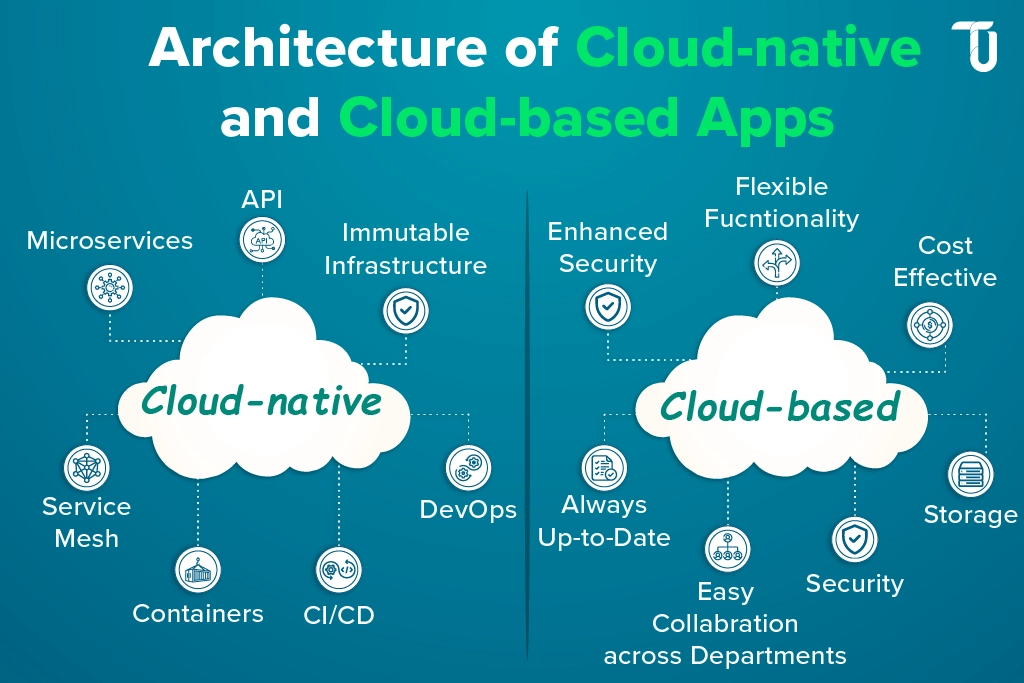
Cloud-native and cloud-based applications are different, even if they sound alike.
Cloud-based applications run on cloud servers. They can still follow the traditional design, just hosted somewhere else.
On the contrary, cloud-native app development concentrates on creating applications optimized to take advantage of all the features of the cloud, like auto-scaling, on-demand resources, and quick upgrades.
| Consideration | Cloud-based application | Cloud-native application |
|---|---|---|
| Architecture | May retain a traditional or monolithic design | Often uses modular, distributed architecture where appropriate |
| Scaling | May require planned capacity changes | Can be designed for automated or elastic scaling |
| Deployment | Depends on the application and hosting setup | Often incorporates automated deployment and release practices |
| Maintenance | Depends on the original design and hosting model | Designed to support ongoing updates and operational visibility |
| Best fit | Existing applications, simpler workloads, or cloud-hosted software | Products needing flexibility, resilience, frequent releases, or independent scaling |
So are we all supposed to go cloud-native? No. They may require more tooling, services, and expertise. And not every app benefits from containers or microservices.
That's why cloud native application development services should make the most sense to your actual business needs, not add complications. For a simple internal dashboard, cloud hosting may do just fine. But for an expanding SaaS platform with fluctuating traffic levels, cloud native may be the best way to go.
Benefits of cloud application development
Why should you migrate apps to the cloud? Cloud development doesn't just mean ditching actual servers. But moving your apps to the cloud can also improve their scalability, accessibility, and efficiency.
Here are four key benefits.
- Scalability and flexibility
With cloud computing, applications are capable of scaling their resource usage up or down depending on the level of demand. Let's say a SaaS product has its regular number of users, but suddenly, in the holiday season, its user base multiplies. If they're prepared for it, they can handle the increase in traffic without permanently boosting their server space.
Similarly, companies can easily scale up by entering new regions without the need to invest significantly in building their own data centers.
- Accessibility and collaboration
Do your team members need to access the same dashboard but are located in different cities? Cloud-based applications could help make this easier for them.
Web apps enable employees, customers, and partners to operate from various locations. However, reliable internet access, proper login security, and a well-designed application are still basic requirements.
- Faster iteration and product development
Cloud platforms provide off-the-shelf services, reusable parts, building blocks, and testing and deployment tools. You can focus less on building the infrastructure and more on actually improving the product.
AI-enabled prototypes can be faster as well. But bear in mind, a working prototype is not the final product - security, testing, and performance will require focused effort before launch.
- Cost visibility and resource efficiency
Cloud services often use usage-based pricing. This means businesses can pay for the computing resources, storage, and other services they consume instead of buying and maintaining physical servers.
Sounds like an easy way to save money, right? Not always. Costs can increase with heavy computing usage, data transfers, storage, software licenses, monitoring, and maintenance. Regular cost reviews and proper resource planning help keep spending under control.
Common types of cloud applications businesses build
Cloud apps are not just for big tech companies. They have become an important part of day-to-day business for companies of all sizes, providing solutions for everything from interacting with customers to tracking data. Here are a few examples.
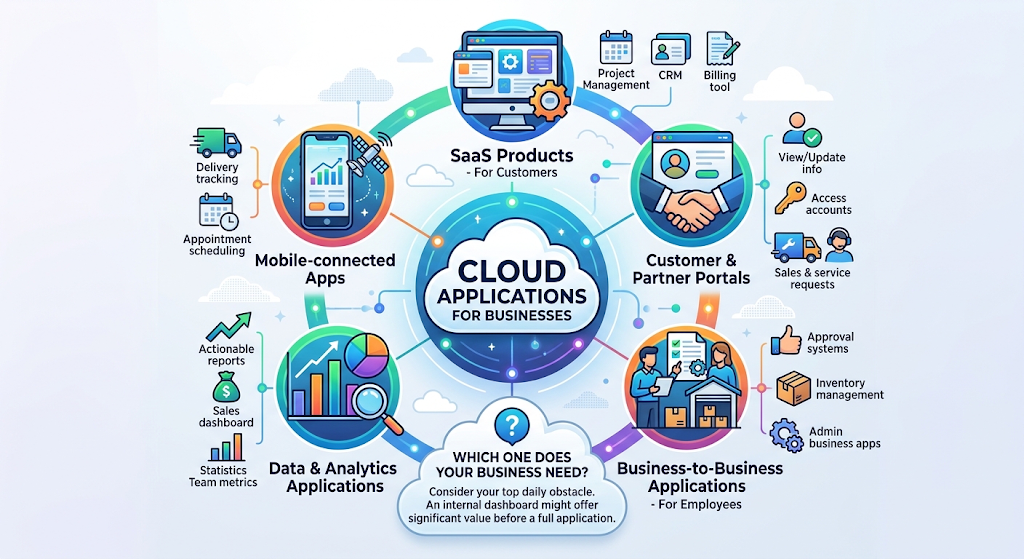
- SaaS products: Cloud products that are SaaS-based that your customers can use, like a project management tool, a CRM, or a billing tool.
- Customer and partner portals: User interfaces that enable customers and partners to view and update their information, access their accounts, and enter sales and service requests.
- Business-to-business applications: Tools used by employees to perform everyday job duties; For example, approval systems, inventory management, and administrative business applications.
- Data & analytics applications: Dashboards that transform business data into actionable reports. For example, a sales dashboard displaying revenue and team metrics.
- Mobile-connected apps: Apps that use the cloud to store data or run that you access through your mobile device. Mobile apps that use the cloud include delivery tracking or appointment scheduling apps.
Not sure which one your business needs? What's your number one obstacle on a daily basis? Sometimes, an internal dashboard can provide more value than a full-fledged application.
How to choose cloud application development platforms and services
Navigating to the best cloud application development platform can be overwhelming, considering the plethora of solutions on the market. But the truth is: The ideal solution for cloud development is not the one with the most features. It's the one that suits your project.
Here are a few things to consider before deciding.

Define the application and its users
Begin with the fundamentals. What issue will your application address? Who will be your user? Decide who's going to use your app, its primary screens, the data it'll need, and how much traffic it'll generate. With that in mind, distinguish the features you'll launch with from the extra bells and whistles. Advice from us? Get it built, test it, then optimize. Streamlining can happen later.
Evaluate architecture and integration requirements
Will your app work with any other API's that exist? For example, payment gateways, CRM, or other databases.
Ensure your selected platform accommodates these relationships and allows modifications to suit business growth. If you want complex integrations, legacy business applications, or distributed programs, you may require skilled developers.
Review security and compliance needs
Security should never be an afterthought. Never take security for granted, particularly with the customer's or the business's data. Look for the following: a secure login, user rights, protection of sensitive data, backups, and logs of activity. If your solution must comply with certain industry regulations, make sure they are met.
Please keep in mind, security is a shared responsibility. The cloud provider secures portions of the infrastructure, and the platform, developers, and business owners are responsible for securing the parts they control. Before launching an important application or using sensitive data, arrange a proper security review.
Consider deployment, ownership, and maintenance
Your app is launched! What's next? Verify the hosting choices, monitoring, software updates, tech support, and also whether there is a recovery strategy. Likewise, check to see if your resource code could be imported and transferred elsewhere.
And don't look at the cost just as the way it first appears from design. It is advisable to give thought to resources, servicing, adjustments, and ongoing improvements.
Decide whether to hire a service provider or use a development platform
Your project's complexity will help you decide.
- Custom cloud application development services: Ideal for high-complexity applications, legacy application migration, unique architecture, and any project that requires dedicated engineers.
A practical option if you want to leverage existing features, integrations, and hosting functionalities.
- AI support development tools: Helpful for creating prototypes, MVPs, and less complex applications that you can have a look at and improve.
You don't always have to choose just one. For example, you could use AI to create the first version and hire developers to handle complex integrations, security, and deployment.
The goal is simple: Choose an approach that works today without making future changes unnecessarily difficult.
Cloud-native application development trends in 2026
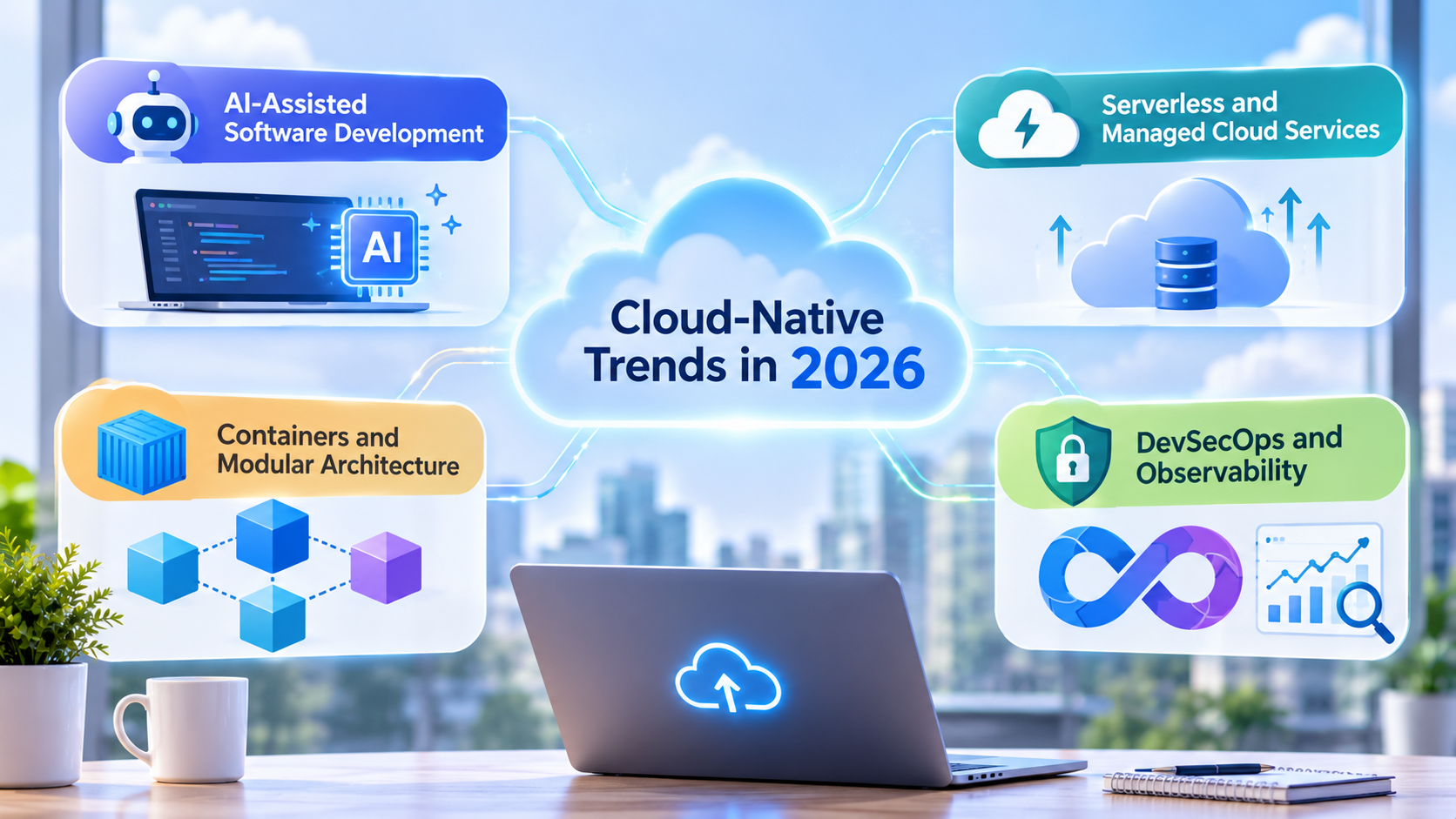
Cloud innovation is always evolving, constantly offering technology teams additional means to construct and run applications. Yet not all of them should make an appearance on your project. Here are the four cloud native application development trends to pay attention to in 2026.
AI-assisted software development
What if you could describe an app instead of coding every feature from scratch? AI can generate application layouts from written instructions, generate code, propose database schemas, and refine interfaces.
This will make the initial development stage faster, particularly for prototypes and MVPs. However, it would require subsequent testing and a code review and security check before the app is available to users.
Serverless and managed cloud services
Want to know how to run application code without servers? Well, that's the beauty of serverless computing! Serverless allows you to delegate your database, scaling, and infrastructure management to a managed cloud services provider.
Doesn't it sound just perfect? It's very useful for applications that may have diverse traffic workloads. The bottom line: Pricing can be confusing, and some services will restrict how much you can personalize or make changing providers more difficult.
Containers and modular architecture
Containers include applications along with the rest of the components they require to run and provide a more consistent environment in which to deploy. Modular architecture can be used to help teams extend and maintain individual parts of the application for bigger projects.
Not all apps need microservices. They add additional work for: communication, monitoring, deploying, and maintaining. A simpler architecture might be more suitable in other, smaller, applications.
DevSecOps and observability
Writing an app is only half the battle. Making it safe, stable, and simple to support is just as important. Add security checks to the development pipeline rather than only during deployment or as a checkpoint.
Observability tools enable teams to gain insight into application performance using logs, metrics, and traces. This allows teams to quickly identify an issue – particularly if an application uses multiple cloud environments.
These practices are even more useful as your app gets more complicated and undergoes more frequent updates. Begin by doing what you need to do, then do more with less.
Cloud application development services vs. an AI-native platform
Should you hire an agency, build an in-house team, or use an AI-native platform? Well, that depends on your budget, timeline, and how complex your application is. Here's a quick comparison:
| Factor | Agency / Outsourced services | In-house team | AI-native platform |
|---|---|---|---|
| Time to first version | Usually weeks to months | Depends on team capacity | Often hours to days for simple apps |
| Upfront cost | Usually high | High hiring and setup costs | Often lower to start |
| Control and code ownership | Depends on the contract | Typically full control | Depends on the platform |
| Ongoing iteration | May require additional contracts | Direct control over updates | Quick changes through AI and visual tools |
| Best fit | Complex projects and regulated migrations | Long-term, business-critical products | MVPs, internal tools, and new app ideas |
Development agencies work better for large-scale projects with more regulation, complex migrations, and apps that require expert support. AI native platforms such as Enter Pro are suitable for new apps, internal apps, and quick updates.
With Enter Pro's AI MVP Builder, you can turn an idea into a working first version, make changes, and test it with users before investing heavily in development.
Build cloud applications faster with Enter Pro
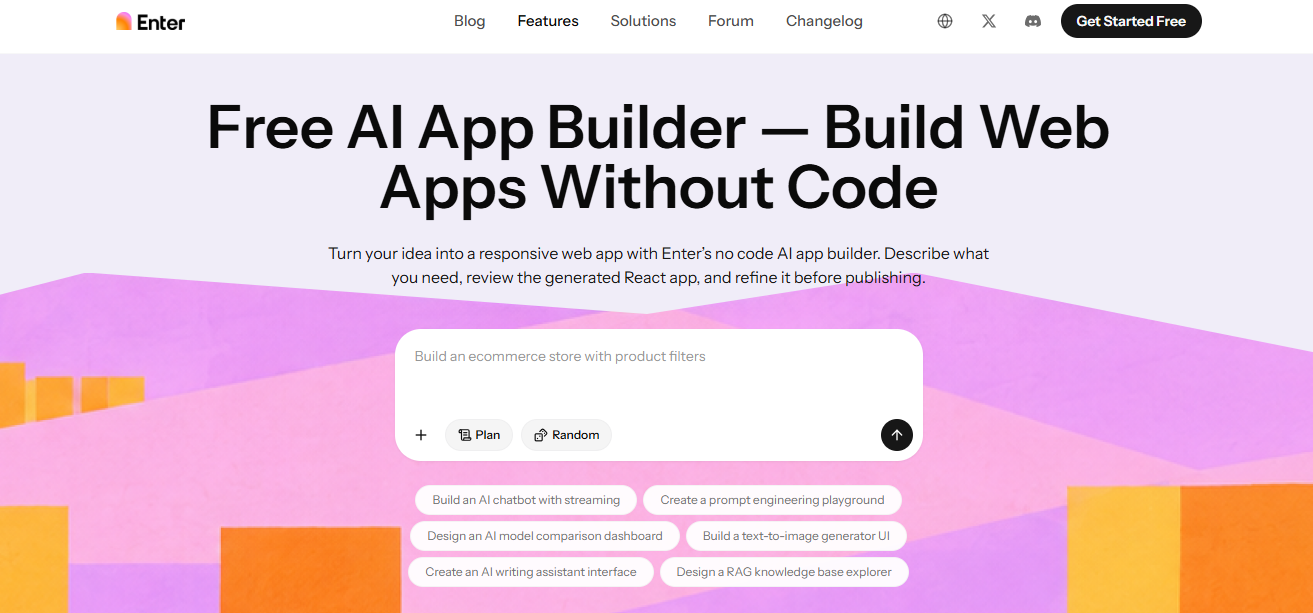
Enter Pro, an AI-native platform by Converge AI that enables companies to implement their ideas as actual web applications. AI App Builder enables you to describe your app in everyday language and creates a responsive React-based app. You can preview the result, edit the design, improve features, and publish it without starting from scratch.
Need to build your SaaS MVP, internal dashboard, customer portal, or AI tool? Enter Pro will get you up and run quickly. It also comes with editable code and starting credits at no additional cost. You will still need to test and audit the final application before you deploy it, but Enter Pro gets you ahead of the game without the time and expense of hiring a cloud native app development service for simpler apps.
| Component | CTA Button |
|---|---|
| Web.Text | Build Your Cloud App with Enter Pro |
| Web.Href | https://enter.pro/workspace/ |
Key benefits
- Build with simple prompts: Describe your app in plain English, including its features, users, and workflows. Enter Pro can generate the frontend, backend, database structure, and business logic to give you a working starting point.
- Edit without coding: The Visual Editor lets you click on any element to change text, colors, fonts, spacing, and layouts. You can preview changes instantly and check how your app looks on different screens.
- Developer-friendly tools: Developers can use GitHub import, Enter Code (an AI coding agent in the terminal), and Enter CLI to extend their projects. This makes it easier to move beyond AI-generated drafts when custom development is needed.
- Own your code: Enter Pro offers 100% source code ownership, so you can export your project and host it elsewhere. It also helps plan application architecture that can support future growth.
- Automate workflows: The AI Agent Builder helps create agents for customer support, lead generation, marketing, and other repeated tasks. You can connect them with services like Supabase, Stripe, and Google Analytics to support real business workflows.
Step-by-step guide to cloud application development with Enter Pro
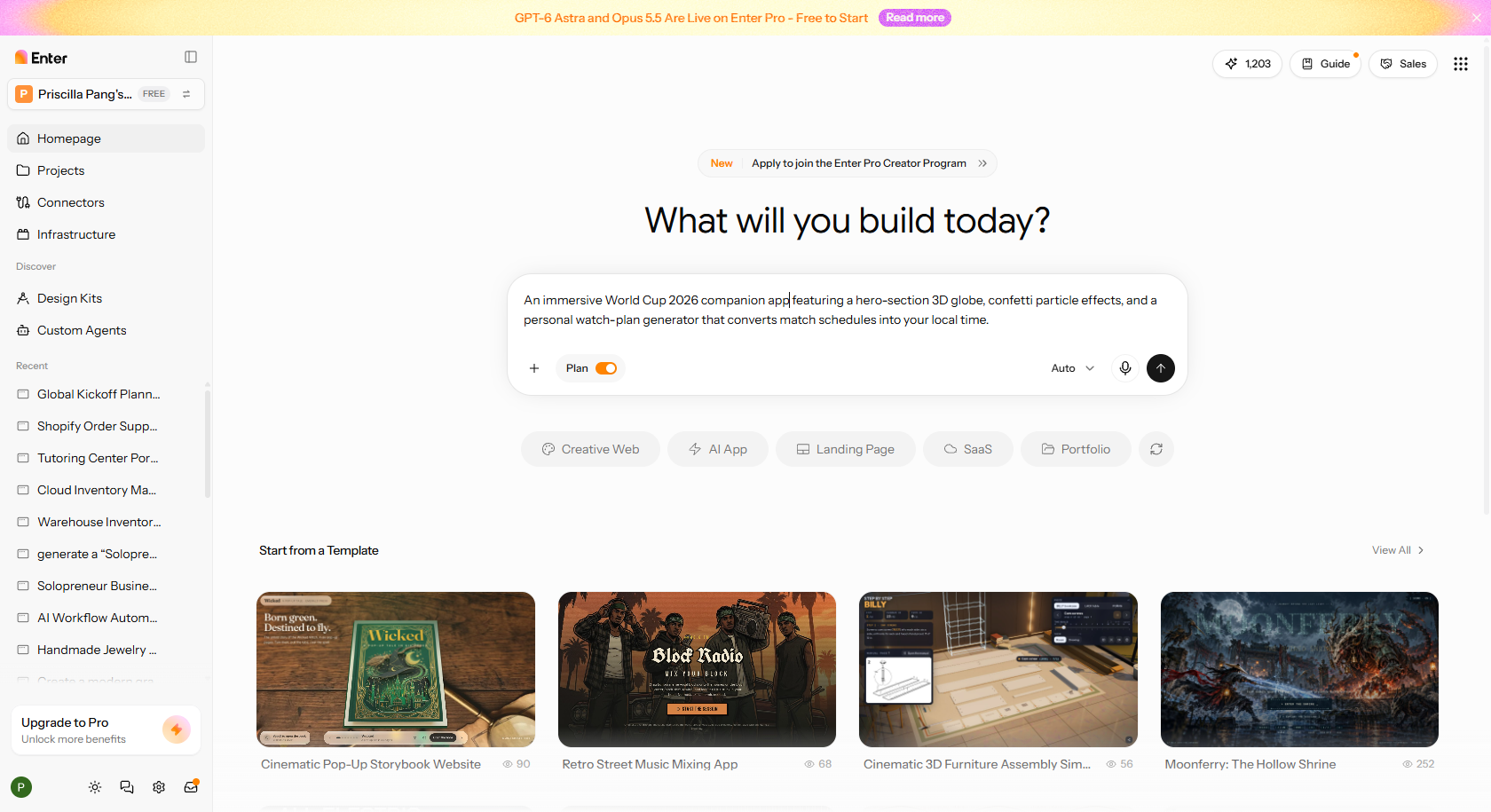
Step 1: Describe your cloud application
Open Enter Pro and describe the application you want to build. Mention your target users, main features, required pages, database needs, and workflows. The more details you provide, the better the starting point.
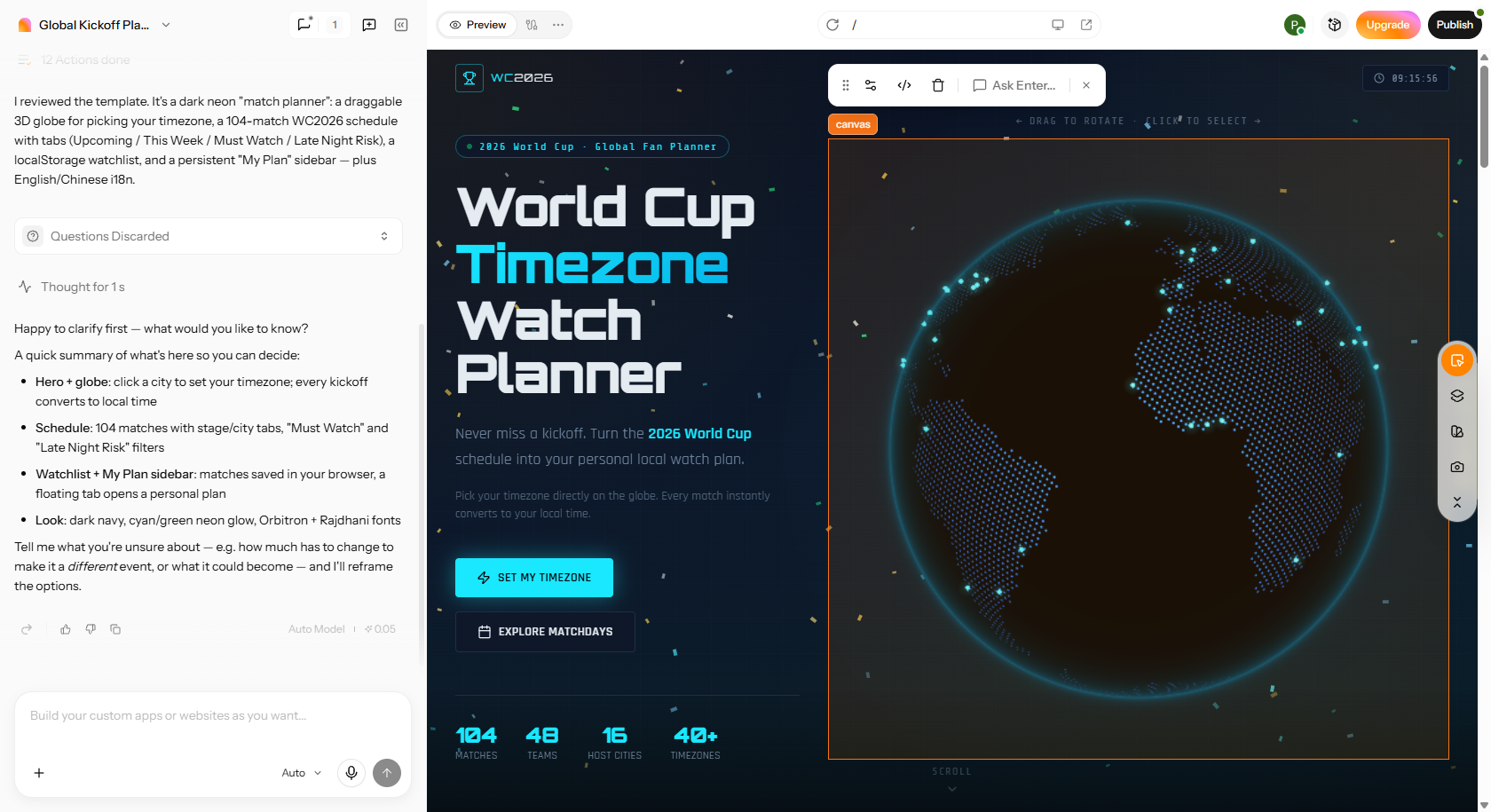
Step 2: Generate and refine your application
Enter Pro generates the initial app structure, interface, and supporting code. Preview the result and use the Visual Editor to change layouts, colors, text, and components. You can also ask AI to add features, adjust workflows, or connect backend services such as authentication and databases.
Step 3: Test and publish your application
Preview your app on desktop, tablet, and mobile screens. Test login, forms, database connections, and important workflows. Check security and user permissions before adding real business data. Once everything works as expected, use Enter Pro's publishing feature to launch your cloud application.
| Component | CTA Button |
|---|---|
| Web.Text | Build Your Cloud App with Enter Pro |
| Web.Href | https://enter.pro/workspace/ |
Conclusion
The key to creating a successful cloud application development is making the right choice. Think about the complexity, security, and integration needs, budget, and future of your application when you decide. Cloud native offers a lot of flexibility, but it's not always necessary. Whatever route you decide to go, whether it is enterprise custom development, a cloud platform, or an AI-assisted builder, keep in mind what works best for your enterprise. Looking to launch without a lot of startup work? Discover Enter Pro to launch an idea quickly, enhance it, and be ready for launch.
FAQs about cloud application development services
What are the best cloud application development platforms?
Some popular services are: AWS, Microsoft Azure, Google Cloud, and Enter Pro (specializing in building apps aided by AI). For infrastructure and development, AWS, Azure, and Google Cloud are giants. Enter Pro may be the best choice if AI is needed to develop the app.
How much do cloud application development services cost?
Cloud application development costs depend on complexity, features, integrations, and hosting. Basic apps may cost a few thousand dollars, while enterprise applications can exceed $100,000. To reduce initial costs, businesses can use AI app builders like Enter Pro to create MVPs and validate ideas before investing in more expensive custom development.
Can an AI create a cloud app without any code?
Yes. Enter Pro and similar AI tools are capable of taking simple, plain-English prompts to generate a whole web app for you - including user interfaces, features, and workflows - without needing to write code yourself. Testing, security, and integration may need additional tools.
When is it better to opt for custom cloud development services as opposed to an AI app builder?
Select custom development for sophisticated apps, very high security needs, legacy migrations, or for powerful integrations. AI app builders are often the best choice for MVPs, prototypes, internal apps, and simpler business apps.
What do cloud application development services include?
Cloud application development services cover the entire application lifecycle, including requirements analysis, UI/UX design, custom application development, cloud infrastructure setup, database management, third-party integrations, security, testing, deployment, and ongoing maintenance.
How long does it take to build a cloud application?
A basic prototype can take hours or days with artificial intelligence (AI) enabled solutions. A bare-bones production app can take weeks or months, and enterprise solutions (think: a database back end and integrations with other systems) can take months to years. It depends on the feature set, integrations, testing, and security.
Which cloud application development platforms are best for startups and SMBs?
For startups and small-to-medium-sized businesses (SMBs), the best cloud application development platforms are those that balance affordability, ease of use, scalability, and development flexibility. The right choice depends on whether you want to build applications with minimal coding, deploy custom software, or manage a more complex cloud infrastructure.