
How to Sell Products Online: 9 Steps to Your First Sale
Learn how to sell products online with practical steps for choosing channels, creating listings, pricing orders, setting up payments, shipping, and finding buyers.
So you have a product to sell, but how will customers actually buy it? It’s not enough to display an image and price tag; you also need to make sure your customers know how to pay, what the shipping costs are, and how to contact you if they need assistance.
Learning how to sell products online starts with finding a customer, setting up a product listing, pricing your product, and testing your order flow. To illustrate these steps, we will follow the example of a fictitious seller who wants to sell a desk organizer ($35) suitable for small home offices. We’ll help her get her first sale, but we can’t guarantee a fast path to income from it.
What Do You Need to Sell Products Online?
At a minimum, you need to have a product to sell that people are interested in buying. You need to know your customer base, where and how you will take orders, and how much you will be charging for your product to cover costs and allow for profit. You need to have a method for taking payment that is eligible for online transactions, a shipping method, and customer contact.
While you don’t necessarily have to set up an ecommerce business before selling a product online, you may have to register your business or set aside money for taxes depending on where you are and what you are doing. Also, there may be some restrictions on the products you can sell and what you as a seller need to do for your customers. The rules will depend on where you are located and the nature of your activity.
How to Sell Products Online in 9 Steps
Since this is your first product, it’s a good idea to stick to something you can manage. Here are the steps our fictitious desk organizer seller can take to get her product online and ready to sell.
Step 1. Pick a Product and Make Sure There Is a Market for It
Our seller has decided she wants to sell a desk organizer because she has noticed people with small desks at home have trouble finding a place for pens, charging cables, notebooks, etc. She decided to narrow her product’s market and sell an organizer that is designed for small desk spaces rather than just selling a “desk organizer” to everyone.
She researches similar products to see what’s available, reads reviews to see what customers don’t like, and tries to engage with potential customers to see what they want in a desk organizer. She sees there is good interest and positive reviews, but no guarantee that people will buy her desk organizer for $35. The deliverable at this stage is a decision to sell a specific product for which she has good information from potential customers.
Step 2. Determine How You Will Source Your Product and Fulfill Orders
You can manufacture your own products, buy products in wholesale quantities, or use dropshipping. You may want to try print-on-demand, or even sell digital products. These are all different approaches, and they will affect who is responsible for what, including quality control and order fulfillment.
Our (example) seller decides to order a small batch of desk organizers and inspects the quality of the products, making sure the measurements are accurate and packaging is satisfactory. She gets information from the supplier about how to get replacement units if there is a problem and how fast they can deliver more product to restock. By ordering a small quantity, she has limited the amount of money she will risk in case customers don’t want the product as much as she thought they would.
Step 3. Determine Your Product’s Price and Margin
Even if you sell a product for $35, that doesn’t mean you’ll earn $35. Here is a fictitious calculation to see what the seller may end up taking home for each organizer sold.
| Item | Cost per order |
|---|---|
| Product price | $35 |
| Product cost | -$12 |
| Packaging | -$3 |
| Shipping subsidy | -$5 |
| Payment and platform fees | -$2 |
| Customer acquisition | -$4 |
| Net before labor, overhead, taxes | $9 |
However, you can’t consider $9 as your net profit. That amount can be reduced by discounting, refunds, damaged orders, and fixed costs. Again, you should use your actual numbers in this calculation before you decide what price to sell your product for.
Step 4. Determine Where You Will Be Selling
You can choose to sell online on a marketplace, or you can set up your own website and sell your product directly from there. A marketplace may help you gain visibility for your product, but you have more control over your customer experience if you have your own website. You can also use social selling, but only if you have a method for customers to order and pay for your product.
It may be a good idea to first focus on one sales channel that is easy to access for your customer base and that fits your business, including the amount of time you have to attend to customer service issues and the fees you have to pay.
Step 5. Set Up Product Listings
Instead of a vague product title like “Desk organizer, great quality,” a better title is “Compact wooden desk organizer, 25 cm wide, with cable slot and three compartments.” Then, you will want to upload original product photos, describe the materials, dimensions, colors, and other product information. You also need to specify whether it is in stock, how long it takes to ship, and what your return policy is.
You can use a photo of your desk organizer placed next to a laptop so that customers can get a sense of its size. The Enter Pro AI Page Generator can help you set up a good product presentation page, so that your product information is presented in a structured and responsive format.
Step 6. Set Up a Simple Online Store or Product Page
You don’t need a very large website to start off. You will want to have a homepage, a product page, an About page, and a Contact page. It’s also a good idea to add an FAQ page, as well as a page with information about shipping and returns.
Using Enter Pro’s Ecommerce Website Builder, the seller can select a website layout that will be suitable for a storefront, customize the design, and add product with a photo, price, description, and variants if needed.
1- Open Enter Pro and Start Your Store
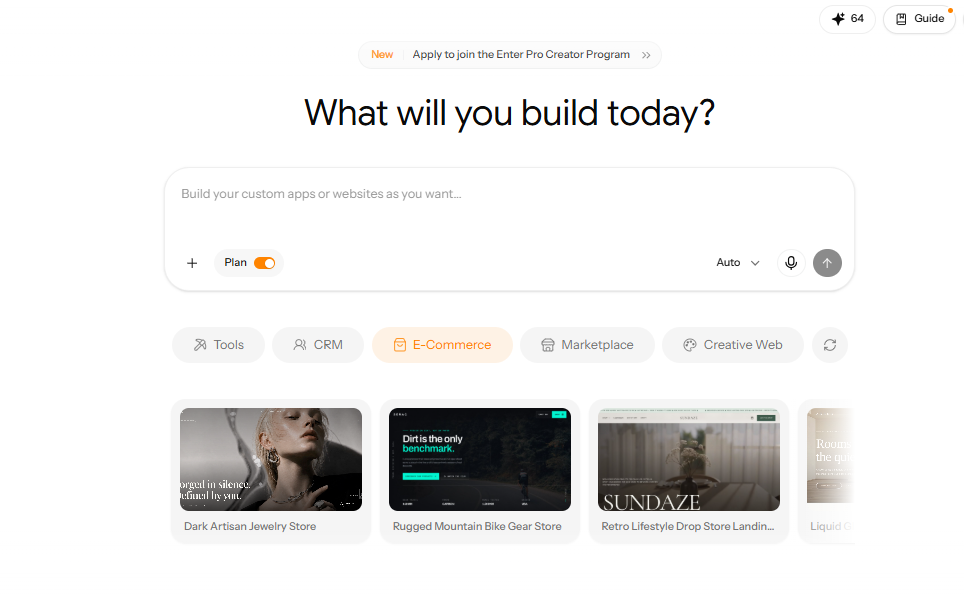
Open Enter Pro and begin by creating a new project. Define your project name as an online store that will sell your chosen products.
2- Write a Detailed Prompt
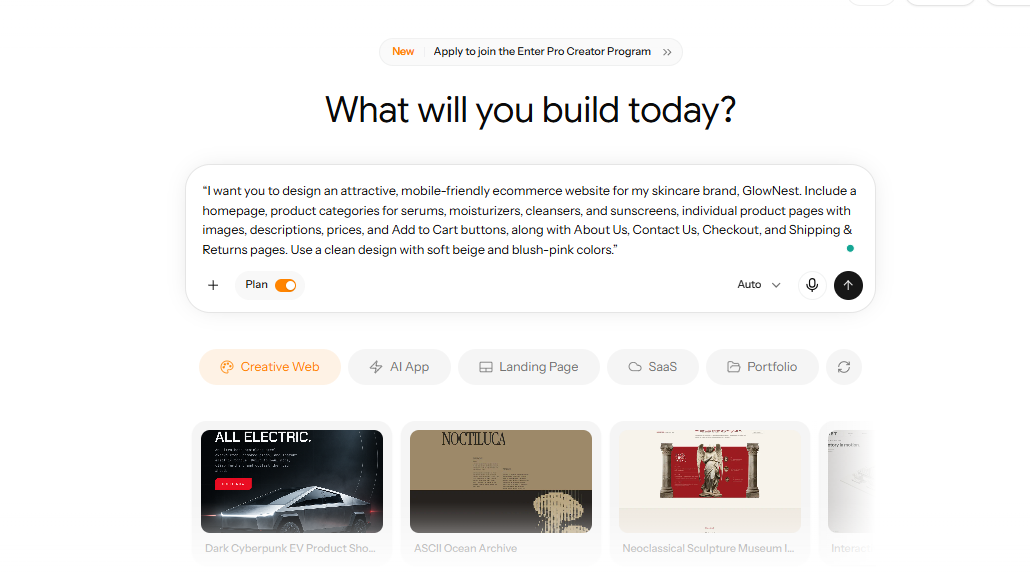
Write a command that gives Enter Pro enough detail to organize the website like:
“I want you to design an attractive, mobile-friendly e-commerce website for my skincare brand, GlowNest. Include a homepage, product categories for serums, moisturizers, cleansers, and sunscreens, individual product pages with images, descriptions, prices, and Add to Cart buttons, along with About Us, Contact Us, Checkout, and Shipping & Returns pages. Use a clean design with soft beige and blush-pink colors."
3- Review the Website Structure
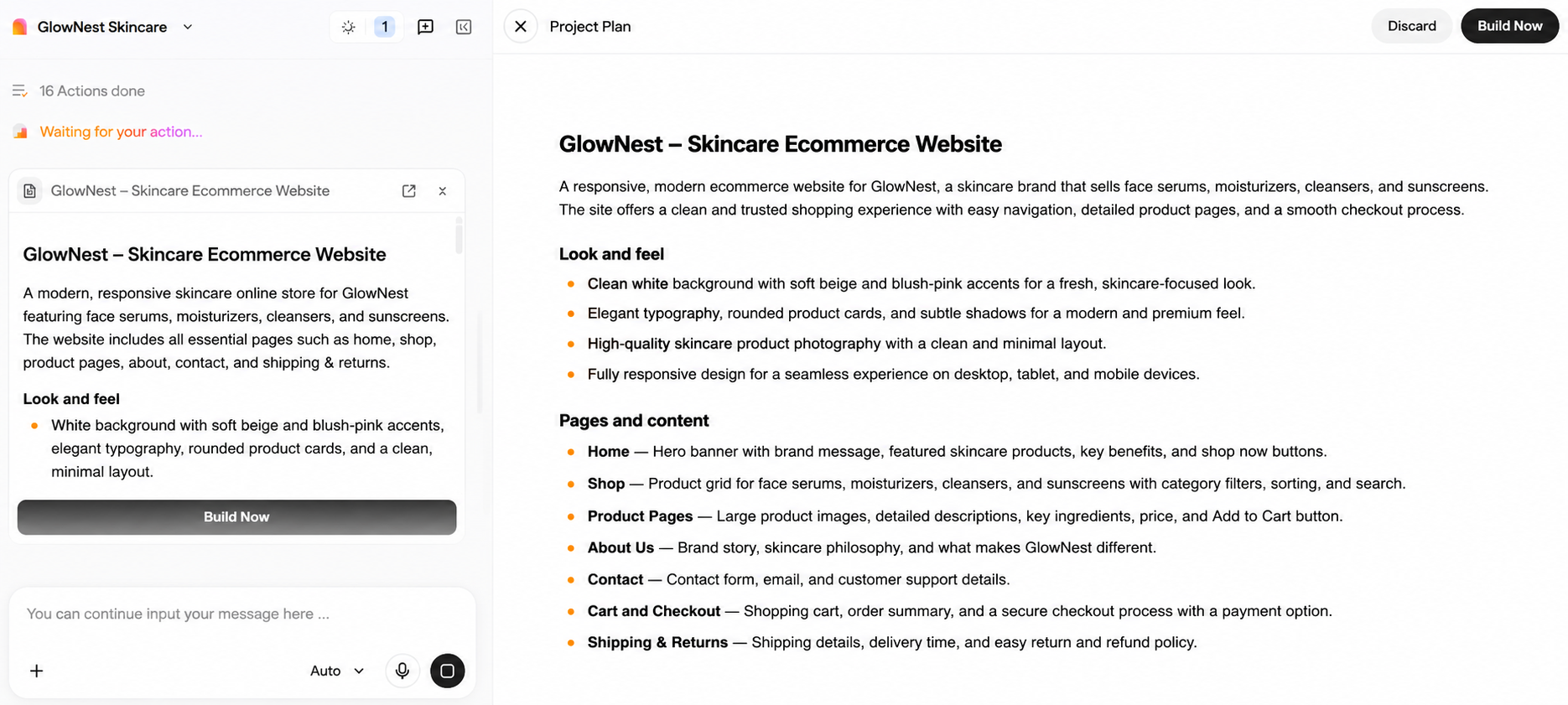
Before proceeding to the design of your entire site, examine the structure of your future webpages. Your customers must be able to proceed from the homepage to the product page and see their sizes and prices.
4- Build and Customize Your Pages
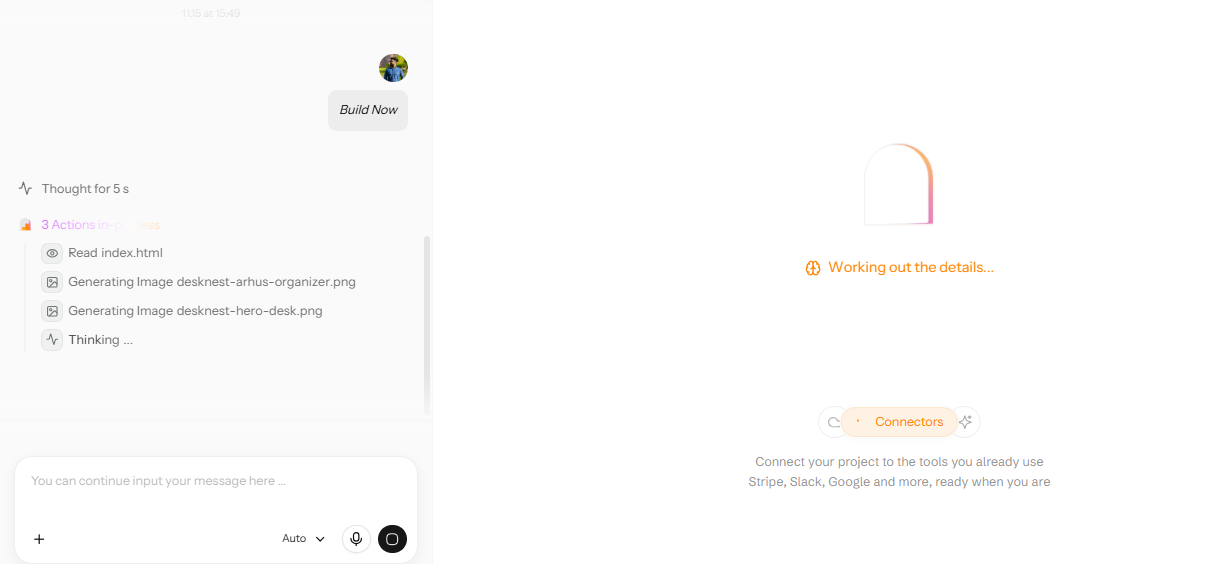
Create your web page and see what it looks like. And then after reviewing the pages select Build Now to start the process.
5- Publish and See Live Website
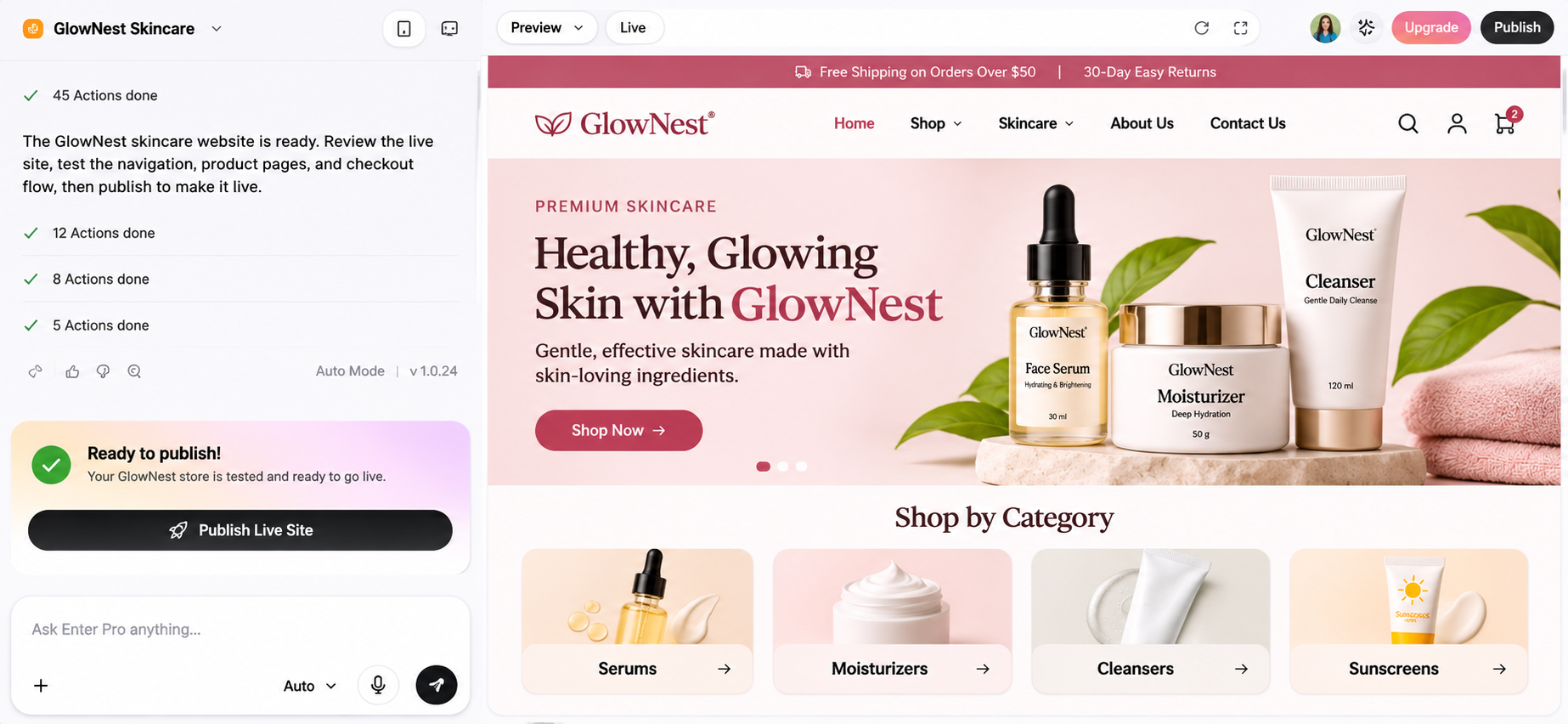
You need to wait until all the content and features are tested. Test your live website for the proper functioning of its navigation, which should differ from your previewed one.
Step 7. Set Up Payment, Shipping, and Returns
Make sure your payment method is available in your country for your product category. You will also want to specify the full price, including any shipping charges and taxes, so that the customer sees the full cost before placing an order.
Make sure you have a good idea of how you will handle packaging and shipping, where you will be shipping, whether you can provide tracking information, how you will handle cancellations, and what your refund process is.
It’s a good idea to place a test order on your phone and make sure the payment goes through, you get the confirmation email and order, and the shipping notification goes through. If you have guest checkout, make sure that is working as well. It’s better to find out now than after you’ve promoted your product.
Step 8. Launch Your Product and Find Customers
Our seller can promote a video of her product in use, demonstrating how it can clear up a messy desk. She can also post information about her product that may show up in searches from relevant keywords, and ask subscribers who expressed interest in the product whether they want to be notified by email when the product goes on sale.

She may also want to test a paid promotion campaign to see whether her offer attracts any interest. Enter Pro’s AI for Marketing can help with planning and tracking custom promotional campaigns. However, she will need to put in the work to create content that is useful, respond to inquiries, and see whether anything comes of her efforts.
Step 9. Monitor Sales, Costs, and Customer Feedback
Now that you’ve launched your product, you will need to keep track of how many people visited your product page, how many added it to their cart, and how many ended up ordering. You will also want to keep an eye on your costs per order and how many customers return products or ask for support.
If you notice customers frequently asking whether your product can hold a tablet, it’s a good idea to post a clearer photo of the product’s dimensions. If customers are consistently surprised at how much shipping costs, you will want to address this more prominently on your product page.
You should also keep in mind that good customer service can make your product more likely to be recommended by those who buy it. However, there is no guarantee that your customers will become repeat customers.
The best place to sell products online depends on your product type, location, and audience preference. Make sure to check if you can sell there, as well as any associated fees and policies before listing your product on a new channel.
Where Is the Best Place to Sell Products Online?
| Channel | Best for | Main tradeoff |
|---|---|---|
| Use your own website | When you want your own branded online store | You’ll have to bring traffic and set up the store |
| Marketplace | When people already search there for similar products | Fees, competition, and platform-specific policies |
| Social commerce | When people like seeing a demo of your product | Depending on the platform, may not have checkout functionality, or limit the products you can sell |
How to Sell Products for Companies Online
If you’re researching how to sell products for companies online, the first thing you’ll need to find out is which type of seller you’ll be. Authorized resellers sell a company’s product on behalf of the company (by buying or procuring the stock, and then reselling them under agreed-upon conditions).
An affiliate works with a company to refer people to their product, and can earn a commission (without having to sell the product). A commission-based sales representative also sells products on behalf of a company. They typically have a different contract with the company that sells them.
How Much Does It Cost to Start Selling Products Online?
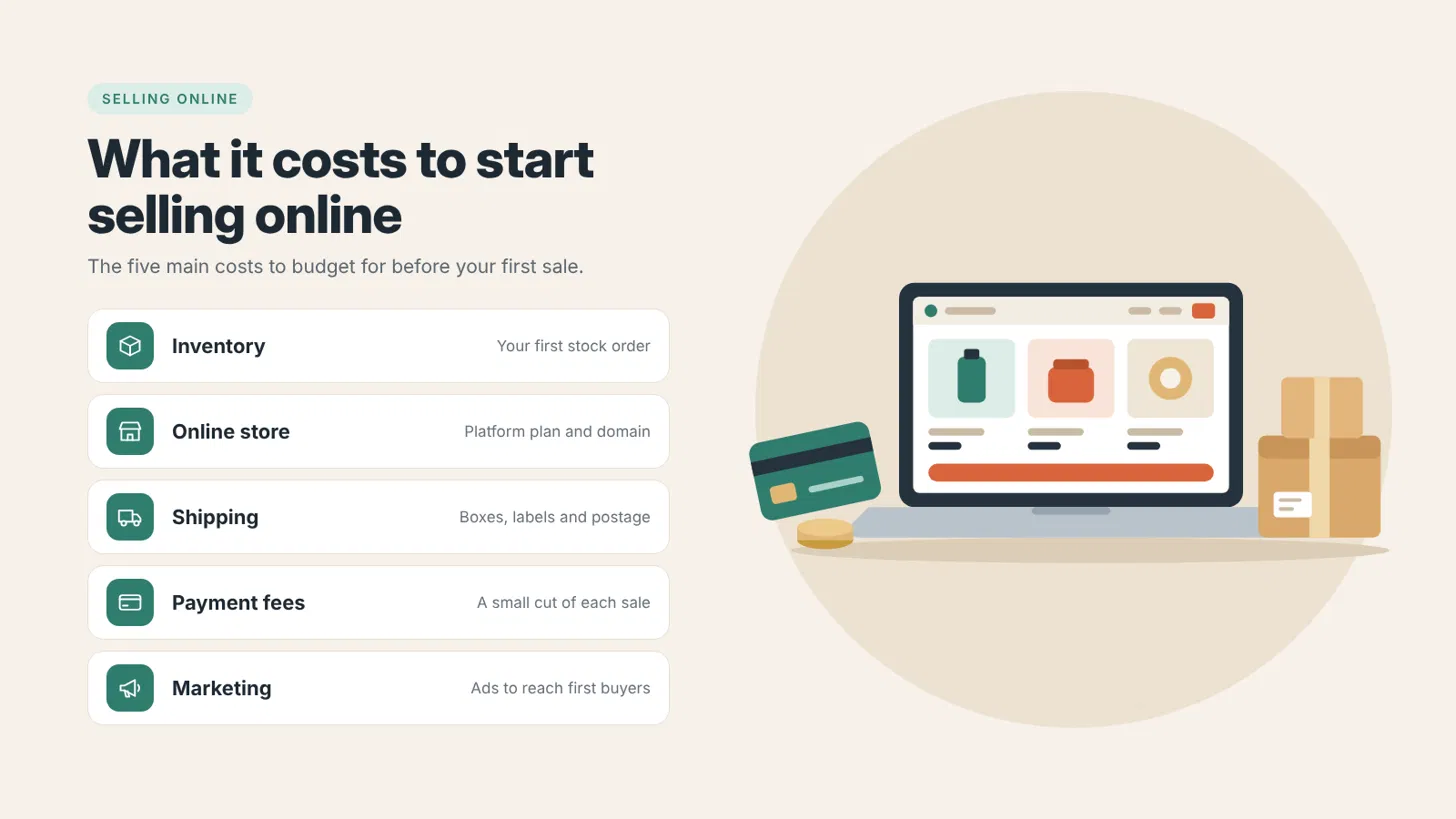
The cost to start selling products online varies depending on factors such as whether you need stock, samples, photographs, fees charged by platforms, and legal requirements you must fulfill. There are also recurring costs, including payment processing, packaging and shipping, subscription-based software and advertising, as well as refunds.
Selling your product on a marketplace may look inexpensive, but there are usually fees and other costs associated with selling on the platform.
In the example of our seller of the desk organizer, she will have to first fund the production of a batch of the product before she can start selling enough units to cover the cost of production. She also needs to keep some money aside to order replacement stock when she runs out. The $9 is the amount remaining after the listed per-order costs, and not a startup cost or net profit.
Sell Products Online Successfully After Launch
There’s no magic formula for how to sell products online successfully. However, keeping your promises (like sending people what they ordered, in a timely manner, in the condition it should be, and honoring your commitments if the product didn’t arrive in time) is always a good idea.
Track your metrics (traffic, sales, margins, and refunds) and ask for reviews from your customers on a regular basis. Once you’ve been selling on one channel for some time and your sales become regular, consider exploring another channel to bring more traffic to your store.
30-day Practical First-Sale Plan
It’s not a guarantee that you’ll make a sale in 30 days, but it’s a good schedule to follow in your first month to plan out your tasks.
Week 1: Do your research and get a sense of whether there’s demand for the product you’re selling
Week 2: Figure out where you’re sourcing the product from and whether you can start listing it for sale (including costs, samples, photographs, etc.)
Week 3: Make sure your website is set up, that you have a working checkout, that you have a shipping policy, and that you’re able to fulfill your first sale
Week 4: Start selling, respond to customer queries, and review your expenses
If you need help with registering your business, finding a supplier, and planning your business as a whole, refer to our guide on how to start an ecommerce business.
Final Thoughts: Sell One Product Well Before Expanding
Our seller of the desk organizer doesn’t need to sell many different products online right off the bat. The first step is to get the sale: a listing that accurately describes the product, and a working checkout and fulfillment process.
We suggest starting with one product that you feel you can manage. If you pay attention to your customers’ actions, questions, and complaints, you will have plenty of information on what to sell. Enter Pro solutions design for multiple tasks, including website creation, tracking orders, automation workflows, and more.
FAQs on How to Sell Products Online
How do I start selling products online (for a beginner)?
It starts by selecting a product to sell to a particular customer. Once you figure out the demand for your product and the total costs of one unit, you can move on to selecting the right channel for your product. Then, publish the product, set up the checkout and delivery, and complete a test order. After that, you can start selling!
What’s the easiest way to start selling products online?
Selling on a marketplace is a relatively easy way to start if you’re a beginner, because the marketplace will already have traffic coming to it. However, there are usually certain fees and requirements that you need to meet to sell on a particular marketplace. If you already have an audience, a simple online store or a social media checkout may work better for you.
Can I sell products online without a website?
Yes, you can sell products online without a website. There are marketplaces and social commerce platforms where you can sell, provided you are eligible to do so. However, if you want a storefront that’s all yours, you can set up your own website and sell there. Enter Pro is one way you can do this.
How can I sell products online without inventory?
You can sell without having the inventory on hand by dropshipping or print-on-demand (in the case of physical products), or by selling as an affiliate (where you refer customers instead of selling products). You should still ensure that your suppliers are reliable and trustworthy and that you understand their terms and conditions. You also have to understand the expectations of your customers (in terms of delivery time, and customer service).
How do I sell products for companies online?
One way to sell for companies online is to become an authorized reseller of their product. You can also sign up for their affiliate program, or become a commission-based sales representative (again, in which you sell their products under contract). You must check the terms of the contract, and understand the permission you have to sell, how you should price your product, and any disclosures you have to make. You should also clarify whether you need to handle payments, delivery, or refunds for the product.
How much do I need to start selling products online?
There is no minimum amount of money you need to start selling products online. However, you’ll need to factor in the cost of samples or inventory, fees charged by platforms or stores, photographs, packaging and shipping, marketing costs, and any legal requirements for your business to sell online. It’s also good to have a reserve set aside in case of refunds or other unexpected costs.
How do I get my first sale online?
To get your first sale, you need to put your product in front of people who will actually buy it. You can do this by demonstrating your product, by optimizing your listing with the right search terms, by participating in communities where your product is relevant, or by advertising it to people. Make sure that you’re able to complete a test order. We also want to emphasize that no channel can guarantee that you’ll make your first sale on a certain date.
Can I sell products online using Enter Pro?
Enter Pro can help you set up and organize ecommerce pages that feature your products with a storefront branded as yours. However, make sure that you’re able to accept payments, set up shipping, receive and ship your inventory, and have a working checkout before you start taking orders.