
One Person Company: The Practical Guide to Running a Business Alone
Explore how a one person company operates day to day, including founder roles, systems, capacity limits, AI support, and decisions about when to delegate.
It can be a bit overwhelming at first to run a one person company. Sometimes you may need to respond to clients, chase up unpaid invoices and work on a report at the same time. To add to that, you’ll have to manage your time, commitments and money along with other things that need to be done throughout the day. We have covered everything you need to know about running a one person company, after you’ve got your first clients and need to ensure that your business is running smoothly.
Understanding One Person Company
A one person company is a business which is owned and largely operated by a single founder. That founder is typically responsible for taking on client work, pricing up projects and dealing with customer queries as well as managing finances. Occasionally, they may hire a contractor to help with certain elements of a project.
Of course, the legal definitions of a one person company, how they’re registered, and what liability they have varies from place to place. In some places, a one person company registration means something specific. The term OPC one person company is often used to describe a particular legal entity, rather than just a company run by a single individual.
What Does One Person Have to Manage?
Customers see the end result of your work, but often don’t see the work that goes into it. A single project may involve sending out a proposal, handling communication with the customer, delivering work and making revisions, as well as invoicing and chasing up a payment.
| What it’s responsible for | What this involves |
|---|---|
| Strategy & decision making | Offers, pricing, decisions on priorities and new commitments |
| Customer communication | Enquiries, updates, feedback and expectations |
| Work delivery | Research, producing the work, making revisions and handing it over |
| Finance and admin | Invoices, expenses, record keeping and chasing payments |
| Quality and compliance | Final checks, compliance with professional rules |
| Learning and improvement | Fixing any recurring problems and improving processes |
Owner, Operator and Specialist: Three Roles in One
To understand what a one person company involves, it can be helpful to think about the separate ‘hats’ a founder must wear. For example, a solo consultant who makes research reports may spend their morning as a specialist (doing the research and writing up findings).
They may then act as an operator by scheduling a client call, or chasing up an invoice. Before they accept another piece of work, they may also need to wear their ‘owner’ hat, to ensure that there’s enough time to do a good job. It can be useful to group tasks together according to these hats, and then to focus on each type of work separately.
The Biggest Constraint Is Capacity, Not Just Money
While we talk about working ‘full time’ as being 40 hours per week, you don’t have 40 hours per week to work on client projects. For example, in a hypothetical week, you may spend 22 hours delivering client work, 6 hours communicating with clients, 5 hours making revisions, 4 hours on admin and 3 hours planning future work. In other words, you’re fully booked.
This highlights why it’s important to understand how much time you have available to work on projects. A good first step is to track your time use for a couple of weeks. From there, you can work out how much time you have available by subtracting the amount of time you need for business maintenance.
How to Build a Weekly Operating System for a One Person Company
An operating system doesn’t need to be complex, but it will enable you to focus on important tasks and ensure that every request is acted on in a timely fashion. For example, if your one person company provides research and reporting, a good operating system would enable you to focus your mornings on analysis work, while also ensuring that you have regular ‘slots’ in the afternoons to handle communications, invoices and other follow ups.
Separate Revenue Work From Business Maintenance
To enable you to focus, it can be helpful to give revenue-generating work time slots that aren’t interrupted. For example, you might set aside 3 mornings per week for working on client reports, 2 ‘slots’ in the afternoon for client communication and a separate slot for handling accounts and planning.
Create a Single Intake and Priority Queue
This is a list of all requests that you have received, including the customer, deadline, what’s been agreed and your next action. To avoid over-booking, it’s important to prioritize work that you’re already committed to first. If a new request comes in and conflicts with an existing deadline, it’s better to tell the client when you can deliver the work, or to discuss a different scope of work, rather than automatically saying yes to the new work.
Standardize Repeatable Tasks With Simple Checklists
It can be helpful to first write down the steps for repeatable tasks, before considering whether you want to automate them. If the task becomes bigger, one option is to use Enter Pro’s AI for Operations, to organise documented procedures into a simple internal workflow.
Set Response Times and Work Boundaries
As long as customers have reasonable expectations, they don’t need a response immediately. For example, you may want to let them know that you’ll respond to messages during working hours, and answer routine queries within one business day.
You may also want to let them know that you’ll discuss additional revisions with them first, before changing a deadline. This will also help you to protect time to focus on delivering client work.
Review Workload and Cash Every Friday
It’s a good idea to have a review every Friday. This should include looking at what you’ve delivered that week, as well as what you’ve got coming up. You should also take a look at your cash flow - what invoices have not been paid? As well as this, it’s helpful to reflect on the amount of time you’ve spent on certain things vs what you planned, and whether you’ve had any issues with the quality of your work.
If you see that you’ve got multiple deadlines coming up, and that invoices are also late, you may need to change something.
Which Tasks Should You Do, Automate or Delegate?
As a general rule of thumb, the best approach is to consider how often a task is done, and what the risk is if it’s done wrong.
| Task | Frequency and risk | Best approach | Review owner |
|---|---|---|---|
| Pricing and commitments | Occasional, high | Founder decides | Founder |
| Status updates | Frequent, low-moderate | Template, or possibly automation | Founder |
| Project intake | Frequent, moderate | Checklist first | Founder |
| Regulated advice | Occasional, high | Get a qualified professional | Founder coordinates |
| Final deliverable | Every project, high impact | Human quality review | Founder |
When AI Helps a One Person Company

AI can be a useful tool when there are repeatable tasks that don’t require a new decision each time. For example, it can help with organising meeting notes, generating a to-do list from a brief, or even helping to generate questions to clarify things with a customer.
A one person ai company can of course still make use of AI, but the key here is that the expertise still lies with the founder. AI is a tool to help, but not a substitute for accountability.
A Practical AI Workflow With Human Checkpoints
For example, a customer might send you a long brief with a few attachments. First of all, record the deadline and what they want from you. You can use AI to help generate a summary and a to-do list from the brief and attachments, but you’ll also want to compare this to the originals, to check that everything makes sense.
This is because AI is known to make mistakes and miss important details. It can also be problematic to enter a customer’s confidential information into a tool without appropriate safeguards.
How to Avoid Becoming the Bottleneck
When each small question slows down the entire company, it means that you are the bottleneck. Scope creep is one common factor leading to bottlenecks. In scope creep, a single small request ends up being yet another unpaid hour.
The way out of this situation is to define what each service package covers and agree on changes before starting extra work. You can also reduce interruptions by checking notifications at set times and avoiding work outside the agreed scope. Before accepting another project, review your current deadlines, delivery commitments, and coordination workload rather than assuming an empty calendar slot means you're available.
When Should a Solo Founder Hire Help?
One can consider hiring assistance when faced with the same issues repeatedly. Some of these issues include administration slowing down the payment process, missing deadlines, and a task requiring technical skills beyond your capacity. When deciding on the kind of help needed, you may consider contracting a specialist or hiring an assistant part-time.
The Numbers a One Person Company Should Track

Compact dashboard can also demonstrate whether projects take more time, customers come back, and there is enough money for covering the next low period.
| Measure | Relevance of the number |
|---|---|
| Delivery hours | Number of hours spent on paid work |
| Lead time of project | Time of waiting by the customers |
| Completion on time | Checks if set deadlines are feasible |
| Repeat clients rate | Demonstrates customer demand |
| Fixed costs monthly | Expenses that must be paid independent of sales |
| Cash buffer | Time during which expenses can be covered |
| Effective hourly earnings | Shows how much you actually earn per hour after accounting for the time spent on client work and related business tasks. |
In the beginning, it is enough to use a spreadsheet. If reports are becoming less comparable, then Enter Pro's AI for Business will provide you with customizable business tools to consider. Before using dashboard for making decisions, check the source numbers and data links.
A Worked Example: One Founder, Five Active Clients
Consider a situation where there is one founder with five customers requiring four hours of delivery per week, making up 20 hours of work. The addition of six hours of communication, four hours of administration and five hours of planning/quality control would mean that 35 out of 40 hours are occupied.
| Weekly activity | Planned hours | With additional revisions |
|---|---|---|
| Client delivery | 20 | 26 |
| Communication | 6 | 6 |
| Administration | 4 | 4 |
| Planning and quality | 5 | 5 |
| Total | 35 | 41 |
With an extra requirement of six hours of revisions from one customer, the schedule would be overloaded. In this case, you can either define whether it is in scope, reschedule to a later period, put off the onboarding of new clients, optimize some repetitive process or provide periodic support.
This calculation is a fictional one, not actual incomes and workload. You can read one such example of going from PM to one-person company here.
How Enter Pro Can Help you to Build a Simple Business Tool
If you provide consulting services to several clients and struggle with tracking deadlines in emails and notes, begin with writing down all the fields you really need to track: client name, project, deadline, current status, and next follow-up action.
Then you can proceed with developing a prototype using Enter Pro's AI App Builder tool. Make sure editing and filtering options are working as expected and reminders can be set up. I have mentioned the step by step instructions below to make your own AI App:
Step 1: Log in to Enter Pro and Start a New Project

You need to open Enter Pro, then sign in to your account, and start a new project. First, decide what type of information you want to track before building anything. You can track stuff like client names, project deadlines, payment status, and upcoming tasks.
Step 2: Write About Your Business Tool in a Prompt
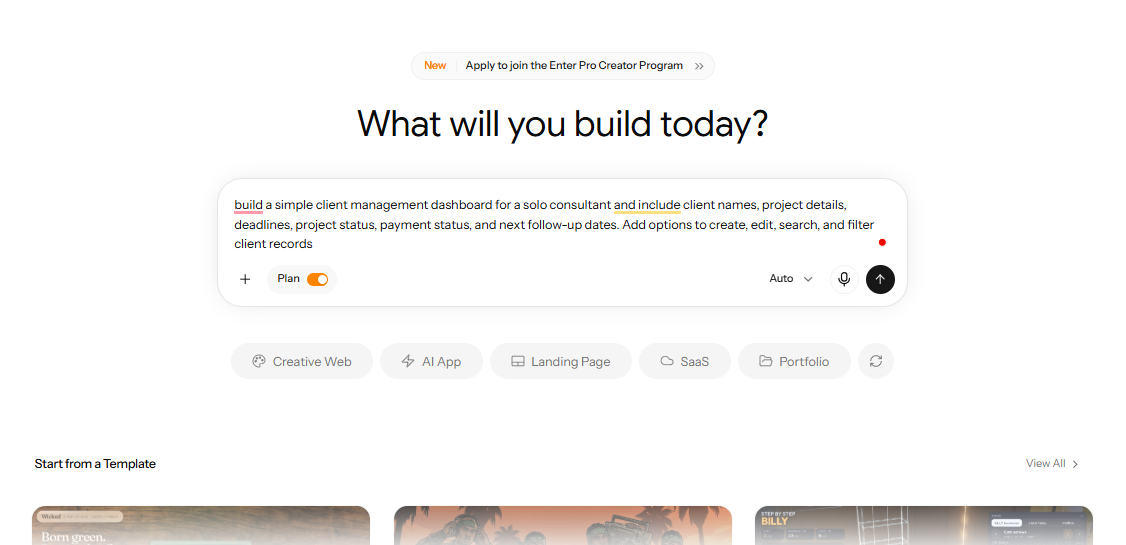
You have to give a clear description of the app you want to build. For example, you can use this prompt:
"Build a simple client management dashboard for a solo consultant and include client names, project details, deadlines, project status, payment status, and next follow-up dates. Add options to create, edit, search, and filter client records."
Step 3: Review the Plan and Build Your Tool
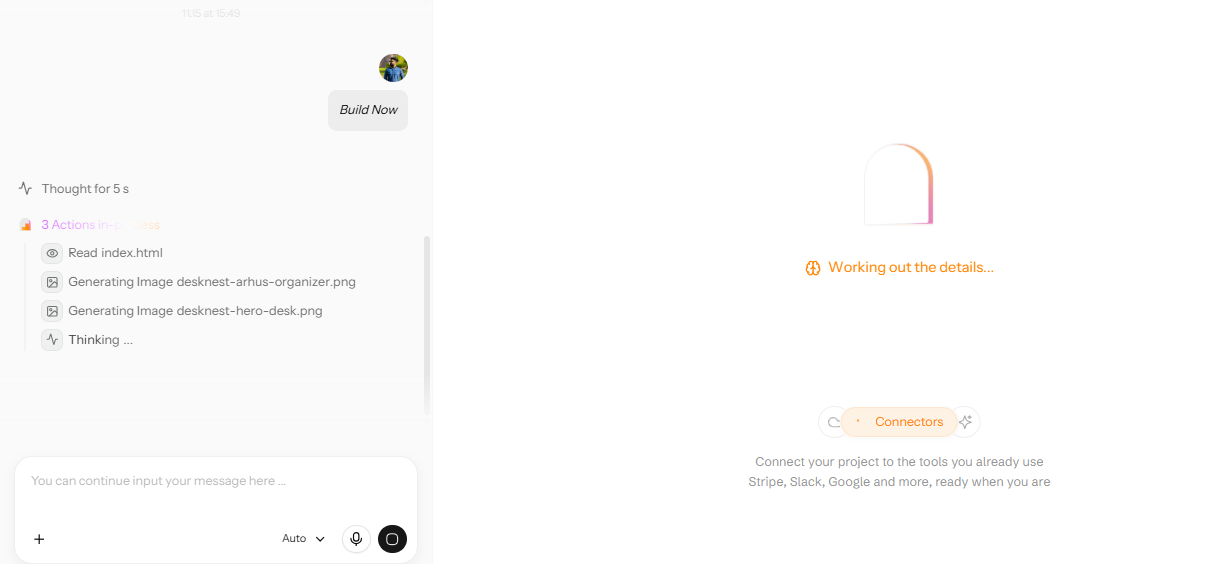
Take a second to look and review the plan and instructions you give to the tool. You can add something that is missing, or remove something if you really don't need it. After you are satisfied, you can select Build Now to start the process.
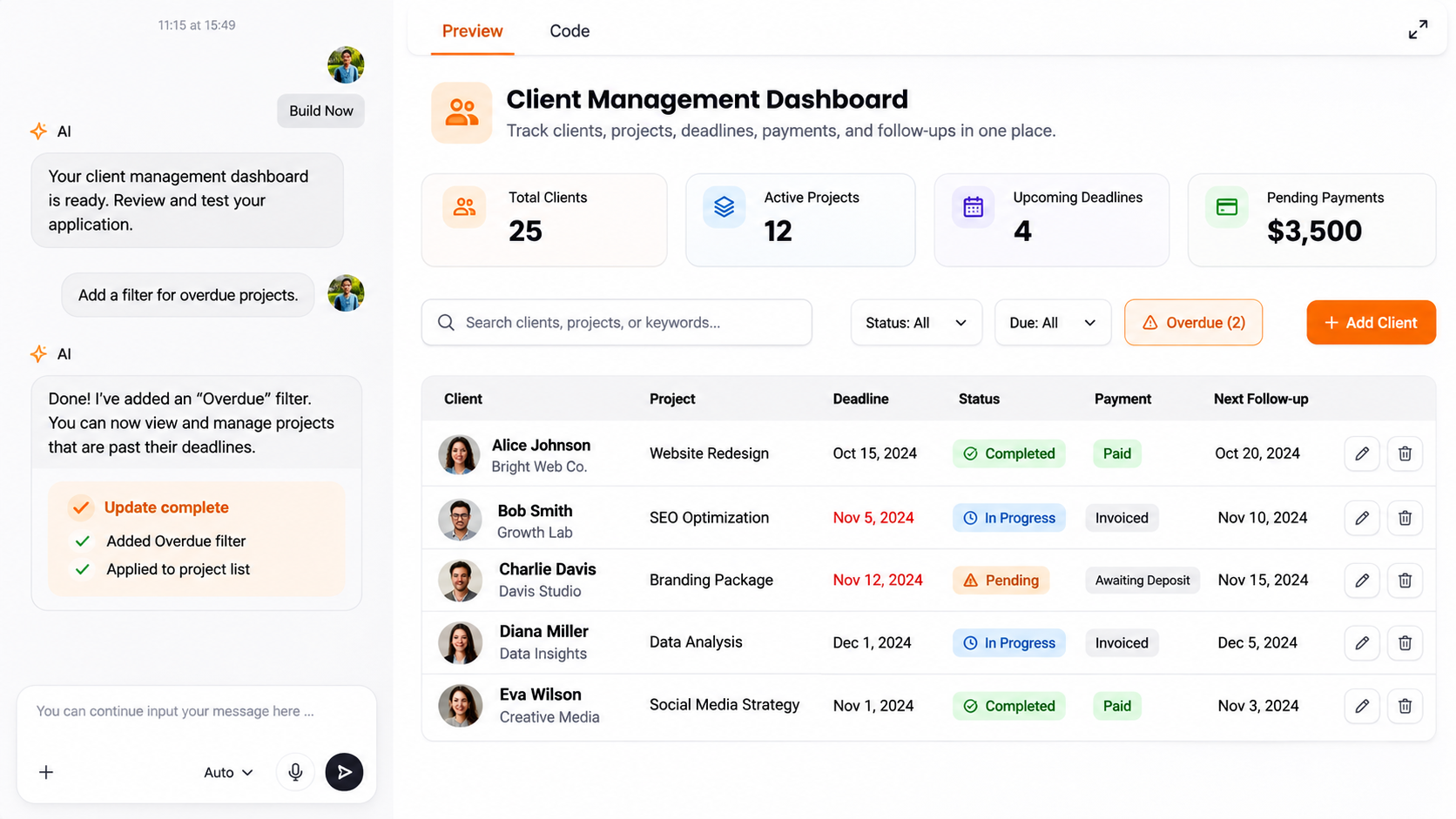
Step 4: Preview, Test, and Refine
Click on the Preview and enter some sample clients into it. See if you can make edits to your projects, filter your entries based on their status and verify that deadlines show up correctly. If you have asked for reminders, see if they are working properly.
Final Thoughts
A sustainable one person company is not one that does everything alone. It is rather an entity where the owner is clear on what needs his involvement and what can be made simpler. Once these processes are running smoothly, it will be easy to decide whether the use of tools or outside assistance would actually improve the business.
You can also use the given solutions from Enter Pro. There are plenty of options to choose from if you need to build an app, a website, or want to automate tasks. Give one command of these solutions and Voila!
FAQs About One Person Company
Can one person run a company without employees?
Certainly, there are many service companies which can be owned by only one person as long as the load is appropriate. However, you will deal with the customer demands, money matters, quality, and deadlines, while some special services may require additional assistance from outside. Or you can use Enter's pro solutions to automate these tasks.
What is the difference between a one person company and freelancing?
In most cases, freelancers are people who sell their personal skills, while a single business person might create certain routines, contracts, and services. However, neither title automatically means a particular form of legal business organization.
What is the hardest part of running a one person company?
The capacity could be hard since paid delivery conflicts with messaging, administration, and planning. Once you are dependent on one calendar, a minor delay will affect your other customers.
How can I organize my work as a solo business owner?
Organize all of your requests, deadlines, and next actions in one place instead of multiple inboxes. Dedicate yourself to delivery, make short checklists for recurring tasks, and look ahead at the week that lies ahead.
What is a one person AI company?
This term refers to an informal definition of a company that applies artificial intelligence only to selected jobs like making notes or writing a rough draft of summaries. Although AI can cut down on routine tasks, you still have to check information, ensure privacy of your clients, and take some decisions.
When should a one person company outsource work?
Think about delegating your task in case it is beyond your capabilities or administrative actions are keeping you away from serving paying clients. Define the task and its real price first.
Can Enter Pro help a solo founder with internal workflows?
Enter Pro might be used to prototype a basic internal software product such as a customer tracking system or a follow up list. Start with a single issue and try out the features based on sample data.
Which numbers should a one person company monitor?
Monitor delivery time, completion time, repeat customers, fixed costs, uncollected payments, and cash reserve. This will tell you about the stability of the firm and not only about its growth in sales.