

v0.dev Explained - Features, Pricing, and How to Use It
Discover v0.dev's usage method, pros and cons, and expert tips with our detailed review. Enter Pro is an excellent alternative for front-end app development.
v0.dev by Vercel is quite an efficient AI-powered tool that turns ordinary prompts into complete apps and websites, making development faster and easier. Exploring the technology behind it, its key features, how to use it, and three experiments I ran with the tool. Also, you will learn that Enter Pro serves as a better alternative to v0.dev for AI-powered app development.
What is v0.dev by Vercel?
v0.dev is an AI-powered app-building tool that transforms natural-language prompts into functional web applications. It can generate UI, backend functionality, front-end code, and full-stack projects that you can view and deploy through Vercel.
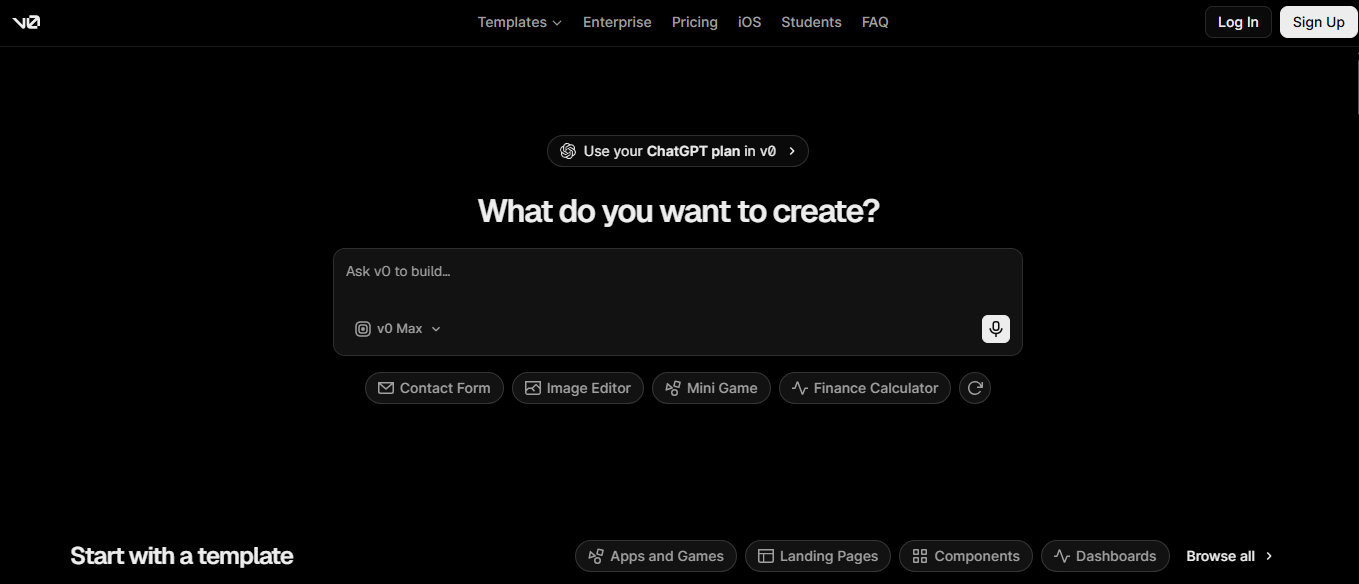
The technology behind v0.dev
v0.dev uses AI models and agentic workflows to transform natural-language prompts into functional applications. It can generate a complete application from a simple text prompt. This includes things like user interface, application logic, and backend functionality. Its agentic workflows help coordinate different development tasks to build more efficient applications.
v0.dev generates user interfaces, mainly using Reach, a JavaScript library for building interactive web pages. It utilizes frameworks like Next.js to properly structure applications and support features like routing and server-side functionality. shadcn/ui offers reusable components, like buttons, forms, and menus, simplifying interface development. The generated projects can run on Vercel, a platform for hosting different web applications.
Key features
- AI-powered app generation: v0.dev utilizes AI to create functional web applications from simple user prompts. It can also create user interfaces, application logic, and backend functionality, decreasing the need for manual coding.
- Natural language development: Users can describe their application requirements in simple, everyday language instead of writing complex code. v0.dev's AI quickly interprets these instructions and generates code that matches the requested functionality and design.
- Real-time preview and iteration: v0.dev lets users preview their generated interfaces and see the way design alterations affect the application. Users can refine their prompts and adjust iteratively until they get the desired result.
- Vercel deployment integration: v0.dev integrates with Vercel, which simplifies the process of deploying web applications online. Users can easily publish their projects and make them accessible through a live URL with less manual configuration.
- AI-assisted code editing: v0.dev uses AI to help users modify, improve, and debug AI-generated code with natural-language instructions. This lets developers fix errors, add features, and refine existing components without writing large sections of code manually.
v0.dev pricing plans
v0.dev offers a variety of pricing plans that suit different development needs, from individuals experimenting with AI-powered coding to teams building production-ready applications. Each plan includes different features, usage limits, and capabilities. The following table gives v0.dev's complete pricing plans:
Note: The following pricing data is from October 2026; please check the official site for the newest plan before subscribing.
| Plan | Price | Key features |
|---|---|---|
| Free | $0/month | $5 in monthly credits, 7 messages per day, Vercel deployment, visual editing, and GitHub sync. |
| Plus | $30/user/month | Access to all models, $30 in monthly credits per user, team collaboration, and centralized billing. |
| Business | $100/user/month | Plus features, default training opt-out, team collaboration, and centralized billing. |
| Enterprise | Custom pricing | Enhanced privacy, SAML single sign-on, role-based access control, priority access, and dedicated support agreements. |
How I made an app with v0.dev
I used v0.dev by Vercel to turn my app idea into a working project with natural-language prompts. Instead of writing each line manually, I described my app idea, refined the design, and exported it. Here's the complete method that I used from start to finish, along with my three experiments.
Step-by-step tutorial (Sign up -> Prompt -> Refine -> Deploy)
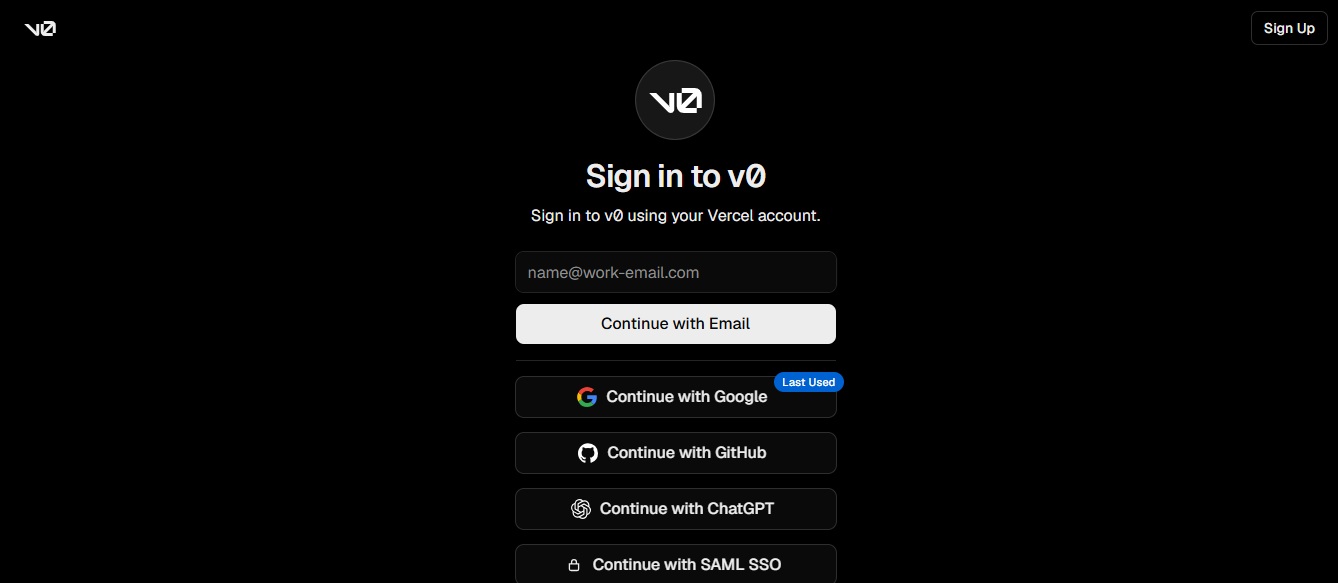
Step 1: Sign up & Setup
I began by visiting v0.dev's official website and signing into my account. After accessing the workspace, I started a new chat to start building my app. The most important thing is having a clear idea of the app, which I did, so I had no problem.
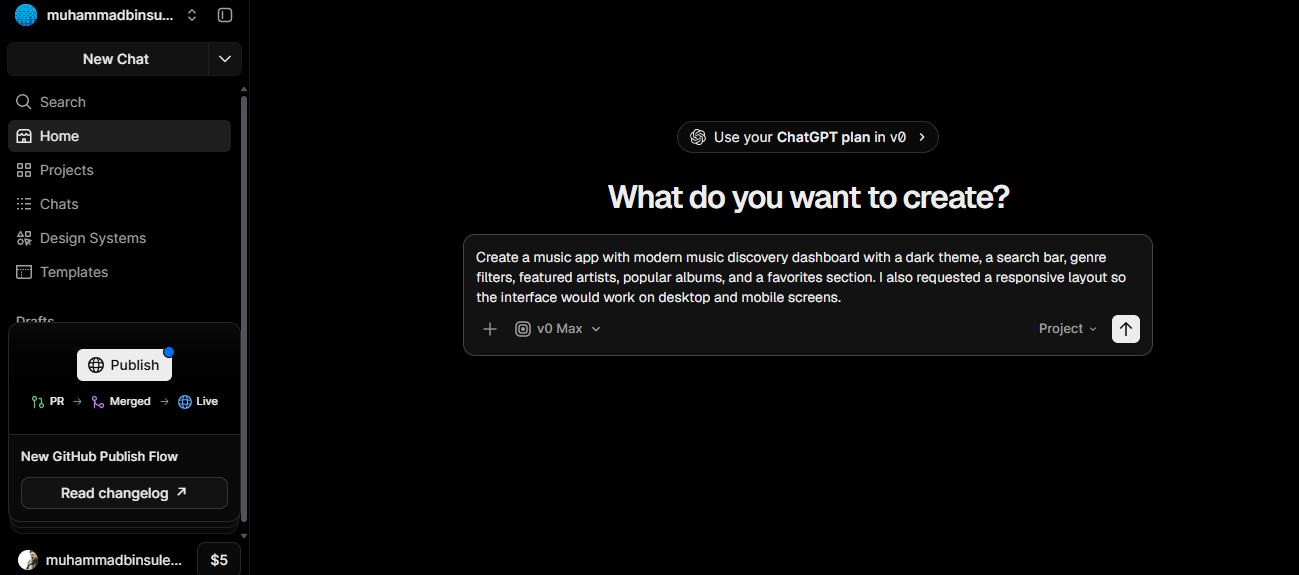
Step 2: Describe your app
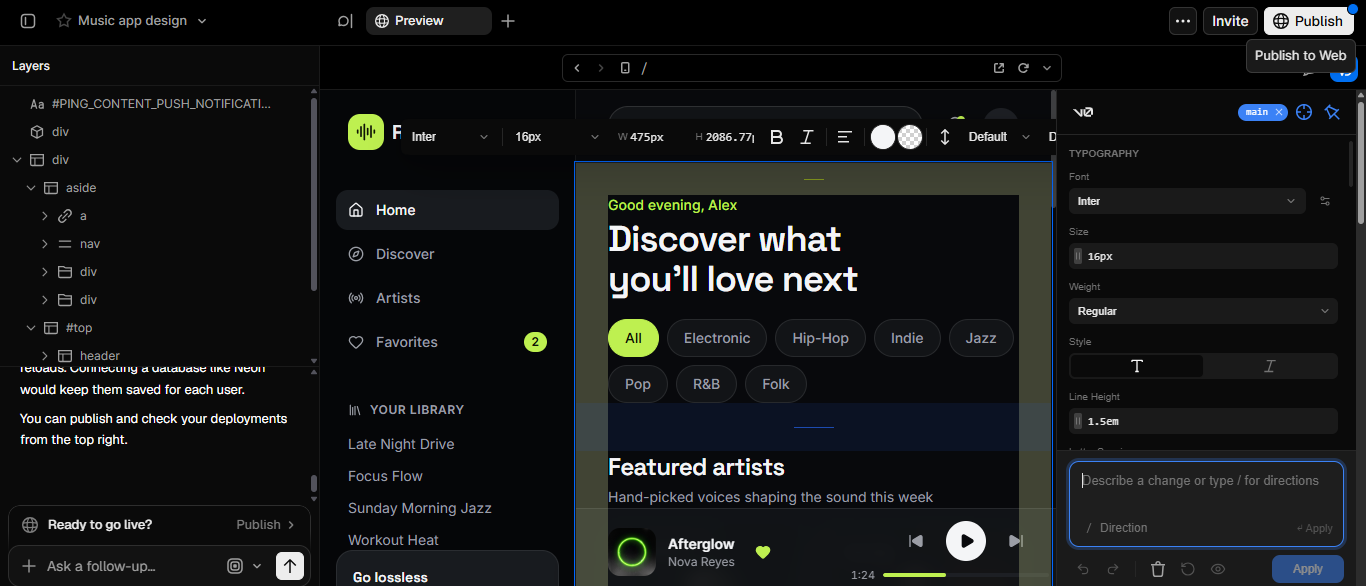
I entered a prompt describing the music app I wanted to build with v0.dev. I asked the AI to create a modern discovery dashboard with a dark theme, search bar, genre filters, featured artists, popular albums, and a favorites section. I also requested a responsive layout so the interface would work well on both desktop and mobile screens.
v0.dev generated a preview that I could preview and improve.
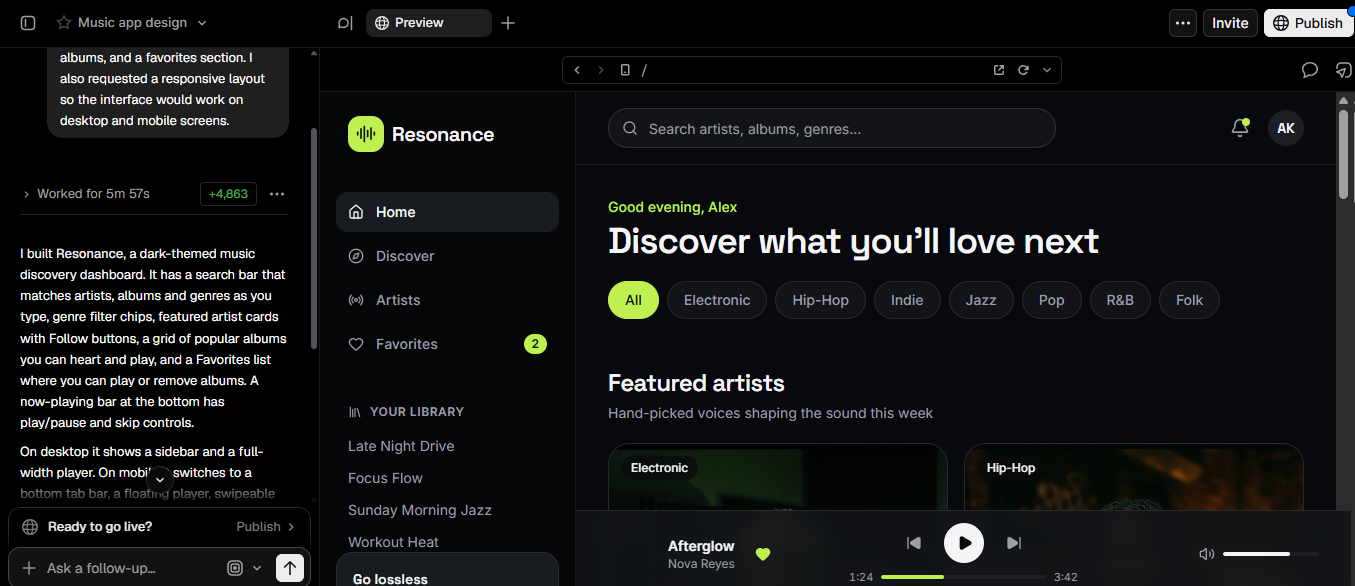
Step 3: Refine the design
After reviewing the initial version, I used follow-up prompts to improve the layout, colors, album cards, and genre filters. I also checked the mobile layout and tested interactive features, such as search and favorite buttons. There are options to refine the design, but I thought mine was OK.
Step 4: Export or deploy
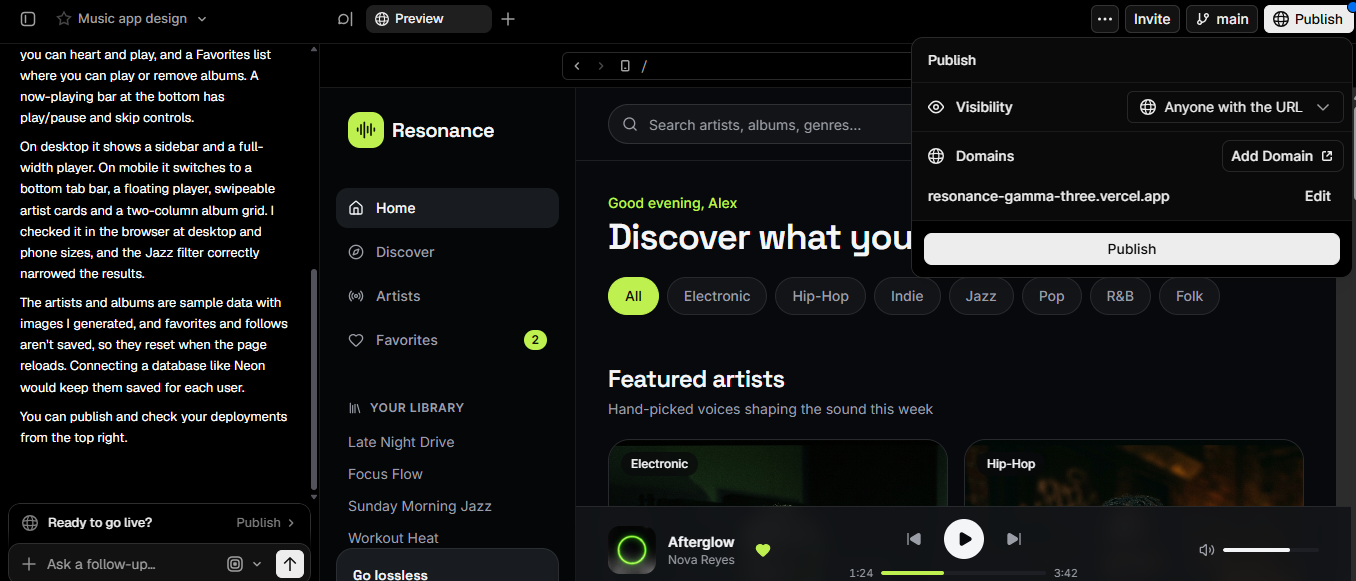
Once I was satisfied with the final look, I clicked on the "Publish" option in the top-right corner of the screen. I set the project name to "resonance" and clicked "Continue" to publish the app. Finally, I clicked the "Publish" button to publish my app.
Experiment 1: Build a landing page from a single prompt
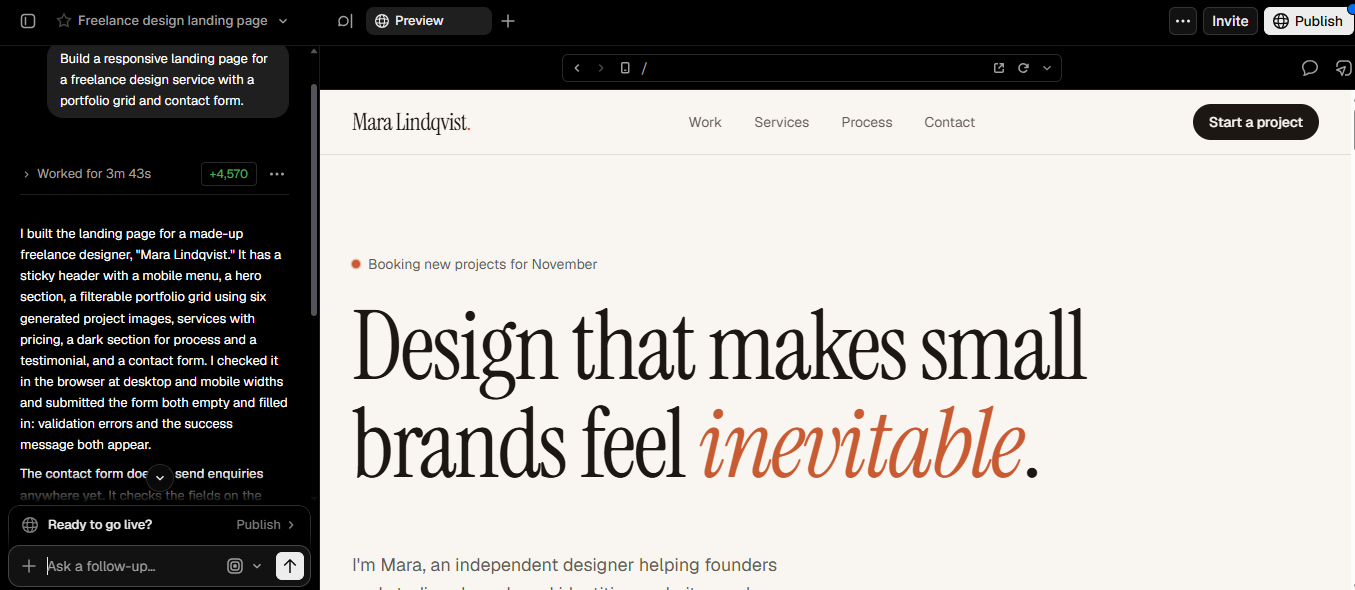
- Test purpose: The main purpose of my first experiment was to see whether v0.dev can generate a complete, beautiful landing page from a single sentence. I didn't want to write complete instructions for the app; Otherwise, it would just be like any other app. I wrote just one line. I didn't want to go into too many details.
- Prompt: Build a responsive landing page for a freelance design service with a portfolio grid and contact form.
- What I liked
Well, I like many things about v0.dev. The first thing I noticed is that it turns prompts into fully functional apps quickly, and I didn't have to wait long. For this freelance design service, it generated the app in 3 minutes and 43 seconds, which is quite fast for an AI-powered tool. I also appreciated that although my prompt was a bit incomplete (not fully detailed in the steps section), the AI filled in the details, and it looked quite presentable.
- What I didn't like:
One thing I didn't like was that some elements needed additional refinement. For instance, the landing page heading was too big, and the other text was small in comparison. So, I needed to make the design more presentable with further prompts. So, I'd say this: Beginners will need to take time to analyze the generated product carefully and figure out what to refine.
Experiment 2: Recreate a UI with a screenshot
- Test purpose: One of the main selling points of v0.dev is its comprehension ability. So, I had to check it. I found a beautiful dashboard design, uploaded it to v0.dev, and observed the results. Want to know the final results? Keep reading to find out more.
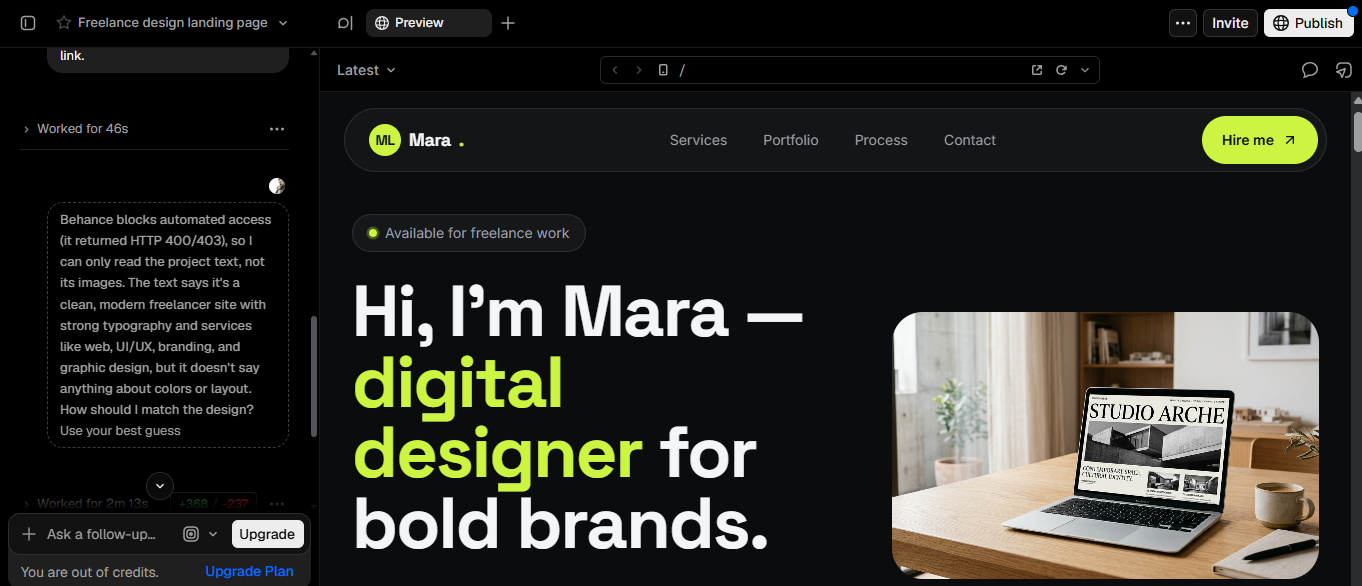
- Operation: Find a beautiful Dashboard design on Dribbble or Behance and upload it directly to the v0.dev chat.
- What I Liked
Again, as I said earlier, the response time was quite quick. The response was quicker than before, at two minutes and thirteen seconds. Although the UI didn't look exactly like the Behance design, it matched to a considerable degree.
- What I didn't like
Here is what I didn't like. The thing is, you can only add screenshots or links. So, I had to copy the link from Behance and paste it into the v0.dev chat, which seemed like a hassle. Additionally, the design wasn't 100% according to the Behance website, and v0.dev's AI guessed certain aspects.
Experiment 3: Add features to existing v0 project
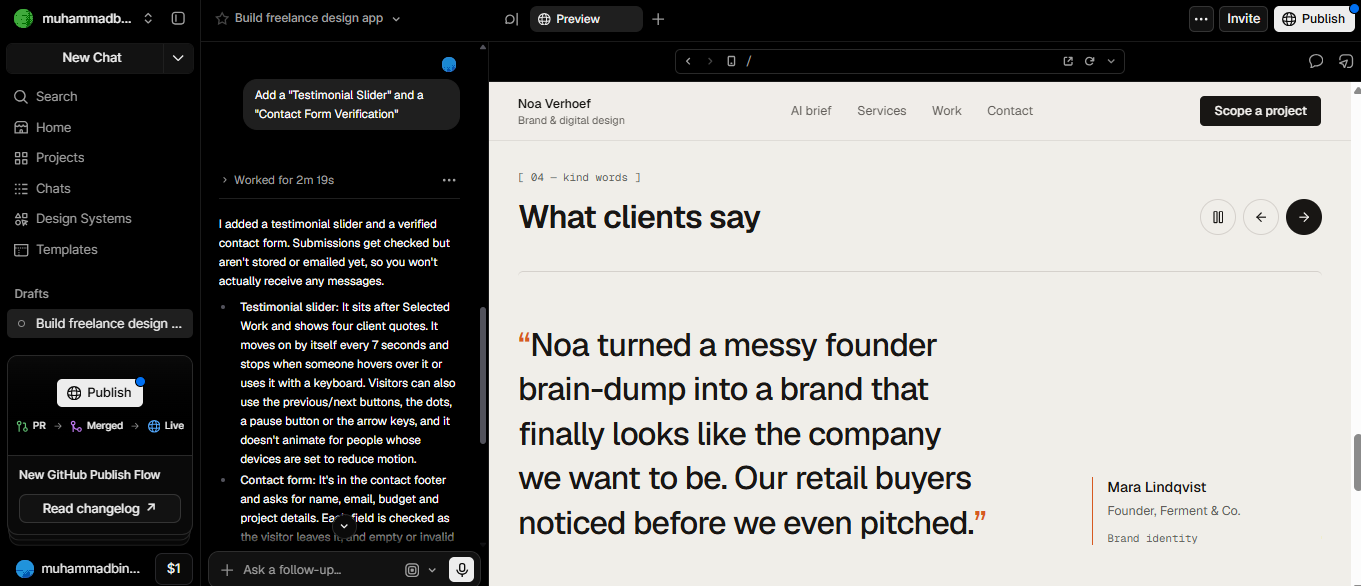
- Test purpose: Lastly, I tested v0.dev's AI ability to "add, delete, and modify" based on existing code, and see whether it destroys the original structure. I wanted it to add a "Testimonial Slider" and a "Contact Form Verification."
- Operation action: Based on a landing page regarding freelance design services, AI must add a "Testimonial Slider" and a "Contact Form Verification."
- What I liked
What I liked about adding features is that it was easy to add the "Testimonial Slider" and "Contact Form Verification," and the response was quick. Another thing is that the features were even easier to add through text prompts. Plus, preview mode let me see the final result and make any necessary adjustments.
- What I didn't like
One of the main things I didn't like about customization is that sometimes it's a bit off. For example, v0.dev added the "Testimonial Slider" accurately but had a bit of a problem adding the "Contact Form Verification." Lastly, I would say that the free version is quite limited. After completing these tasks, meaning making two web apps and a bit of tweaking, my free version was over, and an upgrade was needed for further customization.
v0.dev pros and cons
Like any other tool, v0.dev has its own benefits and disadvantages. So, let's look at the pros and cons of using v0.dev.
Pros
- AI-powered full-stack app generation: Generate applications with application logic, user interfaces, and backend functionality, reducing time spent on manual coding.
- Natural-language development: v0.dev lets users describe requirements in different languages and generate high-quality code without writing everything from scratch.
- Fast prototyping and deployment: Quickly build working prototypes and simplify deployment through Vercel integration.
- Visual design and editing: v0.dev lets users preview interfaces and adjust styles, layouts, and components to refine their applications.
Cons
- Limited multi-language development: v0.dev mainly focuses on React-based web development, making it unsuitable for projects made with unplanned programming frameworks.
- Limited AI model choice: Users have access to supported AI models, not every model on the market, which limits flexibility.
- No built-in 100% code ownership: Although users can export and use the generated code, the usage rights and ownership mainly depend on the applicable terms and third-party dependencies or components.
- No native mobile app development: v0.dev is primarily designed to build web applications, rather than native Android or iOS apps, which may require additional tools for native development.
Although v0.dev is effective for web applications, its React-focused approach and limited native mobile app support may limit some projects. Plus, the free version is very limited. So, developers seeking broader app-building capabilities should consider Enter Pro, which provides AI-powered development and support for creating mobile-oriented applications.
Enter Pro: The best v0.dev alternative to create AI-powered apps
Enter Pro is an AI app builder that enables users to build applications with less manual coding. It gives 100% code ownership and includes several AI models. It also allows users to turn language prompts into functional apps and streamline the development process. With AI-assisted features and a user-friendly workflow, Enter Pro serves both developers and non-technical users. It's also an excellent alternative to v0.dev for users who want to explore flexible, AI-powered app creation, including mobile-oriented applications. Try Enter Pro and build impressive apps and websites in just a few clicks.
Why should you pick Enter Pro
- 100% code ownership: Enter Pro enables users to access and export their generated code for further customization. This gives developers greater control over their projects, subject to the platform's terms and applicable third-party licensing.
- Rich AI models: Enter Pro provides access to AI models such as GPT-5.4, Terra, Claude Sonnet 4.6, Claude Opus 4.6, DeepSeek V4, and other models that assist with code generation and application development. Users can use AI-powered features to build, refine, and customize applications to meet their requirements.
- Prompt to website/app building: Enter Pro transforms natural-language prompts into websites and applications, decreasing the need for manual coding. Users can describe their ideas and then refine the results with AI-powered development.
- Website templates: Enter Pro provides a variety of website templates, which help users to start building websites without designing everything from scratch. These templates serve as a foundation that users can adapt to match their project's visual style and functionality.
How to use Enter Pro for building custom apps
Step 1: Enter the prompt
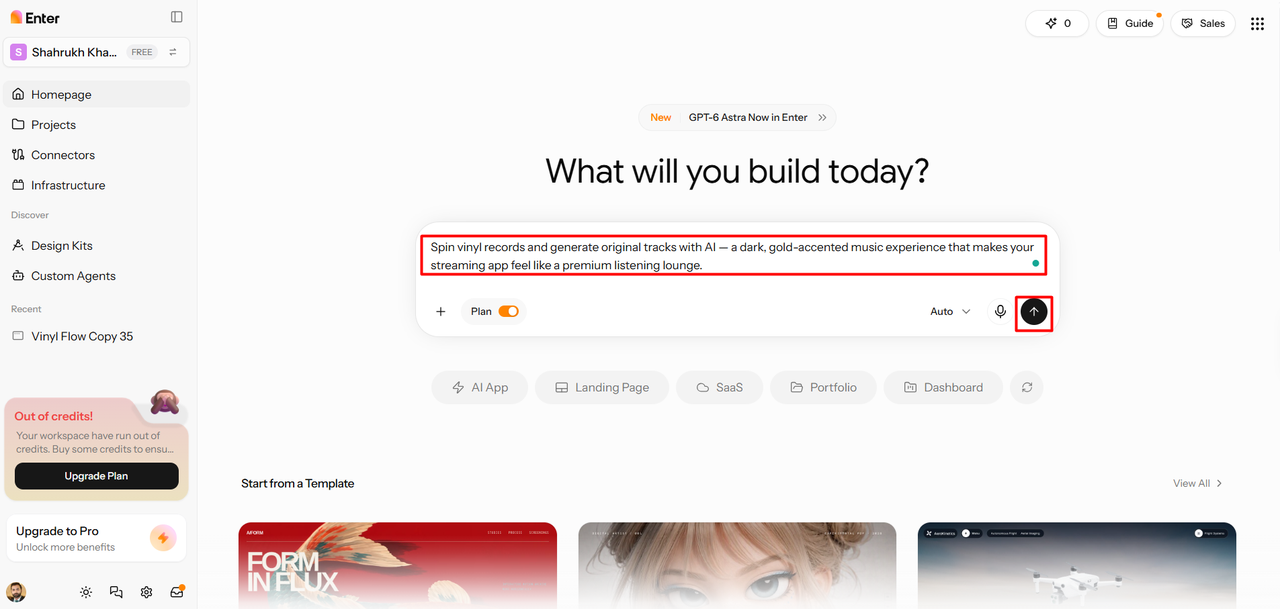
To use Enter Pro, I started by describing my app requirements in the provided dialogue box. I included the details regarding its purpose, desired features, layout, and functionality. After that, I clicked the "Generate" button to start building the app.
Step 2: Build the app
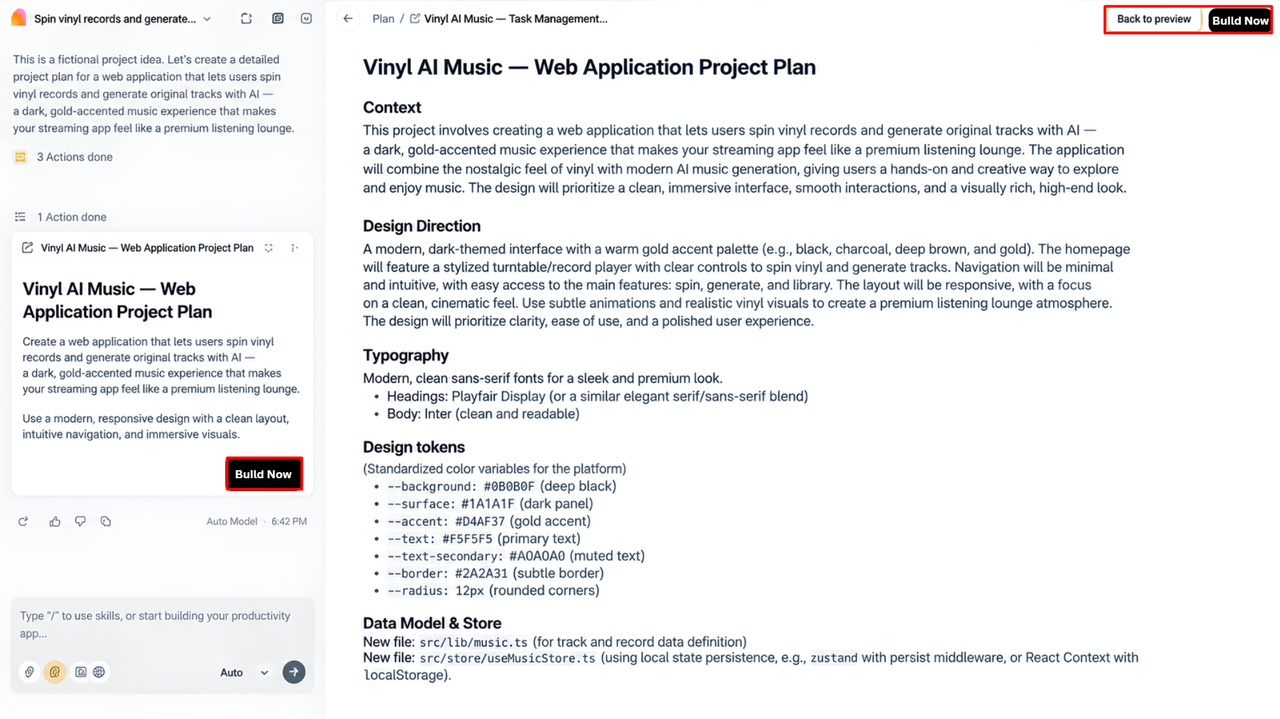
After I submitted my input, Enter Pro's AI started working and gave me a detailed description of the app. I was satisfied with the description, so I clicked on "Build Now" to create the AI-powered app.
Step 3: Publish the app
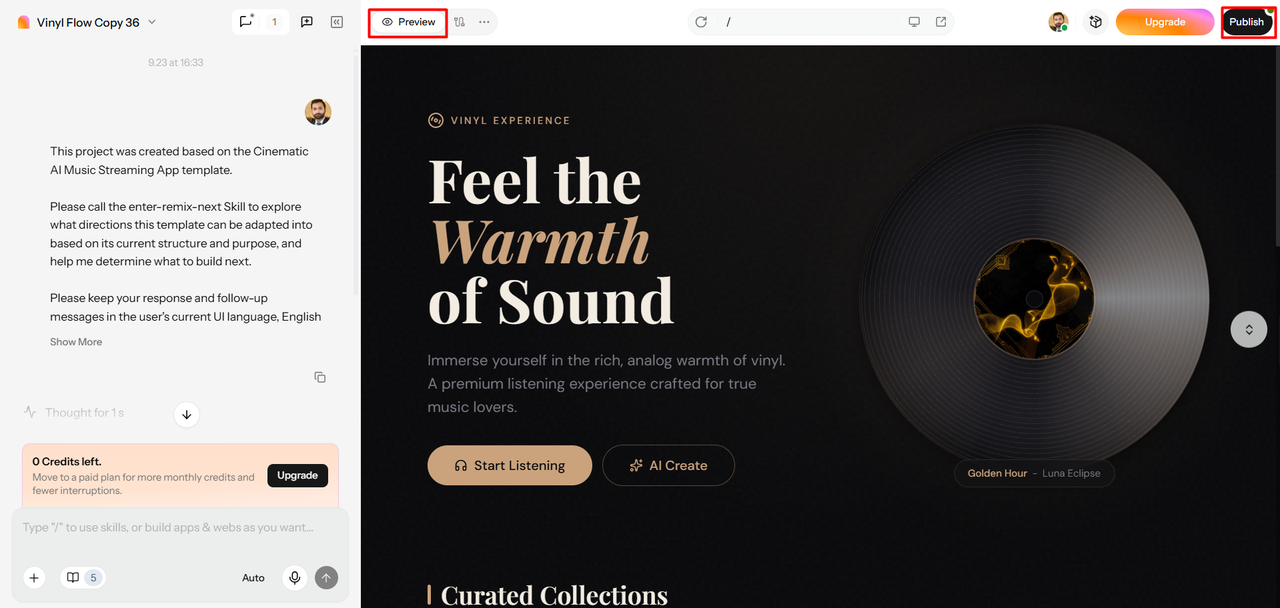
Once the application was ready, I customized it a bit using Enter Pro's editing tools. Next, I clicked the "Preview" option to see the app's final look. Finally, I clicked "Publish" in the top-right corner to make the app live.
v0.dev VS Enter Pro - Which tool reigns supreme?
Both v0.dev and Enter Pro are excellent tools that simplify AI development. However, they differ in their approaches, customization options, and development workflows. Comparing their key differences will help users decide which platform suits them best.
| Tool | v0.dev | Enter Pro |
|---|---|---|
| Ease of use | Easy | Easy |
| AI models | v0 Mini, v0 Pro, v0 Max, v0 Max Fast | GPT-5.4, GPT-5.4 Pro, GPT 5.6, Terra, Luna, Claude Sonnet 4.6, Claude Opus 4.6, Gemini 3 Pro, and other models |
| Code ownership | Not 100% | 100% code ownership |
| Customization options | Design Mode, full code editor, GitHub integration, prompt-based editing | Visual editor, AI code editor, prompt-based editing |
Choose v0.dev if ....
v0.dev suits users who want to build React-based applications instantly with AI-generated code, visual editing, and seamless Vercel deployment. It is especially suitable for developers who prefer working in the Next.js and React ecosystem.
Choose Enter Pro if ...
Enter Pro is ideal for users seeking to explore AI-powered app development with multiple AI models and prompt-based customization. It is a better fit for individuals looking for a flexible workflow for building websites and mobile-oriented applications.
Expert tips for high-quality front-end development
- Start with a clear, detailed prompt: Define your website's purpose, target audience, required features, layout, and visual style before generating code. Clear instructions help AI tools, like Enter Pro, understand your prompt better and produce specific, rather than generic, results.
- Keep the user experience at the center: Design intuitive navigation, readable content, and accessible interfaces, which make it easier for users to complete tasks. Tools like Enter Pro help you develop and adjust interfaces around users' needs.
- Use a consistent design system: Maintain consistent colors, typography, buttons, spacing, and components across all pages. When building apps, clearly specify your preferred design guidelines in text prompts to help maintain a cohesive look.
- Optimize for a responsive design: Ensure that your website adapts smoothly to mobile phones, tablets, and desktop screens. Use Enter Pro to generate responsive layouts, then preview and adjust them for different screen sizes.
- Test and refine the AI-generated code: Check the functionality, accessibility, loading speed, and browser compatibility before publishing your app or website. Review the final results and make any necessary adjustments.
Conclusion
In conclusion, v0.dev is a powerful tool for turning simple text prompts into web applications. Its quick generation, real-time preview, and customization options make it a great tool for AI-assisted development. My experiments showed that v0.dev generates web apps quickly and produces quite presentable results. However, it has some limitations, like its free plan being quite limited and not reproducing an entire UI interface exactly. Plus, its React-focused workflow is also a major limitation. So, if you are seeking broader app-building capabilities with native mobile app development, Enter Pro is worth exploring. Try Enter Pro and transform your ideas into functional apps that stand out.
FAQs about v0dev
Is v0.dev AI easy to use for beginners?
Yes, v0.dev is quite beginner-friendly because it allows users to simply describe their ideas in natural language. It decreases the need to write code manually, although some programming knowledge helps when debugging or customizing projects. Beginners can start with simple prompts and gradually build more complex applications.
Can I customize the projects created with v0.dev?
Yes, v0.dev lets users customize generated projects using prompts, code, and visual editing tools. You can adjust layouts, colors, components, and application functionality to meet your requirements. GitHub integration is a great plus, as it helps you to manage and maintain your project code.
How do I log in to v0.dev if I forgot my credentials?
Visit the official v0.dev website and choose the sign-in option. If you are using an email-based account, follow the available password recovery instructions. If you are signed in through Google and another provider, use that same method. If you still can't access your account, contact v0.dev's support team.
Which programming languages and frameworks does v0.dev support?
v0.dev mainly generates React-based applications utilizing technologies like Next.js, TypeScript, Tailwind CSS, and shadecn/ui. It also generates server-side functionality and integrates smoothly with the supported databases and services. Its primary focus is modern web development, not every programming language and framework.
How can I use v0.dev chat for writing effective prompts?
Begin by clearly describing your application's purpose, desired layout, target audience, and essential features. Include design preferences, colors, and interactive elements to guide the AI's output. Review the results carefully, then use follow-up prompts to correct errors and improve the design. This iterative approach also works perfectly with Enter Pro's AI.
Does v0.dev support mobile-responsive websites and apps?
Yes, v0.dev can generate responsive web interfaces, which adapt to tablets, mobile phones, and desktop screens. You can request mobile-friendly layouts and fine-tune them using prompts and visual editing. However, responsive websites differ from native Android or iOS applications, which may require additional development tools.
Can v0.dev be used for commercial purposes?
Yes, v0.dev can be utilized to build commercial websites and applications, subject to its current terms of service and applicable licensing requirements. Before launching a paid product, carefully review the third-party libraries, assets, and integrations used in your project. Also, check the platform's current pricing and usage limits before deciding.