

How to Debug Software Code in 7 Repeatable Steps
Learn how to debug software code with seven practical steps, logs, breakpoints, regression tests, and an Enter Pro cart example with a duplicate coupon bug.
A cart can compile successfully and still give away an extra $5. In this controlled exercise, the defect was deliberately requested: apply a coupon once, then make a quantity change deduct it again. The useful question is how you prove where the extra deduction happens.
The arithmetic makes the investigation concrete. A $54 cart becomes** $49** with one coupon. Add another** $24** item and the correct discounted total is** $73**. The buggy calculation produces** $68**. You can use that mismatch to trace the state transition instead of guessing which line looks suspicious.
When explaining how to debug software code, I start with a rule: preserve the failure before editing the program. Define the expected result, narrow the path, and test a cause. A patch becomes convincing when it explains the mismatch and survives the same sequence that exposed it.
Understand the Bug Before You Debug It
Separate the Symptom from the Root Cause
The symptom is what you can observe: a wrong total, a crash, an empty page, or a request that never finishes. The root cause is the violated assumption that produces it. In the cart example, the deduction grows when quantity changes even though the flat coupon amount should remain $5.
I would not begin by changing the currency formatter. It displays the result it receives. Follow the value backward through the summary component, total calculation, quantity action, and coupon state until you find the first divergence from the expected calculation.
This is a useful habit when debugging code you did not write. A stack trace or suspicious component name provides a starting point, not a verdict. The origin may sit earlier in the data flow, or outside the process that displays the failure.
Classify the Failure
A syntax error prevents code from running when its structure breaks the programming language’s rules.
A syntax error prevents parsing; a** runtime exception** interrupts execution; a** logic error** produces an incorrect result. Integration defects appear at boundaries between systems. Environment failures depend on configuration, permissions, or dependencies; concurrency defects depend on timing and shared state.
Our coupon defect is primarily a state and logic problem. Build tools can accept every file while the business calculation remains wrong. You should choose evidence that matches the class of failure rather than expecting one successful command to establish correctness.
Preserve Evidence and Assess Impact
Record the expected result, actual result, exact input, action sequence, and failing version. Add environment details, timestamps, request identifiers, logs, and recent changes when they matter. You want another person to reach the same failure without reconstructing your session from memory.
I distinguish investigation from containment. If a production defect is charging the wrong amount, first stop or restrict the affected path through an authorized mitigation. A disposable cart exercise allows experimentation; a live payment incident requires controlled changes and a clear owner.
How to Debug Software Code in 7 Repeatable Steps
The steps form a sequence, but you may loop between inspection and hypothesis testing. Each loop should reduce uncertainty. If you are repeatedly editing unrelated files, pause and ask which observation would most strongly separate the remaining explanations.
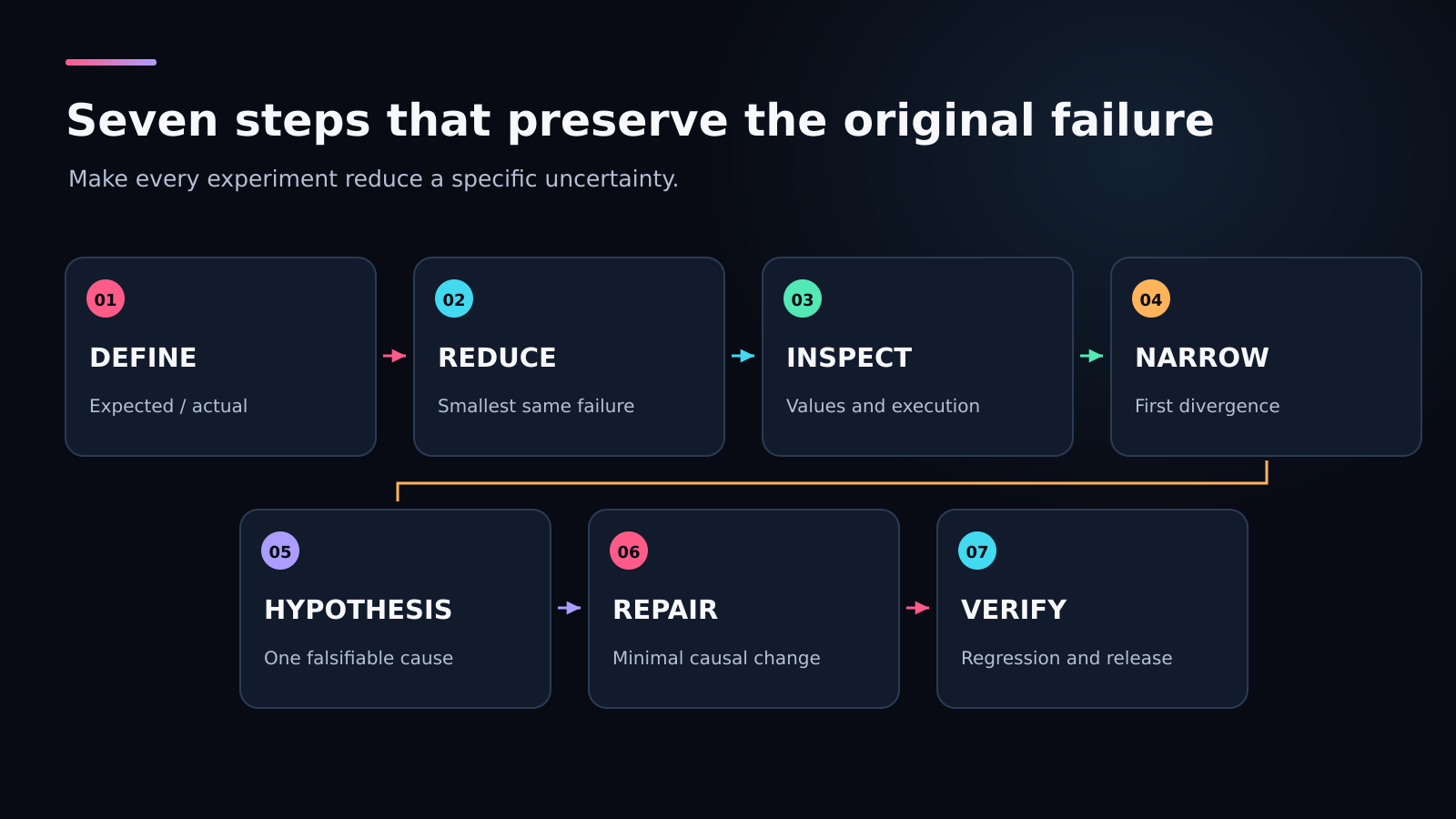
A repeatable investigation preserves the reproduction while reducing the number of plausible causes.
Step 1 — Define and Reproduce the Failure
Replace “the coupon is broken” with a sequence: load the cart, apply the $5 coupon, increase the $24 item’s quantity from one to two, then compare the total with $78 − $5 = $73. Include the starting quantities so the expected result is unambiguous.
| Action | Subtotal | Expected total | Buggy-build evidence |
|---|---|---|---|
| Initial cart, no coupon | $54 | $54 | $54 in plan / report |
| Apply the $5 coupon | $54 | $49 | $49 in preview |
| Increase kettle quantity to 2 | $78 | $73 | $68 in preview; $10 deduction |
The $49 and $68 amounts are visible in successive buggy-preview captures. The initial $54 is specified in the plan and build report; a later repaired, reset preview also shows $54. Screenshots preserve these states, while a recording or interaction test would verify the complete click sequence.
For an intermittent failure, record frequency and conditions rather than inventing a deterministic sequence. “Three failures in twenty attempts after reconnecting” is useful evidence if those attempts were recorded. “Sometimes broken” gives you little to compare.
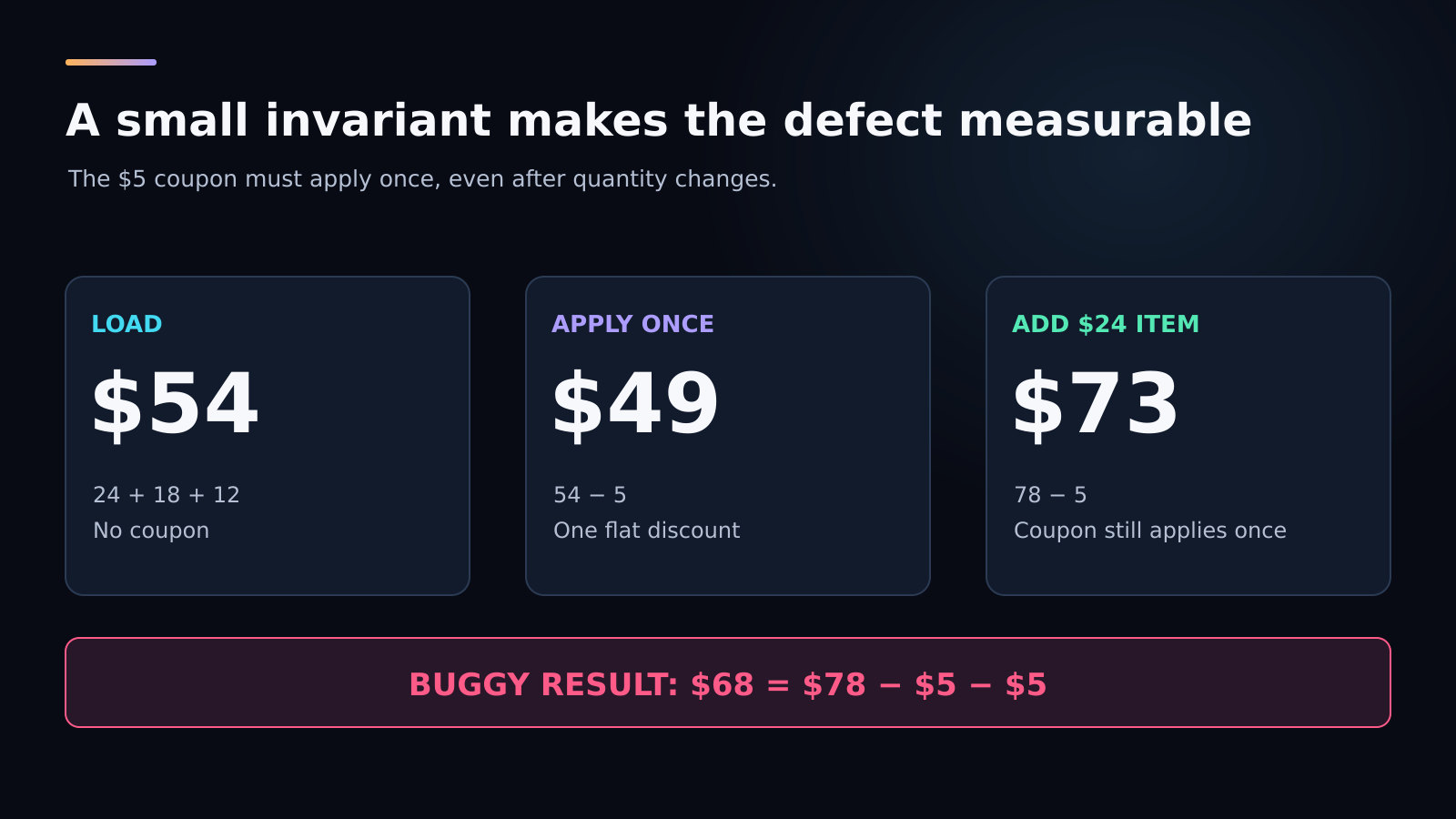
The expected values follow the demo’s prices. The buggy result subtracts the same $5 coupon a second time.
Step 2 — Reduce It to the Smallest Failing Case
Remove anything that does not affect the mismatch. Our arithmetic needs item prices and quantities, coupon state, and total calculation. Product images, search, shipping, and payment integration do not explain an extra flat deduction in this controlled exercise.
I keep the important transition intact while reducing the surrounding code. A minimal example that removes the quantity action may also remove the bug. You need a smaller reproduction of the same failure, not a different program that happens to work.
Document what you removed and confirm the symptom still occurs. That confirmation protects you from drawing conclusions about a test that no longer exercises the original path. For a data-dependent bug, reduce the input set without changing the value that triggers it.
Step 3 — Inspect Errors, Logs, Stack Frames, and State
Read the first relevant failure before the later cascade. Inspect actual values at the boundary: item quantities, subtotal, coupon amount, and displayed total before and after the change. The important question is whether the discount is applied twice, not whether the interface renders a particular label.
VS Code debugging tools expose variables, watch expressions, stack frames, and execution controls. Use a breakpoint where the total is assigned, then inspect the callers and current values. I watch the same value through successive writes rather than stopping at the first plausible one.
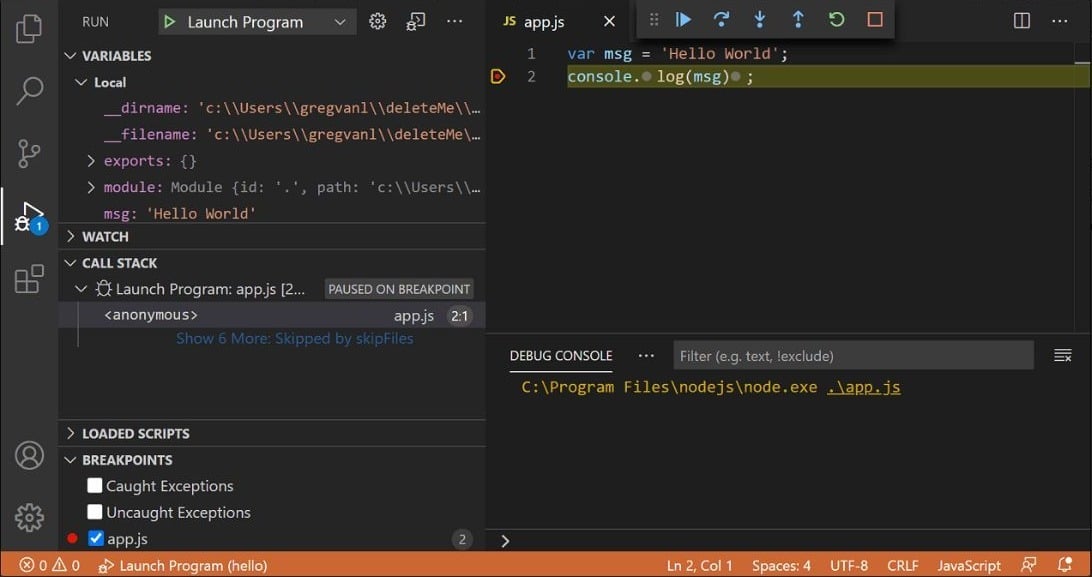
A real debugger interface captured from VS Code’s documentation. The panel shows several kinds of evidence together.
A logic defect may have no exception at all. You can temporarily record the inputs and computed result, or pause just before the wrong assignment. Keep observations narrow enough to interpret; a console full of entire objects often buries the transition you need.
Step 4 — Narrow the Search Space
Split the suspected path into useful boundaries. Is the item state wrong, is the subtotal wrong, or does the displayed total become wrong afterward? If the subtotal is $78 but the display is** $68**, you can stop investigating the multiplication and inspect discount application.
For a regression, git bisect searches between a known good and bad revision. In an ideal binary search, 1,024 candidates shrink to one in 10 halving rounds. Real investigations also need trustworthy endpoints, reproducible builds, and a reliable good-or-bad check.
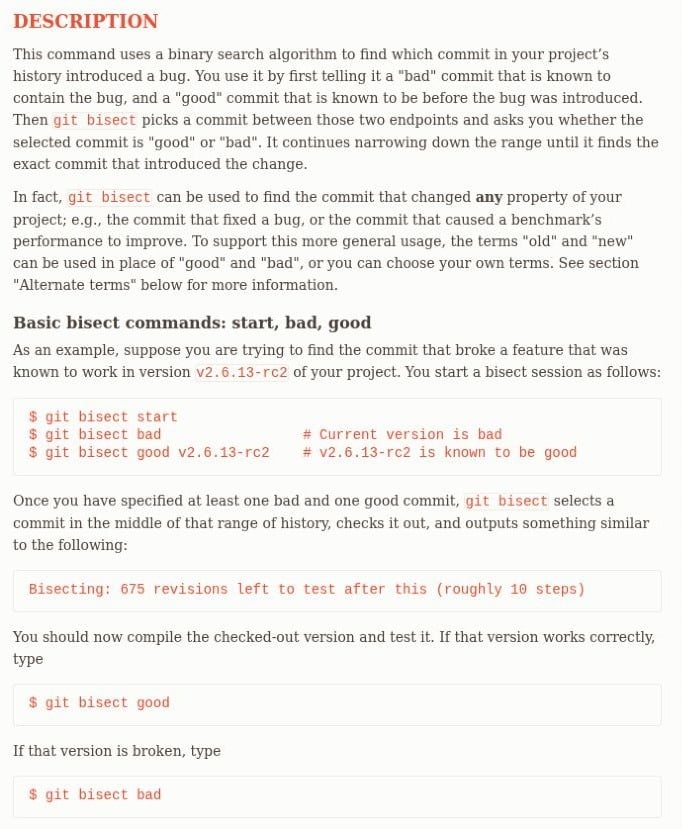
Bisect finds the change associated with a regression; it does not explain the underlying cause by itself.
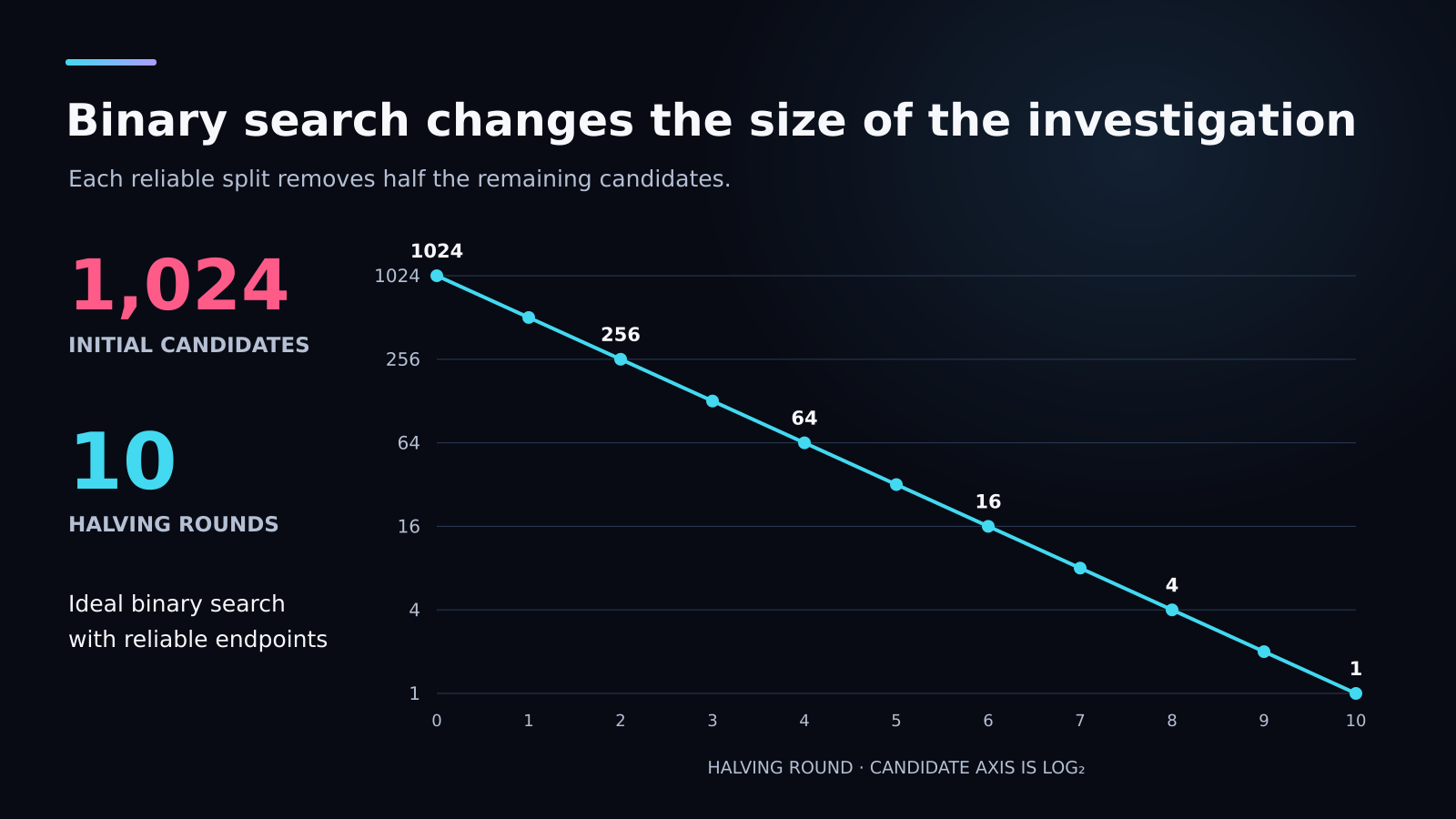
The graphic illustrates an ideal search. Broken builds, skipped revisions, or multiple unrelated failures can complicate an actual run.
I would run a bisect in a clean worktree or disposable branch, preserving any uncommitted work first. Mark a revision bad only when the same reproduction fails. An unrelated dependency installation problem is not evidence that the coupon calculation is defective.
Step 5 — Test One Hypothesis at a Time
Make the hypothesis falsifiable: “The quantity action adds another $5 to the stored coupon deduction.” If that is true, the deduction should rise from $5 to $10 after the first quantity change while the coupon remains active. Removing that accumulation should restore exactly one flat discount.
Do not combine a calculation change with a component rewrite, dependency update, and new coupon rule. I want the result of one experiment to distinguish one explanation. A passing result after four unrelated edits leaves the cause uncertain.
If the hypothesis fails, record why and choose the next one from the evidence. Repeating the same unsupported explanation with slightly different prompts is not a new experiment. You should be able to say what changed in your understanding after each attempt.
Step 6 — Fix the Root Cause
The state model points to a focused repair: derive the flat deduction from coupon state instead of accumulating it during quantity changes. This follows React’s guidance on avoiding redundant state. If a value can be calculated from current inputs, a separate stored copy can drift out of agreement.
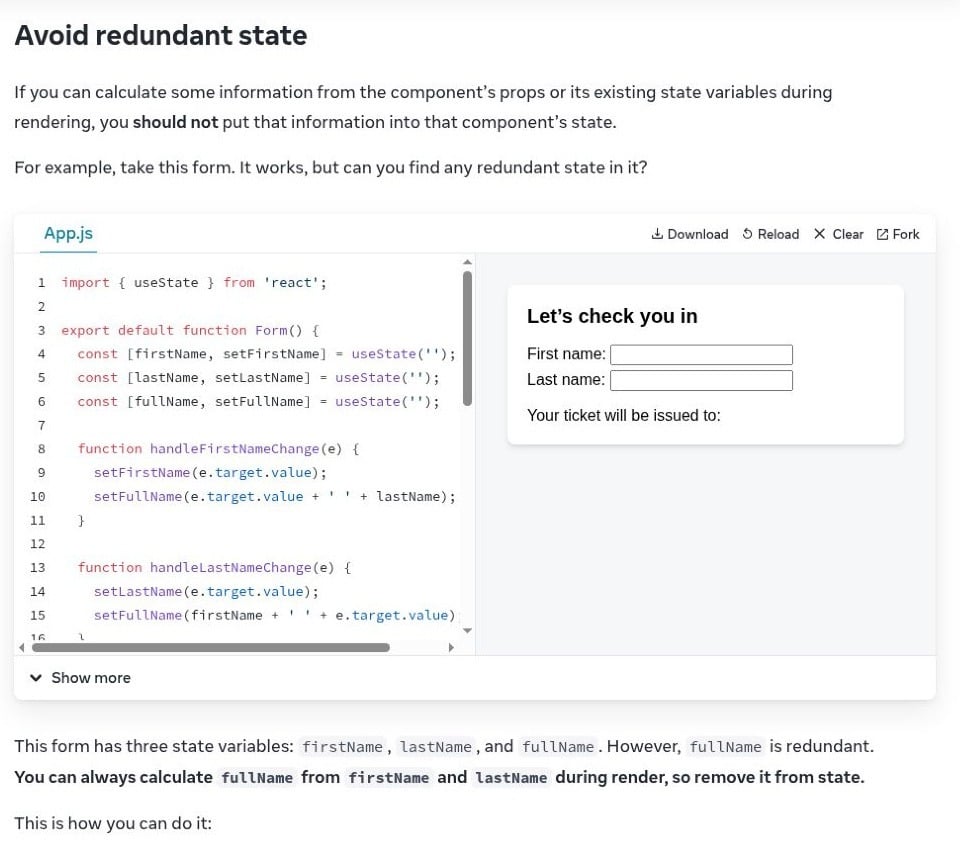
The documentation’s example uses names; the same principle applies to a cart total derived from items and coupon state.
A simplified repair pattern derives the discount from the current coupon state:
const subtotal = getSubtotal(state.quantities);
const couponDeduction = state.couponApplied ? COUPON_VALUE : 0;
const total = subtotal - couponDeduction;
I prefer this repair because a quantity change no longer accumulates discount history. You still need clear business rules: whether the coupon is flat or proportional, whether it can exceed the subtotal, and how currency is represented. A production calculation normally uses integer minor units or another deliberate monetary representation.
A quantity change should alter item state and subtotal while the flat coupon remains $5. Inspect the actual project diff to confirm that the accumulating deduction was removed.
Step 7 — Verify, Document, and Monitor the Fix
Repeat the original sequence, then test nearby cases: decrease quantity, remove the coupon, apply it again, and remove an item. Preserve the failure as a regression test. A check that merely mounts the cart does not protect the quantity-change transition.
| Regression case | Expected condition |
|---|---|
| Coupon applied to the initial cart | $49 total |
| Quantity increased with coupon active | $73 total |
| Quantity returned to its initial value | $49 total |
| Apply an already active coupon | One discount, not two |
| Remove the coupon | Total equals the current subtotal |
You should also review the surrounding rules that the patch touches. If totals are sent to a server or payment provider, verify agreement at that boundary. I would record the cause, changed files, test results, and release or rollback status before closing a production issue.
Match the Debugging Method to the Bug Type
Knowing how to debug software code includes knowing which tool can expose the missing evidence. A breakpoint is excellent for local state; it is less useful for a failure that occurred yesterday across three services. Choose the method by the boundary you need to inspect.
| Bug type | First question | Useful evidence |
|---|---|---|
| Exception | Which input reached the first relevant failing frame? | Stack trace and paused variables |
| Wrong output | Where does the value first diverge? | Intermediate values and assertions |
| Regression | What changed after the last known good version? | Version diff and bisect |
| Slow operation | Which phase consumes the time? | Profile, timings, and traces |
| Intermittent failure | Which state or timing conditions coincide? | Correlated events and identifiers |
| Environment-only failure | What differs between environments? | Configuration, versions, permissions, and data |
| UI defect | Did the event, response, state, or rendering fail? | Browser tools and component tests |
Use Breakpoints and Stepping for Live State
A line breakpoint pauses at a location; a conditional breakpoint pauses only when its condition is true. Chrome’s breakpoint documentation also covers event, DOM, request, and exception breakpoints. You can choose the trigger closest to the symptom.
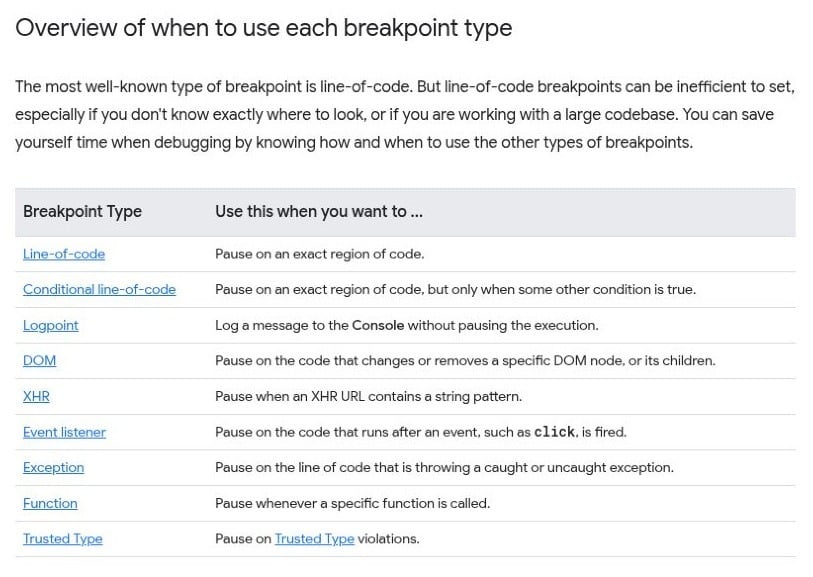
The official overview maps different symptoms to different pause conditions.
Step over to inspect a call’s result, step into when you need its implementation, and step out after checking the current function. I use watch expressions for a small set of relevant values. Watching everything can be almost as distracting as logging everything.
The JavaScript debugger statement can request a pause when debugging facilities are available. Remove temporary debugging statements before release. If deployed code is bundled or transpiled, inspect source-map configuration so the displayed source corresponds to the code running.
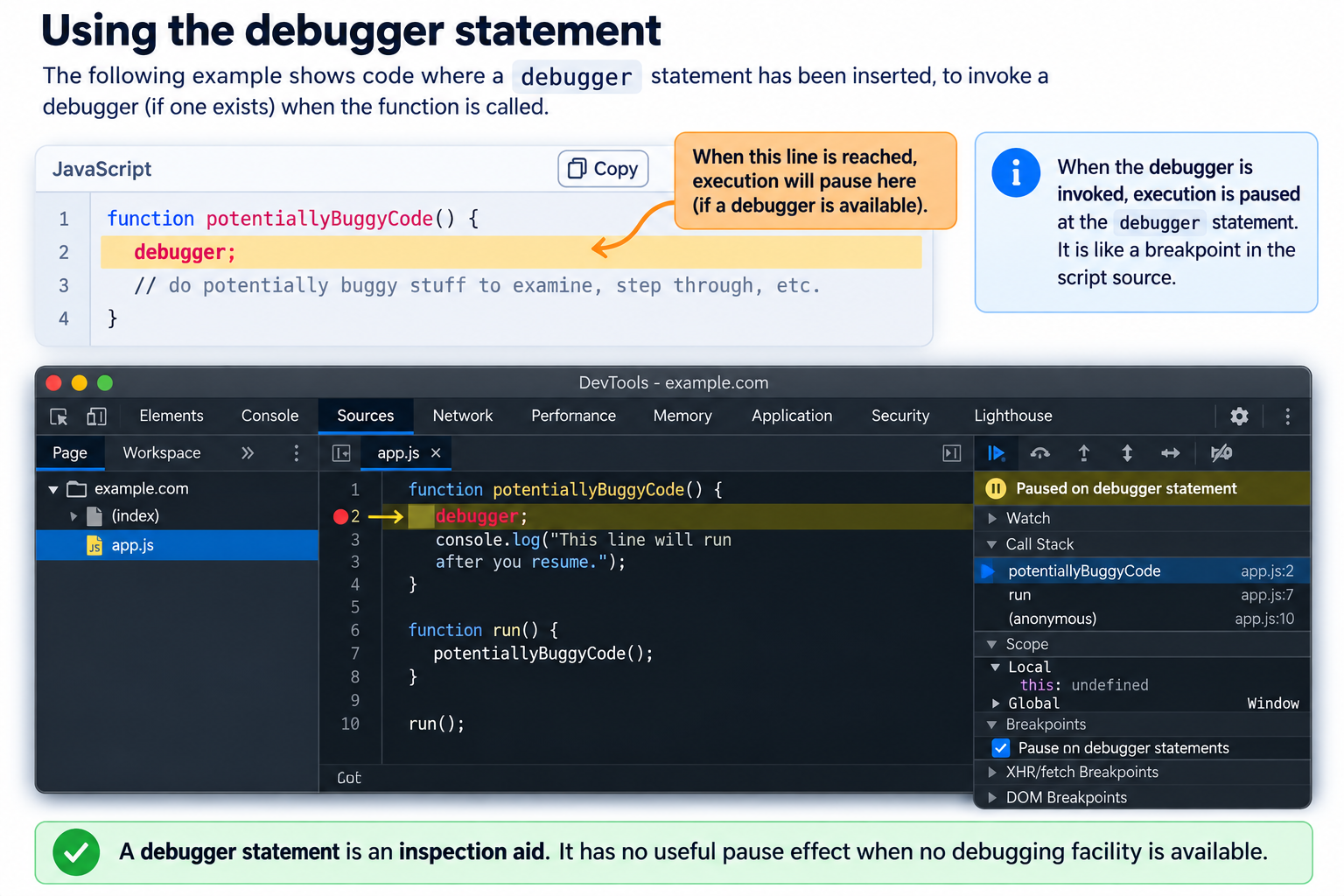
A debugger statement is an inspection aid. It has no useful pause effect when no debugging facility is available.
Use Logs, Tracing, and Profiling for Distributed Evidence
Structured logs record events with consistent fields; tracing follows work across boundaries; profiling examines where time or resources are spent. A request identifier lets you connect related events without guessing from neighboring timestamps. Do not log credentials, payment secrets, or unnecessary personal data.
For the cart, useful diagnostic fields might be quantity, subtotal, coupon state, calculation reason, and resulting total. For a remote order flow, you also need the server’s accepted amount and outcome. I avoid claiming that a frontend value establishes what a separate service actually processed.
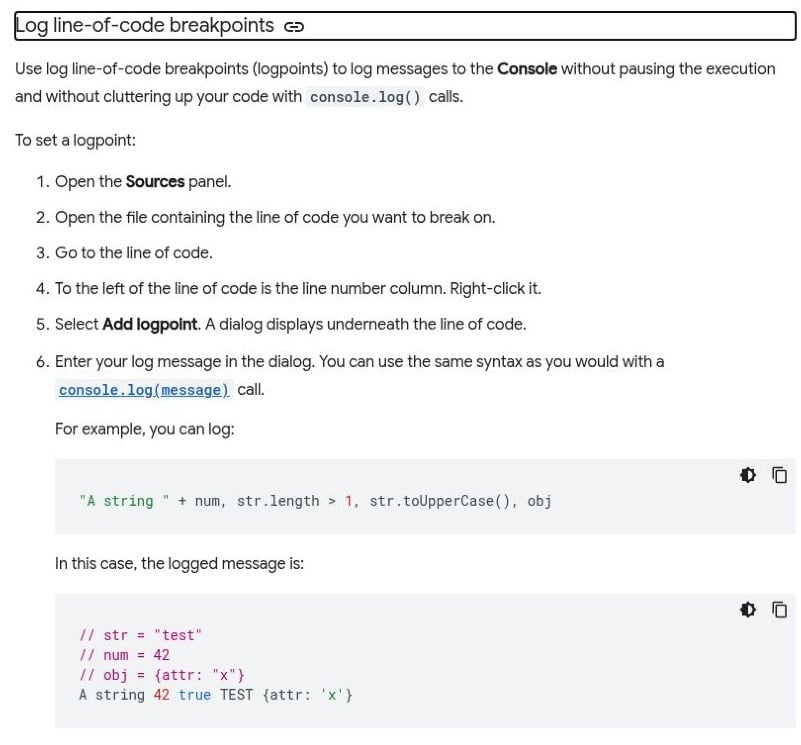
Logpoints can record a value without editing the source or pausing the application.
Use Tests, Assertions, and Binary Search to Isolate the Cause
An assertion turns an assumption into a check. A unit test can verify a pure total function; an interaction test can exercise coupon application followed by a quantity change. You need both when the calculation and the event sequence can fail independently.
I choose the smallest test that preserves the defect, then add a broader check where the failure crosses a boundary. That keeps the test informative. A large end-to-end failure may tell you the order is wrong while leaving the faulty layer unclear.
Debug AI-Generated Code Without Trusting the Patch
Review the Generated Change Before Running It
Code debugging AI can help organize hypotheses and inspect unfamiliar code, but plausible explanations are not execution evidence. Review affected files, commands, dependencies, external calls, and data mutations. You should understand the patch’s scope before accepting it.
I separate type-checking, building, test execution, and observed behavior. They answer different questions. A reducer test can pass while a button handler remains broken, so keep the test scope explicit when debugging AI generated code in your own projects.
Give the Model Evidence Instead of Asking for a Rewrite
Provide the smallest relevant code, exact mismatch, reproduction, environment, and invariant. For this cart, the invariant is “the flat $5 coupon is applied once regardless of quantity changes.” Ask for a ranked explanation and the smallest change that can test it.
A focused request could be: “Trace how couponDeduction changes after SET_QUANTITY. Explain why the $78 subtotal becomes $68. Propose a minimal patch that keeps the flat coupon at $5, and add a test for applying the coupon before changing quantity.” You give the model something it can reason about and something you can verify.
Inspect the Diff and Verify Independently
Read the proposed difference before accepting a reassuring summary. Did the repair remove the accumulating deduction in the quantity action, or merely hide its consequence in the display? Did it change the coupon amount, introduce a package, or alter an unrelated component?
I want tests that fail against the defect and pass against the repair, with the commands and output retained. You should rerun the original reproduction too. A generated test can assert the wrong expectation as confidently as generated application code can calculate the wrong total.
Debug an Enter Pro App from Preview to Code
The Coupon Debugging Demo shows how to debug software code in one controlled Enter Pro project. Six captures follow the prompt, plan, buggy preview, repair request, and repaired preview. The defect was deliberately seeded for this exercise.
Set One Rule Before Building
The prompt fixes the prices at $24, $18, and $12, starts each quantity at one, and excludes shipping and tax. The rule is simple: an active coupon deducts exactly $5. It requests the buggy version first so the failure can be preserved before repair.
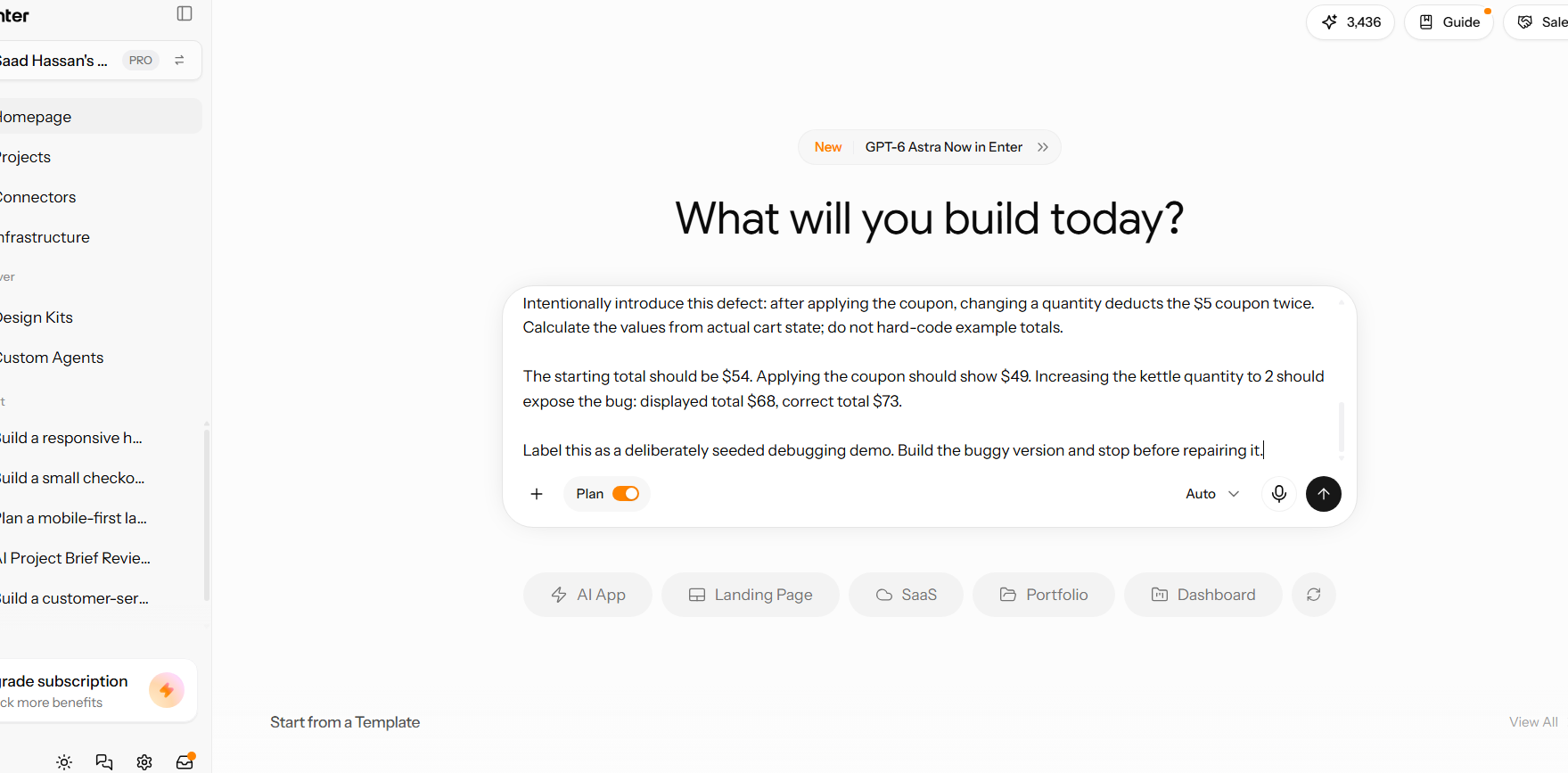
Enter Pro build prompt: deliberately seed a second $5 deduction after a quantity change.
The plan predicts $54 initially, $49 after coupon application, and a $68 displayed total against the correct $73 after increasing the kettle quantity. A plan records intended behavior; the preview provides the next evidence.
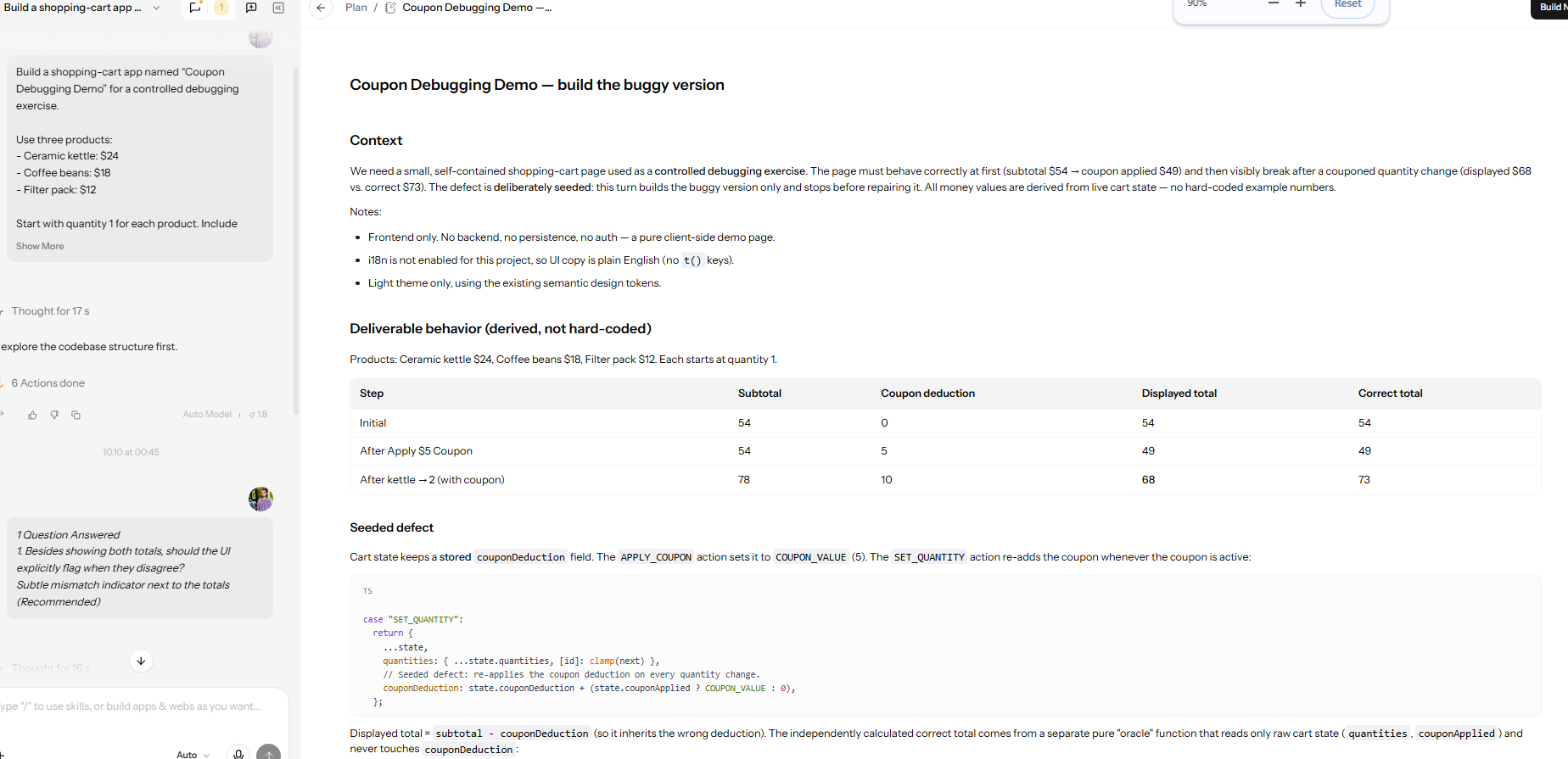
The project plan records the prices, expected totals, and planned quantity-action defect.
Capture the Failure in Preview
With all quantities at one and the coupon active, the preview shows subtotal $54, deduction $5, and both totals at $49. Increasing the kettle quantity to two raises the subtotal to $78, but the deduction becomes $10. The displayed $68 and independently calculated $73 expose the mismatch.
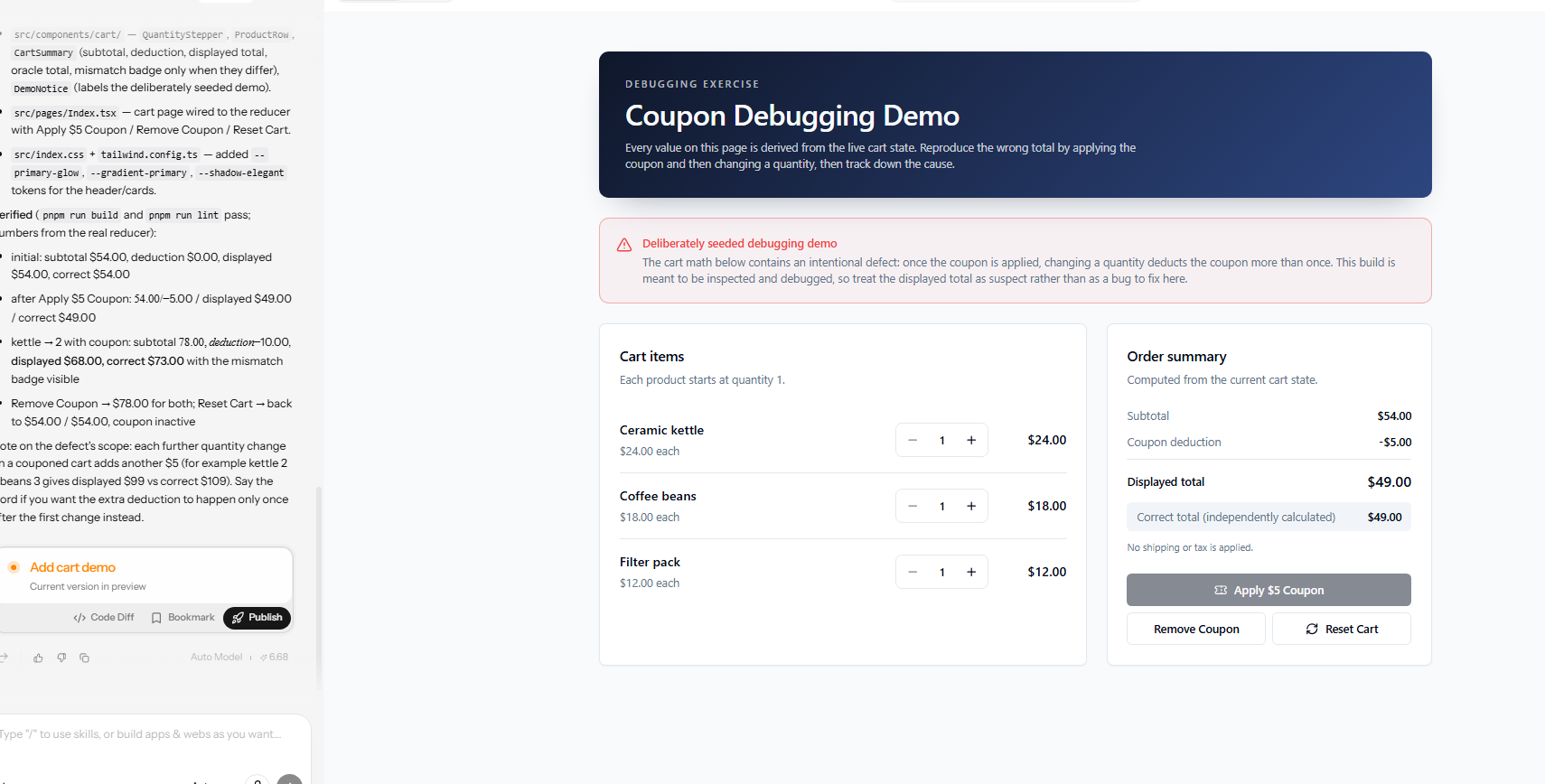
Before the quantity change: subtotal $54, coupon deduction $5, displayed and correct totals $49.
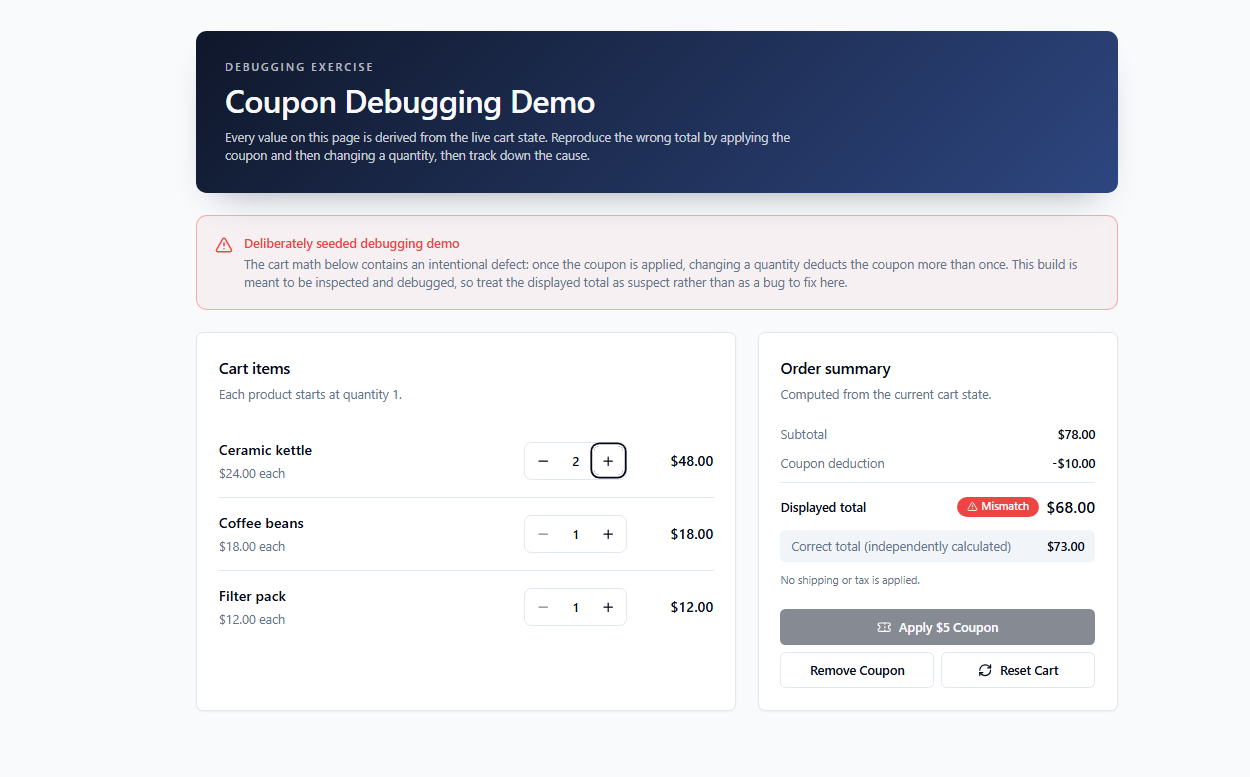
After increasing kettle quantity to two: subtotal $78, deduction $10, displayed $68, correct $73.
The visible plan stores couponDeduction. APPLY_COUPON sets it to $5; SET_QUANTITY adds another $5 when the coupon is active. That planned state path matches the observed deduction increase. Inspect the corresponding reducer code before patching it.
Request a Focused Repair
The repair request keeps the project, products, and coupon rule. It asks for a regression test that fails before the patch and passes afterward, the actual changed filenames and diff, exact commands, and any checks that could not run. This gives the agent a specific invariant to protect.
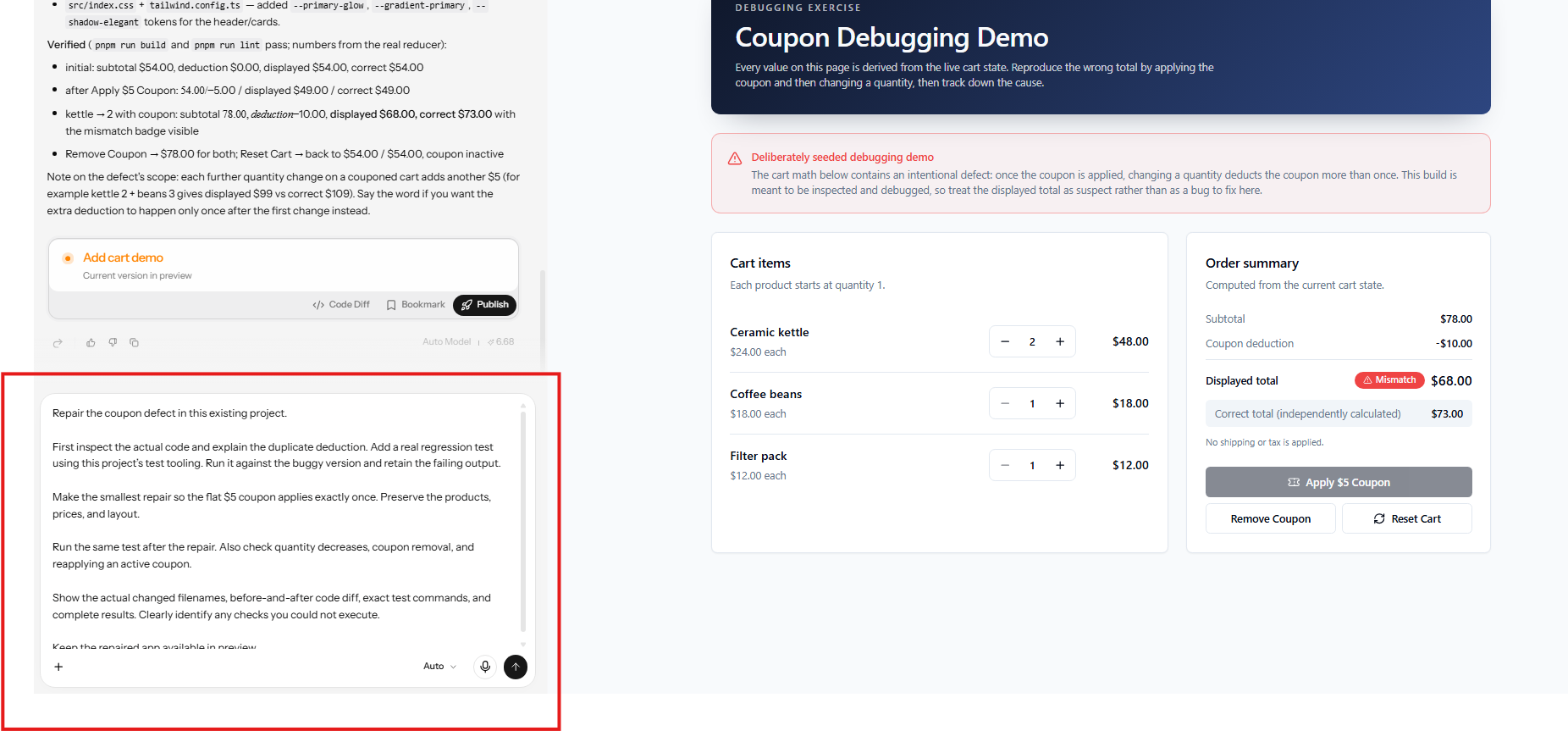
The repair prompt asks for a minimal change and real regression evidence while the 68/73 failure remains visible.
Verify the Repair at the Right Level
The final capture labels the coupon defect repaired and says the deduction is now derived from coupon state. Its preview is reset: each quantity is one, the coupon is inactive, and both totals are $54. This captures the repaired baseline; it does not show the repaired quantity-change total of $73.
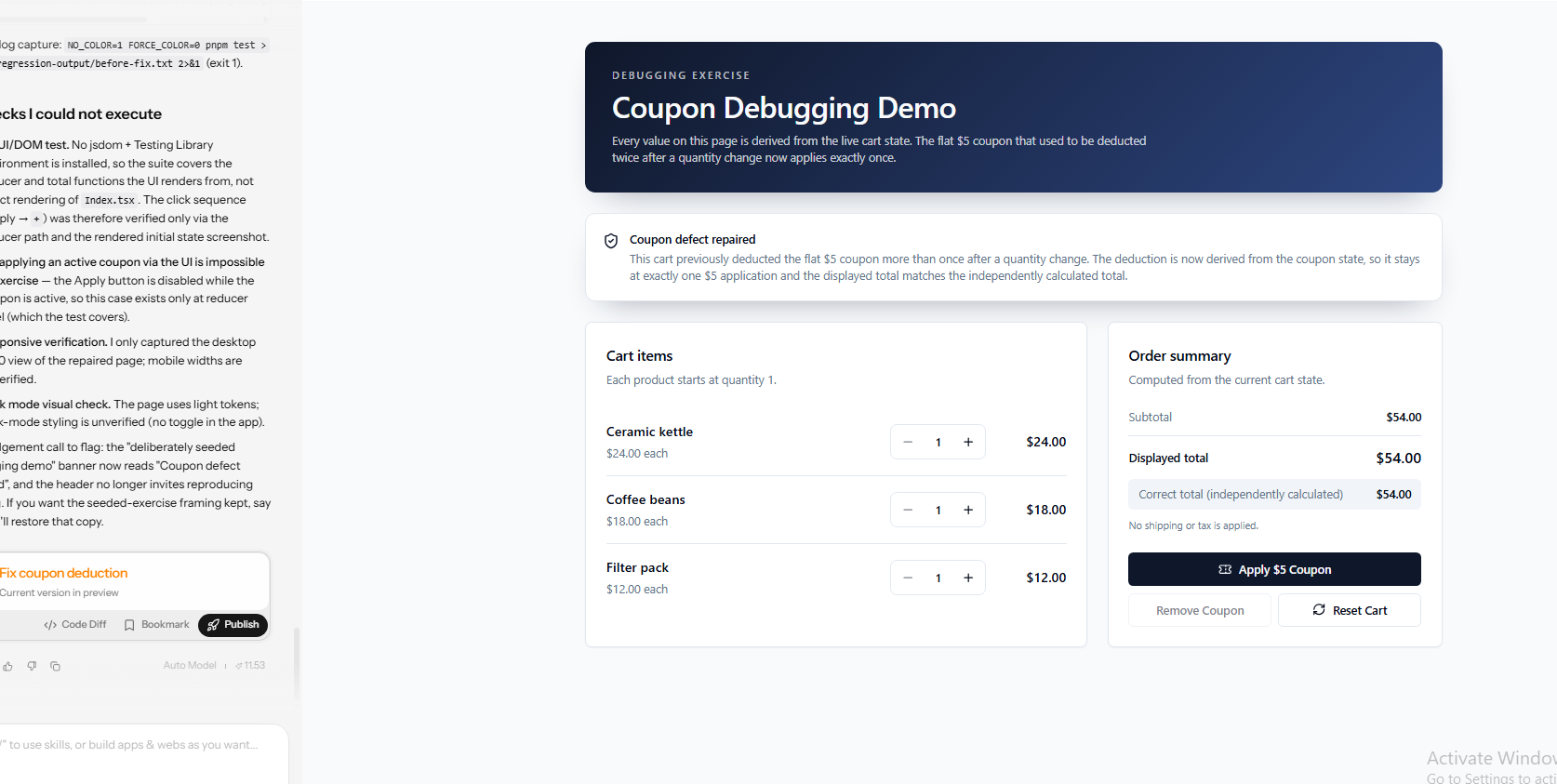
Repaired preview at reset state: both totals $54. The report separately identifies unexecuted UI checks.
The report cites a before-fix npm test log capture with exit code 1. The screenshot does not display the complete raw failing and passing runs or the actual diff. It also states that tests cover the reducer and total functions, with no jsdom and Testing Library environment for UI/DOM testing.
The Apply button is disabled while the coupon is active, so reapplication is a reducer-level check. Mobile widths and dark styling are also marked unverified. To finish verification, reset the repaired cart and repeat $54 → $49 → $73 twice, then check decreases and coupon removal. Retain the diff and complete regression output.
Escalate the Bug and Close It with Evidence
Escalate When Risk Exceeds the Value of Another Experiment
Escalate when the defect involves payments, data loss, security exposure, unsafe behavior, or a system you cannot inspect. You may still gather non-invasive evidence, but the owner needs to decide on containment and release. I would not test a speculative coupon patch against real customers’ transactions.
Transfer a Reproducible Evidence Package
A handoff should include the failing version, reproduction, expected and actual result, relevant logs, tested hypotheses, and current mitigation. Add request identifiers and timing when the failure crosses services. You are transferring the investigation state, not simply assigning a vague complaint.
Complete the Code-Debugging Checklist
Before closure, confirm the cause, focused diff, original reproduction, regression protection, adjacent paths, and deployment status. Remove temporary diagnostics or make them safe and intentional. I also record any check that remains unresolved so a future reviewer does not mistake silence for a pass.
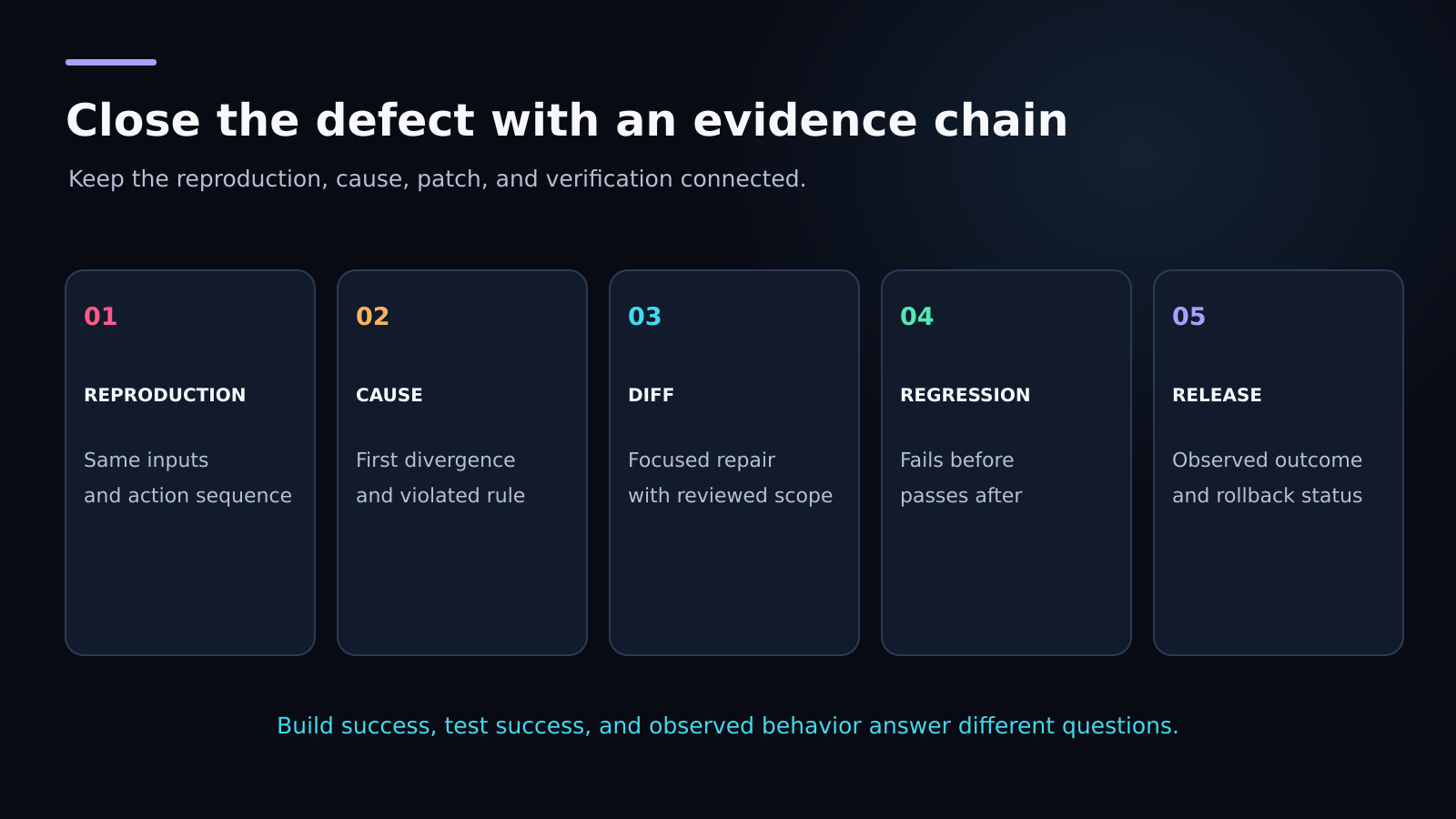
Closure connects the cause and repair to retained evidence. A passing build covers only one part of it.
Final Thoughts: How to Debug Software Code Reliably
You do not need a dramatic rewrite to debug code effectively. You need a precise mismatch, a preserved reproduction, and evidence that narrows the cause. In the cart exercise, the decisive clue is the deduction rising from $5 to $10 when a quantity changes.
My preferred process for debugging AI generated code is to inspect first, change one relevant thing, and verify the original transition afterward. The Enter Pro demo makes the arithmetic and state change visible, while its repair report distinguishes calculation checks from unexecuted UI checks. Keep the diff, regression output, and repeated preview results together so the next person can assess the repair.
Try the workflow in Enter Pro: preserve a failing case, request a focused repair, and review the evidence before accepting it.
Frequently Asked Questions
What Is the First Thing to Do When Code Fails?
Write down the expected and actual behavior, preserve the failing input, and establish a reproduction. If the defect is causing live harm, containment may need to happen before further investigation.
How Do I Debug Code That Fails Only Sometimes?
Record state transitions, timing, retries, and identifiers across repeated attempts. Compare failing and successful runs under similar conditions. One successful rerun does not show that an intermittent cause has disappeared.
Should I Use Print Statements or a Debugger?
Use a debugger when you need live control flow and local values. Use logs for remote, historical, or timing-sensitive evidence. Temporary print statements are useful when they answer a specific question and are cleaned up afterward.
Can AI Debug Code for Me?
Code debugging AI can suggest causes, inspect relevant code, and propose tests or patches. You still need to review the change and verify the result. Treat generated explanations and reported checks according to the evidence available.
How Do I Debug Code Without Making the Bug Worse?
Preserve the original state, work in an isolated environment, and change one relevant variable at a time. Keep a rollback route for production changes and avoid diagnostic actions that mutate real customer data.
Why Does a Bug Return After It Was Fixed?
The patch may have hidden the symptom, missed another path, or failed to preserve the case in a regression test. Compare the new failure with the original evidence before assuming it has the same cause.
How Can I Use Enter Pro for Debugging Code?
Keep the failing preview and repair in one project. Give Enter Pro the action sequence, expected and actual totals, and the rule the patch must preserve. Ask it to inspect the calculation, make a focused change, and retain regression evidence. Review the actual diff and repeat the sequence yourself.
What Should I Verify After Enter Pro Repairs a Bug?
Repeat the original failure and nearby paths, then inspect the complete test results. In this demo, the repaired preview must show $73 after applying the coupon and increasing kettle quantity to two. The $54 reset screenshot alone cannot establish that. Treat reducer tests, UI interaction tests, and build checks as separate evidence.