Best AI Cartoon Video Maker

Create engaging content with our AI cartoon video maker. Framia Pro lets you generate cartoon videos quickly with custom voices and dynamic characters.

Start for Free

Preparing editor…

What is an AI cartoon video maker?

An AI cartoon video maker turns a written prompt into a finished animated scene, building the characters, backgrounds, and voiceover from that one description. It covers styles from 2D vector to 3D, so the same idea can come out as a kids' story or a corporate explainer depending on the prompt. The AI cartoon video maker on Framia Pro also adds lip-synced voiceovers in multiple languages.

Captivating videos that you can create with our cartoon movie creator

Explore these diverse prompt examples to kickstart your creative cartoon animation journey.

Educational Kids Story

Prompt: Create a cartoon video about a brave little fox exploring the solar system and meeting friendly planets. Use a colorful, 2D vector style with a cheerful female voiceover.

Explainer Video

Prompt: Generate an animated 12-second educational video showing an enthusiastic AI biology teacher explaining the DNA double helix beside a chalkboard. Use a clean academic animation style with a friendly male voice, natural gestures, clear lip-sync, and soft classroom background music.

Social Media Cartoon Drama

Prompt: A lemon patriarch furiously scolds a strawberry lady in a lavish ballroom while an elegant peach lady in a pink ball gown mocks her arrogantly. The strawberry lady remains calm, then opens her large brown eyes and smiles confidently as pink petals float around her. Suddenly, she appears in a grand hall surrounded by pineapple bodyguards in black suits, revealing her golden limitless CEO card. She confidently throws the golden card toward the camera as it spins through the air and slides across the reflective marble floor while her bodyguards advance. The lemon patriarch gasps, drops his cane, and trembles in shock as the peach lady dramatically faints backward upon realizing the strawberry lady's powerful status, cinematic lighting, expressive characters, high-quality 3D animation.

Historical Documentary Short

Prompt: Produce an educational cartoon detailing the construction of the Great Wall of China. Use a watercolor animation style to showcase the historical significance.

Product Launch Teaser

Prompt: Design an energetic cartoon teaser for a new energy drink. Feature a tired athlete transforming into a superhero after taking a sip. Use vibrant neon colors and a comic-book style approach.

Customer Service Training

Prompt: Create a cartoon scenario showing a retail employee successfully handling a difficult customer complaint using empathy. Use hand-drawn cartoon style, soft office background noise, and clear conversational voiceovers.

Transform ideas into cartoons with Framia Pro's cartoon video maker

Discover how Framia Pro helps you create engaging cartoon videos effortlessly and in record time.

Generate animations from simple text

Transform your basic text prompts into high-quality animated scenes instantly. Bypass complex software learning curves and let our intelligent engine build your entire storyboard, complete with dynamic characters and vibrant backgrounds, all ready to captivate your target audience.

Add realistic AI voiceovers easily

Apply human-like voiceovers to your characters with just a single click. Choose from multiple languages and diverse accents to give your animated stories genuine emotion and perfect lip-syncing without ever needing to hire expensive professional voice actors.

Build entire scenes in minutes

Accelerate production by leveraging the latest AI video generation models like Seedream, Veo, and Kling. Generate complete sequences rapidly from text prompts, or seamlessly use cartoon images to create cartoon videos, allowing our powerful system to handle heavy lifting.

Customize with diverse visual styles

Select from a wide array of stunning artistic designs for your projects. Tailor the look and feel of your animations to perfectly match your brand identity or personal vision, ensuring every video remains uniquely yours and visually striking.

How to create a cartoon video for free with Framia Pro?

Step 1: Open Framia Pro's "Agent"
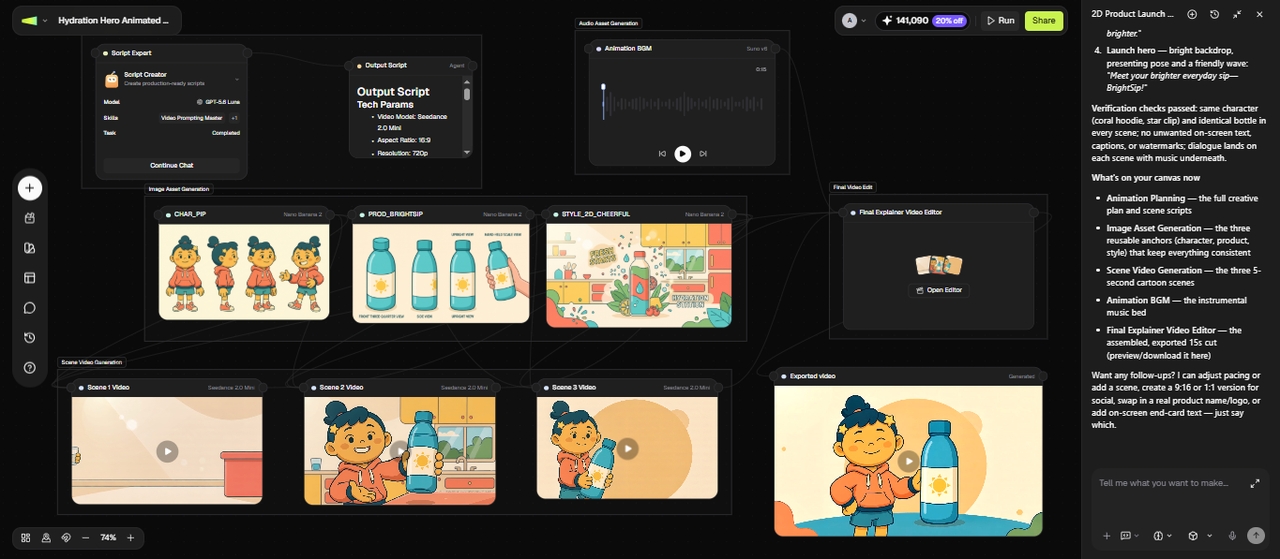
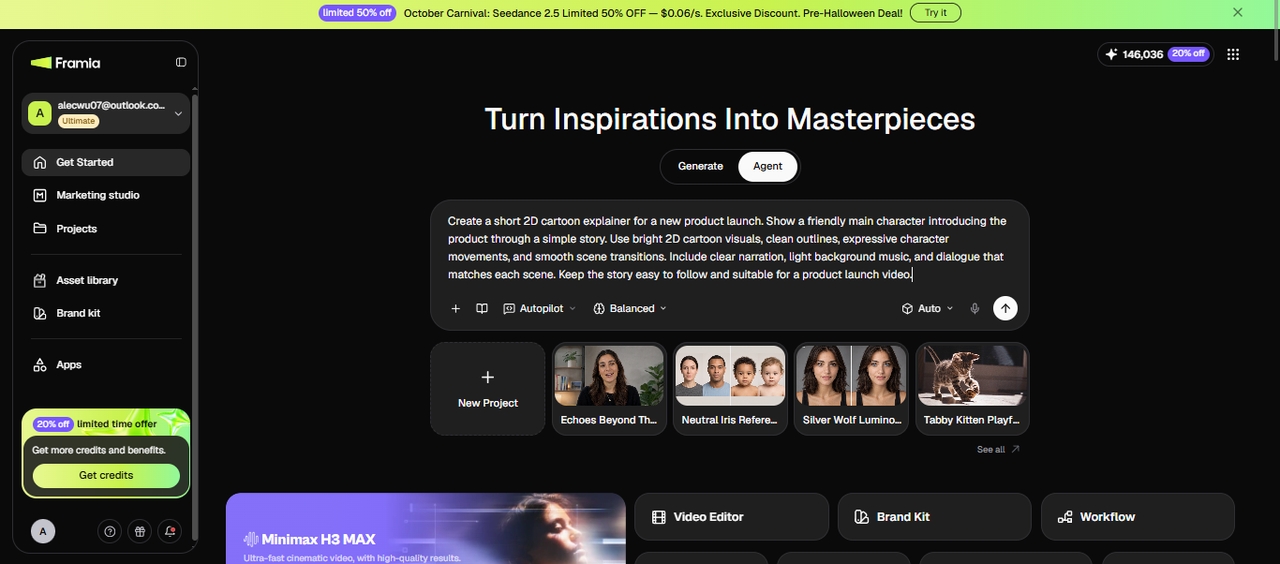
Say you're making a 2D cartoon explainer for a product launch. You open Agent Mode from the dashboard, type your idea (the story, characters, and cartoon style), and add any reference images if you have a character sketch or brand asset. Pick a model and press Enter, and Framia Pro breaks the idea into connected nodes for the script, shots, and audio.
Step 1: Open Framia Pro's "Agent"
Step 2: Adjust the nodes
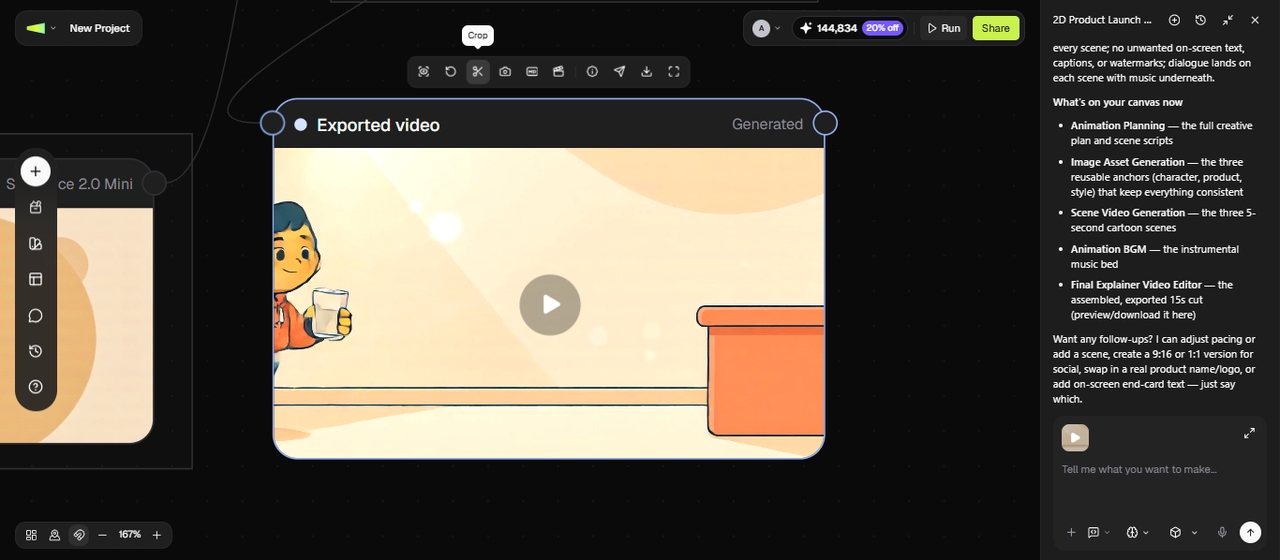
From there, you review the generated nodes and adjust anything that's off: swap a shot, tweak a line of dialogue, or bring in a specialized Skills agent if the scene needs a specific style, like Shorts for a quick social cut. You can run one node to test a single shot or run the full sequence to generate the whole video, then regenerate only the parts that need changes instead of starting over.
Step 2: Adjust the nodes
Step 3: Finalize and export your cartoon video
Once the shots are in place, use the built-in Tool Bar to fine-tune or regenerate individual clips without leaving the project, then export the finished cartoon video or send it straight to a platform like YouTube or Instagram through Publisher.
Step 3: Finalize and export your cartoon video

Why you'll love Framia Pro's AI cartoon video generator?

Uncover the ultimate reasons why creators prefer Framia Pro for their cartoon video needs.

Save money on animation costs
Drastically cut your production budget by eliminating the need for expensive studios and freelance animators. Framia Pro's cartoon animation maker offers premium animation capabilities at a fraction of the traditional cost, maximizing your return on investment while delivering exceptional visual quality.
Boost audience engagement and views
Capture attention instantly with visually striking and entertaining cartoon videos. Animated content naturally holds viewer interest longer, driving higher completion rates, increasing social media shares, and effectively communicating your core message to a wider, more receptive digital audience.
Create videos without technical skills
Navigate our intuitive platform with zero prior animation or video editing experience. The user-friendly interface simplifies the entire creative process, empowering beginners to produce professional-grade cartoon content just as easily as seasoned industry experts through straightforward, simple controls.
Scale content production up rapidly
Multiply your content output without sacrificing quality or burning out your team. Framia Pro's cartoon movie creator enables you to generate bulk animated videos efficiently, helping you maintain a consistent publishing schedule across multiple platforms to grow your brand presence faster.
Reach global audiences with ease
Break language barriers by generating voiceovers and subtitles in dozens of international languages. Effortlessly localize your cartoon videos to resonate with diverse demographic groups worldwide, expanding your market reach and connecting with international viewers on a personal level.
Speed up your launch timeline
Go from initial concept to a published video in a matter of minutes. Streamline your entire workflow to capitalize on current trends quickly, ensuring your marketing campaigns and educational content hit the market exactly when they matter most.

Transform your business with Framia Pro's AI cartoon video maker

Discover how various industries leverage Framia Pro's cartoon animation and movie maker to transform communication strategies.

Engaging marketing and ad campaigns

Drive higher conversion rates by integrating captivating cartoon videos into your advertising strategy. Brands use these lively animations to explain complex products simply, grab user attention on social media feeds, and build memorable identities that stand out online.

Engaging marketing and ad campaigns
Interactive educational and training content

Interactive educational and training content

Transform dull training materials into exciting animated modules that boost knowledge retention. Educators and corporate trainers utilize our platform to simplify difficult concepts, making learning highly enjoyable and visually stimulating for students and employees of all age groups.

Entertaining YouTube and social media

Build a loyal subscriber base quickly by consistently publishing high-quality animated entertainment. Content creators leverage the fast generation speeds to produce funny shorts, storytime animations, and engaging web series that naturally attract millions of views and viral shares.

Entertaining YouTube and social media

See what users are saying about our cartoon video generator

See what our users are saying about their experience creating videos with Framia Pro today.

Framia Pro completely revolutionized our marketing department's workflow. We now produce high-converting animated ads in-house without hiring expensive external agencies. The quality is simply outstanding, and the intuitive interface makes it incredibly easy for my entire team to use.
Alejandro Gómez
Alejandro Gómez
Marketing Director
I have never seen a tool this effective for educational content. The AI voiceovers are remarkably realistic, and the animation styles keep my students deeply engaged. It has significantly reduced the time I spend developing interactive course materials.
Maria Fernanda Reyes
E-learning Specialist
This cartoon video maker is a total game-changer for content creators. I can generate multiple animated shorts a week now. My subscriber count skyrocketed because the visual quality is superb, and the prompt-to-video feature is just unbelievably accurate.
Carlos Silva
Carlos Silva
YouTube Creator
Creating viral content has never been easier thanks to this software. The pre-built styles perfectly match our brand aesthetics. We saw a massive jump in likes and shares immediately after incorporating these AI-generated cartoons into our daily posting schedule.
Sofia Morales
Sofia Morales
Social Media Manager
As a founder with zero design skills, I needed a way to explain my complex product simply. Framia Pro allowed me to create a professional explainer video in just one afternoon. It is an absolute must-have for any startup.
Javier Hernandez
Javier Hernandez
Startup Founder
I was initially skeptical about AI video generators, but Framia Pro completely blew me away. The level of customization is phenomenal, giving me total creative control over the final output while still automating the most tedious parts of animation.
Angela Torres
Angela Torres
Creative Director
We've compiled the most important information to help you get the most out of your experience. Can't find what you're looking for?Contact us

Frequently asked questions

Do I need prior animation experience when using a cartoon movie maker?
No prior experience or technical skills are required for generation. Framia Pro is specifically designed with a user-friendly interface, allowing absolute beginners to produce professional-quality cartoons in mere minutes.
How long does it take to generate a cartoon video?
Most basic cartoon videos are generated within a few minutes. With Framia Pro, our optimized rendering engine ensures your text prompts are transformed into full animated scenes almost instantly.
Can I customize AI voiceovers when trying to create cartoon videos online?
Yes, you can fully customize the audio for your characters. Framia Pro offers a massive library of realistic human voices, allowing you to choose different languages, accents, and emotional tones.
Are cartoon video maker online platforms suitable for commercial use?
Yes, generated animations are generally perfect for commercial business applications. Videos created with Framia Pro can be freely used for marketing campaigns, YouTube monetization, social media ads, and corporate training.
Can I edit the generated video using Framia Pro's cartoon video editor?
Yes, editing is a standard feature after the initial generation. Framia Pro provides an intuitive editor where you can easily swap scenes, change text, adjust voiceovers, and modify background music.
Which AI models does the cartoon video maker use?
Framia Pro builds cartoon scenes using models such as Seedream, Veo, and Kling. Each model has its own style tendencies, so testing more than one on the same prompt can help you compare results.
Can I turn real footage into a cartoon instead of starting from a prompt?
If you already have real video footage, Framia Pro's Video Cartoonizer turns that clip into an animated style directly, which is a different tool from this text-to-cartoon generator.
What visual styles can I choose from for AI cartoon video edit?
You can pick from styles including 2D vector, 3D, watercolor, hand-drawn, and comic-book, so the finished video matches your brand or the story you are telling.
Can I generate a cartoon video in a specific aspect ratio?
You can set your aspect ratio in the same prompt as your scene description, so the video fits the platform you are publishing to, whether that is a square post or a widescreen video.

Still have questions?

Have questions or need assistance? Our team is here to help!

Create stellar cartoon videos with Framia Pro!

With Framia Pro's AI cartoon video maker, you can now effortlessly create dynamic cartoon videos and animations without breaking a sweat.

AI Cartoon Video Maker Online: Generate Animated Videos Easily