Is Seedance 2.5 Actually Better Than Seedance 2.0?
Everyone keeps asking the same question. Honestly, it's the wrong question to ask. Look at the Artificial Analysis leaderboard. Months after ByteDance announced Seedance 2.5 at the Volcano Engine FORCE Conference, Seedance 2.0 is still sitting pretty at an Elo score of 1,219. It even beats out Kling 3.0 Pro and Veo 3.1. If the new model was totally flawless, the old one wouldn't even be on the chart anymore.
So the real question is: which model is right for the shot you need right now?
If you're looking for an honest Seedance 2.5 review and a practical seedance 2.5 vs 2.0 comparison based on daily use, you're in the right place. Yes, 2.5 gives you longer clips, takes way more reference images, and does audio. But Seedance 2.0 still wins on certain motion types—and it's way cheaper. We track all these updates live inside Framia Pro, so here's how these two actually perform in the real world.
Prompt: Cinematic tracking shot moving alongside the vintage speedboat as it slices smoothly through the warm sunset ocean. Suddenly, a majestic photorealistic dolphin leaps high out of the water right next to the boat, its wet skin reflecting the golden hour light. The dolphin gracefully arcs and dives back into the waves, kicking up crisp white foam. The boat maintains a rigid, ultra-stable hull throughout. Flawless fluid dynamics, elegant slow motion.
What Exactly Changed from Seedance 2.0 to 2.5?
Seedance 2.5 isn't just a minor patch. It's a huge jump. Here is what you actually need to care about.
The biggest deal? Time. You can now get a flawless Seedance 2.5 30 second video in a single prompt. If you've ever tried to stitch two 15-second clips together in 2.0 and prayed the lighting wouldn't change, you know how much of a headache this saves.
They also fixed the physics. Water splashes and glass reflections look incredible now. Plus, you can toss in up to 50 reference images (up from just 12). If you need an exact product match for a brand, this is huge. Finally, it makes its own sound. You get synced audio and video in one pass.
Here is a quick breakdown of the main seedance 2.5 vs 2.0 differences:
| Feature | Seedance 2.0 | Seedance 2.5 |
| Max Native Clip Length | 15 seconds | 30 seconds |
| Reference Images | Up to 12 | Up to 50 |
| Audio Generation | Requires 3rd-party tools | Native Joint Audio |
| Liquid & Macro Physics | Often warped | Highly Realistic |
| Action & Anime | Fast & punchy | Slower, cinematic pacing |
| API Cost (Output-sec) | ~$0.20 | ~$0.60 |
Even with all these shiny new features, Seedance 2.0 is still everywhere. It's cheap, and surprisingly, it handles mechanical movements better.
So, how do you decide which one to use?
Seedance 2.0 vs 2.5: Where Each Seedance ai video generator Wins
When evaluating seedance 2.0 vs 2.5 : picking between these two is like choosing between a high-end chef and a fast-casual burger joint. The chef makes a better meal, but sometimes you just need a quick lunch and don't want to pay $100 for it.
Here is exactly what we found after running hundreds of tests.
| Production Scenario | 🏆 The Winner | Why They Won |
| 30-Second Social Ad | Seedance 2.5 | Native 30s length without stitching; perfect continuity. |
| Rapid A/B Variant Factory | Seedance 2.0 | Generates 5 hooks for the price of 2; unmatched ROI. |
| Character-Driven Narrative | Seedance 2.5 | Superior facial consistency and emotion locking across cuts. |
| Mechanical Transformation | Seedance 2.0 | Less structural drift on gears, folds, and assemblies. |
| Macro Product Detail Shots | Seedance 2.5 | Flawless texture preservation in extreme close-ups. |
| Daily High-Cadence Content | Seedance 2.0 | Keeps monthly budgets sane while delivering "good enough" quality. |
Here is our cheat sheet based on six real production scenarios.
1. 30-Second Social Ad (with a Talking Product Shot)
🏆 Winner: Seedance 2.5
Because of the native 30-second length, you get a perfect clip right out of the gate. You don't have to glue clips together anymore. Lighting, physics, and camera moves stay locked in for the whole 30 seconds.
2. Rapid A/B Variant Factory (10+ hooks per day)
🏆 Winner: Seedance 2.0
If you're testing TikTok ads, you need volume. Seedance 2.0 is cheap and fast. You can literally generate five different video hooks on 2.0 for the price of two on 2.5. For fast scroll-stopping content on platforms like Framia Pro, 2.0 is still the MVP.
Prompt: Cinematic slow-motion, dynamic product reveal. The camera executes a smooth, sweeping orbit around the shoe, showcasing the premium texture and materials. Subtle atmospheric particles (like floating dust or mist) move gently in the background. Stable and highly detailed geometry, no warping, photorealistic commercial ad style.
3. Character-Driven Narrative (with a Recurring Face)
🏆 Winner: Seedance 2.5
When the same person needs to be in multiple shots, 2.5 destroys 2.0. As we've seen in character consistency tests, 2.5 actually remembers what your subject looks like. Seedance 2.0 tends to drift and forget facial details after a few seconds.
4. Product or Mechanical Transformation Shots
🏆 Winner: Seedance 2.0
Plot twist! If your shot has gears locking, metal folding, or machines assembling, 2.0 is actually better. For some reason, 2.5 introduces weird warping on strict mechanical physics. Newer isn't always better.
Prompt: The mechanical cube slowly unfolds and transforms. Precise interlocking metallic panels slide outward and hinge open, inner gears rotating smoothly. Rigid structural physics, photorealistic macro shot, stable geometry.
5. Macro Product Detail Shots (Texture & Close-ups)
🏆 Winner: Seedance 2.5
Seedance 2.5 significantly upgraded its understanding of micro-details. If you are shooting extreme close-ups of product textures—water droplets on a perfume bottle, the weave of a fabric, or makeup swatches—Seedance 2.5 holds the macro focus without blurring or warping the underlying geometry as the camera moves.
6. Daily High-Cadence Content on a Tight Budget
🏆 Winner: Seedance 2.0
Social media demands food every day. If you're running every single TikTok meme or background clip through the premium model, your monthly budget is going to vanish in a week. Stick to Seedance 2.0 here. It hands you 90% of the visual quality for a fraction of the price.
Which One Should You Actually Use?
Still debating seedance 2.0 vs seedance 2.5 for your next generation? Let's make it simple. Just match what you're trying to create with the right engine:
| Our Production Goal | The Winning Choice | The "Why" Behind the Choice |
| Ultra-Realistic Human Portraits & Close-ups | Seedance 2.5 | Unmatched skin texture, cinematic lighting accuracy, and natural micro-expressions. |
| High-Speed Action & Mechanical Movements | Seedance 2.0 | Superior physics engine handles cars, robots, and fast motion without structural collapse. |
| Stylized Art, Anime & Fantasy Worlds | Seedance 2.5 | Incredible prompt adherence for artistic styles, rich colors, and imaginative aesthetics. |
| Complex Multi-Character Interactions | Seedance 2.0 | More stable temporal consistency when multiple subjects are moving in the same frame. |
| Commercial & Product Videography | Seedance 2.5 | Crisp detail retention and macro-level clarity perfect for high-end product showcases. |
| Ultimate Flexibility: Both Models + Pro Output | 🔥 Framia Pro | Why choose? Get one subscription to access both Seedance 2.0 and 2.5. Seamlessly switch models to match the specific needs of each shot in one unified, high-quality workflow. |
The True Cost of a Usable Clip — Seedance 2.5 vs Seedance 2.0
When you actually dig into the hidden seedance 2.5 vs 2.0 differences, you realize the sticker price is basically a lie.
Right now, the newer model runs about $0.60 per output-second at 720p. The older one sits around $0.20. So, it's three times as expensive on paper. But judging these tools strictly by their base price is like buying a ticket on a budget airline. Sure, the initial fare is cheap, but once they charge you for your bags and a seat, you're paying full price anyway.
Let's look at how the math plays out on a standard 30-second ad:
If you go the Seedance 2.0 route, you're capped at 15 seconds. That instantly means you have to run at least two separate generations. The hidden catch here is that characters and lighting tend to drift across the cut. You will probably have to reroll three or four times just to get two halves that somewhat match. Then, you still have to sit there and manually edit them together.
If you take the Seedance 2.5 route, you get the entire 30 seconds in one go. Because the characters stay consistent, you usually nail the shot in one or two tries. Plus, there is zero stitching required.
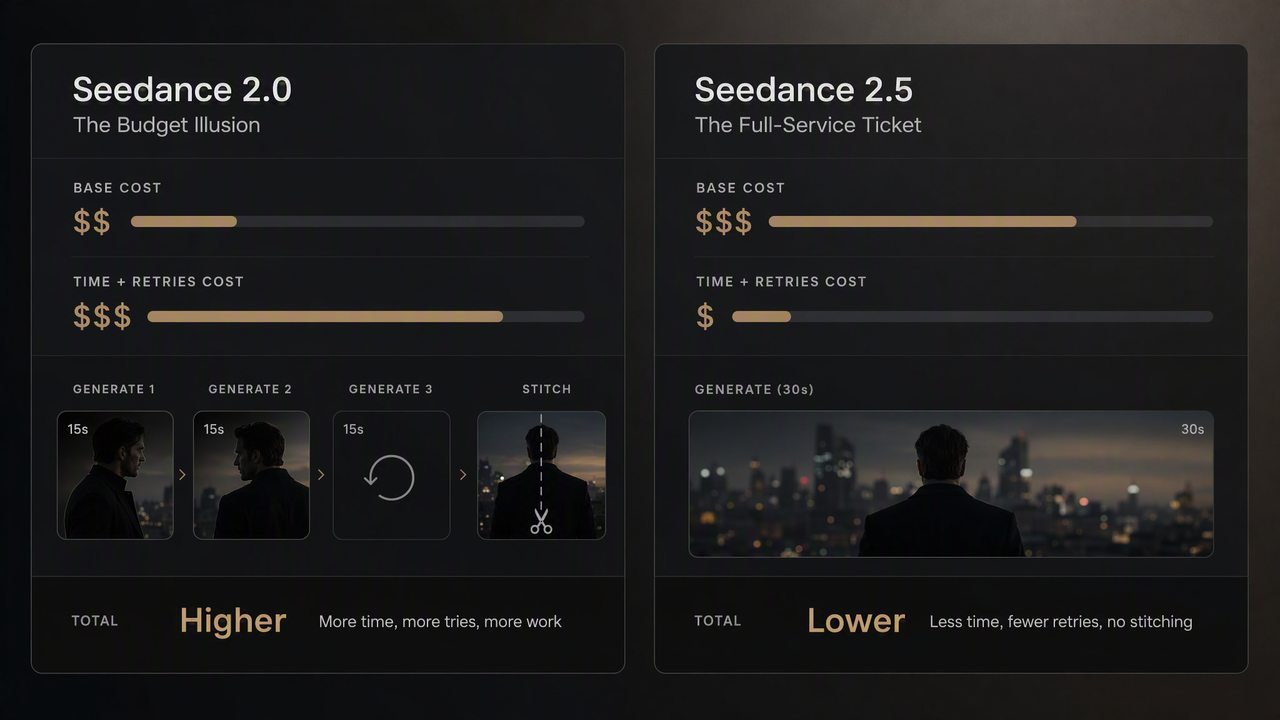
Run the numbers, and that "expensive" model suddenly becomes the cheaper option because you aren't wasting hours editing and rerolling. If you use Framia Pro, you can actually watch your retry counts drop on the timeline, making this whole cost comparison incredibly obvious.
Pricing Comparison: Seedance APIs vs. Framia Pro
| Platform / Model | Estimated Cost (720p)* | Best For |
| Seedance 2.5 API | $0.60 per output second | Final cinematic shots and complex character motion where polish is critical. |
| Seedance 2.0 API | $0.20 per output second | Cost-conscious iterations and simple mechanical/product motion. |
| Framia Pro | Unified Subscription (or Credit System) | Predictable project scaling. Seamlessly switch between models without per-second API anxiety, plus built-in timeline management. |
*Pricing Note: Seedance API rates are calculated and converted based on official documentation (checked August 2026). Actual production costs will vary based on retry rates, which is why a unified platform often yields a lower total cost.
The Smart Playbook: Using Seedance 2.5 and 2.0 Together
When evaluating seedance 2.0 vs 2.5, the smartest creators don't pick sides. They use both. Here is the exact 5-step workflow top teams use to save money:
1. Draft Batch (Seedance 2.0)
Generate 4–6 cheap variants to test your hooks.
2. Lock the Concept
Pick the winning draft.
3. Hero Render (Seedance 2.5)
Run the winning idea through the Seedance 2.5 video generator for that premium, 30-second cinematic finish with native audio.
4. Region-Edit for Market Variants
Use 2.5's region editing to swap out backgrounds or text for different ads.
5. Export and Color-Grade
Finish the asset in your standard pipeline once the hero clip and its regional variants are locked.
Budget-wise, this strategy usually means producing 5 to 6 Seedance 2.0 drafts (cheap, fast, disposable) followed by 1 or 2 Seedance 2.5 finishing renders. It costs a fraction of running every single draft on the premium model, with absolutely no compromise on the final asset.
This hybrid workflow is exactly what Framia Pro's Storyboard Timeline Editor is built to handle: keeping draft shots and hero shots on the same timeline, rather than scattered across separate tools and endless exports.
Execute This Workflow in Framia Pro
Juggling different AI subscriptions to pull off this workflow is a nightmare. You shouldn't have to switch tabs to generate your base images and then animate them.
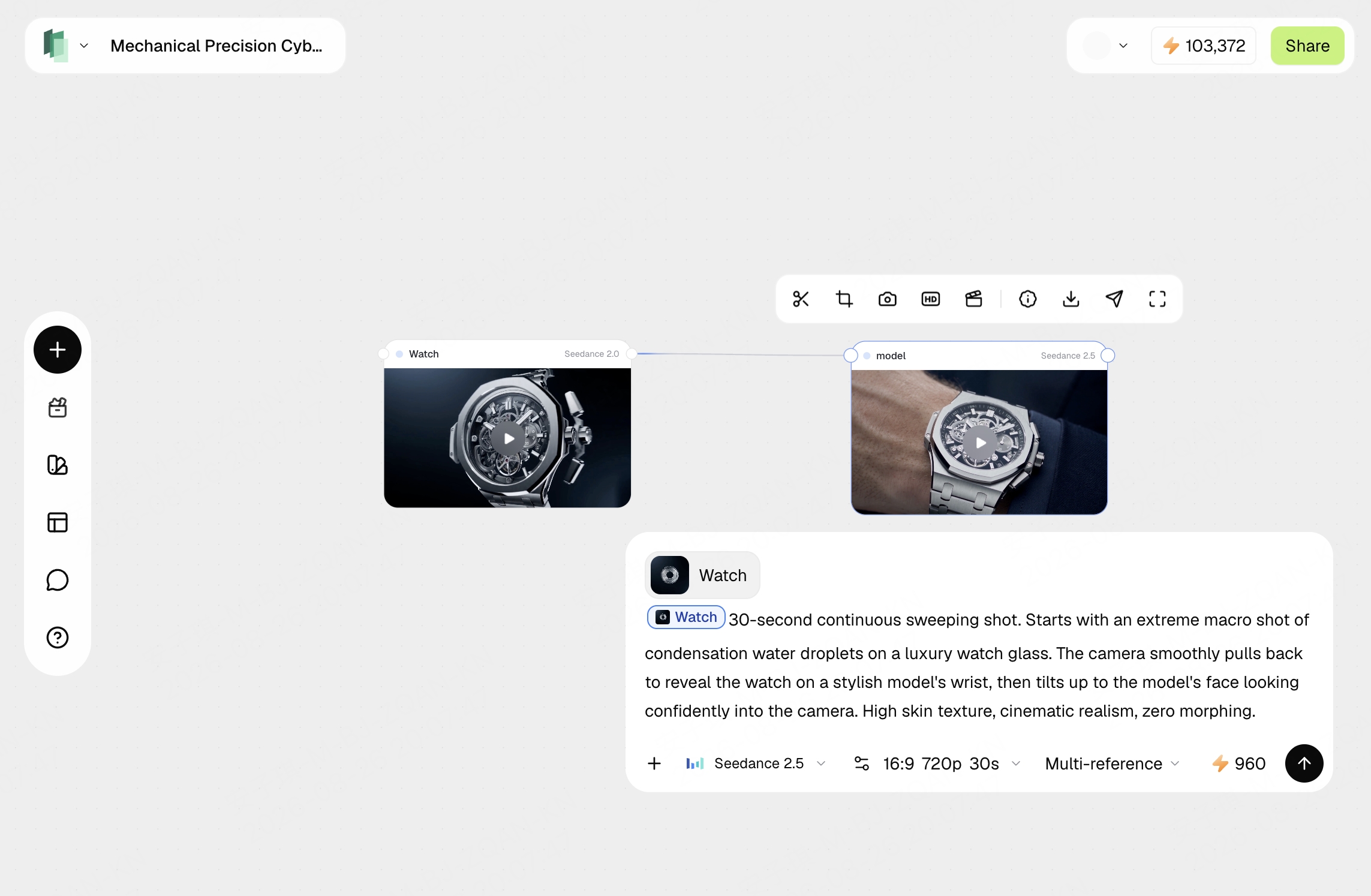
Framia Pro is built exactly for this mixed-model reality. On a single canvas, you can prompt Image 2 for your cinematic keyframes, instantly test them in Seedance 2.0 for quick slow-motion, and then drop the winner into the Seedance 2.5 video generator for a flawless 30-second speaking ad. You get the whole Image 2 and Seedance pipeline under one subscription, on one timeline.
But having access to the models is only half the battle. Seedance 2.5 is powerful, but it's really picky about prompts. In Framia, we didn't just plug the model in—we built AI Agents to handle the prompting for you. They automatically take your basic ideas and expand them into the highly-structured prompts that the new model actually wants. This means you don't need to memorize camera jargon or weights; you just get premium videos every time without the headache.
Is Seedance 2.5 a Complete Replacement for Seedance 2.0?
No. They aren't competitors—they are two totally different tools. Stop asking which one is better and start asking which one fits your shot.
Use Seedance 2.0 as your rapid-fire draft engine for A/B testing and daily TikToks. Reserve Seedance 2.5 for your flawless hero shots and macro details. If you want to do this easily, Framia Pro puts both models on one timeline so you never have to choose.
FAQs about Seedance 2.5 vs 2.0
Is Seedance 2.5 always better than Seedance 2.0?
Nope. It leads on clip length, faces, and audio. But Seedance 2.0 is cheaper, handles mechanical motion better, and still holds its own on the leaderboards.
What is the maximum native clip length for Seedance 2.5?
Seedance 2.5 generates native 30-second clips in a single pass, double the 15-second native length of Seedance 2.0, which removes the need to stitch two segments together for a 30-second deliverable.
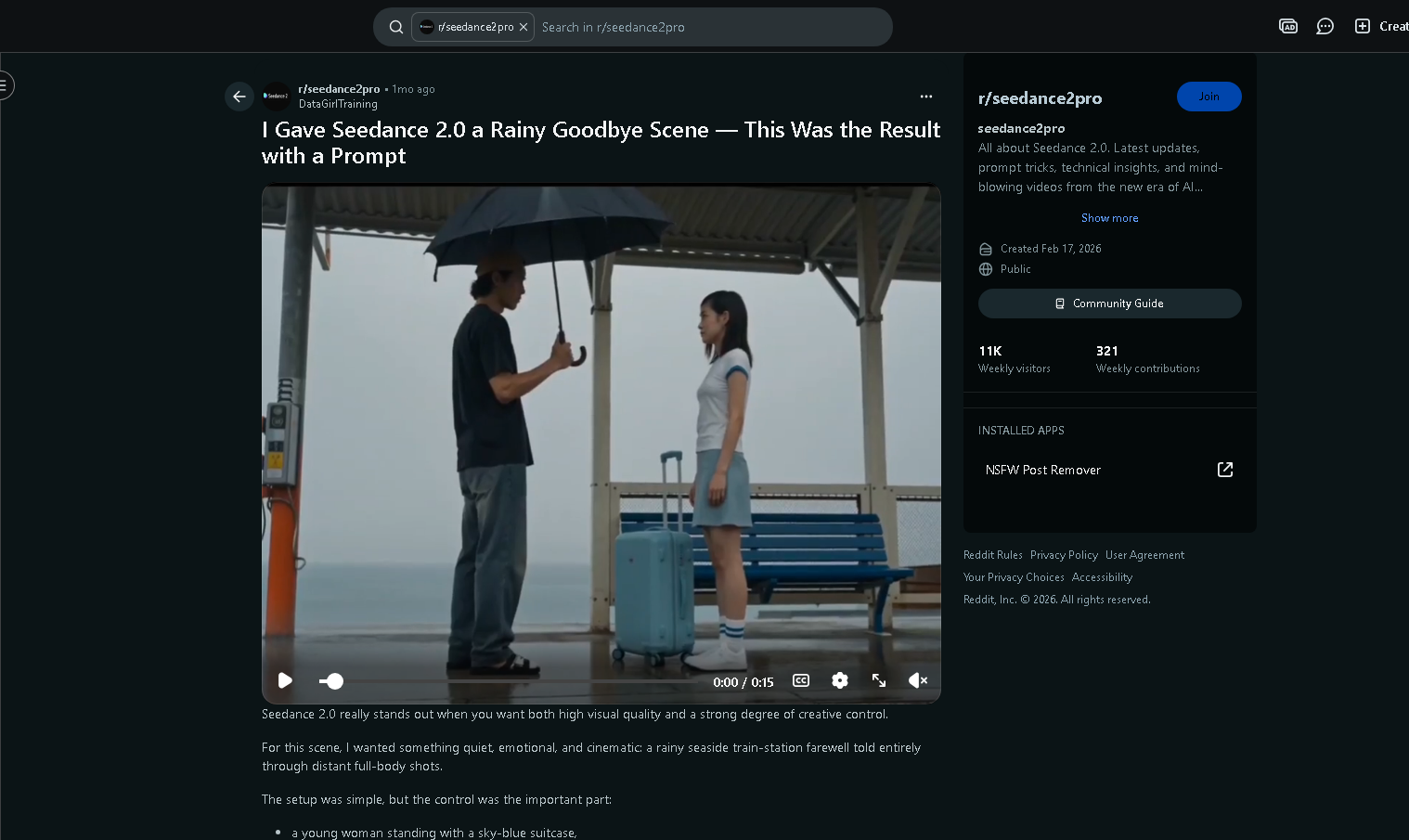
Why did Seedance 2.0 win on some Reddit prompts even after 2.5 launched?
Threads in communities like Reddit's r/seedance2pro report cases where Seedance 2.0 produced steadier results on mechanical or transformation-heavy prompts, matching the pattern seen in recent start-to-end frame testing — newer doesn't automatically mean better for every motion type.
How much does Seedance 2.5 cost per second compared to 2.0?
The Seedance 2.5 cost is around $0.60 per output-second at 720p. Seedance 2.0 is roughly $0.20. But remember, 2.5 requires fewer retries, so the final project cost is usually much closer.
Does Seedance 2.5 generate synchronized audio natively?
Yes. It produces voice, sound effects, and visuals all at once, so everything syncs up perfectly.
Can Seedance 2.5 handle extreme close-ups and macro shots?
Absolutely. Seedance 2.5 macro shots are a massive upgrade. It holds sharp focus on tiny details like condensation or fabric weaves without blurring.
Should I upgrade all my Seedance 2.0 workflows to 2.5 immediately?
Not necessarily. If your workflows are high-volume or low-budget, keep them on 2.0. Save 2.5 for hero shots and long narratives.
What types of motion does Seedance 2.0 still handle better?
Testing shows 2.0 handles mechanical and structural transformations—like objects folding or hinging—with less warping than 2.5.
Can I run a seedance 2.0 vs seedance 2.5 test side by side to compare outputs?
Yes. Running the exact same prompt through both models is the best way to see which one fits your specific shot.