ByteDance officially launched Seedance 2.5 on July 31, 2026, introducing 30-second single-shot generation, native audio, up to 50 reference inputs, and local editing. While these features could reduce the need to stitch short clips together, the real question is whether the added length and control deliver enough quality and consistency to justify the cost.
Is Seedance 2.5 worth the hype?
- Yes, but mainly for the right workflow. Seedance 2.5 is most compelling when you need longer single-shot scenes, dialogue-heavy storytelling, complex camera movements, or stronger consistency across a video.
- The 30-second generation is not automatically more efficient. If your project needs several precise shots, generating and editing shorter clips can still give you more control and fewer expensive failed generations.
- Its biggest advantage is control, not just duration. Reference inputs, timestamp-level editing, local edits, and 3D scene control make it more useful for complex productions than simply extending a clip to 30 seconds.
- The higher cost matters. Seedance 2.5 can be harder to justify for simple clips or workflows where cheaper models can already produce the shots you need.
- The real test is how it performs across different workflows. In this review, we compare its output, consistency, editing control, audio, cost, prompting requirements, and limitations against Seedance 2.0, Wan, and Kling.
Seedance 2.5 is worth the hype if you use it for what it does best—not simply because it can generate a 30-second video in one go. The longer generation window is useful for continuous shots and dialogue-heavy scenes, but it does not eliminate the need for human direction or editing. In fact, some creators report that accuracy can drop later in a long multi-shot generation, making a shot-by-shot workflow more practical when every moment needs precise control.
The bigger question, then, is whether Seedance 2.5's additional control and consistency justify its higher cost. That's what we test in this review. We look at 30-second generation quality, character and scene consistency, native audio, reference inputs, camera control, local and timestamp-level editing, prompt adherence, pricing, and real-world use cases. We also compare Seedance 2.5 with Seedance 2.0, Wan, and Kling to see where it actually offers an advantage and where a cheaper or more controllable workflow may still be the better choice.
How did we test Seedance 2.5 for video generation?
NOTE: Our team has hands-on experience testing AI models and AI video workflows, but this is not an independent laboratory benchmark, and ByteDance did not sponsor this test. The results below reflect our own generations and should not be treated as a guarantee of the results you will get on your account.
We ran the same set of prompts, reference images, and audio clips through Seedance 2.5 and Seedance 2.0 inside Framia Pro, so the only variable that changed was the model. We generated 10 clips per model, for a few different content types instead of one single scene:
- Cinematic story shots
- Short drama clips
- Ecommerce and product videos
- An action sequence
- A music-style edit
We then selected three representative outputs as evidence for this review, with each one included in the article and reviewed frame by frame rather than judging the model from a single successful generation.
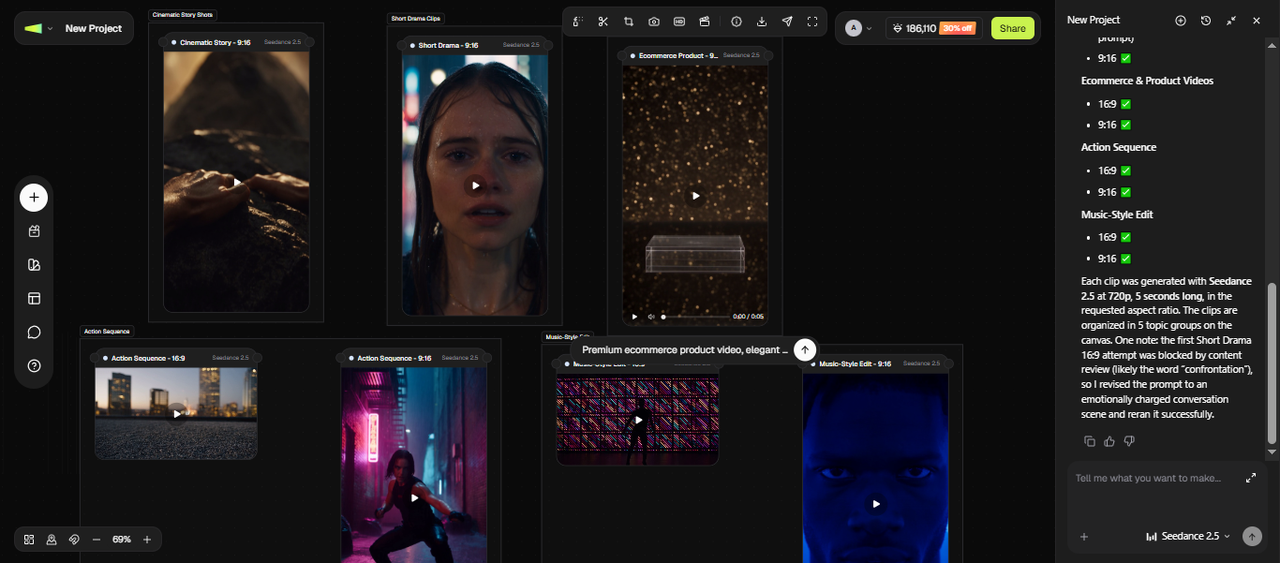
For each clip, we checked the same handful of things every time:
- How stable the picture stayed from the first second to the last
- Whether a character's face and outfit held up without drifting
- How close the lip movement landed to the audio
- How well the camera followed the direction in the prompt
- How closely the output matched what we actually asked for
- How many attempts it took before a clip was usable without extra editing
We reviewed every clip frame by frame to look for small slips like a character's outfit changing mid-scene, an object moving on its own, a background that shifts between frames, or audio drifting out of time with the mouth. The goal wasn't to grade Seedance 2.5 against a spec sheet. It was to see where it holds up on the kind of clips creators actually need, like ads, social content, story-driven videos, and branded content, and where it still needs a manual pass afterward.
What is Seedance 2.5? A quick overview
Seedance 2.5 is ByteDance's newest AI video generator, released on July 31, 2026, after several weeks of enterprise beta testing. It takes text prompts, images, audio, and video clips and creates a single video in one pass.
This one is built with content teams in mind. If you cut product videos, ad creatives, or social clips for a living, Seedance 2.5 targets your exact workflow: longer scenes, characters that stay consistent, and edits you can apply to one part of a clip instead of redoing the whole thing.
The timing matters too. AI video has turned into a race, with Wan, Kling, and Google's Veo all shipping major updates this year. Seedance 2.0 already sat at the top, and Seedance 2.5 raises that bar again, at least on the numbers ByteDance has published so far.
Let's review the features of Seedance 2.5 to see what it actually offers:
Seedance 2.5 features you should know about
Seedance 2.5 builds on the previous version with longer generations, stronger scene control, and a workflow designed for professional video creation. Here's why each upgrade actually matters, not just what it's called.
| Feature | Why it matters |
| 30-second single-take video | No visible seams from stitching clips |
| Up to 50 reference inputs | Locks character, product, and style |
| Native audio generation | Lip sync stays aligned automatically |
| Macro-to-landscape shots | Close-ups and wide shots in one model |
| 3D previsualization and green-screen | More controlled camera and blocking |
| Local video editing | Fixes one detail without a full rerun |
| Multi-character consistency | Faces and outfits stay steady |
| Cinematic camera control | Predictable moves from simple prompts |
| Commercial content support | Less editing before you publish |
30-second video generation
Seedance 2.5 renders a full 30-second clip in one pass, up from the roughly 15-second cap on Seedance 2.0. That single take skips the visible seams stitched clips tend to leave behind, such as a face that shifts slightly or a light source that jumps between cuts.
Up to 50 reference inputs
Seedance 2.0 topped out at around 12 mixed assets. Seedance 2.5 raises that to 50: images, video clips, audio, and style boards, combined in a single generation. You can use these references to keep characters, products, camera style, colors, and visual direction consistent throughout complex scenes and longer productions.
Native audio generation
Seedance 2.5 creates video, dialogue, sound effects, ambient audio, and music together in one generation. Since audio and visuals are produced simultaneously, speech timing and lip sync stay aligned without requiring a separate audio generation or synchronization step.
Create macro-to-landscape shots
Seedance 2.5 supports macro cinematography with detailed close-ups, realistic depth of field, and precise focus transitions. You can highlight product textures, facial details, and small scene elements with a more immersive cinematic look.
3D previsualization and green-screen
Seedance 2.5 supports professional production workflows with 3D white-model previsualization and green-screen video transformation. By using 3D scene layouts, camera planning, and performance blocking as guidance, creators can achieve more controlled compositions and turn early concepts into polished cinematic videos.
Local video editing
Seedance 2.5 lets you edit selected regions within a video. You can replace objects, remove unwanted elements, or adjust characters while preserving the original camera movement, timing, lighting, audio, and scene continuity.
Multi-character consistency
Seedance 2.5 is designed to keep multiple characters recognizable throughout longer scenes. It maintains facial features, clothing, positioning, and interactions while following reference inputs, reducing identity changes that commonly appear in AI-generated videos.
Cinematic camera control
The model understands detailed camera directions such as dolly in, pan, tilt, track, orbit, crane, and zoom. You can also control movement speed with instructions like "slow" or "quick" to give more predictable camera motion without manual animation.
Commercial content support
Seedance 2.5 is built for commercial workflows that include product demos, ecommerce videos, social media ads, explainers, brand campaigns, and promotional content. Its longer clips, native 4K output, reference-based control, and synchronized audio reduce the amount of editing needed before publishing.
Seedance 2.5 features tested in real-world scenarios
A list of technical specifications does not always show how an AI video model performs in actual projects. To understand where Seedance 2.5 fits, we tested its main features across different content types, including short dramas, cinematic scenes, ecommerce videos, action sequences, brand ads, and music videos.
Here is where Seedance 2.5 works best and which features matter for each type of content.
| Use case | What Seedance 2.5 helps create | Key features used |
| Short drama and storytelling | Create longer scenes with multiple characters, dialogue, and connected actions | 30-second single-shot generation, multi-character consistency, native audio |
| Ecommerce and UGC ads | Generate product demonstrations, presenter-style clips, and social content | Product references, close-up shots, audio generation |
| Action scenes | Create dynamic movement with camera tracking and physical interactions | Motion control, camera movement, scene consistency |
| Brand commercials | Maintain product style, colors, and visual direction across campaigns | Reference inputs, local editing, image-to-video |
| Music videos | Generate visuals that match sound and rhythm | Native audio generation, motion control, cinematic shots |
Short drama and cinematic story scenes
The 30-second single take plus multi-character consistency means a short drama scene can run from setup to payoff without a visible cut. Native dialogue keeps two characters talking in the same shot instead of splicing separate takes together.
Sample timestamped prompt to try:
0-8s: Vertical audience-perspective medium shot of Liam at the piano, one slow gentle push toward him as he finishes a restrained piano phrase and lifts his gaze beyond the camera as if noticing someone watching; hold his composed, observant posture under soft stage light, ending on his eyes and the glow of the piano keys 8-17s: Luminous match cut from the piano key reflection into a refined close-up VN interface portrait of Liam; transition the background into a softly painted pastel interior with delicate translucent interface framing as his expression shifts subtly from composed observation to quiet interest while reading the heroine's words; cream text box appears in the lower safe area reading exactly “You always notice everything... except when someone is looking at you.” 17-25s: Subtle camera drift across Liam's eyes and the dialogue box; he lowers his gaze briefly, then looks back with the faintest almost-smile, showing growing interest in her implication; keep the VN interface elegant and restrained 25-30s: Two understated VN choice buttons appear briefly beneath the dialogue in a balanced stacked layout, reading exactly “Look away” and “Hold his gaze”; after a brief pause, both choices fade while the dialogue box remains, ending on Liam's quietly interested close-up with a soft glint in his eyes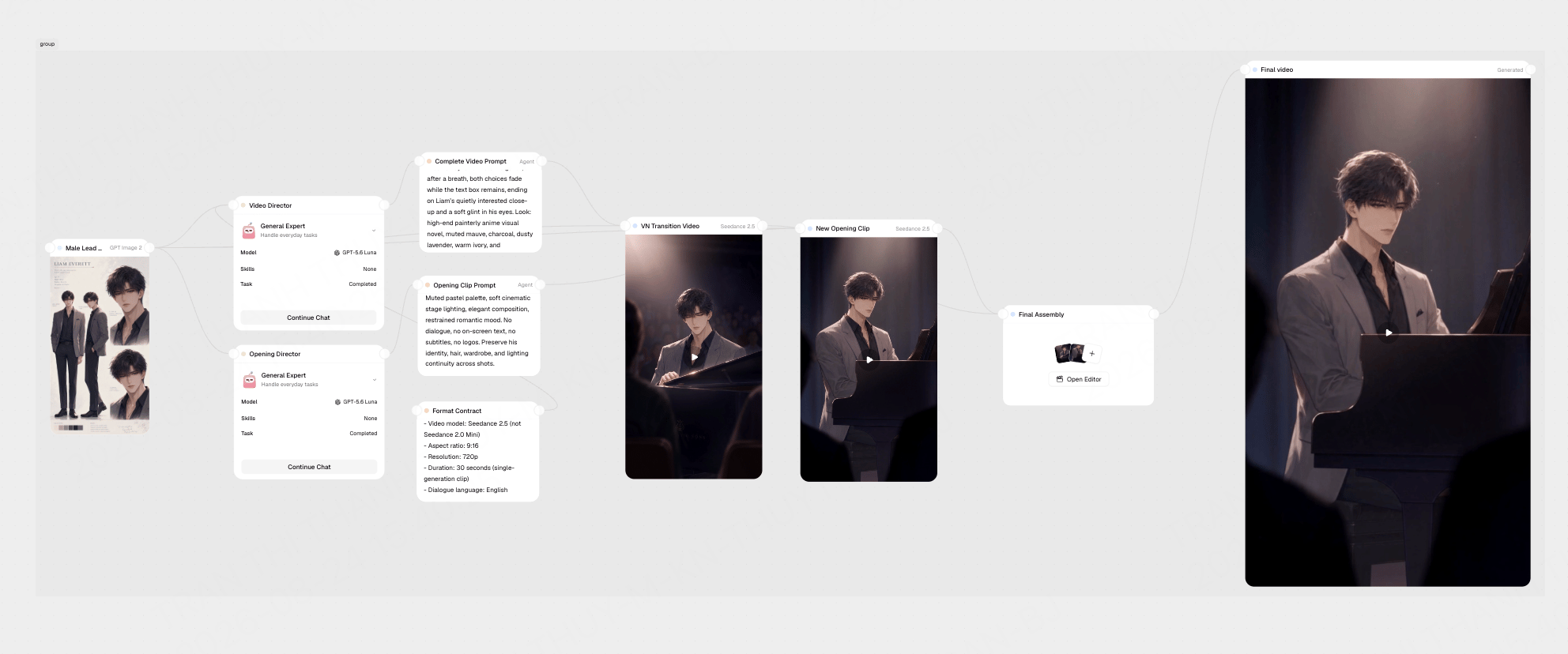
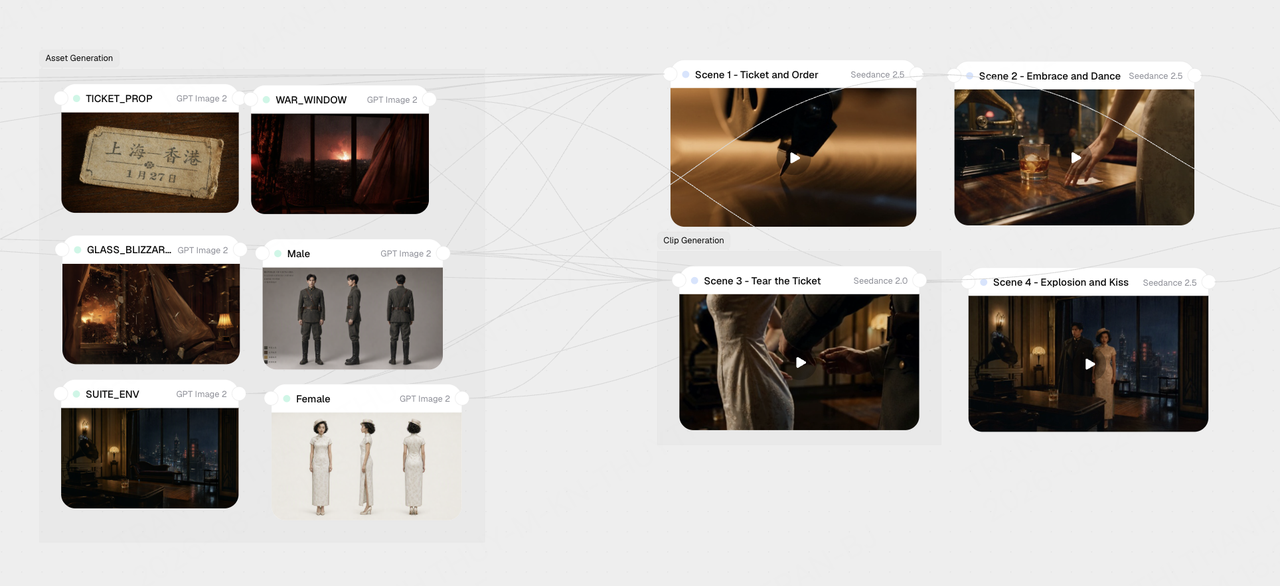
Another sample timestamped prompt to try:
0-7s: Gramophone, ticket, and approaching-war atmosphere establish the deadline. 7-15s: He pushes the ticket across the table and says, “Leave tonight. Leave me forever.” 15-24s: She ignores the ticket, approaches, embraces him, and answers, “I already left once.” 24-34s: Their final dance moves to the window; he says, “You cannot stay.” 34-42s: She tears the ticket, smiles through a tear, and says, “Then I will stay.” 42-51s: Fire flashes outside and the window explodes inward in slowed, brilliant glass fragments. 51-60s: He shields her with his coat and back; his resistance collapses into a desperate kiss as the jazz dies under the blast.Use @Image1 to lock character A's face and outfit, and @Image2 for character B.
E-commerce and UGC-style product videos
Macro shots plus lip-synced narration make this a fit for a talking-head product pitch with close-up product cutaways in the same clip.
Sample timestamped prompt to try:
0-3s: Presenter holds product up to camera, natural lighting, direct eye contact 3-8s: Cut to macro shot of product texture and detail, presenter narrates over audio 8-15s: Presenter demonstrates product use, camera at eye level 15-20s: Return to presenter for closing line, product held next to face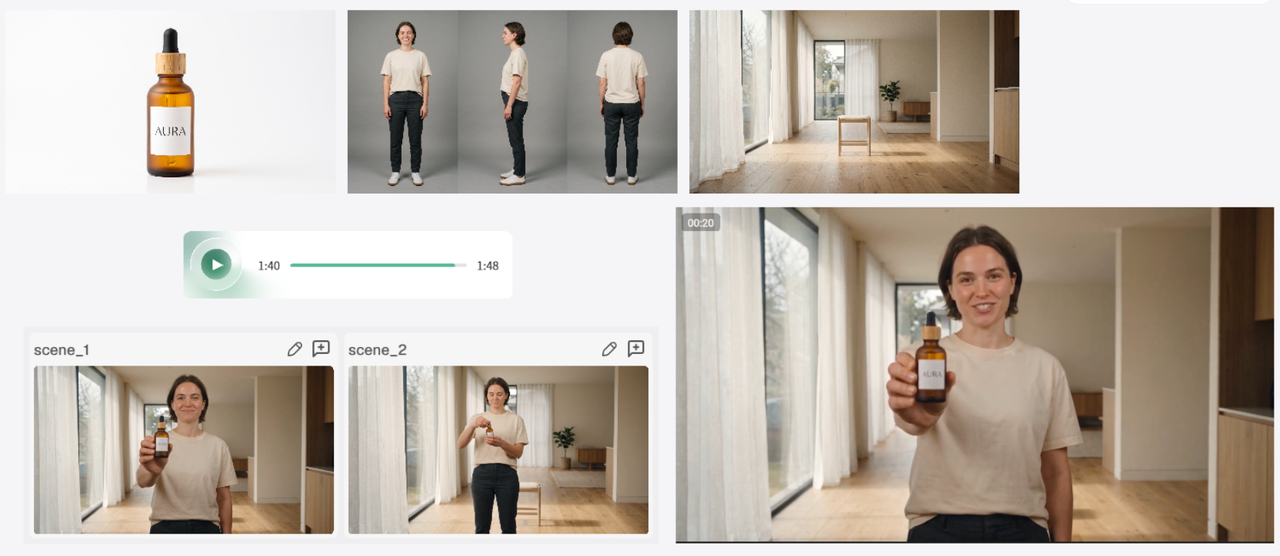
Action and fight scenes
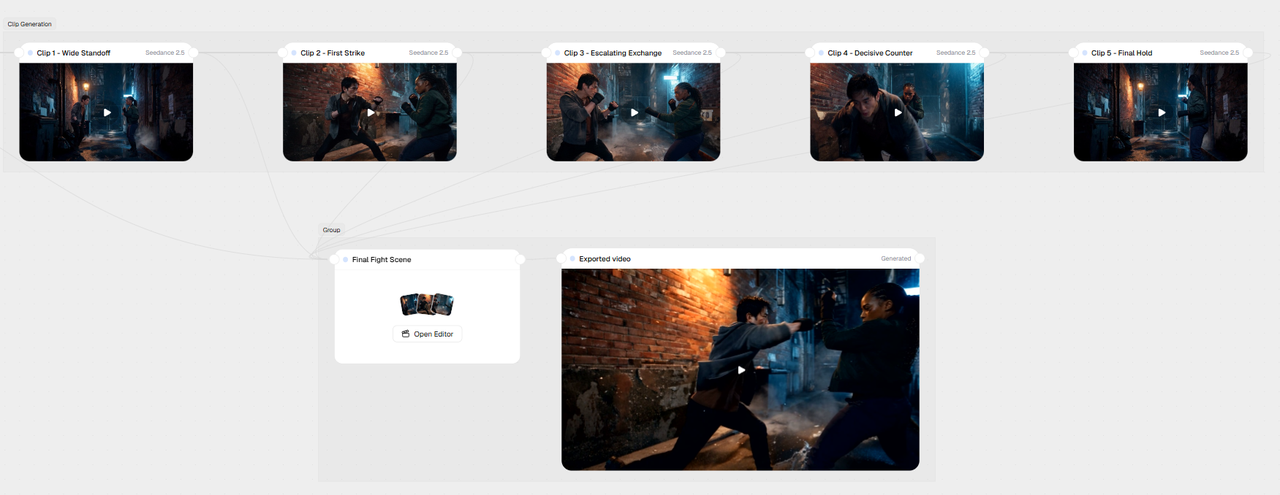
Cinematic camera control (orbit, track, crane) plus longer single takes give action sequences room to build instead of cutting every two seconds.
Sample timestamped prompt to try:
0-5s: Wide shot, two fighters face off in an alley, camera slowly circles the pair 5-12s: Fighter A throws first strike, camera tracks alongside at eye level 12-20s: Fighters exchange blows, camera orbits around the pair, fast cuts implied through motion blur 20-26s: Fighter B lands a decisive hit, camera cranes upward and pulls back 26-30s: Fighter A falls out of frame, camera holds on Fighter B standing aloneUse @Image1 and @Image2 to lock each fighter's face, build, and outfit so they hold steady through the fast movement.
Brand ads
Reference-locked color and product shots keep a brand's visual identity consistent from the opening frame to the logo card at the end.
Sample timestamped prompt to try:
0-6s: Smooth clockwise orbit around the device standing firmly in its matching dock on a clear acrylic block above marble, completing a luxurious 360-degree reveal as warm highlights move across the pearl-white body and rose-gold details, ending on a centered three-quarter product composition; match cut into the treatment head 6-11s: Controlled macro push-in toward the rose-gold massage rollers as they rotate subtly, with delicate luminous microcurrent energy lines tracing between the rollers without obscuring their real geometry; end on crisp metallic detail and follow the energy glow into the device LEDs 11-16s: Slow upward tilt along the device's ergonomic curves as red and blue LED light therapy glows from the treatment head, reflecting softly on the polished rose gold and surrounding acrylic; match the glowing curve to the contour of a woman's jawline 16-25s: Close profile of the same woman gliding the device once along her jawline from chin toward ear with relaxed posture and eyes gently closed; slow lateral camera tracking preserves natural skin texture, correct device-to-skin contact, and the bright editorial room, then dissolve into a translucent 3D sub-dermal diagram showing collagen stimulation and immediate-looking skin lifting before dissolving back to the vanity 25-30s: Gentle pullback reveals the device in its matching dock on a marble-and-acrylic vanity beside minimal luxury skincare objects, with the woman serenely enjoying the finished routine in the sunlit background; settle into a premium end card reading exactly “LUMIÈRE - Awaken Your Inner Radiance” in elegant high-fashion typography, centered in safe vertical space and fully legible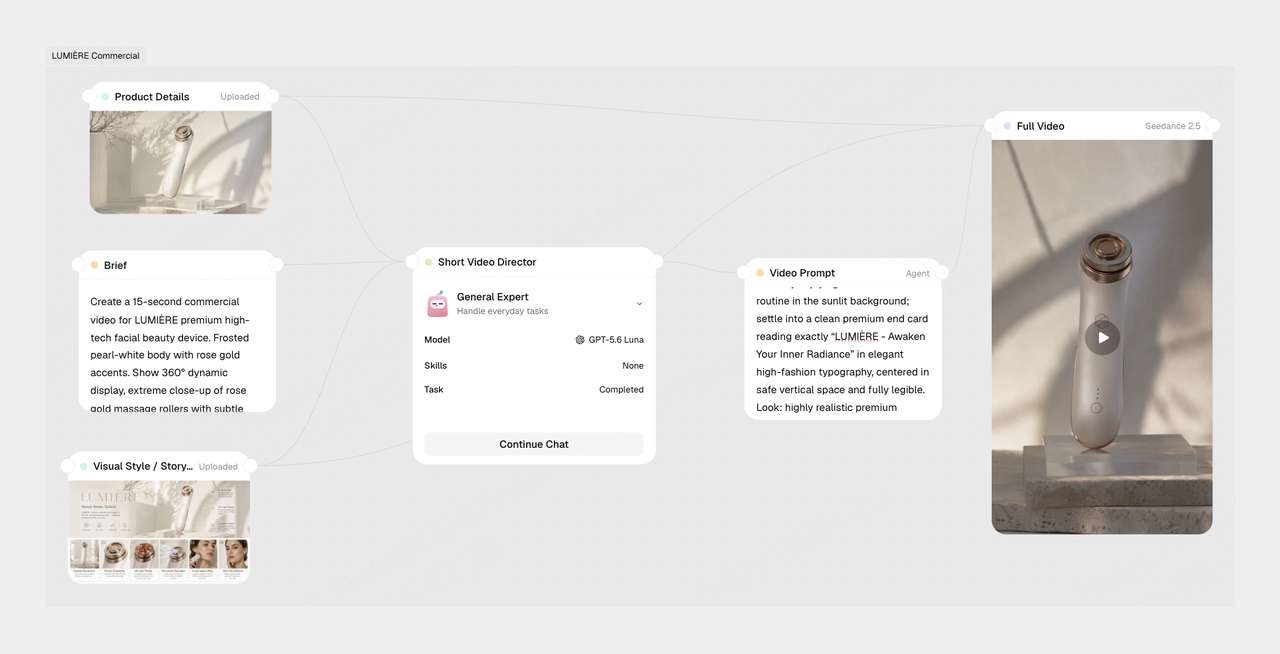
Music and rhythm videos
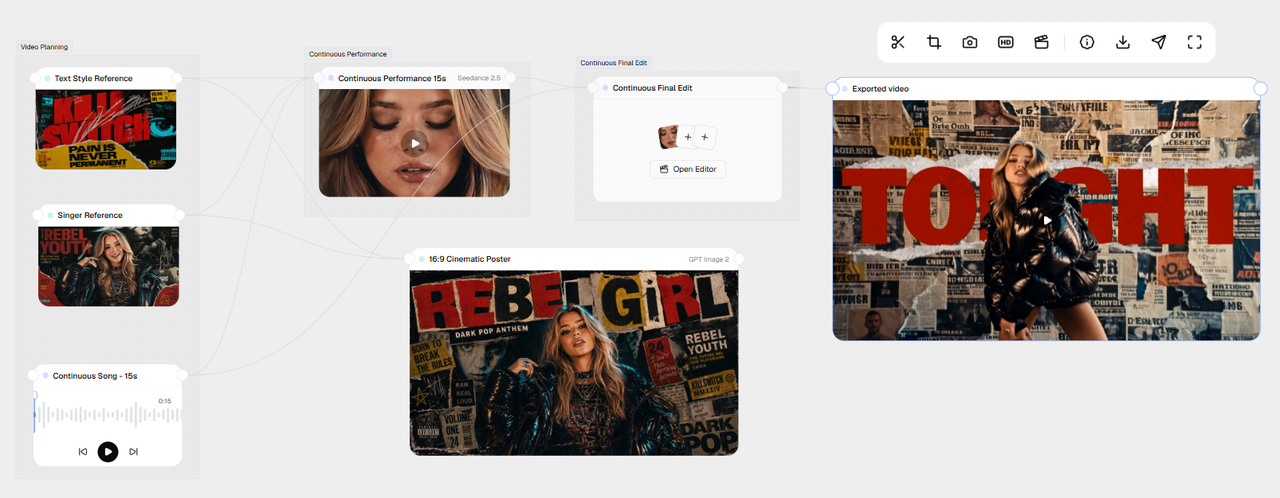
Native audio generation lets you sync cuts and motion to a soundtrack in the same generation instead of editing to the beat afterward.
Sample timestamped prompt to try:
0-6s: Preserve the original subject and core composition from @Image1, gradually introduce dramatic cinematic lighting, deeper contrast, atmospheric shadows, and subtle film grain for a dark, immersive film-poster look 6-14s: Enhance visual depth with rich cinematic color grading, refined editorial styling, and stronger light-and-shadow separation, keeping the performer's appearance and core composition consistent with @Image1 14-22s: Intensify the dark-pop, grunge, edgy, contemporary, and slightly mysterious aesthetic with atmospheric depth, textured film grain, and a premium cinematic finish, while maintaining the same performer throughout 22-30s: Settle into the final cinematic poster composition, with a clear and prominent English title integrated into the design using bold cinematic typography, fully legible and balanced with the original subject; keep the performer's look consistent with @Image1 and maintain the track and tempo from @Audio1Use @Audio1 to set the track and tempo, and @Image1 to lock the performer's look across the full clip.
Seedance 2.5 reviews from Reddit users: Does it match real creator expectations?
After testing Seedance 2.5 ourselves, we also checked creator discussions on Reddit to see whether other users were seeing the same results. The main question behind these discussions was simple: Is Seedance 2.5 actually worth the hype, or is it just another impressive demo model?
The answer depends on what you are creating.
What creators like about Seedance 2.5?
| Feature | What Reddit users said |
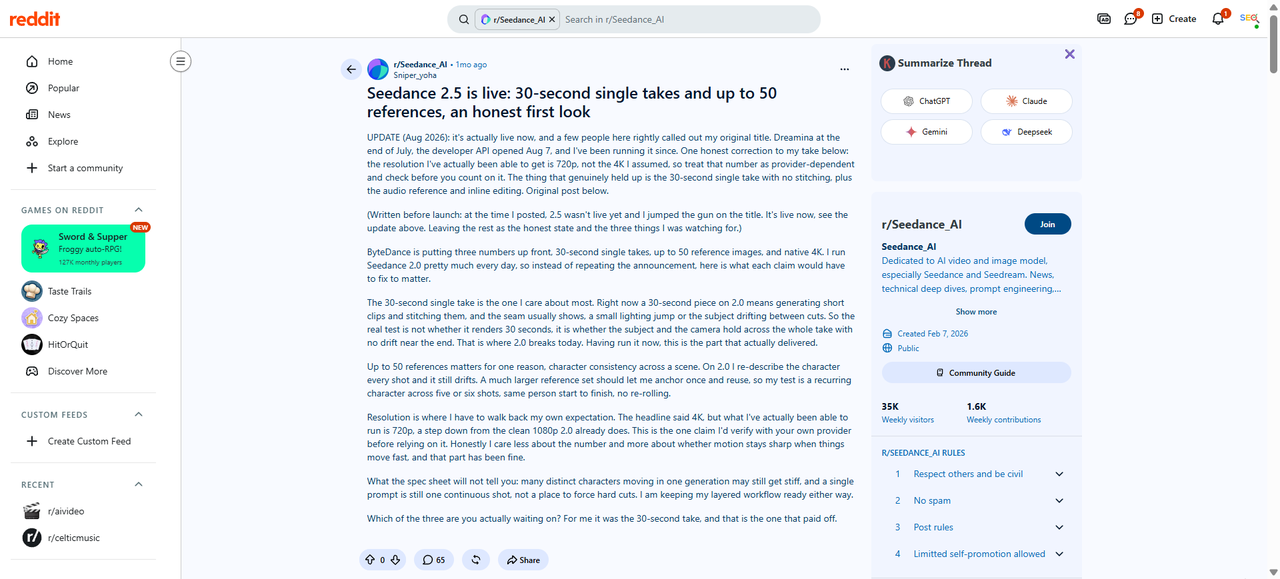
| 30-second single-shot generation works as promised | A creator who used Seedance 2.0 daily said the main test was whether the subject and camera could stay stable throughout a full 30-second clip without the drift seen in stitched clips. After testing 2.5, they said this was the feature that “actually delivered.” |
| Targeted editing can fix specific mistakes | Creators liked that Seedance 2.5 includes region-level and timestamp editing. One user explained that instead of regenerating the entire video when a small error appears, creators can mask and fix the affected area. |
| Reference images help with character consistency | A Seedance 2.0 user said that using more references could solve character drift because they previously had to describe the same character again for every shot. They saw reference support as useful for keeping a character stable across scenes. |
| Longer generations are useful for story-based content | Some users saw value in longer clips for scenes where characters interact or talk. However, they also noted that consistency remains a challenge when scenes become more complex. |
Reddit creators have praised its 30-second generation, reference controls, and improved motion and character consistency.
Where creators still have concerns?
| Issue | What Reddit users said |
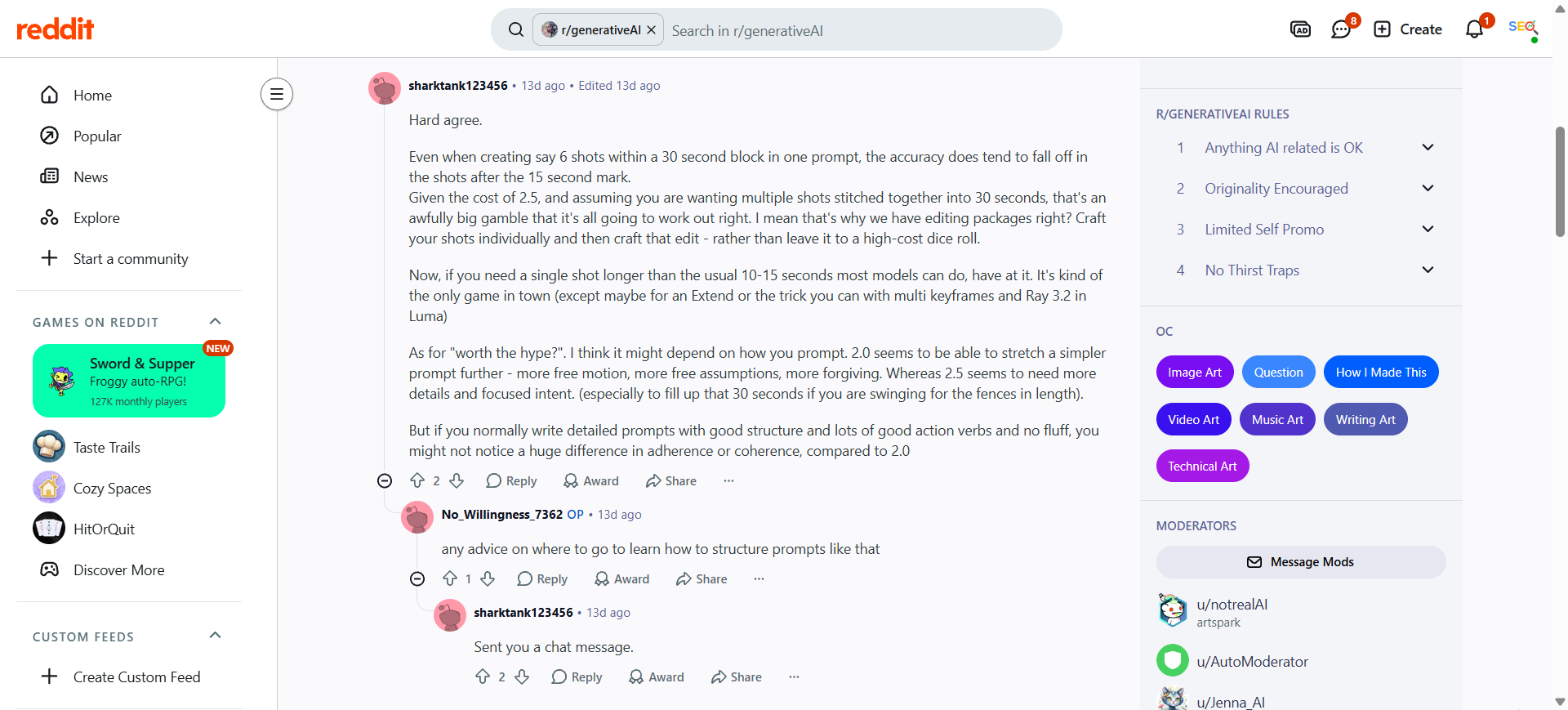
| Multi-shot prompts can lose accuracy | One creator found that when generating multiple shots inside a single 30-second prompt, accuracy often dropped after the 15-second mark. They suggested that creating separate shots and editing them together may still produce better results for polished videos. |
| The price is a major concern | Several users questioned whether the higher cost is worth it. One creator said Seedance 2.5 was around three times more expensive than Kling and that the results did not always justify the extra cost. |
| The 4K output claim depends on the provider | A user who tested the model after launch corrected their earlier assumption about 4K output. They said they were only able to generate 720p and advised users to check the resolution available through their provider. |
| Complex character scenes still need work | Although Seedance 2.5 supports up to 50 references, creators noted that handling many different characters in one generation can still result in stiff movements or inconsistent results. |
| Seedance 2.0 may still perform better for some motion tasks | A creator testing dance scenes said Seedance 2.0 produced clearer results and followed prompts better for their use case. They also mentioned that Seedance 2.5 was much more expensive. |
| Some users question whether the upgrade is a major leap | A few creators argued that longer generation time and more references do not automatically mean better results. They said the real test is whether the model reduces retries and improves prompt following. |
Overall, Reddit users see Seedance 2.5 as a meaningful upgrade, but concerns around cost, consistency, resolution, and prompt accuracy suggest that the improvements may not justify the upgrade for every workflow.
Seedance 2.5 vs Seedance 2.0 vs Seedance 1.5 Pro
| Feature | Seedance 1.5 Pro | Seedance 2.0 | Seedance 2.5 |
| Max clip length | 4–12 seconds | ~15 seconds | 30 seconds (180s beta) |
| Reference inputs | Single image + prompt | Up to 12 mixed assets | Up to 50 mixed assets |
| Audio | Native audio-video joint generation | Native audio-video generation | Native audio, generated in the same pass |
| Post-generation editing | Not supported | Not supported | Local/region-level editing |
| Camera control | Basic cinematic prompt terms | Cinematic prompt control | Prompt control + 3D blockout input |
| Commercial license | Included | Included | Included + Volcano Arc IP licensing |
What's new in Seedance 2.5:
Seedance 2.5 AI image-to-video generator doubles clip length to 30 seconds, raises the reference cap from 12 to 50, and adds local editing so you can fix one detail instead of regenerating the whole scene. A 3D blockout input sharpens camera control, and every plan includes Volcano Arc's IP licensing layer.
Should you upgrade from Seedance 2.0?
If your projects need longer takes, more reference control, or edits without a full rerun, yes. Seedance 2.5 solves real Seedance 2.0 pain points. If 15-second clips and 12 references already cover your work, the upgrade adds cost without much practical gain.
For a detailed breakdown of capabilities, pricing, and use cases, see our Seedance 2.5 vs. Seedance 2.0 comparison.
When should you still use Seedance 2.0?
Seedance 2.5 isn't the right pick for every job. Stick with Seedance 2.0 when:
- Your projects stay under 15 seconds
- You need lower, predictable costs at higher volume
- You're creating many social variants where 2.5's higher per-second cost adds up
- Your existing API workflow already works well with 2.0
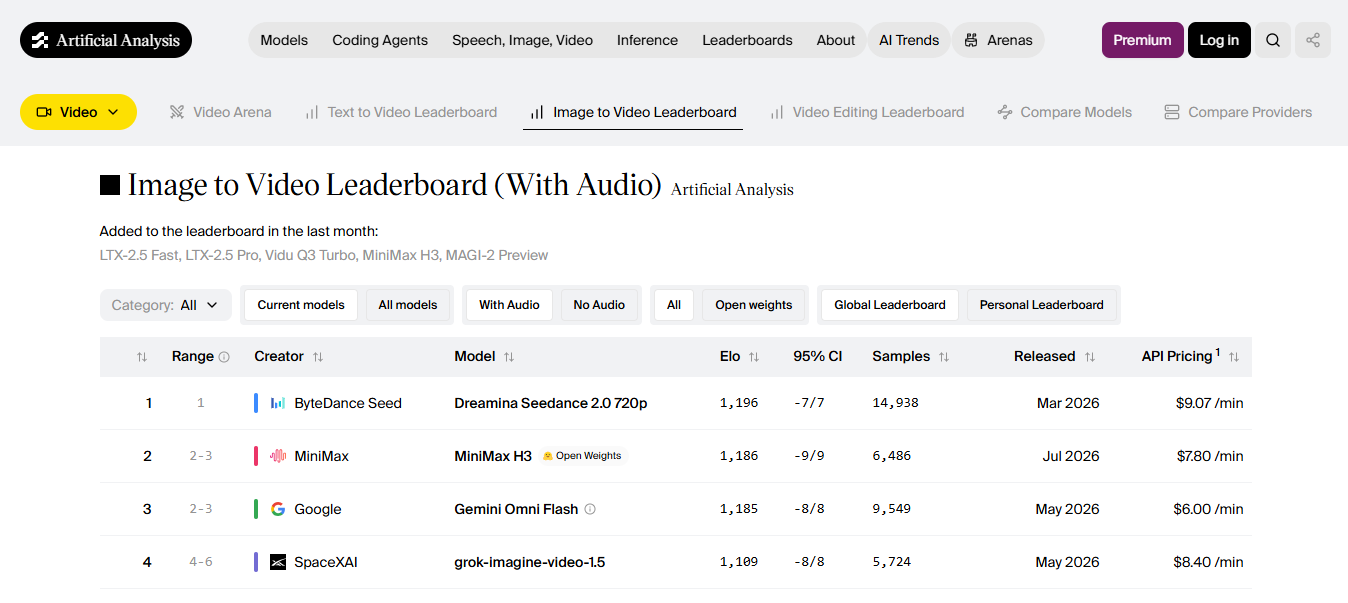
Seedance 2.0 also still holds its own quality. It topped the Artificial Analysis Video Arena for image-to-video and ranked near the top for text-to-video. If your work already runs fine on 2.0, there's no rush to switch.
Who should still use Seedance 1.5 Pro?
Seedance 1.5 Pro still fits short clips under 12 seconds, quick social cuts, or projects where synced dialogue matters more than resolution or reference count. It costs less to run and stays a solid pick for lighter, faster jobs.
Seedance 2.5 vs Wan 2.7 vs Kling 3.0
| Category | Seedance 2.5 | Wan 2.7 | Kling 3.0 |
| Video duration | Single 30-second take | Clips capped at 15 seconds | Clips up to 15 seconds |
| Motion realism | Stronger physics and motion stability over 2.0 | Roughly 30% cleaner output than Wan 2.6, sharper edges | Strong camera work, Motion Brush for hand-set paths |
| Character consistency | Locks identity across the full clip using up to 50 references | Multi-reference consistency, up to 5-9 reference images | Subject and element reference locks specific people or props |
| Prompt accuracy | ByteDance claims a 20% gain over Seedance 2.0, not yet independently verified | Thinking Mode plans the shot before generating | Smart Storyboard auto-plans shots, strongest text rendering of the three |
| Editing tools | Local, region-level editing on an existing clip | Instruction-based video editing mode | Motion Brush plus Smart or Custom Storyboard editing |
| Pricing | Not yet published (Seedance 2.0 runs $9.07/min for 1080p) | $9.00/min (1080p, per Artificial Analysis) | $15.12–$20.16/min depending on tier (1080p) |
| Best use cases | Long single-take brand films, multi-character scenes | Budget production, open-weight flexibility | Multi-shot storyboards, ads with on-screen text or logos |
Which AI video model should you choose?
You can choose the Wan 2.7 AI video model if you want an open-weight model that you can self-host and customize. On the other hand, if your project focus is short cinematic videos, native audio, multi-shot storyboards, and lip-sync, the Kling 3.0 model is the best choice.
While Seedance 2.5 is a newer release, it is still a far better option for longer clips, since it generates up to 30 seconds in one pass and holds up to 50 reference inputs at a time. This makes it the pick for product videos, commercials, and branded content that need the same character, product, or set to stay consistent from the opening shot to the closing frame.
Seedance 2.5 pricing and plans
ByteDance has not published an official standalone pricing page for Seedance 2.5 AI video generator yet. Instead, the model rolls out through ByteDance products like Dreamina and CapCut, plus the Volcano Engine API, where pricing follows each platform's own credit system. Third-party testing gives us real numbers to work with in the meantime.
| Setting | Estimated cost |
| 480p, per second | ~$0.10-0.12 |
| 720p, per second | ~$0.23 |
| Video-referenced job, per second | up to ~$0.89 |
| 30-second 720p clip | ~$7 |
| Seedance 2.0, per second (comparison) | ~$0.15 |
All figures above are third-party estimates and platform promotions, not official ByteDance pricing. They'll shift as the rate card firms up, so treat them as a starting point rather than a quote.
The real cost isn't the first render. Most creators don't land a usable clip on attempt one, so the number that actually matters is cost per approved clip, not cost per generation. If a finished 30-second video takes three or four attempts before it's usable, a $7 clip turns into $21-28 in practice. Factor rerolls into your budget before you commit to a production schedule built around Seedance 2.5.
For comparison, MiniMax H3 runs $0.08 per second at 768P; Wan 3.0 sits around $0.10 per second; Kling 3.0 comes in around the same range as Wan; and Flux 3 runs $0.17 per second on its standard HD tier. All of them undercut Seedance 2.5's per-second rate. If your project doesn't need the 30-second single take or the 50-reference ceiling, a cheaper model may cover the same result for less.
Seedance 2.5 review: Understand the strengths & limitations
Pros
- Genuine 30-second single takes cut down on the multi-clip stitching workflow 2.0 forced
- 50 reference inputs give real creative control over character, product, and camera style
- Local, timestamp-level editing means one bad detail doesn't require a full regeneration
- Native audio keeps lip sync tight without a separate syncing pass
Cons
- You'll pay about 50% more per second than Seedance 2.0, and most platforms only give you 720p output, so you have to do an extra upscale step if you need 4K
- Real human faces are off limits. The model blocks selfies, public figures, or anyone you'd recognize outright on most ByteDance-owned platforms
- Longer, busier scenes still trip it up. You have to watch for characters drifting, door hinges bending the wrong way, people jumping position between frames, gestures read as something they're not.
- It rewards a tight, structured prompt. In fact, prompts that worked fine on 2.0 often need a rewrite here.
- There's no open-weight option to self-host, and peak hours can mean a real wait, sometimes 70-90 seconds just for a short preview
After reviewing Seedance 2.5's capabilities, the next step is finding a platform where you can actually use the model. Framia Pro brings multiple leading AI models into one workspace, so you can access Seedance without switching between separate tools or managing different subscriptions.
Access Seedance 2.5 on Framia Pro: Here's how it works
Framia Pro is an AI creation platform that brings image, video, audio, and language models together in one interface. Rather than using separate websites for each model, you can choose the one that best fits your project from a single workspace. You can generate videos using either the Canvas or the newer Workflow and Marketing Studio tools, depending on how much control your project needs. Below, we walk through both paths step by step.
How to use Seedance 2.5 with Workflow canvas on Framia Pro?
The Workflow Canvas is designed for creators who want to control each stage of production. You can build a reusable pipeline, adjust individual nodes, and refine specific parts of your project without starting over.
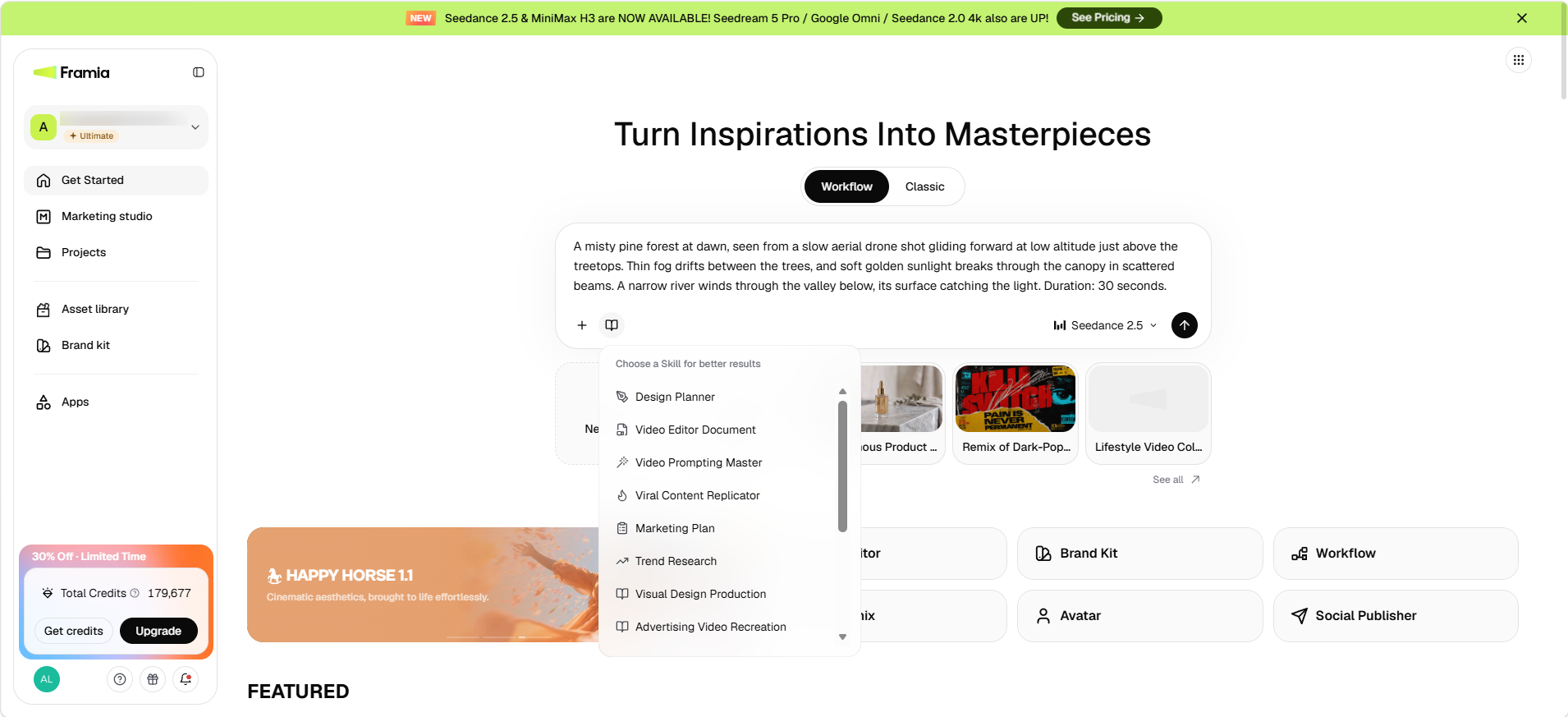
Step 1: Go to Workflow and add your prompt
Open the Workflow tab from the Framia Pro dashboard and create a new project. Choose Seedance 2.5 from the model tab, then enter your video prompt. Click + to upload reference images, videos, or audio files if you want the model to follow specific subjects, styles, or scenes, and click "Choose a skill..." to select Video planner or short video director, depending on your project.
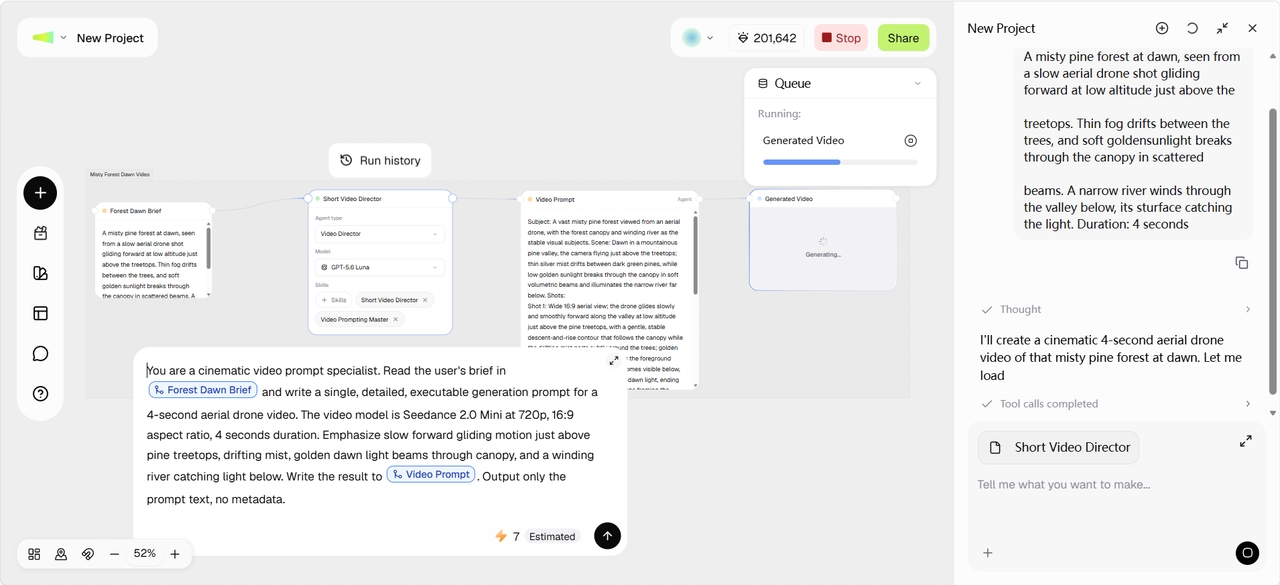
Step 2: Review and customize the workflow
Framia Pro puts together a connected workflow for video planning, asset generation, clip generation, and final edits. Review each node and update prompts, replace assets, modify camera movement, adjust lighting or pacing, and change generation settings to match your creative direction. You can also add additional Image, Text, Video, and other nodes from the left menu and branch them with the one Framia Pro has put together.
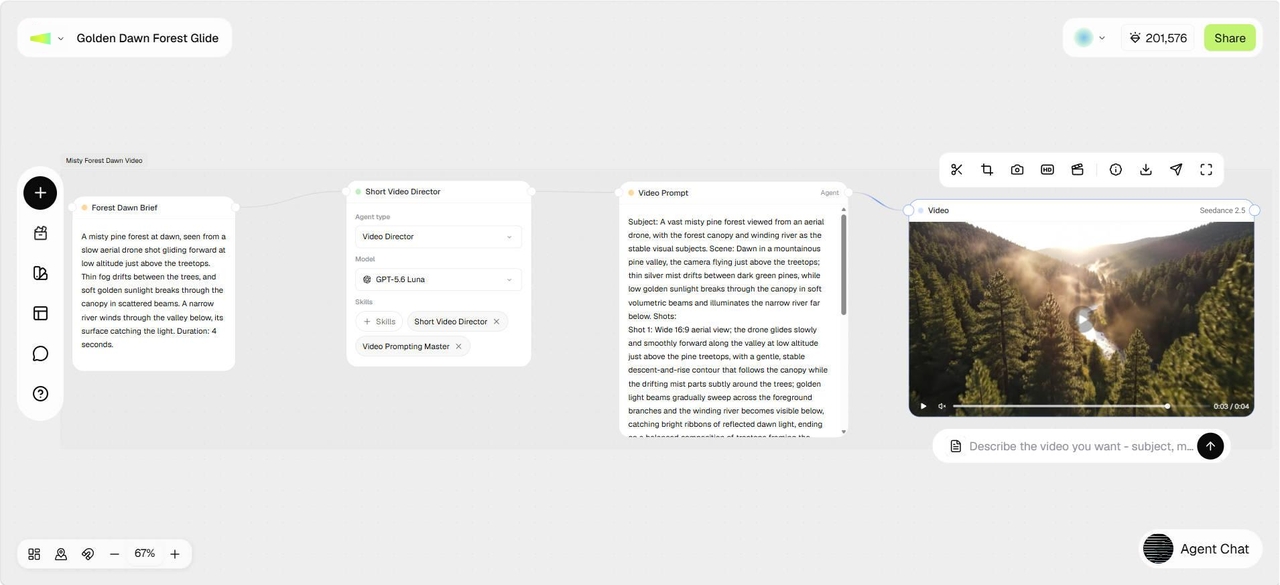
Step 3: Render and export your video
Run the workflow to generate your video using Seedance 2.5. Once the output is ready, open it in the built-in Video Editor to trim scenes, add captions, regenerate selected sections, or make final adjustments before exporting the completed video.
How to use Seedance 2.5 with Classic Canvas on Framia Pro?
Framia Pro offers the quickest way to create videos with Seedance 2.5. Simply describe your idea, choose the model, and let the Classic Canvas handle the generation process.
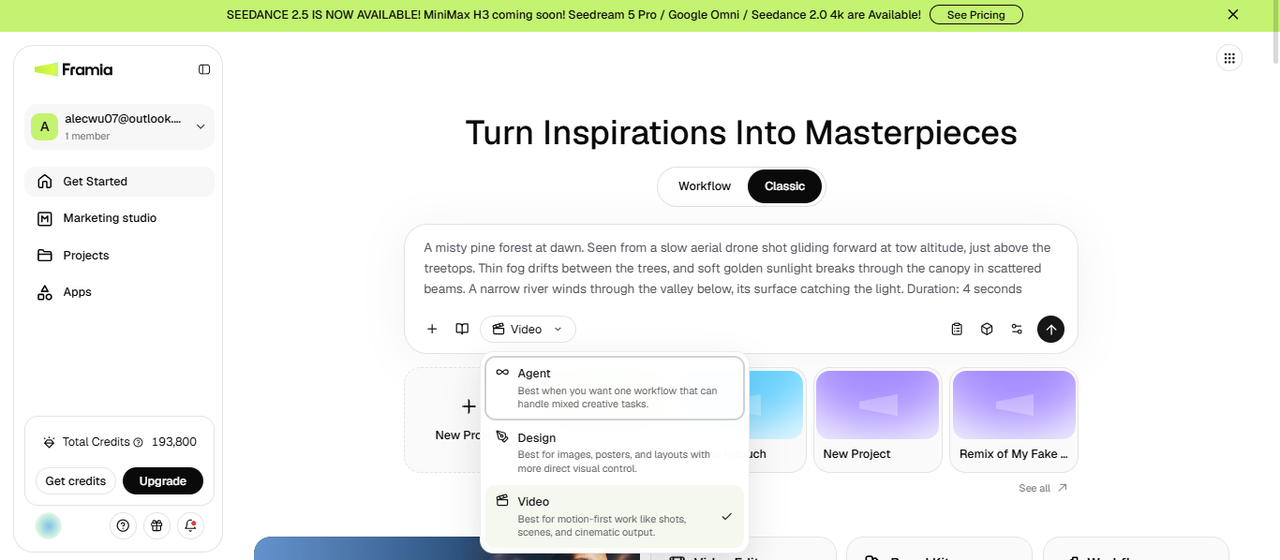
Step 1: Open the Classic canvas from your dashboard
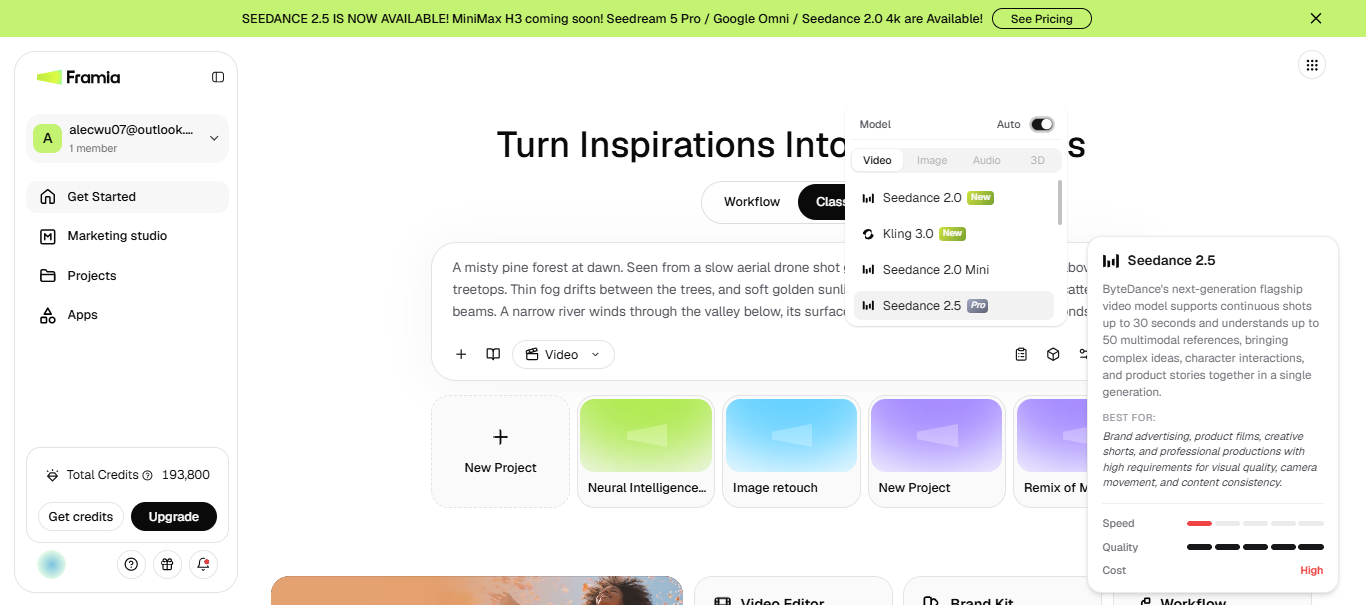
Log in to your Framia Pro account and head to the homepage, then select "Video" from the drop-down menu in the Canvas on the main dashboard. This tells Framia Pro you're generating a video rather than an image or a design asset. Type your video prompt in detail and make sure not to add complex instructions. You can also select Music Video, Social, E-Commerce, Ad Video, or other skills.
Step 2: Select Seedance 2.5 and adjust settings
Click + to upload any reference image or audio file. Click "Select Model" to choose Seedance 2.5 from the available AI models. Then set your preferred aspect ratio, video duration, resolution, and any other generation settings before creating your video.
Step 3: Generate and export
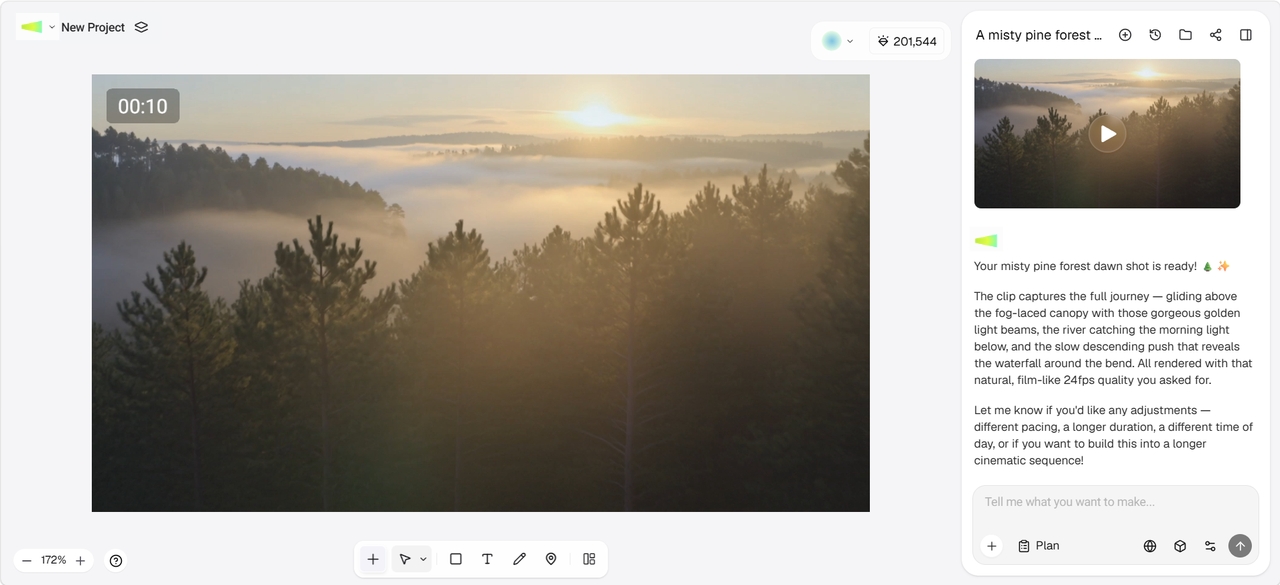
Click Generate and wait for the video agent to create the video. Once it's ready, preview the result and regenerate or refine it directly from the same workspace. You can then click "Download" to save it to your device.
What else does Framia Pro bring to the table?
- Node-based workflows: Build reusable, connected pipelines for prompts, images, video, audio, and editing.
- Chat-to-edit storyboard: Rearrange, trim, and adjust clips by chatting with AI on a visual timeline.
- Beat-synced generation: Music Video Director matches cuts, motion, and lip sync to your soundtrack.
- Social templates: Start from remixable templates formatted for TikTok, Reels, and Shorts.
Final Verdict on Seedance 2.5
This Seedance 2.5 review clearly shows that the model earns its spot if you need longer AI-generated clips, native audio, and tighter control over characters and camera movement. Want to run Seedance 2.5 next to other leading AI video models without hopping between tabs? Framia Pro gives you one workspace to generate, edit, compare, and export it all in one place.
Frequently asked questions
Is Seedance 2.5 free?
Yes. You can try the Seedance 2.5 image-to-video generator on Framia Pro using the platform's available credits, although usage depends on your plan. Paid subscriptions provide more generations and access to additional AI models. If you're deciding which model to use, compare the latest options in our AI video models guide.
What is Seedance 2.5 pricing?
ByteDance hasn't published official pricing yet. Early third-party estimates put a 30-second clip somewhere between $0.66 and $1.80 at lower settings, and $15 or more at full 4K, though none of that is confirmed.
Can Seedance 2.5 generate audio?
Yes. When you generate videos with Seedance 2.5 on Framia Pro, the model can create dialogue, sound effects, ambient sounds, and background music in the same generation. If audio matters for your projects, see our Kling 2.6 review to compare another model with native audio generation.
What video resolutions does Seedance 2.5 support?
Seedance 2.5 supports output up to 4K depending on the platform and settings, though most current platforms cap generation at 720p and require a separate upscale for a higher-resolution finish. On Framia Pro, you can pick from the supported export settings while creating your project.
What are the limitations of Seedance 2.5?
Seedance 2.5 blocks real human face references at the model level on most ByteDance-owned platforms, caps most generations at 720p, and can still show motion drift or gesture misreads in complex scenes. Credits run out fast at the higher price point, and queue times stretch during peak hours on lower-tier plans. Framia Pro gives you one workspace to regenerate, edit, and organize a project instead of bouncing between tools when a result isn't right.
Is Seedance available in the USA?
Yes. Seedance 2.5 is available through Dreamina, and the official Dreamina launch materials list the United States among its supported markets. Availability can still depend on the specific platform, account, and rollout status.
Where can I get Seedance 2.5?
You can access Seedance 2.5 through Framia Pro & Dreamina, where the model is available for AI video generation. It is also available in supported CapCut workflows.
Can Seedance 2.5 do image-to-video?
Yes. Seedance 2.5 supports image-to-video generation. You can upload an image as a reference and use it with a prompt to guide the subject, scene, style, or motion in the generated video.
Is Seedance 2.5 available right now?
Yes. ByteDance officially launched Seedance 2.5 globally on July 31, 2026, after a preview at the Volcano Engine FORCE conference on June 23, 2026.
Who owns Seedance 2.0?
ByteDance owns and develops the Seedance model family, including Seedance 2.0 and 2.5. The models are distributed through ByteDance products like Dreamina and CapCut, as well as the Volcano Engine API.
How long is a Seedance 2.5 video?
A single Seedance 2.5 generation runs up to 30 seconds in one pass. Some platforms report experimental extended modes beyond that, but ByteDance hasn't officially confirmed a public limit past 30 seconds.