Key takeaways
- Engagement, not raw view count, tells you whether a video actually worked
- Great video content starts with one clear goal and a script built around your audience
- The first three seconds decide whether someone stays or scrolls past
- Editing pace and sound design carry a video across the finish line
- Framia Pro's Classic and Workflow Canvas cut production time while keeping every step editable
- Consistent posting, strong thumbnails, and fast replies push engagement even after upload
Most videos get scrolled past within the first few seconds, no matter how sharp the camera work looks. High quality footage and engaging footage aren't the same skill, and mixing the two up is one of the biggest traps creators fall into. This guide covers what actually keeps someone watching: the hook, the story, the visuals and sound, the edit, and the common mistakes that quietly kill watch time. By the end, you'll have a clear plan for how to create engaging video content that holds attention from the first frame to the last.
What makes video content engaging?
View counts look nice on a dashboard, but they don't tell you if anyone stuck around. A video with fewer views and a high completion rate earns more trust from platform algorithms than one with a huge view count and a five-second drop-off. Engagement signals tell the algorithm your content deserves a wider push.
Metrics that actually matter
| Metric | What it tells you |
| Watch time | Total minutes people spend on your video |
| Audience retention | The percentage of viewers still watching at each point |
| Completion rate | How many viewers reach the end |
| Shares | How many people pass your video along to others |
| Comments | How much conversation your video sparks |
| Saves | How many people bookmark your video to revisit later |
Viewers drop off when the intro rambles, the pacing drags, or the video promises something the content doesn't deliver. Poor audio, shaky footage, and a weak first line also send people scrolling. Most drop-off happens in the opening seconds, so a slow start costs you the entire video, not just the intro.
How to create engaging video content: Best practices
Creating a video people actually watch through comes down to a handful of repeatable steps. Each one adds to the last, from setting a goal to optimizing the final export, and skipping any single step usually shows up in your retention graph.
Start with a clear goal
Before you touch a camera, get clear on what this specific video needs to do. Pick one primary goal, whether that's educating, selling, or entertaining, and write everything else around it. Skip trying to hit three goals in one clip, since that usually waters down all three.
Write a script that keeps people watching
A script gives your video a spine, even if you never read it word for word on camera. Outline the main points in the order your viewer needs them, then trim anything that doesn't push the story forward. After that, read it out loud once before filming, since a line that reads fine on paper can sound stiff coming out of your mouth.
Hook viewers in the first 3 seconds
The first three seconds decide whether someone stays or swipes away, so this is not the place to ease in slowly. Open with a question, a bold claim, or an unfinished thought instead of a logo animation or a slow wind-up. This taps into the Zeigarnik effect, a psychology concept showing that an open loop sticks in memory far longer than a thought that wraps up neatly, which is exactly why cliffhangers pull people past the intro.
Plan your shot before filming
Winging it on set costs you time later in the edit, so sketch a rough shot list first. Note the camera angles and shot types, the framing, and the lighting for each scene before you hit record. Once that's done, walk through the space ahead of time too, since spotting a bad background or a noisy vent early saves you a reshoot.
Record clean, steady footage
Good footage doesn't need expensive gear, it needs steady hands and clean audio. Use a tripod or brace your arm against something solid, and record sound close to the source with an external mic if you have one. Shoot a little extra footage at the start and end of each clip too, since that extra buffer gives your editor room to work with.
Edit videos to hold attention
The edit is where a decent video turns into one people actually finish. Cut out dead air, tighten pauses, and add quick cuts or zooms wherever the pace starts to sag. A video caption generator can save time here too, since captions layered in during the edit keep sound-off viewers watching just as long as everyone else.
Optimize videos for each platform
A video shaped for YouTube won't necessarily land the same way on TikTok or Instagram. Adjust your aspect ratio, caption style, and length for wherever it's going to live, and trim your hook down further for platforms where the scroll happens fast. Export a version for each destination instead of posting one file everywhere, since native formatting tends to outperform a stretched or cropped upload.
Applying all of this by hand, shot by shot and platform by platform, takes hours you might not have every week, which is where a dedicated video tool starts to earn its place in your workflow.
Create engaging AI video content faster with Framia Pro
Framia Pro is an AI creative platform that turns text prompts, photos, and scripts into finished videos inside one workspace. It connects leading video models such as Veo 3.1, Gemini Omni Flash, Seedance 2.5, and Kling 3.0, alongside image and music generation, so you don't switch between separate tools for each part of production.
The AI video generator covers a Workflow Canvas for multi-step projects, a Classic canvas for single-prompt generation, automatic voiceovers and captions, and one-click resizing for different platforms. Whether you're producing a single social clip or a full campaign, Framia Pro cuts the manual work down to a few prompts and edits.
Steps to create engaging video content using Classic canvas
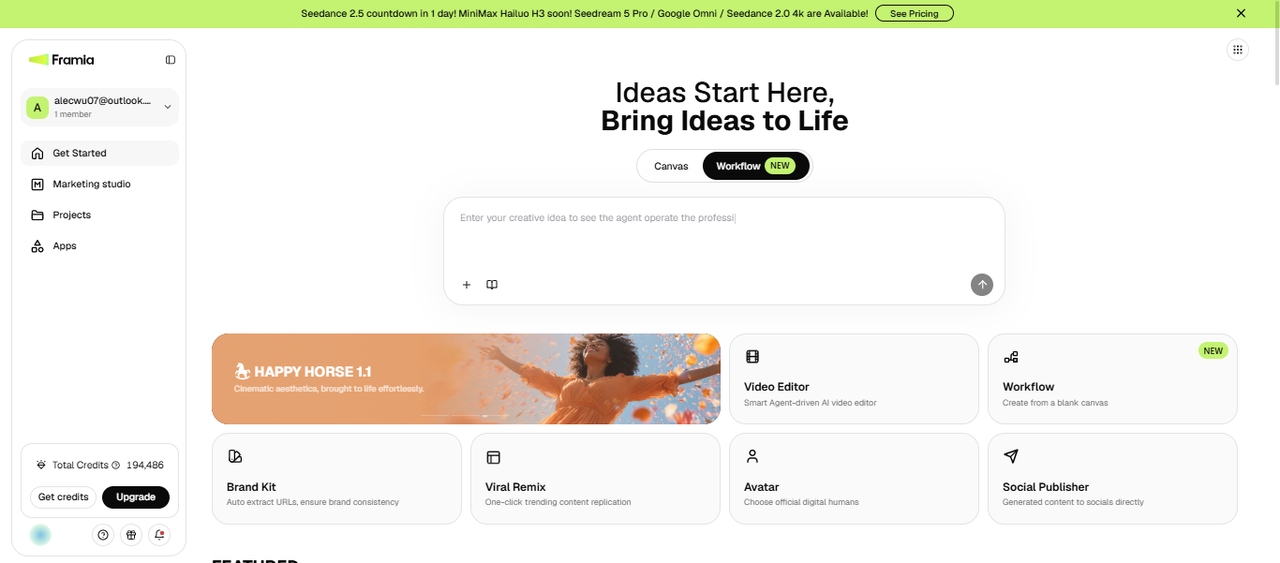
Classic canvas is the fastest route from an idea to a finished video inside Framia Pro. Pick the agent that matches what you're making, describe your video prompt in plain language, and let the AI handle the visuals, pacing, and sound. Here's how the process plays out from start to export.
Step 1: Choose the right skill
Sign in to Framia Pro and open the Canvas from the dashboard. Select Video or Agent and pick Music, Shorts, Ad Video, Social, or another skill that best matches your project. Describe your idea in plain language and upload optional reference images, videos, or audio.
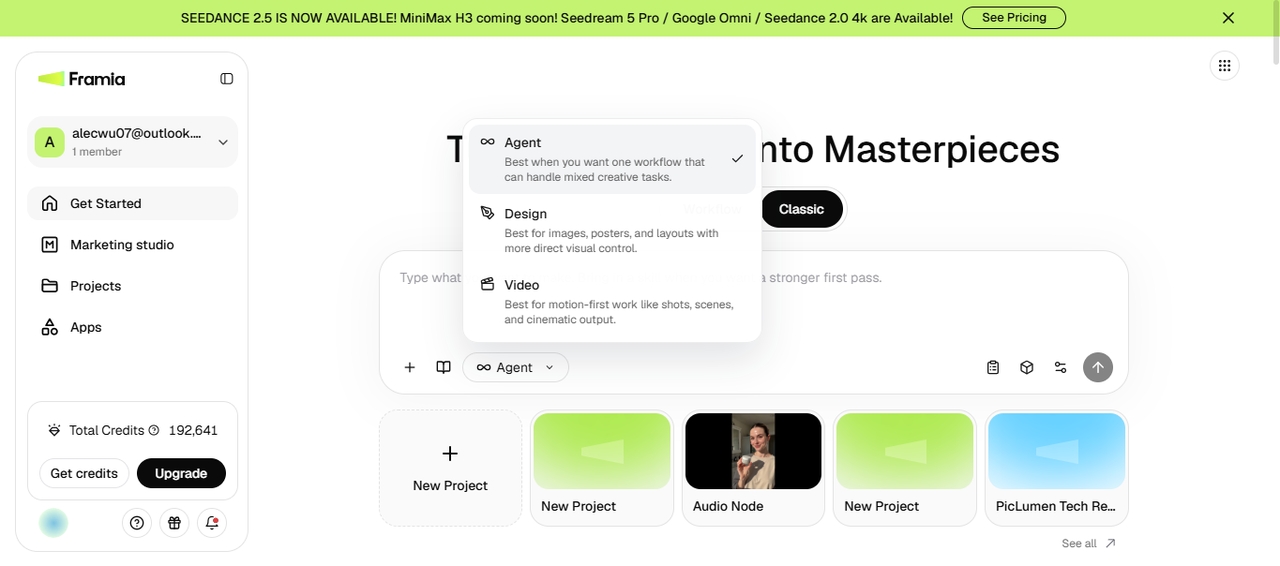
Step 2: Choose your video model
Click "Select Model" to pick the AI video model that best fits your project, such as Seedance 2.5, Veo 3.1, Kling 3.0, Wan 2.7, Hailuo 02, or another available model. You can also click "Plan" to plan and confirm the video with AI before generation. Choose the aspect ratio, duration, and resolution settings before starting the video.
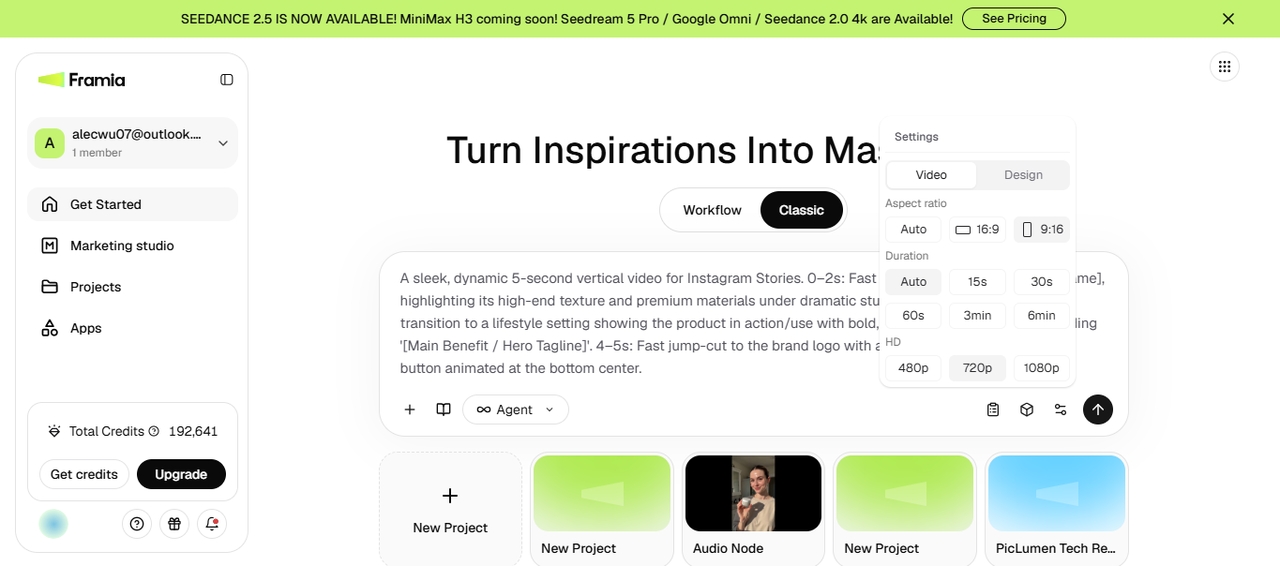
Step 3: Generate, edit, and export
Click Generate to create your video. Framia Pro uses your selected model to generate the video. You can then review the output, update the prompt or replace reference files if needed, and then regenerate the clip. Otherwise, open it in the built-in Video Editor to trim clips, rearrange scenes, add captions, music, transitions, or effects before exporting or sharing the finished video to your social accounts.
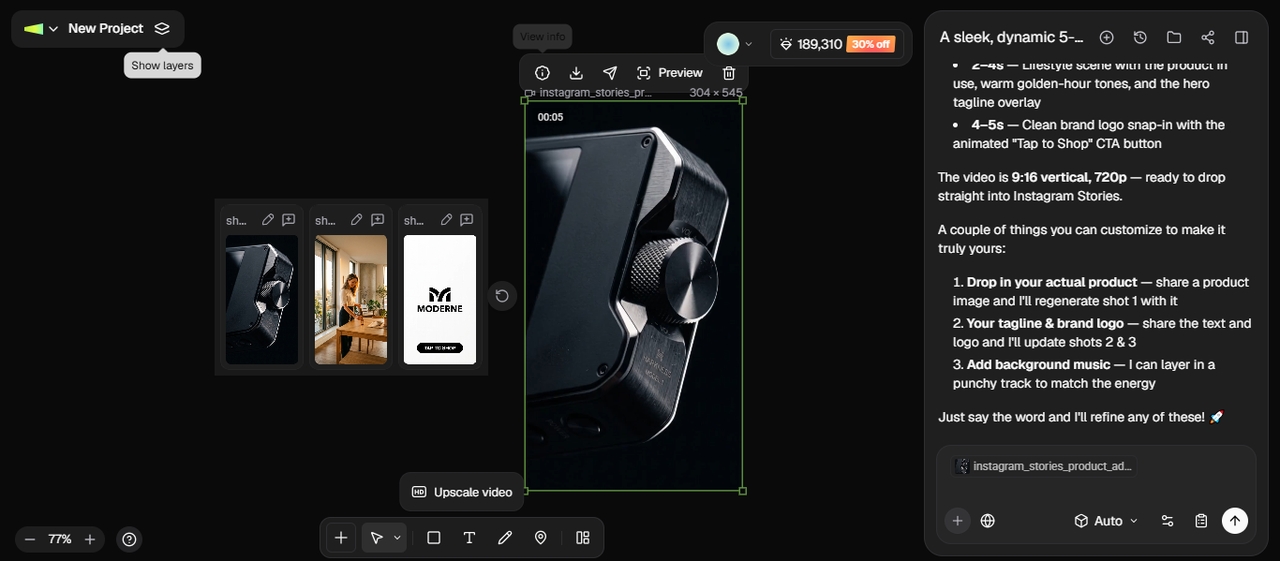
How to use Workflow Canvas to create engaging video content
Workflow Canvas gives you more control than Classic Canvas by letting you connect multiple nodes to put together a full project instead of generating one clip at a time. You can branch a single idea into several variations, layer in research and script generation, and route everything toward multiple output nodes on the same canvas. Here's how to set it up.
Step 1: Create a video workflow
Open Workflow Canvas from the Framia Pro dashboard and create a new project. Enter your video idea, upload optional reference images, videos, or audio files, then select Video Planner from the Skills menu. Generate the workflow to automatically create connected nodes for scripting, visuals, audio, and video production.
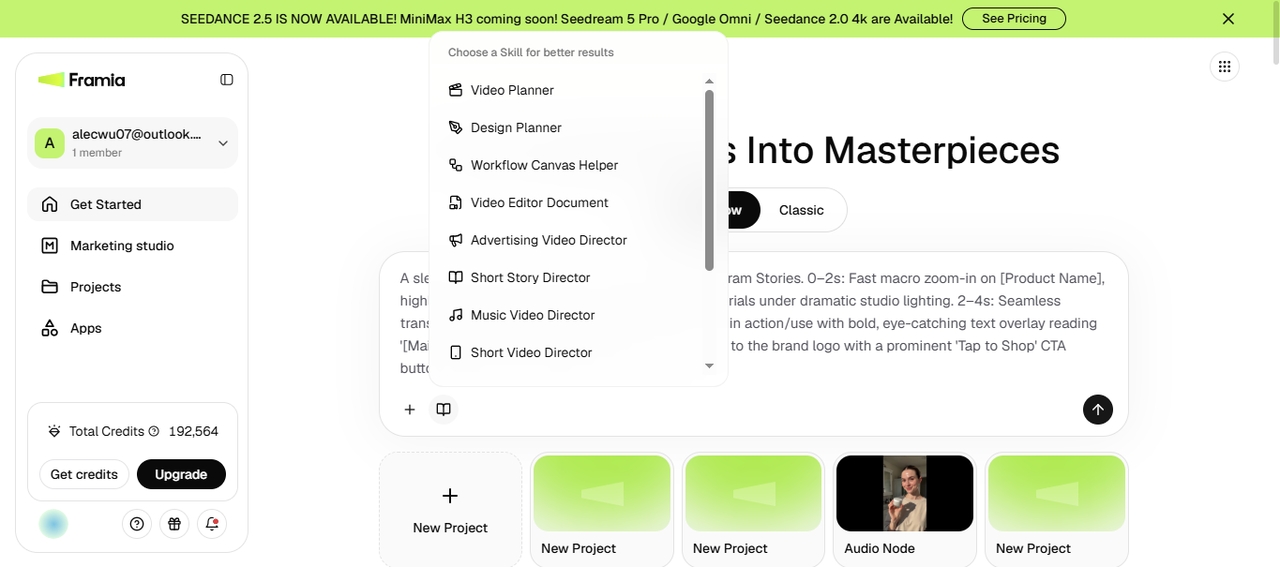
Step 2: Customize the workflow
Review every node and adjust it before generation. You can edit the Text node to rewrite prompts, the Image node to replace reference assets, the Video node to switch AI models, or update settings such as aspect ratio, duration, camera movement, motion strength, or visual style. Add more Text, Image, Video, or Audio nodes to expand the workflow, create multiple versions, connect outputs to new nodes, or generate different creative directions from the same project.
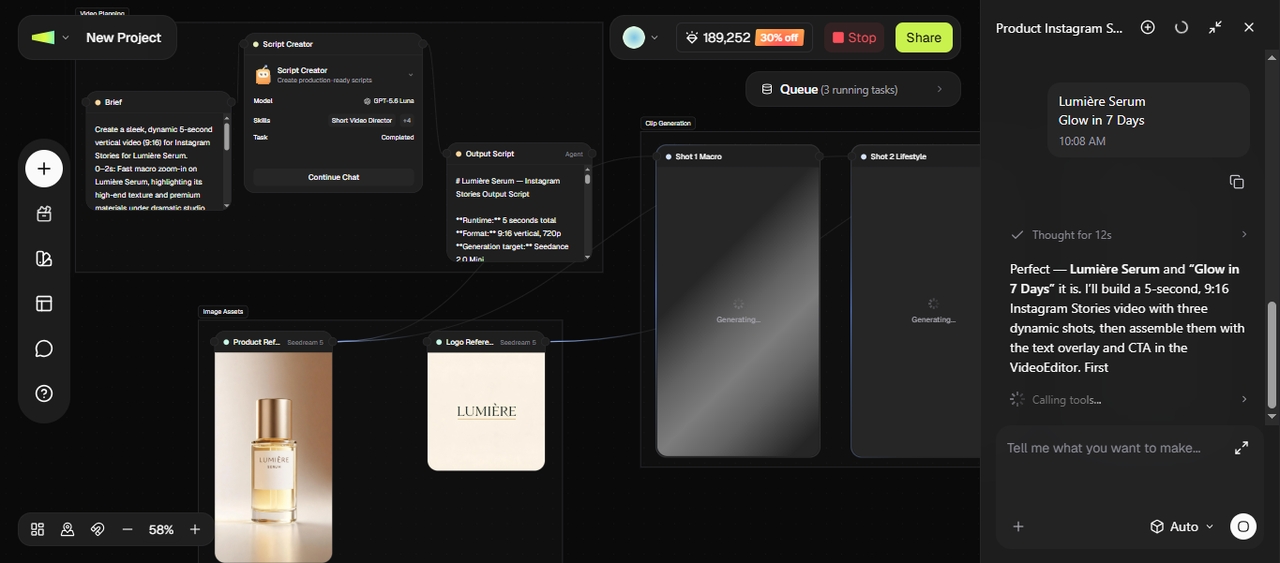
Step 3: Generate, edit, and export
Run individual Video nodes or groups, or run the entire workflow. Since each node works independently, you can regenerate only the sections that need changes without rerunning the complete project. Open the generated clips in the built-in Video Editor to trim scenes, rearrange clips, replace shots, add captions, background music, transitions, or effects, then export the finished video or publish it directly to social media.
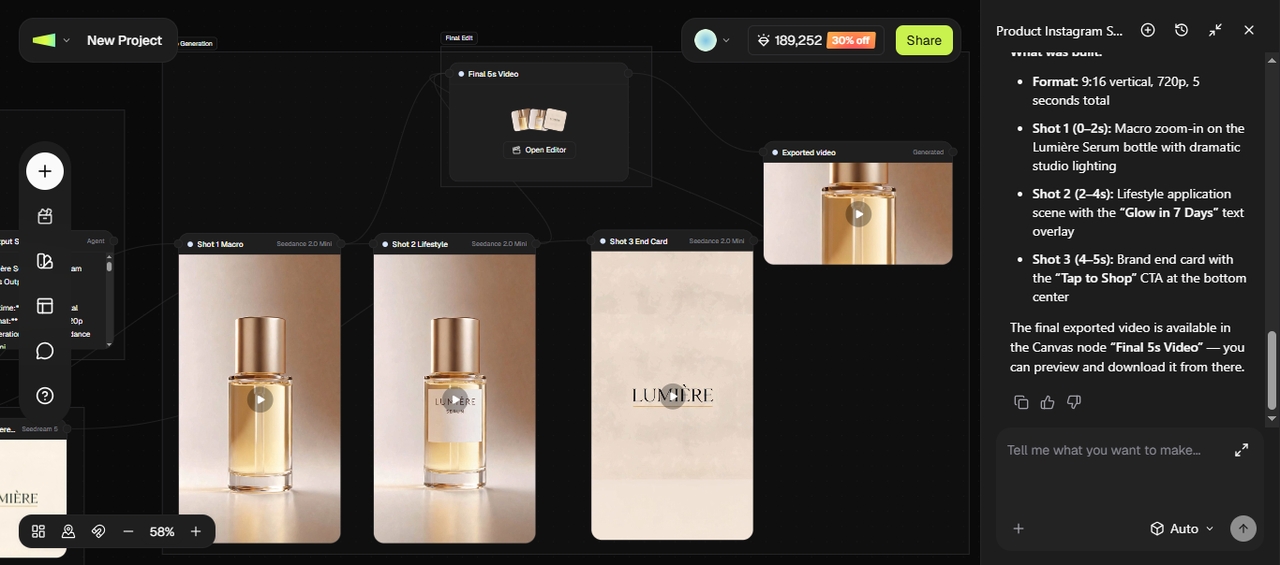
Increase video engagement after publishing
Getting the video out the door doesn't end the engagement work. What happens after publishing can swing your reach up or down just as much as the video itself.
Write better titles
A vague title gets scrolled past even if the video inside is great. Use specific, curiosity-driven language that tells a viewer exactly what they'll get, and test a few versions if the platform allows it.
Design thumbnails that earn clicks
Your thumbnail is the first thing anyone sees, often before the title even registers. Pull from a list of YouTube thumbnail ideas, use bold text, and stick to a clear focal point so it stands out in a crowded feed.
Publish consistently
When you post on a predictable schedule, it trains your audience to check back, and it signals to the algorithm that your channel is active. Pick a cadence you can actually stick to instead of overcommitting for one big week.
Reply to comments
Early comments influence how a video performs in the first hour, so jump in and respond while the post is still fresh. A quick reply also tells the algorithm there's real conversation happening under your video.
Repurpose one video into multiple formats
One long video can turn into several short clips, a carousel post, and a handful of quotes for other platforms. Run the strongest ten-second moment through an AI shorts generator for a fast short-form cut.
Test different hooks
Not every hook lands the same way with every audience, so try a few variations on similar videos and watch which one holds retention longer.
Conclusion
To sum up, you've learned how to create engaging video content, starting with a strong hook, a script that respects your viewer's time, and shots planned before you ever hit record. Sound, pacing, and platform-specific editing carry the momentum through to the end, while consistent titles and thumbnails carry it forward after publishing. Framia Pro pulls each of these pieces, from scripting to resizing to publishing, into one workspace, so the whole process moves faster without cutting corners on quality.
Frequently asked questions
- How do I make engaging video content?
Focus on a strong hook in the first three seconds, a script trimmed down to what matters, and an edit paced fast enough to hold attention. Framia Pro's Agent mode generates hooks, visuals, and pacing from a single prompt, which cuts a lot of trial and error out of the process.
- How many views do you need on YouTube to earn $10,000?
YouTube income depends on factors such as your niche, audience location, RPM (revenue per thousand views), sponsorships, and affiliate commissions. Some creators earn $10,000 per month with a few hundred thousand views, while others need millions. YouTube's own revenue-sharing model gives creators a share of ad revenue once they qualify for the Partner Program, and if you promote affiliate products, your earnings often depend more on clicks and conversions than view count.
- What makes good video content for affiliate marketing?
Good affiliate videos answer common questions, demonstrate the product in use, and explain why someone should choose it. Keep the message focused, include a clear call to action, and optimize the video for the platform where you'll publish it. That's where Framia Pro includes Video Agents and a Storyboard Editor to help you generate, edit, and refine videos without switching between multiple tools.
- How long should an engaging video be?
Length depends on the platform and the goal, but shorter usually wins on TikTok and Reels while longer suits YouTube tutorials and deep dives. Watch your retention graph rather than a fixed number, since a 90-second video with strong retention beats a 5-minute one with a steep drop-off. Framia Pro's Workflow Canvas produces multiple length variations from a single project, so testing this stays easy.
- Does AI help increase video engagement?
AI speeds up the parts that used to eat the most time, such as scripting, editing, and resizing for different platforms, freeing up more energy for the story and the hook. Framia Pro's AI video generation models handle the technical heavy lifting, from voiceovers to lip sync, while you steer the creative direction.
- How often should I post videos?
Consistency matters more than volume, so pick a schedule you can hold for months rather than weeks. Two solid videos a week beat seven rushed ones. Framia Pro's Social Publisher lets you queue content for multiple platforms from one canvas, so sticking to a schedule takes less coordination.
- What is the best aspect ratio for social media videos?
Vertical 9:16 works for TikTok, Reels, and Shorts; square 1:1 suits Instagram feed posts; and widescreen 16:9 fits YouTube. Framia Pro resizes a single video for each of these formats with one click, so you don't have to reshoot or manually reformat for every platform.
- How to create good video content?
Start with one clear goal, hook viewers in the first three seconds, and build a script trimmed down to what matters. Pace the edit so it never drags, then optimize the export for whatever platform it's landing on.